Chapter 11 – Contributed data
import warnings
warnings.filterwarnings('ignore')
Many leading market participants – such as investment banks, dealers and brokers – publish financial information on the LSEG network. This can include:
- Prices.
- Analysis.
- Market commentary.
These contributors provide insight and market rates in all asset classes, from vanilla equities to exotic energy derivatives.
Contributed data is available both as pages and as RICs. Expert information is also available from specialist data providers who publish analytics and market commentary. This can be ordered in addition to the LSEG service you have subscribed to.
LSEG ensures that the quality of data published is always high. All contributors have contractually agreed:
- To provide data that reflects their position or trading in the marketplace.
- To update in a timely manner, reflecting the level of activity in a particular market.
- Not to copy data from another source and republish onto their pages/RICs.
- Not to publish defamatory or obscene material, or include advertising statements on behalf of third parties.
The Data Library for Python can get the Contribution RIC data dynamically.
The first step is importing the library.
import lseg.data as ld
Before we move on, I am expecting that you have open and log in to the LSEG Workspace Desktop application in the same machine that run this Jupyter Notebook.
Next, open the session.
ld.open_session()
<lseg.data.session.Definition object at 0x1ba6f150dd0 {name='workspace'}>
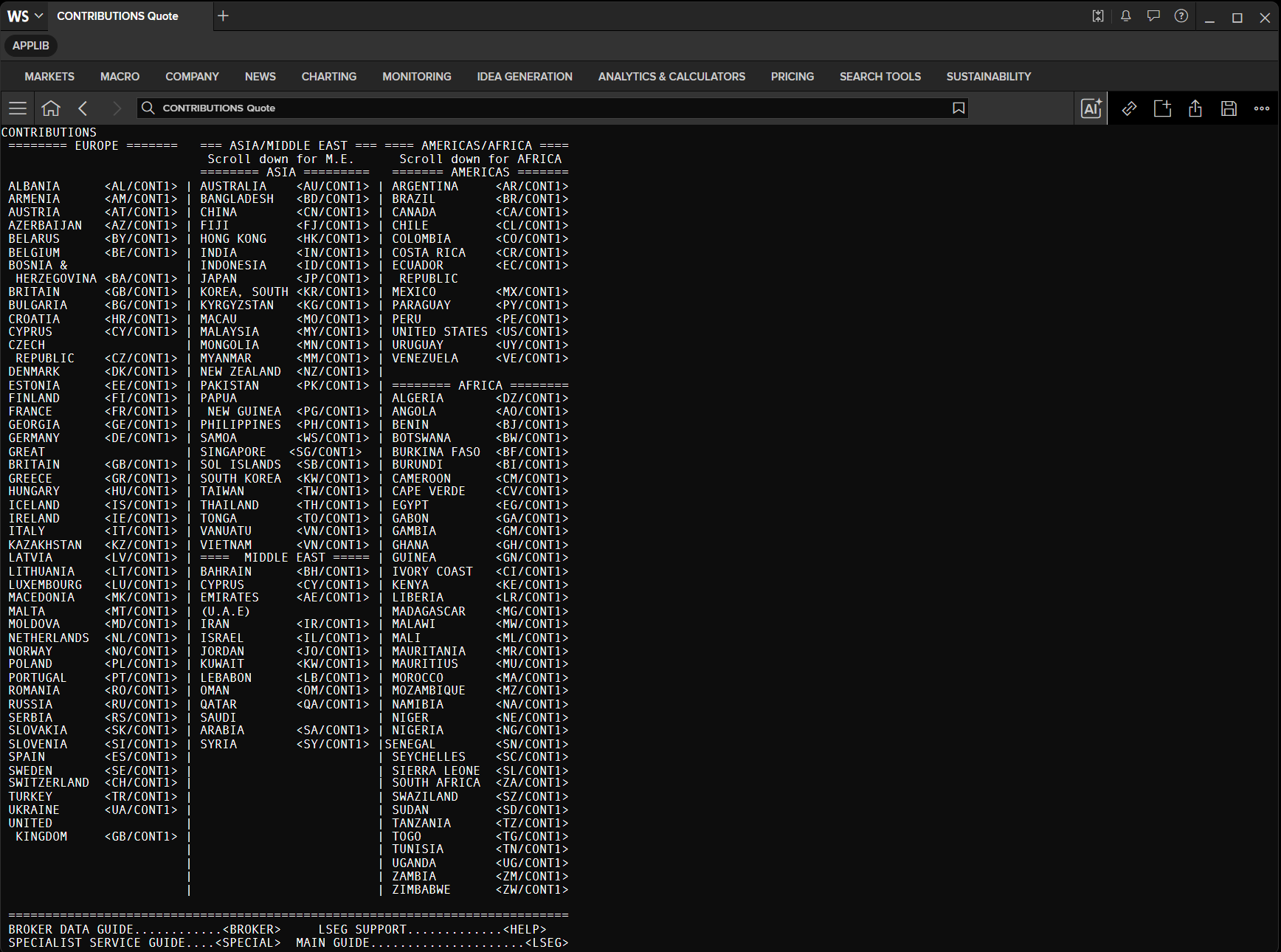
There is a legacy index page CONTRIBUTIONS that gives you information about country, market, and contributor name.
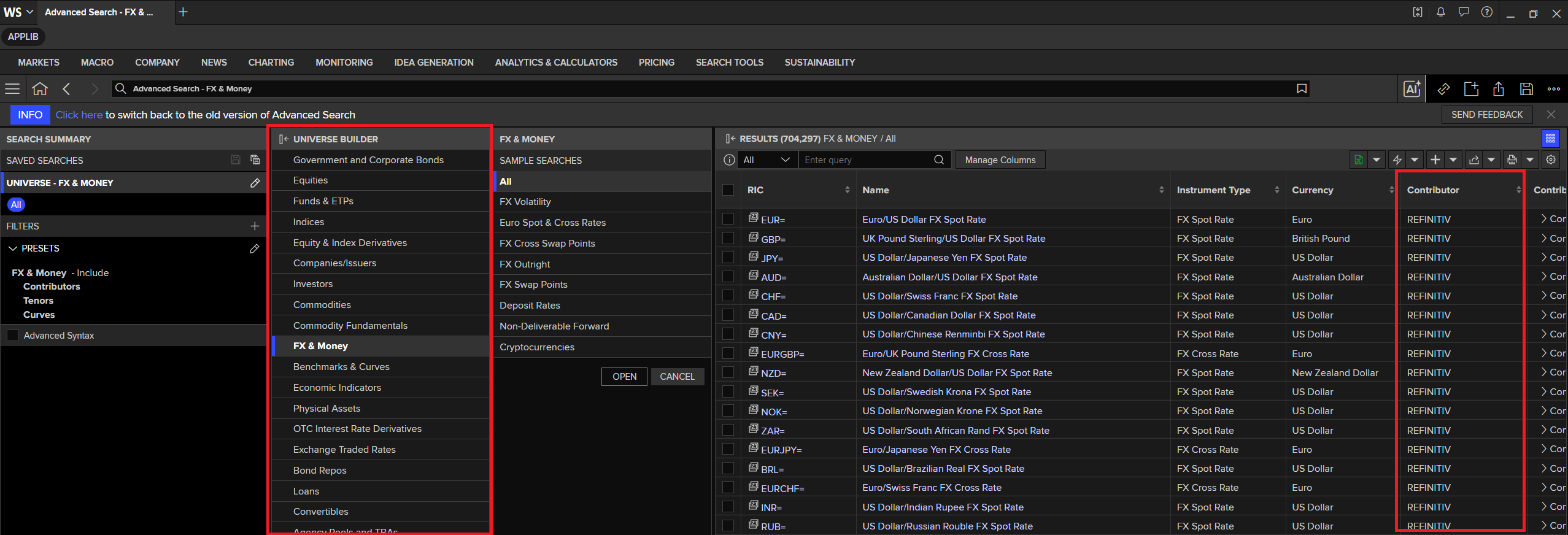
As mentioned in Chapter 3, Page RICs were originally designed for terminal screen displays prevalent during the 1980s and 1990s. The LSEG Workspace Search makes it easy to find contributed RICs with just a few clicks.
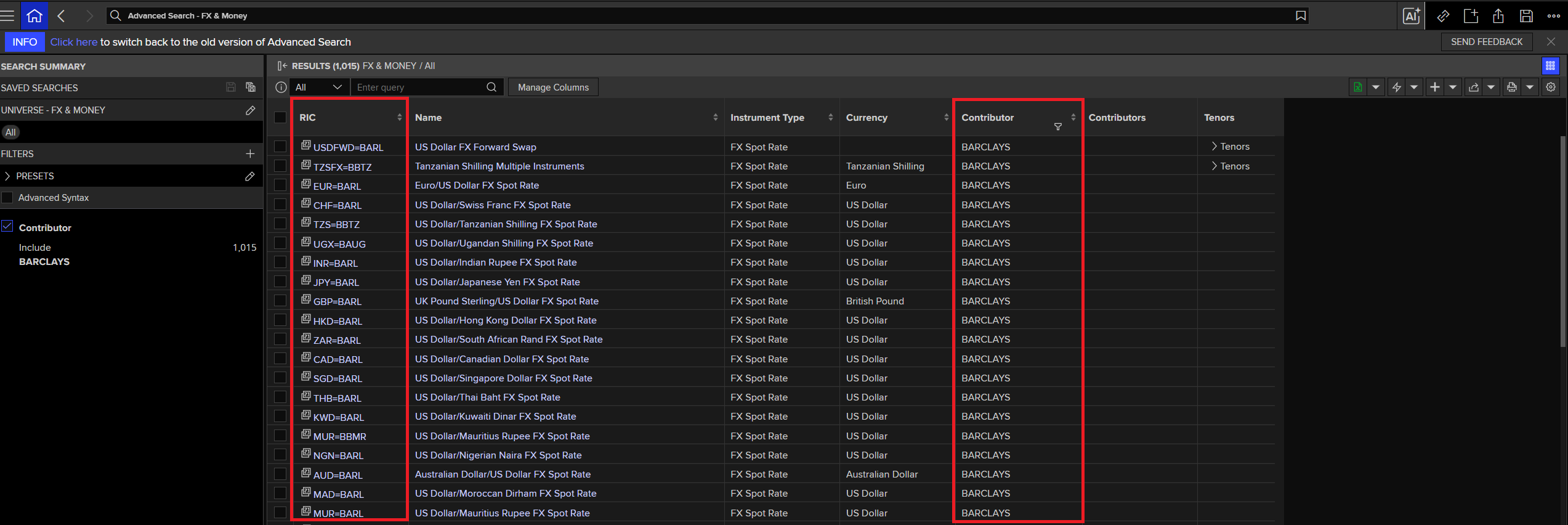
The Search app displays the Contributor column when you select a universe that contains contribution data. Let's demonstrate with the FX & Money universe.
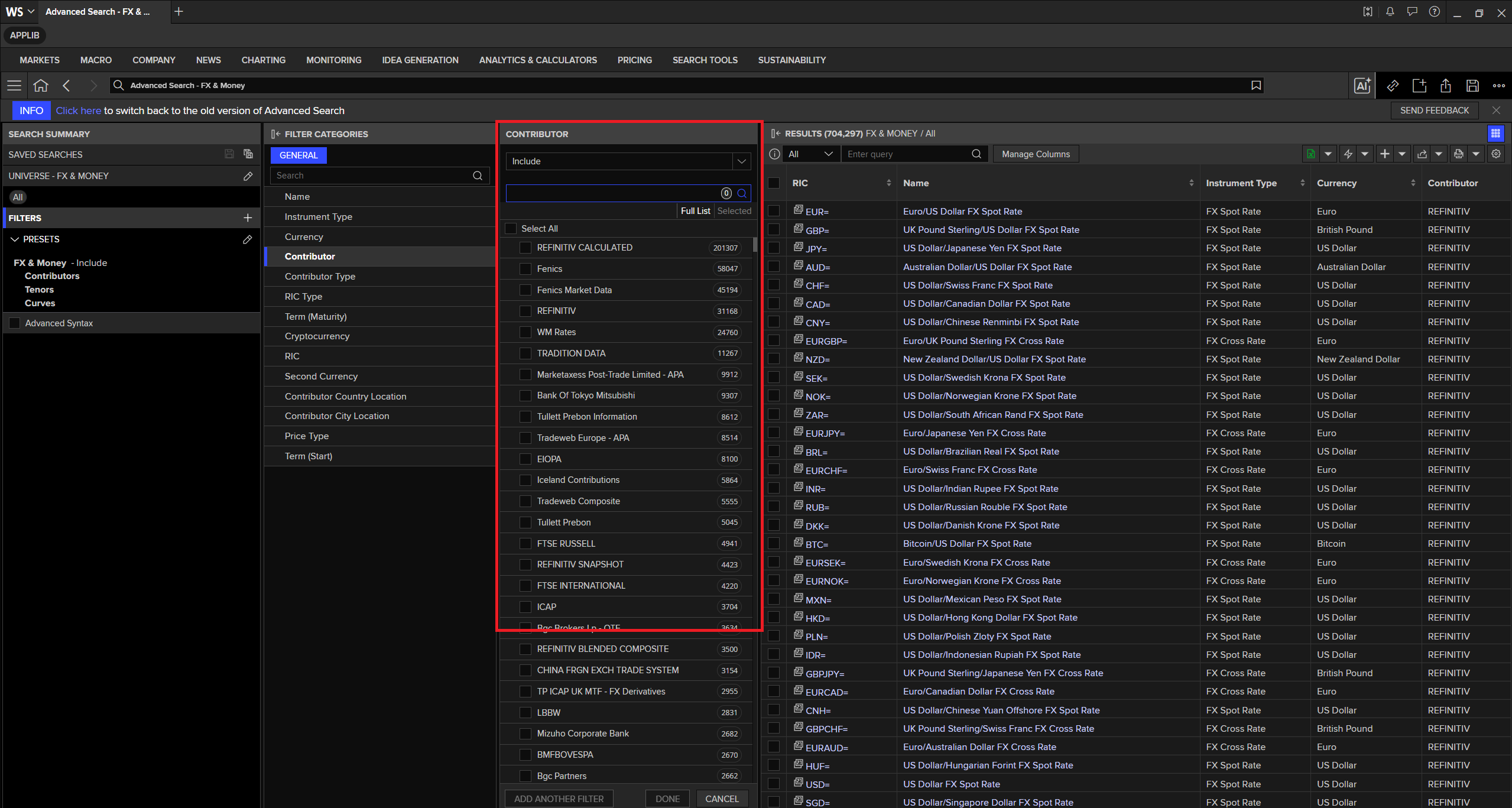
You can use the Contributor filter to narrow down to specific contributor(s) as follows.
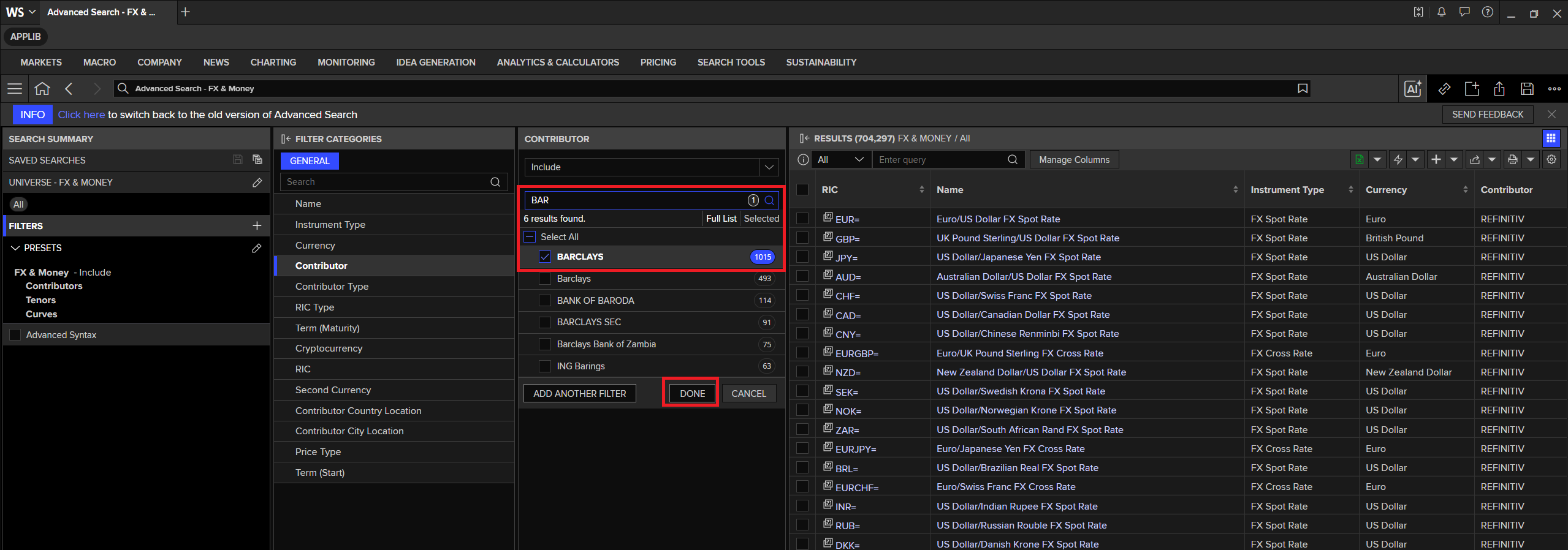
Once you have selected the contributors you need, click Done. Workspace returns the list of instruments from the selected contributor(s).
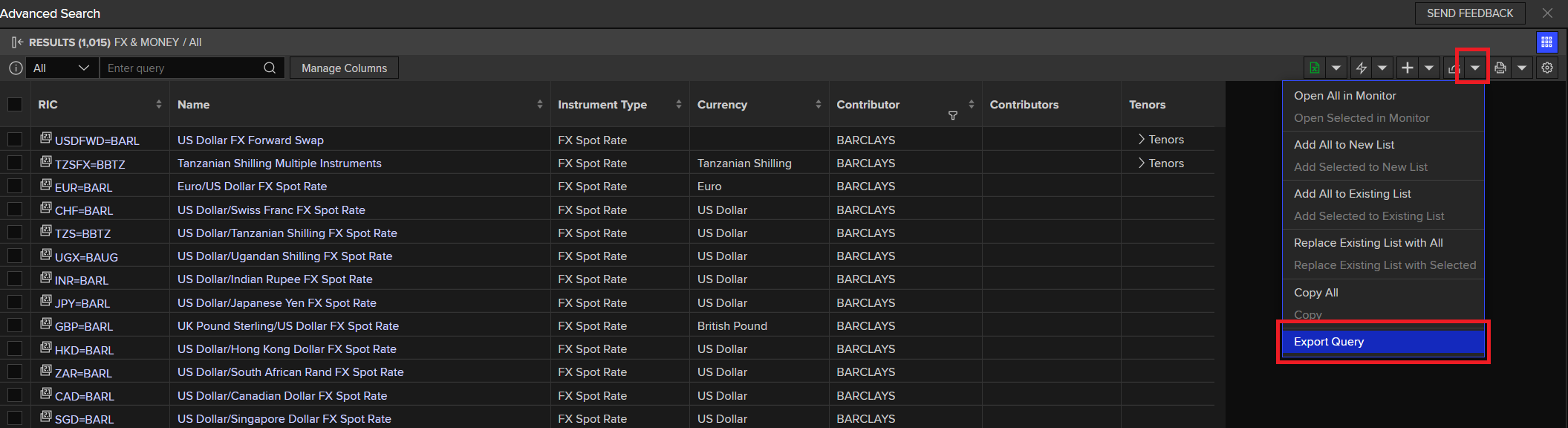
You can click the Export Query menu to export the search query for use with the Data Library Search method. The Search method lets you build your own search dynamically to retrieve the same data as the Workspace Search app.
In the Export Query window, select the CODEBOOK tab. Note that the Search app displays the Data Library version 1 (RD) syntax, but the search code and syntax are fully compatible with the LSEG Data Library (version 2, LD). For more details on the differences between RD and LD, see the Essential Guide to the Data Libraries - Generations of Python library (EDAPI, RDP, RD, LD) article.
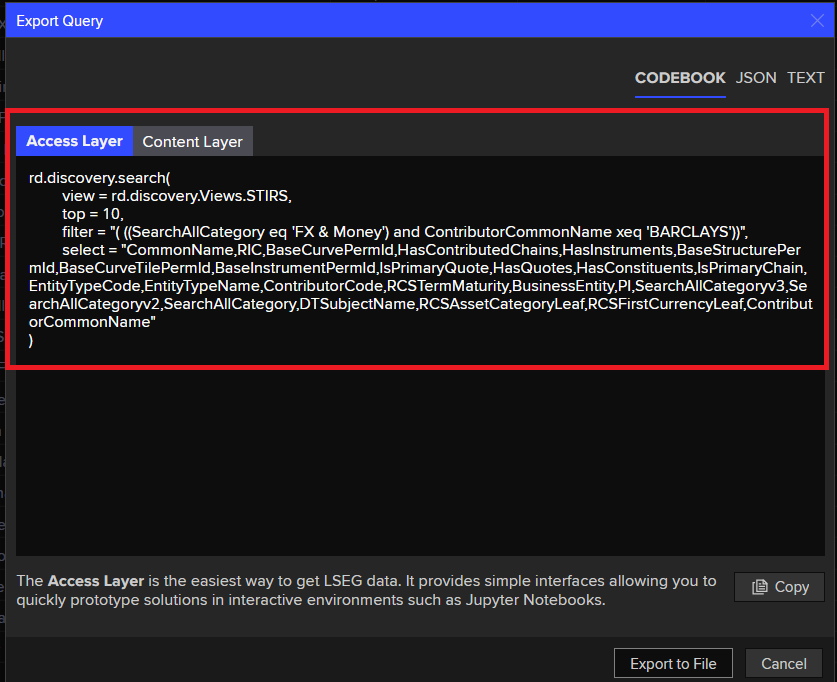
Note that you don't need to use the full complex search query shown above. A simpler query like the one below works just as well to get the list of contributed RICs you need.
To learn more about using the Workspace Search app with the Data Library Search function, see the following articles:
- Find content and functionality using the Data Library with Workspace Advanced Search
- Building Search into your Application Workflow
- Build queries easily using Refinitiv's Search API with Python and Jupyter
from lseg.data.content import search

search_result = ld.discovery.search(
    view = search.Views.STIRS,
    top = 20,
    filter = "(SearchAllCategory eq 'FX & Money') and (ContributorCommonName xeq 'BARCLAYS')",
    select = "CommonName,RIC,ContributorCommonName"
)

search_result
| CommonName | RIC | ContributorCommonName | |
|---|---|---|---|
| 0 | US Dollar FX Forward Swap | USDFWD=BARL | BARCLAYS |
| 1 | Tanzanian Shilling Multiple Instruments | TZSFX=BBTZ | BARCLAYS |
| 2 | Euro/US Dollar FX Spot Rate | EUR=BARL | BARCLAYS |
| 3 | US Dollar/Swiss Franc FX Spot Rate | CHF=BARL | BARCLAYS |
| 4 | US Dollar/Tanzanian Shilling FX Spot Rate | TZS=BBTZ | BARCLAYS |
| 5 | US Dollar/Ugandan Shilling FX Spot Rate | UGX=BAUG | BARCLAYS |
| 6 | US Dollar/Indian Rupee FX Spot Rate | INR=BARL | BARCLAYS |
| 7 | US Dollar/Japanese Yen FX Spot Rate | JPY=BARL | BARCLAYS |
| 8 | UK Pound Sterling/US Dollar FX Spot Rate | GBP=BARL | BARCLAYS |
| 9 | US Dollar/Hong Kong Dollar FX Spot Rate | HKD=BARL | BARCLAYS |
| 10 | US Dollar/South African Rand FX Spot Rate | ZAR=BARL | BARCLAYS |
| 11 | US Dollar/Canadian Dollar FX Spot Rate | CAD=BARL | BARCLAYS |
| 12 | US Dollar/Singapore Dollar FX Spot Rate | SGD=BARL | BARCLAYS |
| 13 | US Dollar/Thai Baht FX Spot Rate | THB=BARL | BARCLAYS |
| 14 | US Dollar/Kuwaiti Dinar FX Spot Rate | KWD=BARL | BARCLAYS |
| 15 | US Dollar/Mauritius Rupee FX Spot Rate | MUR=BBMR | BARCLAYS |
| 16 | US Dollar/Nigerian Naira FX Spot Rate | NGN=BARL | BARCLAYS |
| 17 | Australian Dollar/US Dollar FX Spot Rate | AUD=BARL | BARCLAYS |
| 18 | US Dollar/Moroccan Dirham FX Spot Rate | MAD=BARL | BARCLAYS |
| 19 | US Dollar/Mauritius Rupee FX Spot Rate | MUR=BARL | BARCLAYS |
Or if you want all non-LSEG contribution RICs, you can use (ContributorCommonName ne 'REFINITIV') query as follows.
search_result = ld.discovery.search(
    view = search.Views.STIRS,
    top = 10,
    filter = "(SearchAllCategory eq 'FX & Money') and (ContributorCommonName ne 'REFINITIV')",
    select = "CommonName,RIC,ContributorCommonName"
)

search_result
| CommonName | RIC | ContributorCommonName | |
|---|---|---|---|
| 0 | Euro/US Dollar FX Spot Rate | EURUSD=AU | Australia Contributions |
| 1 | Euro/US Dollar FX Cross Rate | EURUSD=BACR | Central Bank of Costa Rica |
| 2 | US Dollar/Japanese Yen FX Spot Rate | USDJPY=AU | Australia Contributions |
| 3 | Australian Dollar/US Dollar FX Spot Rate | AUDUSD=AU | Australia Contributions |
| 4 | US Dollar/Japanese Yen FX Spot Rate | JPYA=NMST | Nomura Securities EOD |
| 5 | US Dollar/Swiss Franc FX Spot Rate | USDCHF=AU | Australia Contributions |
| 6 | Australian Dollar/US Dollar FX Cross Rate | AUDUSD=BCRA | Banco Central De La Republica |
| 7 | New Zealand Dollar/US Dollar FX Cross Rate | NZDUSD=BCRA | Banco Central De La Republica |
| 8 | New Zealand Dollar/US Dollar FX Spot Rate | NZDUSD=AU | Australia Contributions |
| 9 | US Dollar/Canadian Dollar FX Spot Rate | CADT=BMMA | Bank Of Montreal Nesbitt Burns |
Example of FX Cross Rate's non-LSEG contribution RICs.
ld.discovery.search(
    view = search.Views.STIRS,
    top = 10,
    filter = "(SearchAllCategory eq 'FX & Money') and (ContributorCommonName ne 'REFINITIV') and (RCSAssetCategoryLeaf xeq 'FX Cross Rate')",
    select = "CommonName,RIC,ContributorCommonName"
)
| CommonName | RIC | ContributorCommonName | |
|---|---|---|---|
| 0 | Euro/US Dollar FX Cross Rate | EURUSD=BACR | Central Bank of Costa Rica |
| 1 | Australian Dollar/US Dollar FX Cross Rate | AUDUSD=BCRA | Banco Central De La Republica |
| 2 | New Zealand Dollar/US Dollar FX Cross Rate | NZDUSD=BCRA | Banco Central De La Republica |
| 3 | US Dollar/Danish Krone FX Cross Rate | USDDKK=FEDA | Fedai |
| 4 | Euro/Japanese Yen FX Cross Rate | EURJPYA=NMST | Nomura Securities EOD |
| 5 | UK Pound Sterling/Japanese Yen FX Cross Rate | GBPJPYA=NMST | Nomura Securities EOD |
| 6 | US Dollar/Polish Zloty FX Cross Rate | USDPLN=NBPC | NARODOWY BANK POLSKI |
| 7 | US Dollar/Czech Koruna FX Cross Rate | USDCZK=VALR | Valmer |
| 8 | US Dollar/Hungarian Forint FX Cross Rate | USDHUF=VALR | Valmer |
| 9 | US Dollar/Romanian New Leu FX Cross Rate | USDRON=REU | REUTERS |
Contributed data is not limited to the FX & Money universe category. You can use the Workspace Search app to explore other universes that include the Contributor column and export their example queries in the same way.
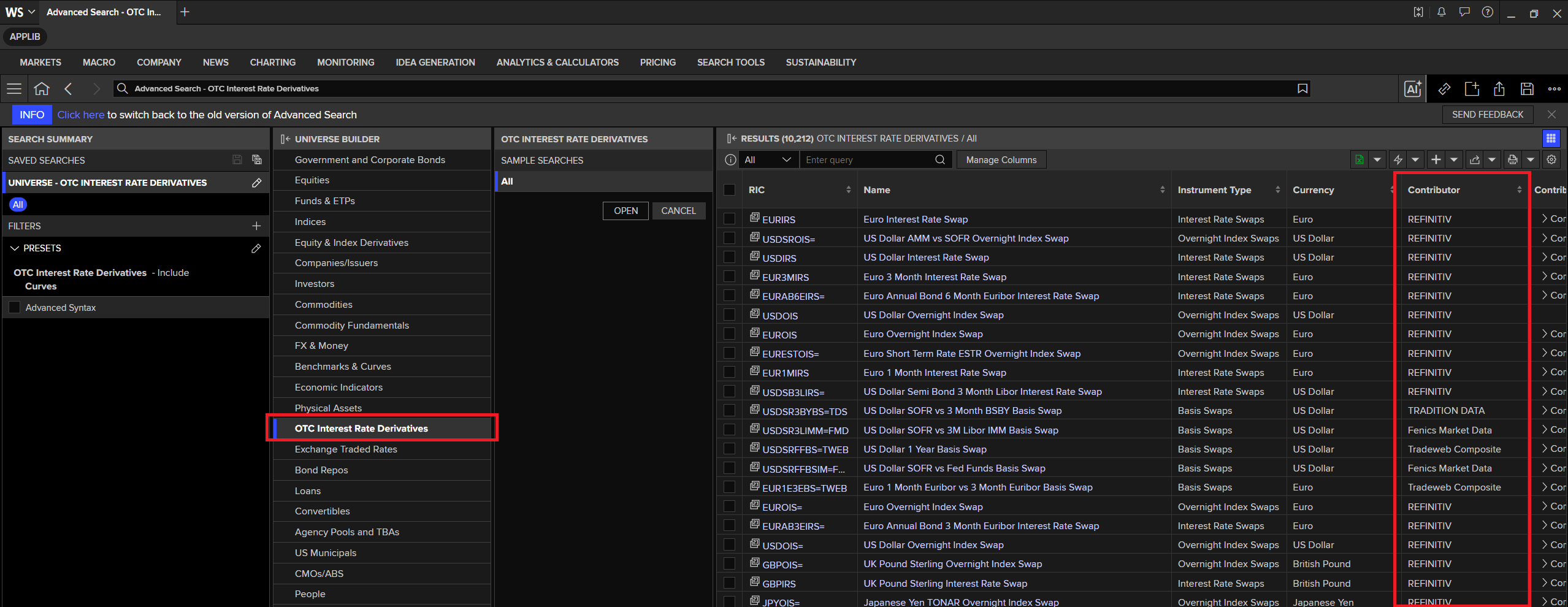
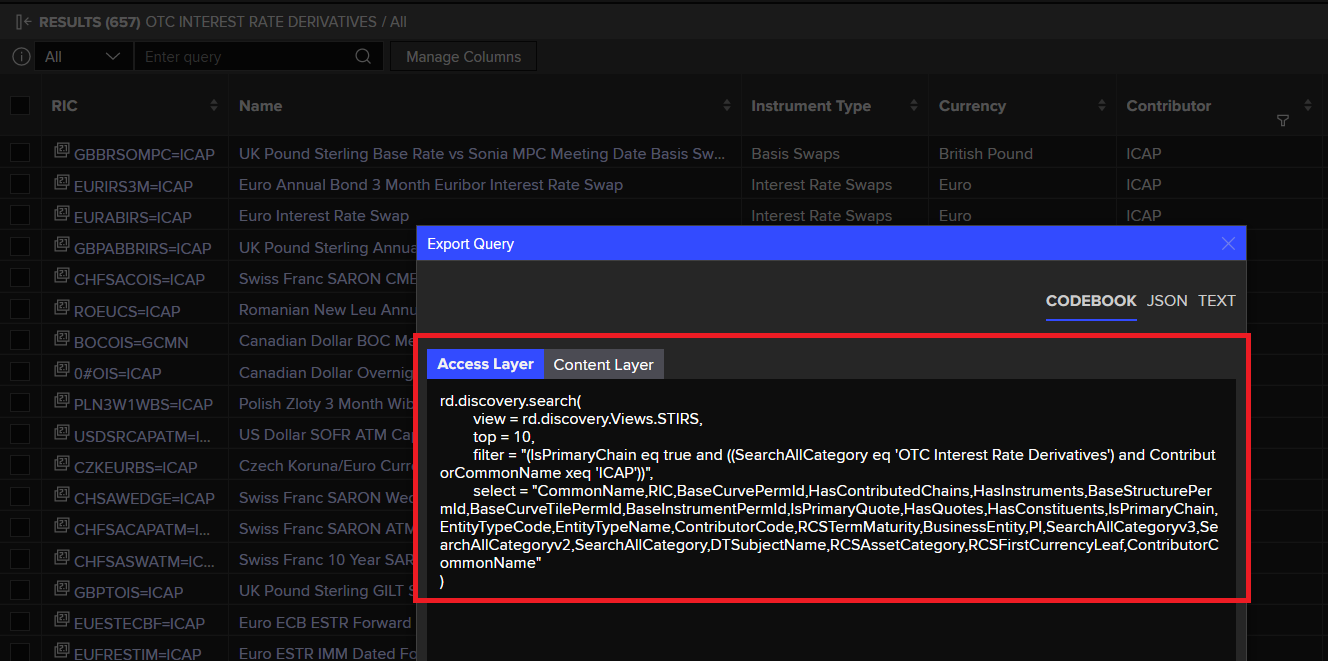
The example below shows how to search for OTC Interest Rate Derivatives contribution RICs.
ld.discovery.search(
    view = search.Views.STIRS,
    top = 20,
    filter = "((SearchAllCategory eq 'OTC Interest Rate Derivatives') and (ContributorCommonName xeq 'ICAP'))",
    select = "CommonName,RIC,ContributorCommonName"
)
| CommonName | RIC | ContributorCommonName | |
|---|---|---|---|
| 0 | UK Pound Sterling Base Rate vs Sonia MPC Meeti... | GBBRSOMPC=ICAP | ICAP |
| 1 | Euro Annual Bond 3 Month Euribor Interest Rate... | EURIRS3M=ICAP | ICAP |
| 2 | Euro Interest Rate Swap | EURABIRS=ICAP | ICAP |
| 3 | UK Pound Sterling Annual Bond Base Rate Intere... | GBPABBRIRS=ICAP | ICAP |
| 4 | Swiss Franc SARON CME Cleared Expiry Overnight... | CHFSACOIS=ICAP | ICAP |
| 5 | Romanian New Leu Annual Money 3 Month Euribor ... | ROEUCS=ICAP | ICAP |
| 6 | Canadian Dollar BOC Meeting date Overnight Ind... | BOCOIS=GCMN | ICAP |
| 7 | Canadian Dollar Overnight Index Swap | 0#OIS=ICAP | ICAP |
| 8 | Polish Zloty 3 Month Wibor vs 1 Month Wibor Ba... | PLN3W1WBS=ICAP | ICAP |
| 9 | US Dollar SOFR ATM Caps/Floors | USDSRCAPATM=ICAP | ICAP |
| 10 | Czech Koruna/Euro Currency Basis Swap | CZKEURBS=ICAP | ICAP |
| 11 | Swiss Franc SARON Wedge Caps/Floors | CHSAWEDGE=ICAP | ICAP |
| 12 | Swiss Franc SARON ATM Caps/Floors | CHFSACAPATM=ICAP | ICAP |
| 13 | Swiss Franc 10 Year SARON ATM Swaption | CHFSASWATM=ICAP | ICAP |
| 14 | Euro Short Term Rate ESTR Overnight Index Swap | EURESTOIS=ICAP | ICAP |
| 15 | UK Pound Sterling GILT SONIA Treasury Swap Spr... | GBPTOIS=ICAP | ICAP |
| 16 | Euro ECB ESTR Forward Starting Overnight Index... | EUESTECBF=ICAP | ICAP |
| 17 | Euro ESTR IMM Dated Forward Starting FRA-OIS S... | EUFRESTIM=ICAP | ICAP |
| 18 | Euro Interest Rate Swap PM Fixing | EURSFIXP=ICAP | ICAP |
| 19 | Euro ESTR vs 3 Month Euribor Basis Swap | EUREST3EBS=ICAP | ICAP |
The Workspace Data Item Browser (DIB) supports contributed RICs for exploring the fields too.
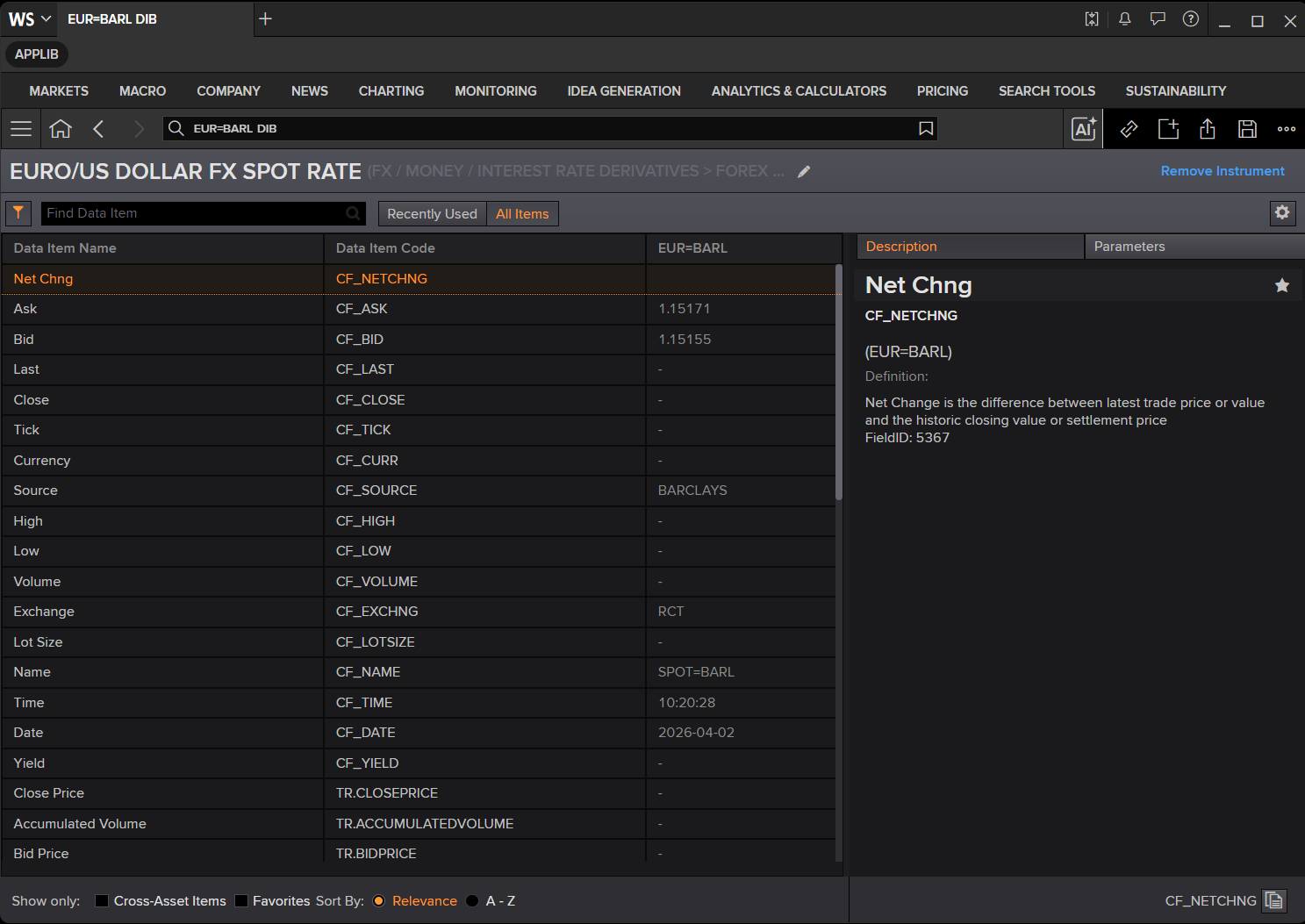
Now you have the list of contributed data with the information you need. Let move on to the contributed data RIC code and FIDs information.
RICs and FIDs
RICs (also known as logical records) are now the preferred format for publishing information on LSEG Platform.
- Each RIC has a set of fields that hold specific items of information about a single financial instrument (Bid/Ask/High/Low, etc.).
- These fields are also referred to as FIDs (Field Identifiers) because each field has a unique numeric identifier.
Example full-quote contributed RIC:
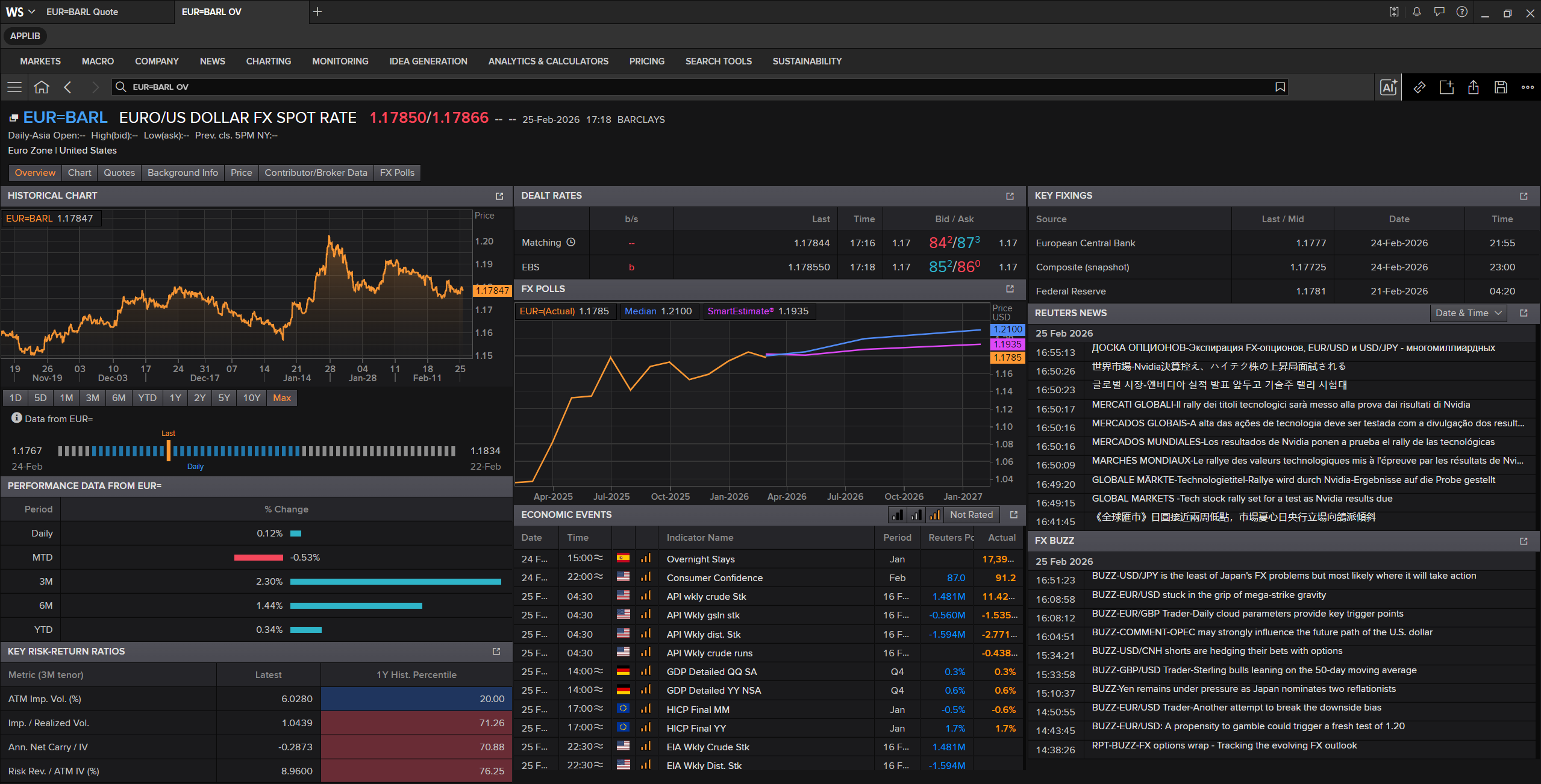
EUR=BARL
The Overview application of the contributed RIC is as follows:
Or you can use EUR=BARL Quote to get the Quote data specifically.
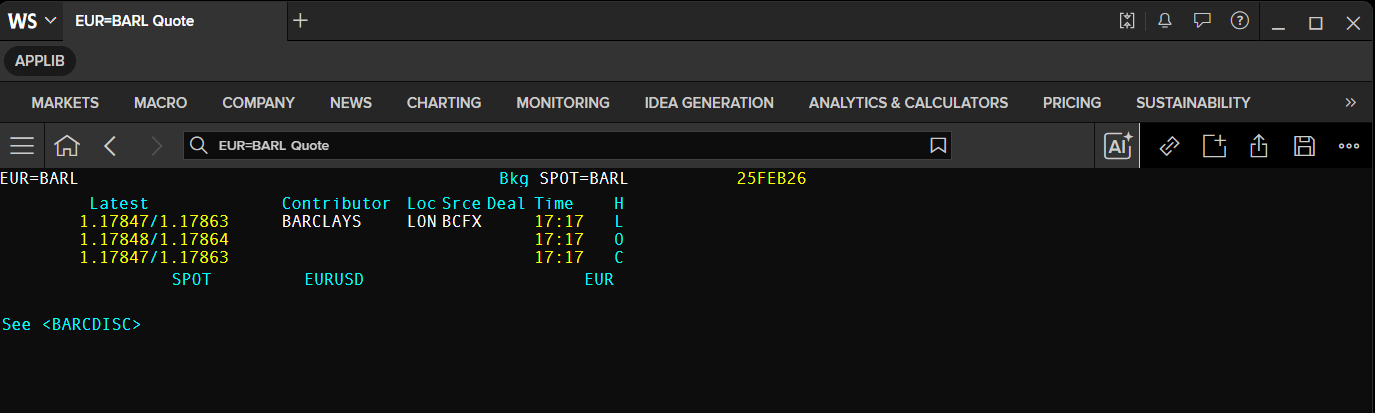
When you request a full quote on a RIC, the key information for the instrument is displayed (for example: Bid, Ask, Contributor, Location, Time, Date). LSEG uses a display template to control this display.
It is important to realize that a RIC contains many more FIDs than are shown in the full quote. These are defined by the record template.
LSEG Workspace application can right-click on the Quote app and choose the options on the Template menu to to toggle between
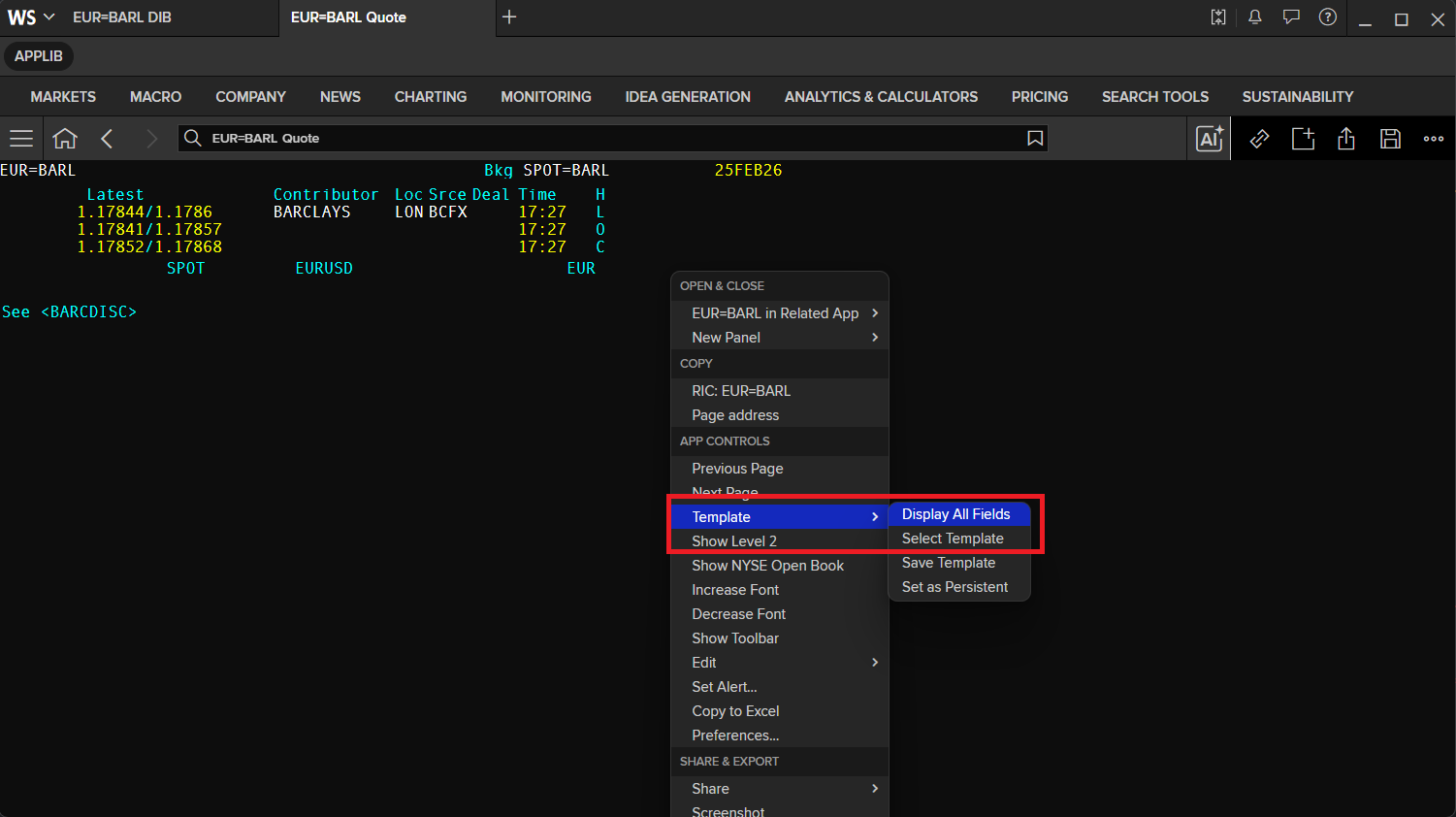
display the RIC data as all the fields available.
- The Display All Fields (all fields contained in the record).
- The Select template (choose which display template you want to display this data).
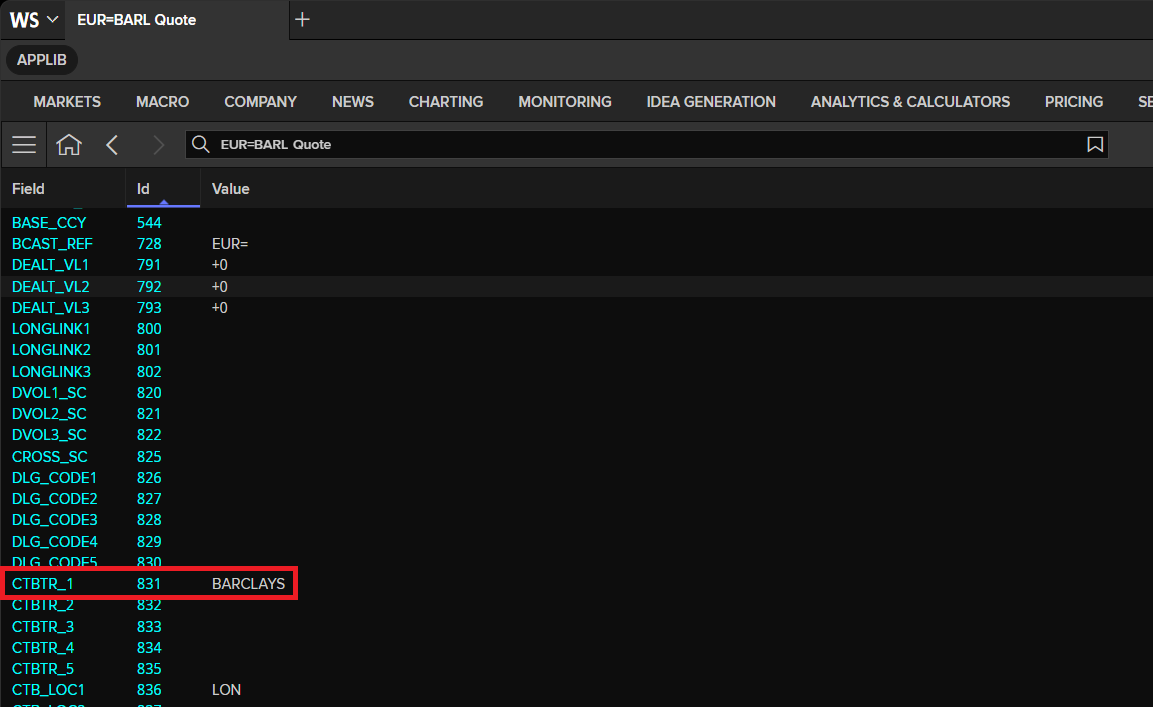
You can check the Contributor information from the CTBTR_1 field by displaying all fields.
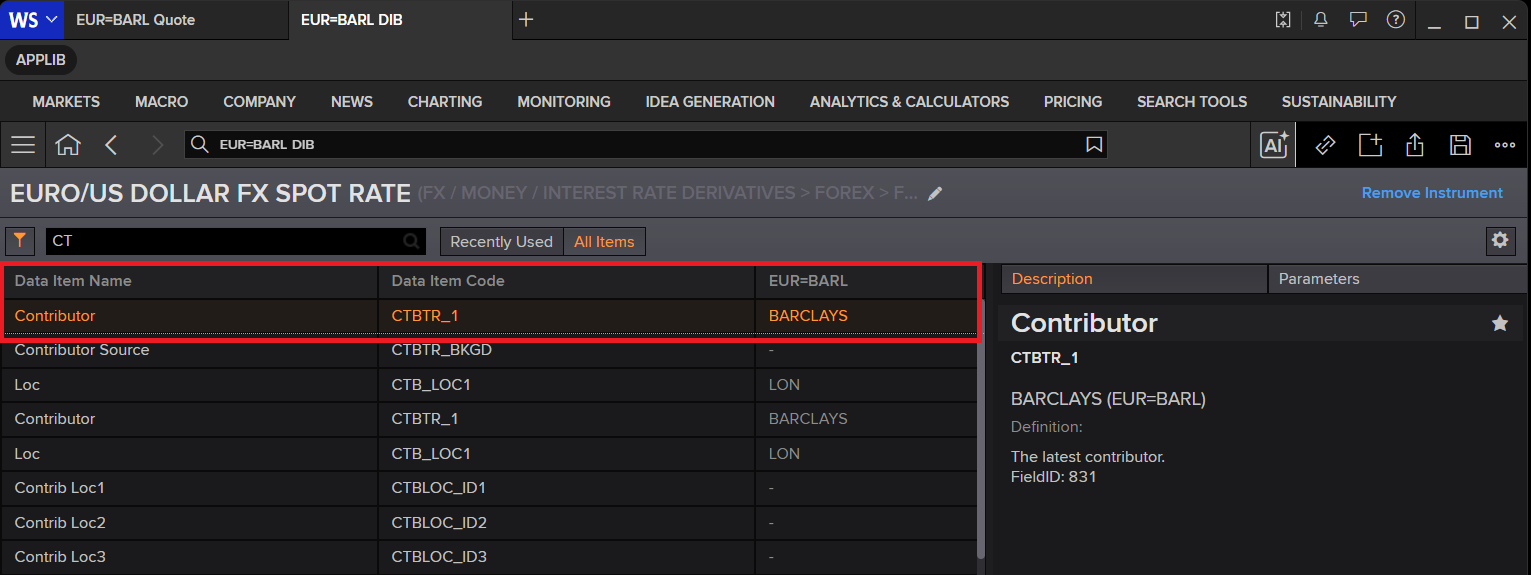
Alternatively, you can use the Data Item Browser app (DIB on the Workspace) to check the field data that you need.
In short:
- LSEG has thousands of different fields (FIDs) to cover the full breadth of market requirements.
- For a specific RIC, only some of those fields are relevant.
- The record template indicates which fields are relevant for that instrument type (cash vs futures, etc.).
- The display template defines which of those fields are shown when you view a full quote (the most important fields).
You can use the Library get_data method to get the full-quote contributed RIC programmatically.
contrib_quote = ld.get_data(
    universe=['EUR=BARL','JPY=BARL','GBPJPYA=NMST'],
    fields=['CTBTR_1','CF_ASK','CF_BID','CF_DATE','CF_TIME']
)

contrib_quote
| Instrument | CTBTR_1 | CF_ASK | CF_BID | CF_DATE | CF_TIME | |
|---|---|---|---|---|---|---|
| 0 | EUR=BARL | BARCLAYS | 1.16991 | 1.1696 | 2026-04-08 | 06:27:29 |
| 1 | JPY=BARL | BARCLAYS | 158.179 | 158.134 | 2026-04-08 | 06:27:28 |
| 2 | GBPJPYA=NMST | NOMURA SEC | <NA> | 212.72 | 2026-04-08 | 00:00:05 |
Some contributed quote RICs are not supported by the get_history method.
For those instruments, use the Content layer historical_pricing module to request historical data instead.
To learn more, see:
- Data Library Content Layer Historical Pricing tutorial page.
- LSEG Data Library for Python - Reference Guide
- Content Layer Historical Pricing examples (GitHub)
- Content Layer Historical Pricing tutorial (GitHub)
from lseg.data.content import historical_pricing
from lseg.data.content.historical_pricing import Intervals

eur_barl_history = historical_pricing.summaries.Definition(
    universe = 'EUR=BARL',
    interval=Intervals.FIVE_MINUTES
).get_data()
eur_barl_history.data.df.head(10)
| EUR=BARL | BID_HIGH_1 | BID_LOW_1 | OPEN_BID | BID | BID_NUMMOV | ASK_HIGH_1 | ASK_LOW_1 | OPEN_ASK | ASK | ASK_NUMMOV | MID_HIGH | MID_LOW | MID_OPEN | MID_PRICE |
|---|---|---|---|---|---|---|---|---|---|---|---|---|---|---|
| Timestamp | ||||||||||||||
| 2026-04-08 04:50:00 | 1.16761 | 1.16735 | 1.16758 | 1.1675 | 214 | 1.16791 | 1.16767 | 1.16784 | 1.16778 | 198 | 1.167745 | 1.16753 | 1.16771 | 1.16764 |
| 2026-04-08 04:55:00 | 1.16762 | 1.16725 | 1.16751 | 1.1675 | 218 | 1.16787 | 1.16753 | 1.16778 | 1.16776 | 206 | 1.16774 | 1.167405 | 1.167645 | 1.16763 |
| 2026-04-08 05:00:00 | 1.16766 | 1.16725 | 1.16753 | 1.16744 | 212 | 1.16797 | 1.16757 | 1.16787 | 1.16773 | 230 | 1.167815 | 1.167415 | 1.1677 | 1.167585 |
| 2026-04-08 05:05:00 | 1.16777 | 1.16737 | 1.16746 | 1.16753 | 211 | 1.16807 | 1.16772 | 1.16772 | 1.16783 | 184 | 1.167915 | 1.167565 | 1.16759 | 1.16768 |
| 2026-04-08 05:10:00 | 1.16771 | 1.16698 | 1.16752 | 1.16761 | 216 | 1.16802 | 1.16743 | 1.16783 | 1.16788 | 204 | 1.167845 | 1.167205 | 1.167675 | 1.167745 |
| 2026-04-08 05:15:00 | 1.16797 | 1.16744 | 1.16757 | 1.16792 | 204 | 1.1683 | 1.16775 | 1.16789 | 1.16825 | 207 | 1.1681 | 1.167595 | 1.16773 | 1.168085 |
| 2026-04-08 05:20:00 | 1.16857 | 1.16784 | 1.16794 | 1.16854 | 213 | 1.16888 | 1.16821 | 1.16824 | 1.16879 | 204 | 1.168715 | 1.16803 | 1.16809 | 1.168665 |
| 2026-04-08 05:25:00 | 1.16862 | 1.16828 | 1.16852 | 1.16845 | 203 | 1.16894 | 1.16856 | 1.1688 | 1.16869 | 201 | 1.168755 | 1.16844 | 1.16866 | 1.16857 |
| 2026-04-08 05:30:00 | 1.16863 | 1.16823 | 1.16837 | 1.16859 | 209 | 1.16902 | 1.16856 | 1.16869 | 1.16884 | 197 | 1.1688 | 1.1684 | 1.16853 | 1.168715 |
| 2026-04-08 05:35:00 | 1.16875 | 1.16842 | 1.16859 | 1.16868 | 200 | 1.16901 | 1.16869 | 1.16883 | 1.16895 | 199 | 1.16887 | 1.168555 | 1.16871 | 1.168815 |
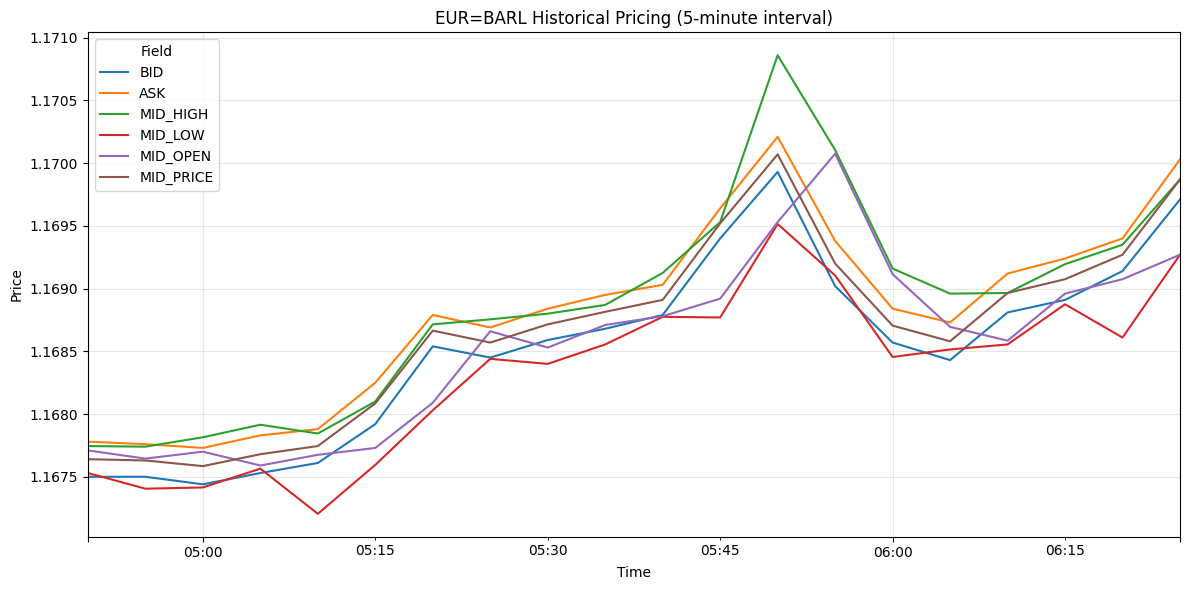
You can use any Python graph libraries likes Matplotlib, Plotly, seaborn, bokeh, etc. to plot this historical data dataframe object into graphs for visualization.
I am demonstrating with the Matplotlib library.
import matplotlib.pyplot as plt

# Fields requested for visualization from the historical pricing DataFrame
fields_to_plot = ['BID', 'ASK', 'MID_HIGH', 'MID_LOW', 'MID_OPEN', 'MID_PRICE']

# Work on a copy to avoid mutating the original eur_barl_history.data.df object
plot_df = eur_barl_history.data.df.copy()

# Use TIMESTAMP as the x-axis if this column is available
if 'TIMESTAMP' in plot_df.columns:
    plot_df = plot_df.set_index('TIMESTAMP')

# Keep only fields that exist in the current dataset and track missing ones
available_fields = [field for field in fields_to_plot if field in plot_df.columns]
missing_fields = [field for field in fields_to_plot if field not in plot_df.columns]

# Stop execution if none of the requested fields are present
if not available_fields:
    raise ValueError('None of the requested fields were found in response.data.df')

# Inform the user about fields that are not returned in this response
if missing_fields:
    print(f"Skipping missing fields: {missing_fields}")

# Plot all available fields as line series
ax = plot_df[available_fields].plot(figsize=(12, 6), linewidth=1.5)
ax.set_title('EUR=BARL Historical Pricing (5-minute interval)')
ax.set_xlabel('Time')
ax.set_ylabel('Price')
ax.grid(True, alpha=0.3)

# Add legend and optimize layout for display
plt.legend(title='Field')
plt.tight_layout()
plt.show()
The advantages of contributing to RICs
If you want to be a contributor, RICs have significant advantages over page-based items.
The table below summarises the relative merits:
| Logical contribution (RICs) | Page contribution |
|---|---|
| Real-time intraday prices. | Free format – contributor defines content and layout. |
| Record/display templates determine content and format of the display. | Potentially more than one instrument per page. |
| Discrete FID list per instrument type. | Can mix prices, commentary, menus, disclaimers, etc. |
| Predictable format (Bid/Ask etc.). | Content limited by page size. |
| Consistent logical structure. | No automatic inclusion in aggregated displays. |
| Ripple fields to show price history. | Page content is not archived. |
Automatic sourcing to value-added displays (Super RICs), e.g. EUR=. | |
| Use of colour improves readability. | Monochrome only. |
| Chains and tiles to retrieve multiple instruments in one display. | |
| Historical data available. | |
| Easy export/control (Excel, in-house apps). | |
| Tick indicators and RIC name specify instrument. |
Restricted Data Sets (RDS)
The vast majority of contributed data is made available to all LSEG clients subscribing to the relevant LSEG service.
- A contributor page classified as FX, for example, is available to all clients subscribing to a service containing FX information.
- This is known as unrestricted or public data.
Some contributed pages have restricted access to protect the publishers of the data from their competitors (for example, brokers restricting competing brokers from viewing their pages).
Restricted Data Sets (RDS) control who can and cannot view contributed data:
-
Public restricted
- Data is released to all subscribers to the relevant service, except those specified by the contributor.
- Typically used where a contributor requires a wide audience with certain key exclusions.
-
Private restricted
- Data is released only to LSEG subscribers specified by the contributor.
- Typically used for communication between contributor sites or to send information to a limited number of subscribers.
- These subscribers can view the RDS data regardless of the products they subscribe to.
What to do if you can’t see a RIC or page you think you should see
Access is usually granted per billing address. If you’ve changed your office location or billing address, it can affect your access to some restricted data sets.
Action:
- Contact the LSEG Help Desk or your LSEG Account Manager.
- They can tell you whether you are still entitled to see that information.
- You may need to contact the owner of the restricted data set to arrange permission again.
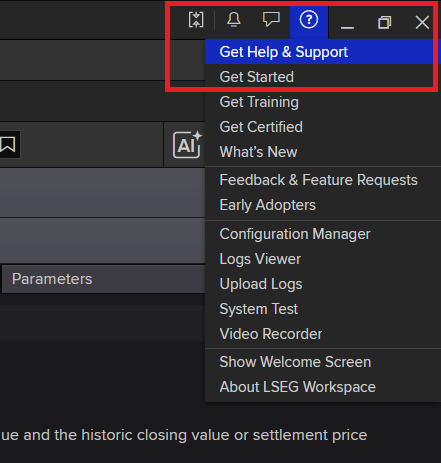
To contact the LSEG Help Desk or search for Helps and Tutorials, you can click on the Get Help & Support option on the ? menu of LSEG Workspace.
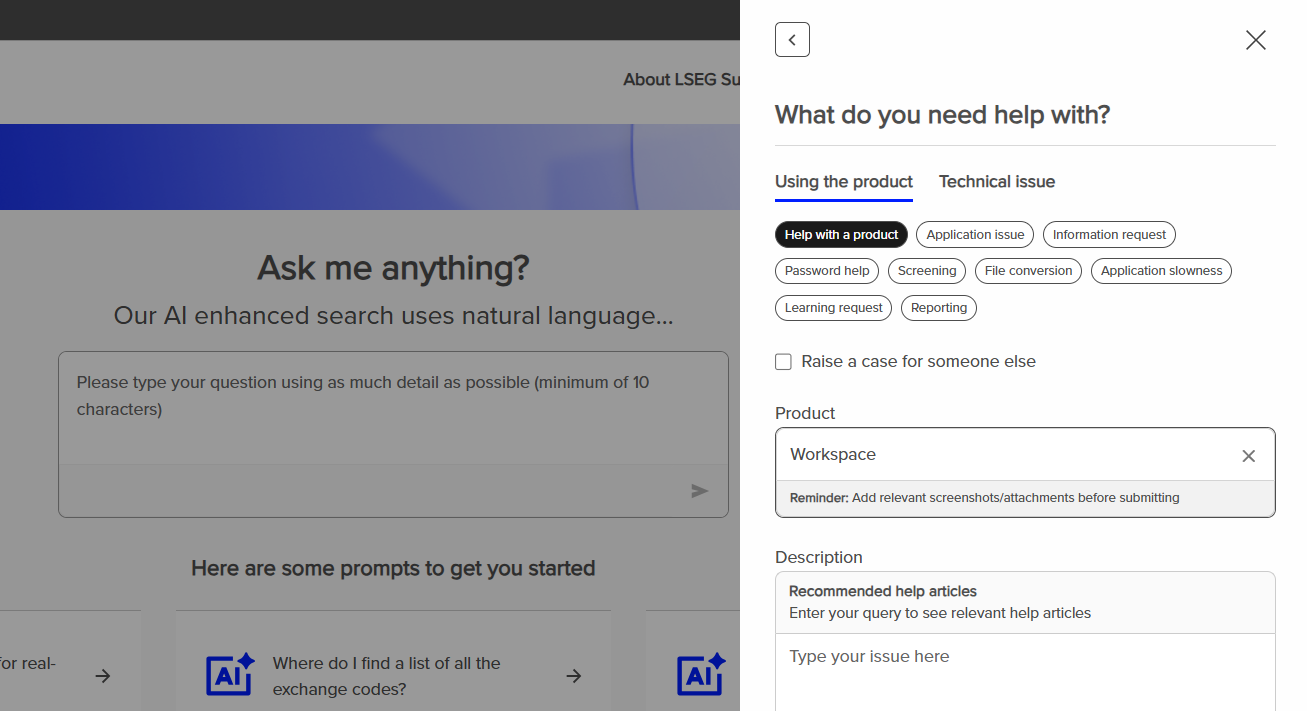
Alternatively, you can submit a support ticket via LSEG Support website.
Super RICs
Some contributed prices on pages or RICs can also appear on Super RICs.
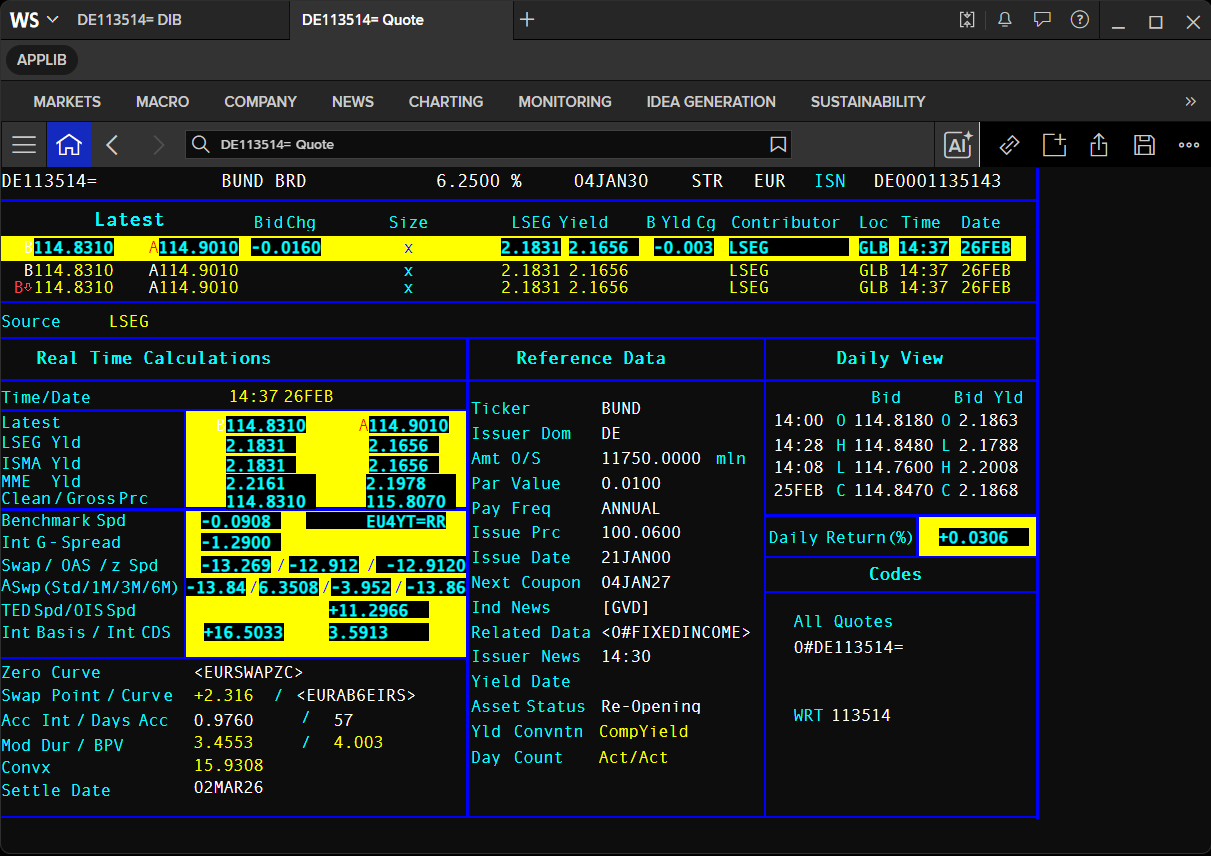
A Super RIC displays a single issue with the three latest contributed prices available. These prices may be sourced from a single contributor or from three different ones.
Example Super RICs:
EUR=– shows the last three contributed FX rates (with contributor identifiers).DE113514=– German Bund 6.25%; includes more detailed bond information plus the last three prices and contributors.
The recommended method is to contribute price information directly to logical records (RICs). Super RIC updates are triggered automatically by updates from the contributed RICs, as long as the updates meet the relevant tolerance requirements.
- This ensures that clearly incorrect updates are not passed through automatically and maintains the integrity of the composite display.
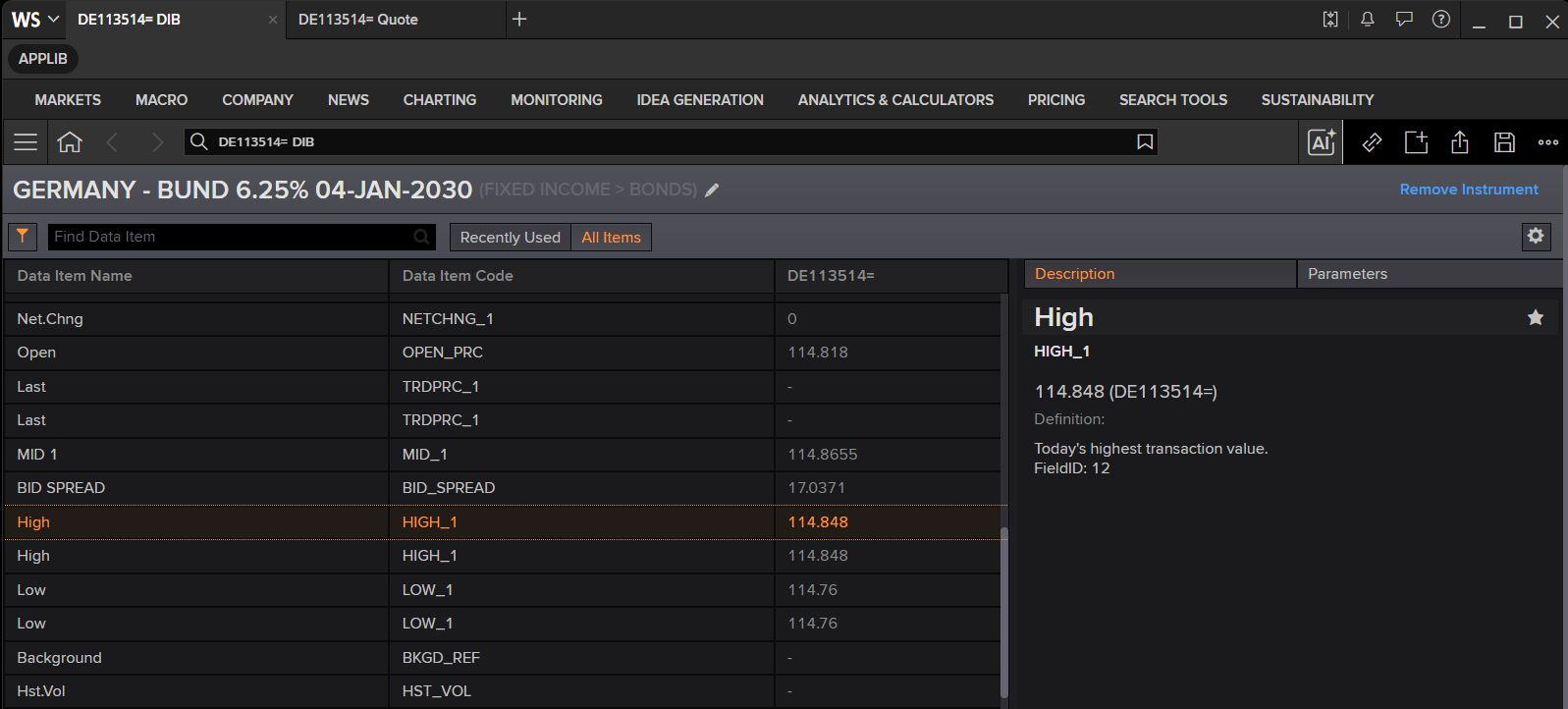
You can use the Data Library methods together with the Data Item Browser app for getting these super RICs data programmatically.
ld.get_data(
    universe=['DE113514=','EUR='],
    fields=['NETCHNG_1','CF_ASK','CF_BID','PCTCHNG','PRIMACT_1','SEC_ACT_1','RT_YIELD_1']
)
| Instrument | NETCHNG_1 | CF_ASK | CF_BID | PCTCHNG | PRIMACT_1 | SEC_ACT_1 | RT_YIELD_1 | |
|---|---|---|---|---|---|---|---|---|
| 0 | DE113514= | 0.889 | 113.156 | 113.114 | 0.7922 | 113.114 | 113.156 | 2.5243 |
| 1 | EUR= | 0.0103 | 1.17 | 1.1697 | 0.89 | 1.1697 | 1.17 | <NA> |
The Super RICs are supported by the Library get_history method as follows.
history = ld.get_history(
    universe='DE113514=',
    count=20
)
history.head(15)
| DE113514= | BID | ASK | B_YLD_1 | A_YLD_1 | ASP6M | BID_HIGH_1 | OPEN_BID | BID_LOW_1 | HIGH_YLD | LOW_YLD | ... | ZSPREAD | INT_BASIS | INT_CDS | TRTN_PRICE | OIS_SPREAD | TED_SPREAD | ASP1M | REDEM_DATE | DIRTY_PRC | CLEAN_PRC |
|---|---|---|---|---|---|---|---|---|---|---|---|---|---|---|---|---|---|---|---|---|---|
| Date | |||||||||||||||||||||
| 2026-03-09 | 113.798 | 113.846 | 2.421 | 2.4088 | -17.9317 | 113.84 | 113.319 | 113.282 | 2.5526 | 2.4103 | ... | -16.6515 | 20.4681 | 3.8166 | -0.0087 | 6.7088 | <NA> | 0.5672 | <NA> | 114.9281 | 113.798 |
| 2026-03-10 | 113.933 | 114.02 | 2.3842 | 2.3621 | -17.0677 | 114.098 | 113.788 | 113.773 | 2.4249 | 2.3423 | ... | -16.1435 | 20.1851 | 4.0416 | 0.1245 | 8.5434 | <NA> | 3.7009 | <NA> | 115.0803 | 113.933 |
| 2026-03-11 | 113.51 | 113.597 | 2.4896 | 2.4673 | -16.2228 | 113.933 | 113.89 | 113.481 | 2.497 | 2.3818 | ... | -14.9921 | 18.5559 | 3.5638 | -0.0009 | 7.6757 | <NA> | 2.3479 | <NA> | 114.6744 | 113.51 |
| 2026-03-12 | 113.476 | 113.556 | 2.491 | 2.4706 | -17.1539 | 113.585 | 113.42 | 113.329 | 2.5287 | 2.4632 | ... | -14.9423 | 18.7303 | 3.788 | 0.0143 | 7.9952 | <NA> | 2.1925 | <NA> | 114.6918 | 113.476 |
| 2026-03-13 | 113.349 | 113.392 | 2.5212 | 2.5102 | -19.1321 | 113.548 | 113.427 | 113.244 | 2.5482 | 2.4702 | ... | -16.1048 | 19.8825 | 3.7778 | -0.007 | 7.2533 | <NA> | 0.8531 | <NA> | 114.5819 | 113.349 |
| 2026-03-16 | 113.412 | 113.449 | 2.5026 | 2.4932 | -19.2653 | 113.555 | 113.246 | 113.245 | 2.5455 | 2.466 | ... | -15.6393 | 19.671 | 4.0318 | -0.0105 | 8.2228 | <NA> | 1.3985 | <NA> | 114.662 | 113.412 |
| 2026-03-17 | 113.561 | 113.598 | 2.462 | 2.4525 | -18.6758 | 113.584 | 113.358 | 113.277 | 2.5349 | 2.4561 | ... | -17.2891 | 21.3275 | 4.0384 | 0.0017 | 8.988 | <NA> | 2.5655 | <NA> | 114.8281 | 113.561 |
| 2026-03-18 | 113.308 | 113.374 | 2.5246 | 2.5076 | -18.3979 | 113.622 | 113.59 | 113.249 | 2.5397 | 2.444 | ... | -16.8737 | 20.6647 | 3.791 | -0.0113 | 8.242 | <NA> | 1.8453 | <NA> | 114.5922 | 113.308 |
| 2026-03-19 | 112.972 | 113.014 | 2.6041 | 2.5933 | -18.067 | 113.15 | 113.119 | 112.769 | 2.6567 | 2.5581 | ... | -16.6725 | 20.4413 | 3.7688 | -0.0017 | 7.7898 | <NA> | 0.8559 | <NA> | 114.3076 | 112.972 |
| 2026-03-20 | 112.573 | 112.616 | 2.7053 | 2.6941 | -19.2186 | 113.116 | 112.822 | 112.573 | 2.7053 | 2.5645 | ... | -17.6974 | 21.6922 | 3.9948 | -0.007 | 13.5657 | <NA> | -0.2331 | <NA> | 113.9257 | 112.573 |
| 2026-03-23 | 112.725 | 112.789 | 2.6635 | 2.6469 | -20.5794 | 113.067 | 112.387 | 112.283 | 2.7786 | 2.5748 | ... | -18.9193 | 23.91 | 4.9907 | 0.0114 | 6.5609 | <NA> | -0.2338 | <NA> | 114.0949 | 112.725 |
| 2026-03-24 | 112.659 | 112.706 | 2.6783 | 2.6661 | -22.0106 | 112.884 | 112.703 | 112.576 | 2.6999 | 2.6199 | ... | -20.2508 | 25.275 | 5.0242 | 0.0053 | 6.4601 | <NA> | -0.2822 | <NA> | 114.046 | 112.659 |
| 2026-03-25 | 112.845 | 112.889 | 2.6277 | 2.6162 | -20.657 | 112.915 | 112.584 | 112.582 | 2.6961 | 2.6095 | ... | -18.9175 | 23.6778 | 4.7603 | 0.0096 | 7.1949 | <NA> | 0.8172 | <NA> | 114.2491 | 112.845 |
| 2026-03-26 | 112.376 | 112.411 | 2.743 | 2.7338 | -20.7484 | 112.593 | 112.575 | 112.376 | 2.743 | 2.6863 | ... | -8.5696 | 13.3385 | 4.769 | -0.007 | 6.6232 | <NA> | -0.2272 | <NA> | 113.8315 | 112.376 |
| 2026-03-27 | 112.4 | 112.444 | 2.7344 | 2.7229 | -22.1645 | 112.441 | 112.244 | 112.125 | 2.8065 | 2.7237 | ... | -20.523 | 25.2562 | 4.7331 | 0.0132 | 5.9614 | <NA> | -0.806 | <NA> | 113.8726 | 112.4 |
15 rows × 37 columns
Logicisation
If you contribute to pages rather than RICs, it may still be possible for your page-based contributions to be passed automatically to a Super RIC.
- This process is called logicisation.
- LSEG picks up the coordinates of an instrument on your page and inserts the information into a RIC or Super RIC.
Because logicisation depends on knowing the precise location and format of each piece of data on the contributed page, you must notify LSEG in advance if you want to change the format of that page.
Contributed pages
Pages are the alternative medium for contributing. They are particularly useful where you want to publish text of any kind.
There are two page sizes on IDN:
- Small page – 14 rows × 64 characters.
- Large page – 25 rows × 80 characters .
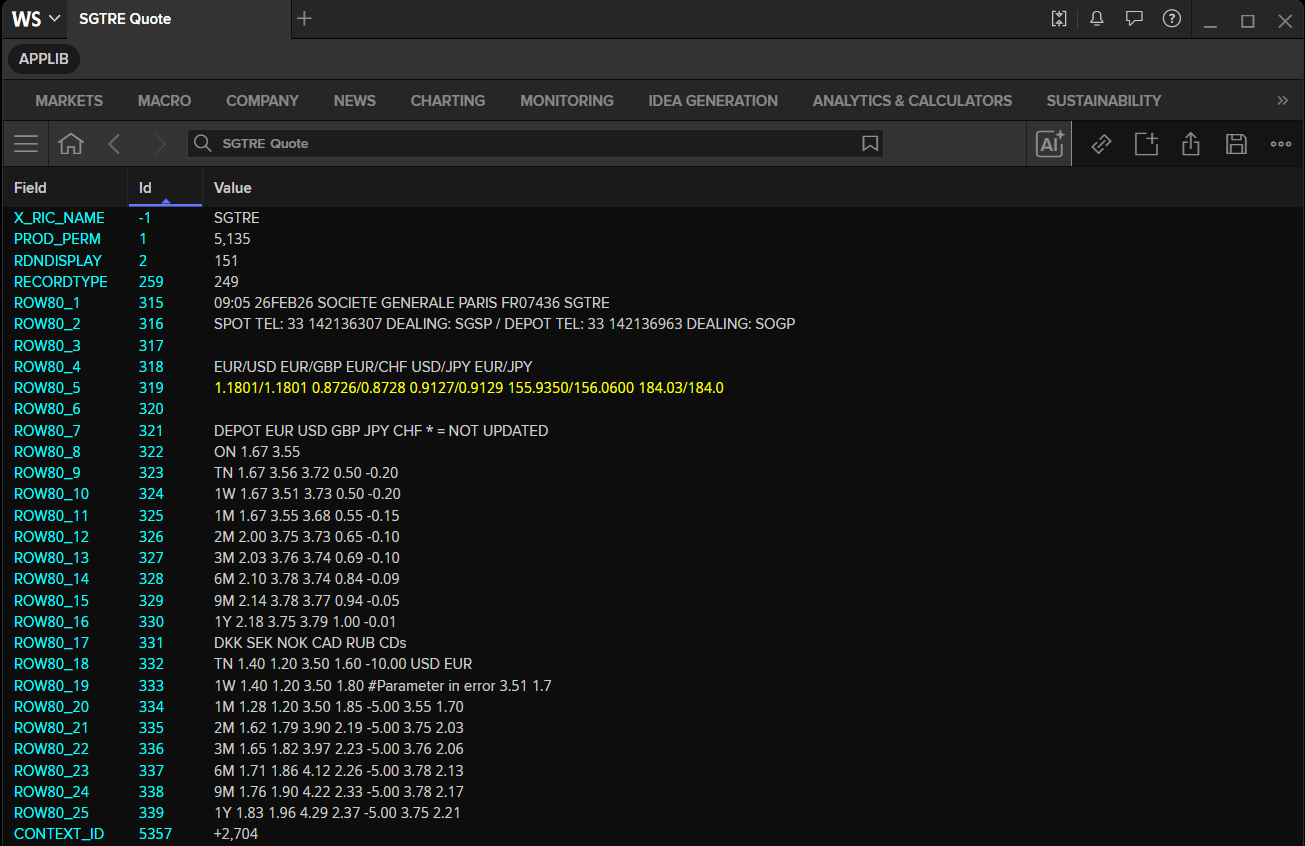
Example: SGTRE Page RIC (Societe Generale Depos and CD's) with 25 rows × 80 characters (contains ROW80_1 to ROW80_25 fields)
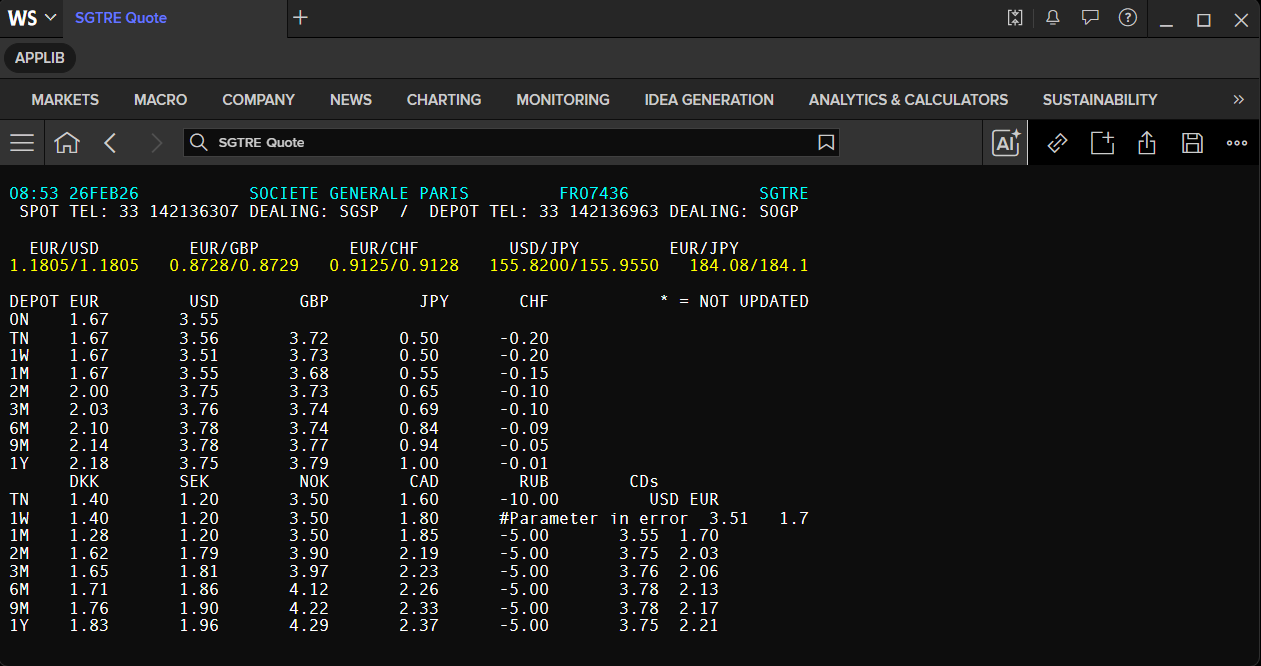
The top row of each page is owned by LSEG. It usually contains:
- Date and time stamp (time of most recent insert).
- Name and subscriber number of the page owner.
The rest of the page belongs entirely to the contributor.
The library get_data method can retrieve the contributed Page RICs dynamically.
rows_list = [f'ROW80_{i}' for i in range(1, 26)]
# Request page rows based on detected format
df = ld.get_data(
    universe=['SGTRE'],
    fields=rows_list
)

# Print each returned row field and its value
for col in df.columns:
    print(f'{col}: {df[col].values[0]}')
    Instrument: SGTRE
    ROW80_1: 06:27 08APR26           SOCIETE GENERALE PARIS         FR07436             SGTRE
    ROW80_2:  SPOT TEL: 33 142136307 DEALING: SGSP  /  DEPOT TEL: 33 142136963 DEALING: SOGP
    ROW80_3:
    ROW80_4:   EUR/USD         EUR/GBP         EUR/CHF         USD/JPY         EUR/JPY
    ROW80_5: 1.1700/1.1700   0.8707/0.8708   0.9211/0.9218   157.9800/158.2800   185.00/185.0
    ROW80_6:
    ROW80_7: DEPOT EUR         USD        GBP         JPY       CHF           * = NOT UPDATED
    ROW80_8: ON    1.67       3.55
    ROW80_9: TN    1.67       3.56       3.72       0.50      -0.20
    ROW80_10: 1W    1.68       3.51       3.73       0.50      -0.20
    ROW80_11: 1M    1.69       3.55       3.81       0.55      -0.15
    ROW80_12: 2M    2.07       3.75       3.95       0.75      -0.10
    ROW80_13: 3M    2.15       3.84       4.12       0.83      -0.10
    ROW80_14: 6M    2.37       3.97       4.35       0.95       0.14
    ROW80_15: 9M    2.51       4.03       4.55       1.04       0.28
    ROW80_16: 1Y    2.63       4.07       4.68       1.15       0.39
    ROW80_17:       DKK        SEK         NOK        CAD        RUB        CDs
    ROW80_18: TN    1.40       1.20       3.50       1.60      #Parameter in error   USD EUR
    ROW80_19: 1W    1.40       1.20       3.50       1.75      #Parameter in error  3.51   1.7
    ROW80_20: 1M    1.71       1.20       3.50       1.80      -5.00       3.55  1.72
    ROW80_21: 2M    1.91       2.06       4.15       1.13      -5.00       3.75  2.10
    ROW80_22: 3M    1.97       2.05       4.36       1.48      -5.00       3.84  2.18
    ROW80_23: 6M    2.25       2.30       4.57       1.27      -5.00       3.97  2.40
    ROW80_24: 9M    2.51       2.47       4.90       1.31      -5.00       4.03  2.54
    ROW80_25: 1Y    2.60       2.64       5.05       1.17      -5.00       4.07  2.66
Contributing and Updating your RICs
As a contributor, you'll find that RICs and pages can be contributed and updated with minimal effort:
- Manually – by typing the updated quote.
- Automatically – using spreadsheets or programmatically.
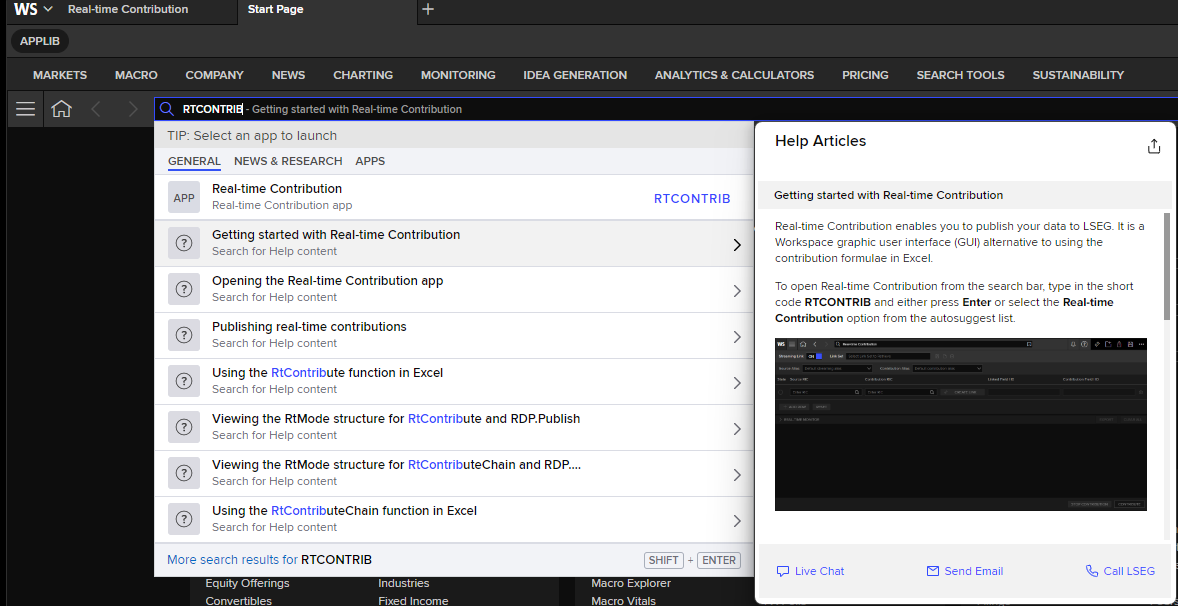
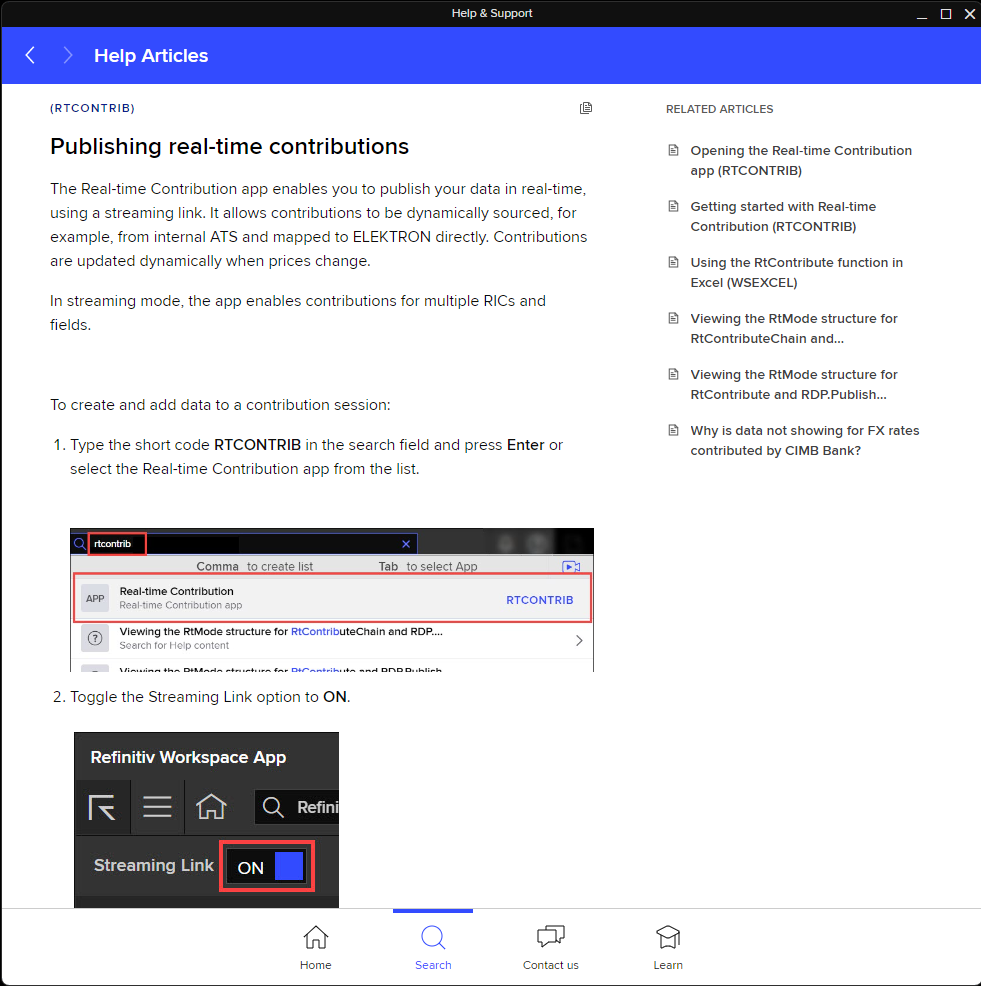
The Workspace desktop application Real-Time Contribution RTCONTRIB app lets enables you to publish your data to LSEG. It is a Workspace graphic user interface (GUI) alternative to using the contribution formulae in Excel.
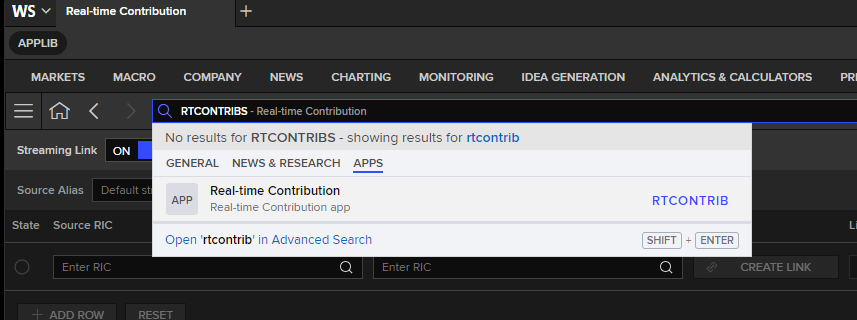
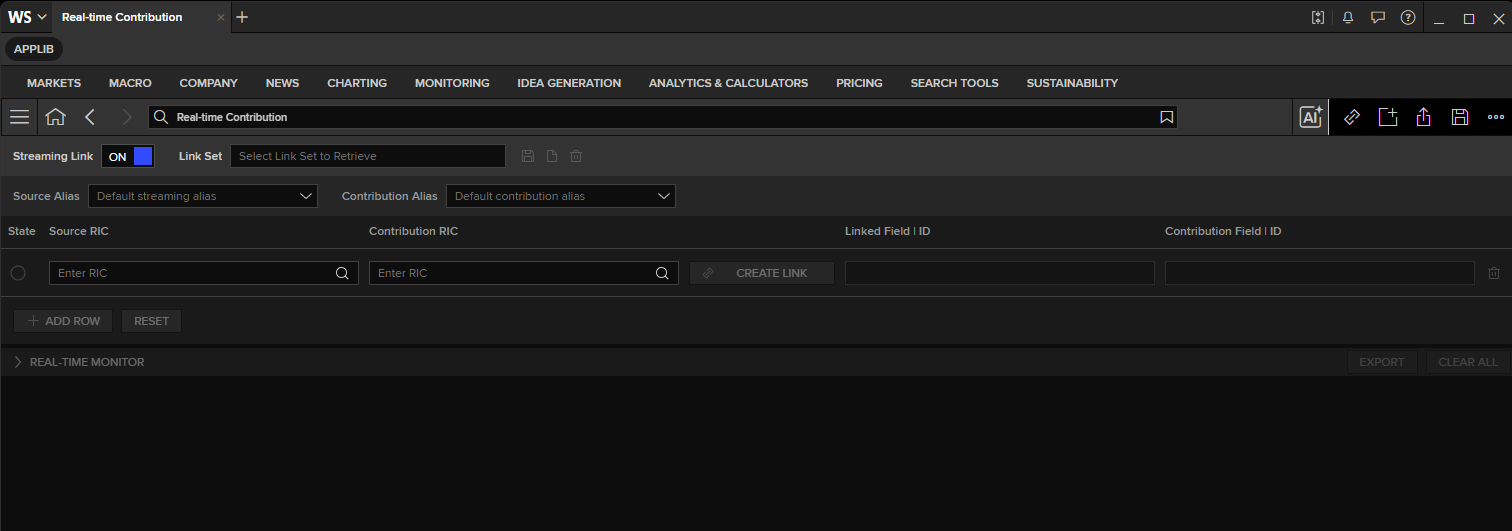
You can search for this RTCONTRIB help and documentation from the Workspace search bar.
Please contact your LSEG Representative or Account Manager for more detail.
Programmatic contribution is also supported. The available approach depends on how your LSEG Workspace application is connected to the LSEG Platform.
If your LSEG Workspace application connects to LSEG Platform directly
The LSEG Contributions Real-Time Cloud (RCC) is a new service for contributing content to LSEG Real-Time and Workspace platforms. The RCC aims for replacing the legacy Market Link-IP (MLIP) system.
You can use the Real-Time WebSocket API and Real-Time SDK (RTSDK - ETA and EMA APIs) C/C++, and Java editions to contribute and update data to the LSEG platforms directly. The contributed and updated data will be stream to LSEG Workspace Platform.
Please see more details on the following resources:
- RCC Contribution tutorial with the WebSocket API (code demonstration in Python)
- RCC Contribution tutorial with EMA C++ API
- RCC Contribution tutorial with EMA Java API
- RCC Contribution via Real-Time Data Distribution System with EMA API
If your LSEG Workspace application connects to your local Real-Time Market Data System
This scenario means your Market Data team has Real-Time Data Distribution System (RTDS) or Advanced Transformation Server (ATS) deploys in your organization local environment, and your LSEG Workspace desktop application connects to it.
In this case, you can use the Data Library Content Layer Pricing's contribute method to contribute and update Page and Quote data to your local Market Data System directly. The contributed and updated data will be stream to your LSEG Workspace application.
Please see more details on the Content - Pricing stream - How to send contributions example
In brief: contributed data
- LSEG customers can publish their own rates using RICs (logical records) or pages.
- Contributors are contractually obliged to ensure the quality and accuracy of the information they publish.
Data can be contributed as:
- Public (unrestricted) – any customer with access to the service can see it.
- Public restricted – everyone except a particular user group defined by the contributor can see it.
- Private restricted – only a pre-defined group of customers can see the information.
Logicisation is the process of transforming page-based information into record-based information.
To end the Data Library session, please use the ld.close_session method.
ld.close_session()