Chapter 7 - Futures
01 - OVERVIEW
Futures are exchange traded contracts that obligate two parties to transact a specified asset at a predetermined price on a defined expiry date (a.k.a delivery date). They are standardised in terms of contract size, settlement method, and delivery date, and are centrally cleared - eliminating the bilateral counterparty risk.
Futures markets span stock indices, fixed income, foreign exchange, interest rate and commodities etc. Major futures contracts have a quarterly expiry cycle although non-quarterly expiry also exists.
02 - INDIVIDUAL FUTURES CONTRACTS
Futures can be explored both LSEG Workspace & Programmatically. Before we explore we need to get familiar with the instrument codes. For Individual futures contracts, the codes incorporate indicators that tell you what the delivery month and year are. Once you know the root code, you can easily construct your own futures contract codes.
Format:
<rootcode><monthcode><yearcode>
Example: FEIZ4 where,
- FEI = Root Code for the three-month Euribor
- Z = December
- 4 = 2024
Delivery Month Codes for Futures
| Month | Code | Month | Code |
|---|---|---|---|
| January | F | July | N |
| February | G | August | Q |
| March | H | September | U |
| April | J | October | V |
| May | K | November | X |
| June | M | December | Z |
You can remember the delivery codes using the phrase:
Phrase to remember: Focus on Growth, Help the Journey, Keep Moving, Navigate Quality, Uphold Value, and eXcel with Zeal.
Delivery Years for Futures
Two-digit year codes are going to be the standard for futures contracts after January 2024 and beyond. The change was implemented to support contracts expiring more than 10 years in the future.
Exceptions: You may still see some RICs with single digit year codes based on certain exchanges or product type conventions and if the contracts expire more than 10 years in the future, the code is then a two digit number. Example: FEIZ6 has an expiry of December 2026 while FEIZ31 has a expiry of December 2031.
Note: The earlier
FEIZ4example uses a single-digit year code because single-digit codes are still seen on legacy and shorter-dated contracts.
RIC Rules App: The RIC Rules app on LSEG Workspace can be used for details on all type of RIC formats.
03 - CONTINUATION RICS
The most convenient way to display futures contracts is by using continuation RICs. Since every futures contract has an expiry/delivery date, it ceases to exist after its expiry and the RIC changes every time. A continuation RIC will always display the details of the present contract and will roll over to the next one automatically thus eliminating the need to change the month and year code in a display.
Terms to understand:
- Front month = Refers to the nearest active expiry contract. The one closest to today's date that is still actively trading.
- Back month = All contracts with expiry dates beyond the front month.
Types of continuation RICs by Rollover Method:
In every format below, <position> is 1 for the front contract, 2 for the second front, and so on. The lowercase c is mandatory — continuation RICs are case-sensitive.
| # | Rollover method | Format | Example | Notes |
|---|---|---|---|---|
| 3.1 | Nearest expiry | <root>c<position> | FEIc1 | Rolls to the nearest active expiry contract. |
| 3.2 | Quarterly months only (serial) | <root>cm<position> | FEIcm1 | For short interest rate futures that also settle in odd months — displays main quarterly months only. |
| 3.3 | Highest volume | <root>cv<position> | FEIcv1 | Rolls to the contract with the highest volume. |
| 3.4 | Highest open interest | <root>coi<position> | FEIcoi1 | Rolls to the contract with the highest Open Interest change. |
| 3.5 | Highest volume + OI combined | <root>cvoi<position> | FEIcvoi1 | Rolls based on the combined volume + Open Interest change leader. |
| 3.6 | Lead month only | <root>c<position>t | FEIc1t | Tracks only the lead (front) month contract — unlike c1 which tracks all monthly contracts. |
Note:
FEIin the examples is the root code for the three-month Euribor.
04 - FUTURES CHAINS
Futures chains allow you to see all the available contracts for a futures in one display as a list. Any RIC starting with 0# is a chain (ideally) A chain displays the individual futures contract with all contract months.
Example:
0#FEI:
Accessing the Data:
-
On Workspace: Type the chain RIC of a futures contract in the search bar and press enter to open the overview app for the respective instrument. (or) Press F4 on Workspace to launch the Quote app. Type the chain RIC code to view the chain instantly.
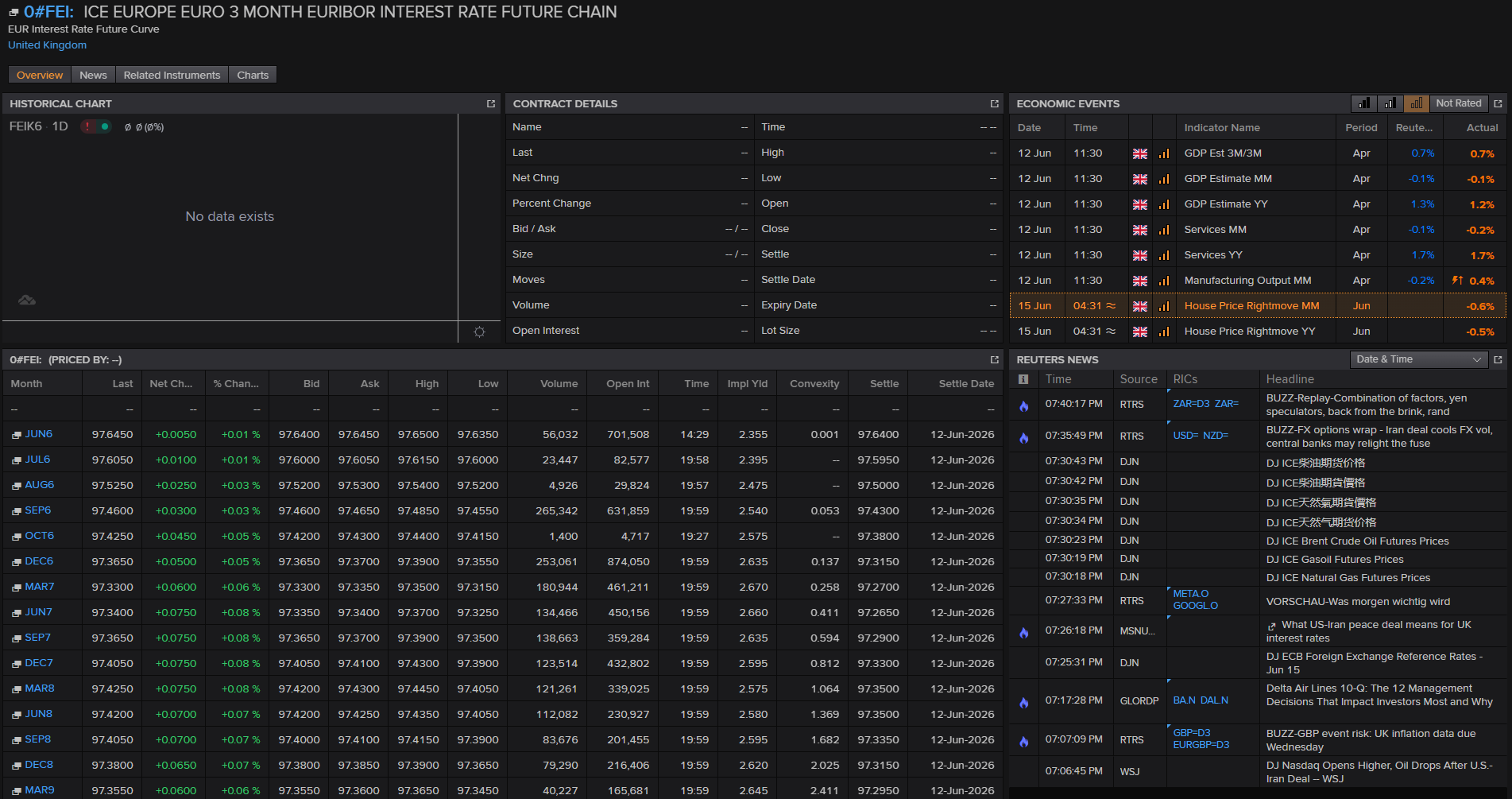
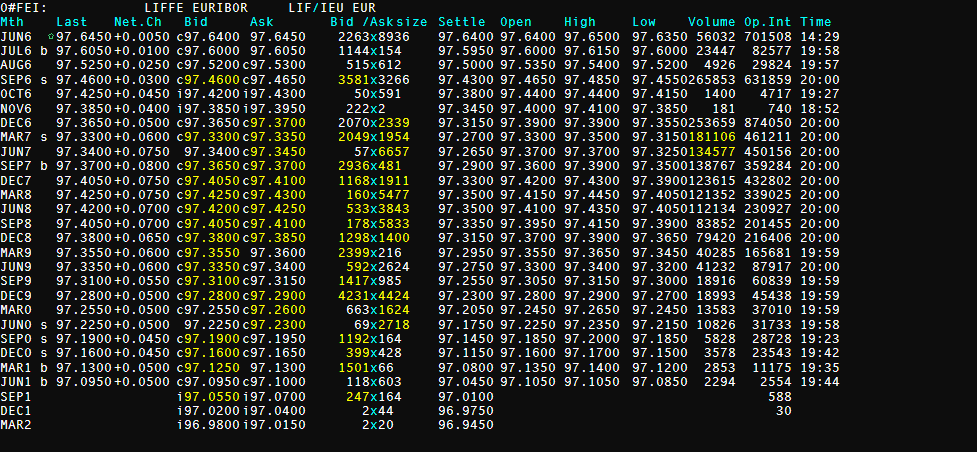
-
Programmatically:
You can access the chain constituents using the following methods:
Method 1:
from lseg.data.discovery import Chain
import lseg.data as ld
ld.open_session()
chain_constituents = Chain('0#FEI:')
display(chain_constituents.constituents)
ld.close_session()
    ['FEIM6',
     'FEIN6',
     'FEIQ6',
     'FEIU6',
     'FEIV6',
     'FEIX6',
     'FEIZ6',
     'FEIH7',
     'FEIM7',
     'FEIU7',
     'FEIZ7',
     'FEIH8',
     'FEIM8',
     'FEIU8',
     'FEIZ8',
     'FEIH9',
     'FEIM9',
     'FEIU9',
     'FEIZ9',
     'FEIH0',
     'FEIM0',
     'FEIU0',
     'FEIZ0',
     'FEIH31',
     'FEIM31',
     'FEIU31',
     'FEIZ31',
     'FEIH32']
Method 2:
Note: This may not work for all type of chains which are not of the standard format.
import lseg.data as ld
ld.open_session()
chain_constituents = ld.get_data(
    universe=['0#FEI:'],
    fields=['DSPLY_NAME']
)
display(chain_constituents)
ld.close_session()
| Instrument | DSPLY_NAME | |
|---|---|---|
| 0 | FEIM6 | EURIBOR 3M JUN6 |
| 1 | FEIN6 | EURIBOR 3M JUL6 |
| 2 | FEIQ6 | EURIBOR 3M AUG6 |
| 3 | FEIU6 | EURIBOR 3M SEP6 |
| 4 | FEIV6 | EURIBOR 3M OCT6 |
| 5 | FEIX6 | EURIBOR 3M NOV6 |
| 6 | FEIZ6 | EURIBOR 3M DEC6 |
| 7 | FEIH7 | EURIBOR 3M MAR7 |
| 8 | FEIM7 | EURIBOR 3M JUN7 |
| 9 | FEIU7 | EURIBOR 3M SEP7 |
| 10 | FEIZ7 | EURIBOR 3M DEC7 |
| 11 | FEIH8 | EURIBOR 3M MAR8 |
| 12 | FEIM8 | EURIBOR 3M JUN8 |
| 13 | FEIU8 | EURIBOR 3M SEP8 |
| 14 | FEIZ8 | EURIBOR 3M DEC8 |
| 15 | FEIH9 | EURIBOR 3M MAR9 |
| 16 | FEIM9 | EURIBOR 3M JUN9 |
| 17 | FEIU9 | EURIBOR 3M SEP9 |
| 18 | FEIZ9 | EURIBOR 3M DEC9 |
| 19 | FEIH0 | EURIBOR 3M MAR0 |
| 20 | FEIM0 | EURIBOR 3M JUN0 |
| 21 | FEIU0 | EURIBOR 3M SEP0 |
| 22 | FEIZ0 | EURIBOR 3M DEC0 |
| 23 | FEIH31 | EURIBOR 3M MAR1 |
| 24 | FEIM31 | EURIBOR 3M JUN1 |
| 25 | FEIU31 | EURIBOR 3M SEP1 |
| 26 | FEIZ31 | EURIBOR 3M DEC1 |
| 27 | FEIH32 | EURIBOR 3M MAR2 |
05 - DELAYED FUTURES DATA
Certain Futures quotes are fee-liable and if you do not have access to the real-time data, you can access the delayed data (delayed by around 15 min in general) for free. You can view delayed full quotes on futures by adding a forward slash (/) in front of the RIC, for example: /FEIZ4
This is only available for contacts for specific months and expiry dates.
Note: Continuation RICs will not provide delayed data.
CODE TO BE ADDED. Need to explore the working code.
06 - EXPIRED FUTURES
Futures are contracts which ceases to exist after the expiry date. You can still view the expired historical contracts by varying the format of the RIC and it is not straight forward as seen earlier.
Format:
<root code><Month Code><Year Code><^><Decade Code>
Example:
FEIZ6^1 where,
- FEI = Root Code for the three-month Euribor
- Z = December
- 6 = year digit (last digit of the year)
- ^ = caret to indicate an expired futures contract
- 1 = decade code. The decade code identifies which decade the contract belongs to.
^1represents the 2010s, soFEIZ6^1is December 2016.^0would represent the 2000s, soFEIZ6^0would be December 2006.
import lseg.data as ld
ld.open_session()

expired_futures = ld.get_history(
    universe=['FEIZ6^1'],
    fields=['TRDPRC_1', 'HIGH_1', 'LOW_1', 'BID', 'ASK']   # if you skip the fields parameter, all the fields available will be displayed.
)
display(expired_futures)
ld.close_session()
| FEIZ6^1 | TRDPRC_1 | HIGH_1 | LOW_1 | BID | ASK |
|---|---|---|---|---|---|
| Date | |||||
| 2016-11-22 | 100.305 | 100.31 | 100.305 | 100.305 | 100.31 |
| 2016-11-23 | 100.31 | 100.31 | 100.305 | 100.305 | 100.31 |
| 2016-11-24 | 100.305 | 100.315 | 100.305 | 100.305 | 100.31 |
| 2016-11-25 | 100.31 | 100.31 | 100.305 | 100.305 | 100.31 |
| 2016-11-28 | 100.31 | 100.315 | 100.305 | 100.305 | 100.31 |
| 2016-11-29 | 100.31 | 100.315 | 100.305 | 100.305 | 100.315 |
| 2016-11-30 | 100.31 | 100.315 | 100.305 | 100.305 | 100.31 |
| 2016-12-01 | 100.31 | 100.315 | 100.305 | 100.31 | 100.315 |
| 2016-12-02 | 100.31 | 100.315 | 100.305 | 100.305 | 100.315 |
| 2016-12-05 | 100.31 | 100.315 | 100.305 | 100.31 | 100.315 |
| 2016-12-06 | 100.31 | 100.315 | 100.31 | 100.31 | 100.315 |
| 2016-12-07 | 100.315 | 100.315 | 100.31 | 100.31 | 100.315 |
| 2016-12-08 | 100.32 | 100.32 | 100.31 | 100.315 | 100.32 |
| 2016-12-09 | 100.32 | 100.32 | 100.315 | 100.315 | 100.32 |
| 2016-12-12 | 100.315 | 100.32 | 100.315 | 100.315 | 100.32 |
| 2016-12-13 | 100.32 | 100.32 | 100.315 | 100.315 | 100.32 |
| 2016-12-14 | 100.315 | 100.32 | 100.31 | 100.315 | 100.32 |
| 2016-12-15 | 100.315 | 100.32 | 100.31 | 100.315 | 100.32 |
| 2016-12-16 | 100.31 | 100.32 | 100.31 | 100.31 | 100.315 |
| 2016-12-19 | 100.315 | 100.315 | 100.31 | 100.31 | 100.315 |
07 - TOOLS FOR FINDING DATA
Method 01 - Search & Advanced Search
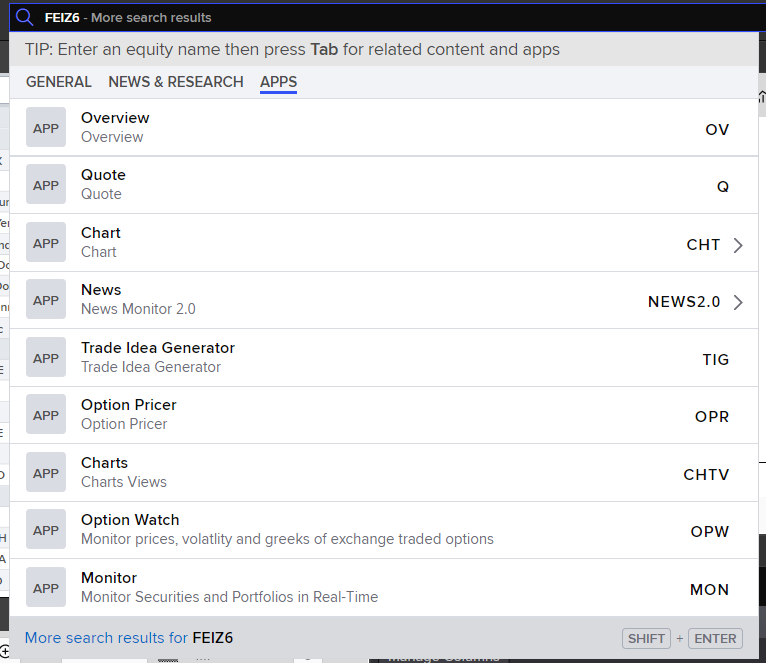
Once you have identified the RIC for a Futures Contract, use the Search Bar on LSEG Workspace to type the RIC and select it from the smart results. This is quite straightforward and the classic approach.
Example:
Searching for FEIZ6 or 0#FEI:
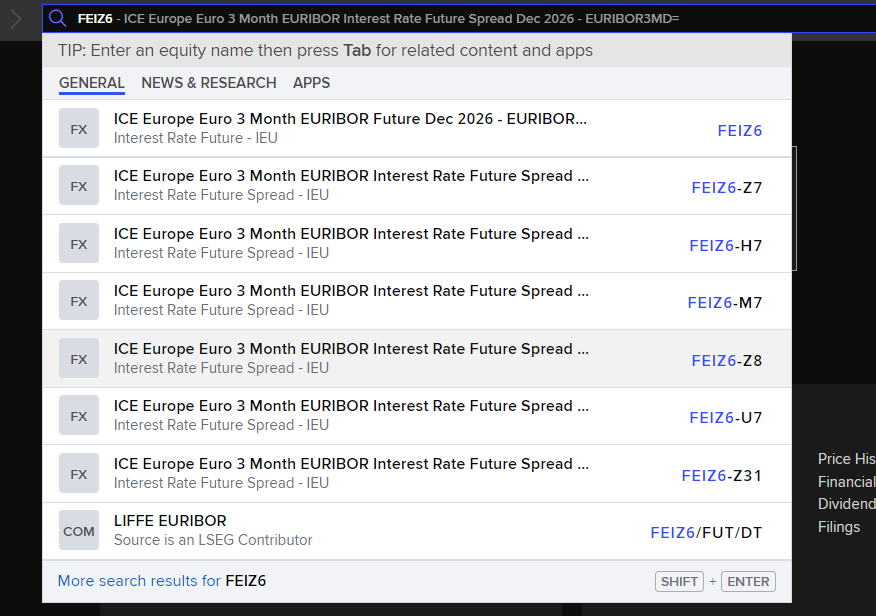
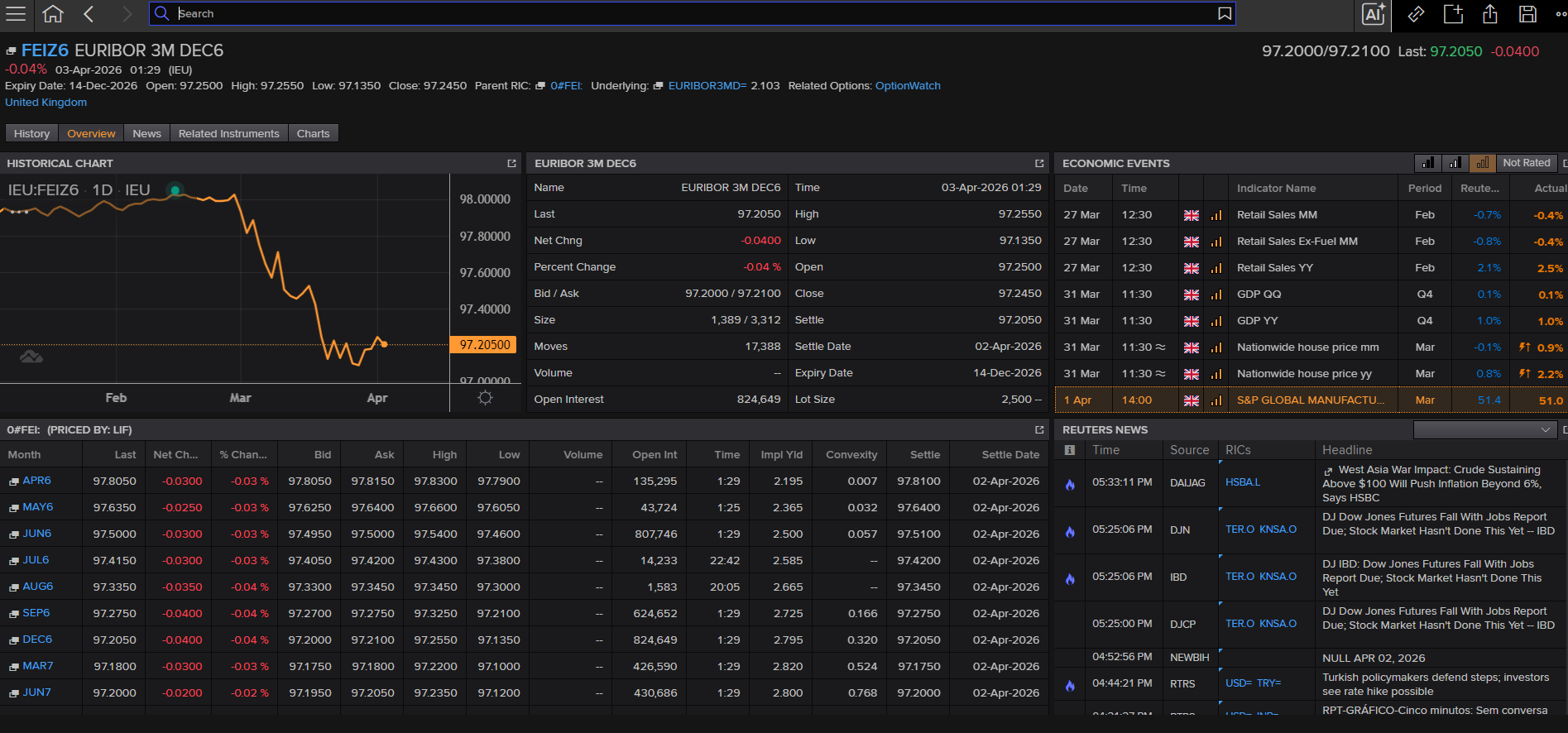
Now, either you can choose the option from the results or switch to the apps section and choose the one you would like to.
Advanced Search:
If you do not know the RICs and want the list of all futures which you can drill down by asset type, exchange etc., the Advanced Search app can help. Once on the Advanced Search App, start by defining the Universe from the Universe Builder section. Example: Equity & Index Derivatives > Futures. You can drill down by using applying filters from the filters section usually on the left. Example: Exchange = LSEG.
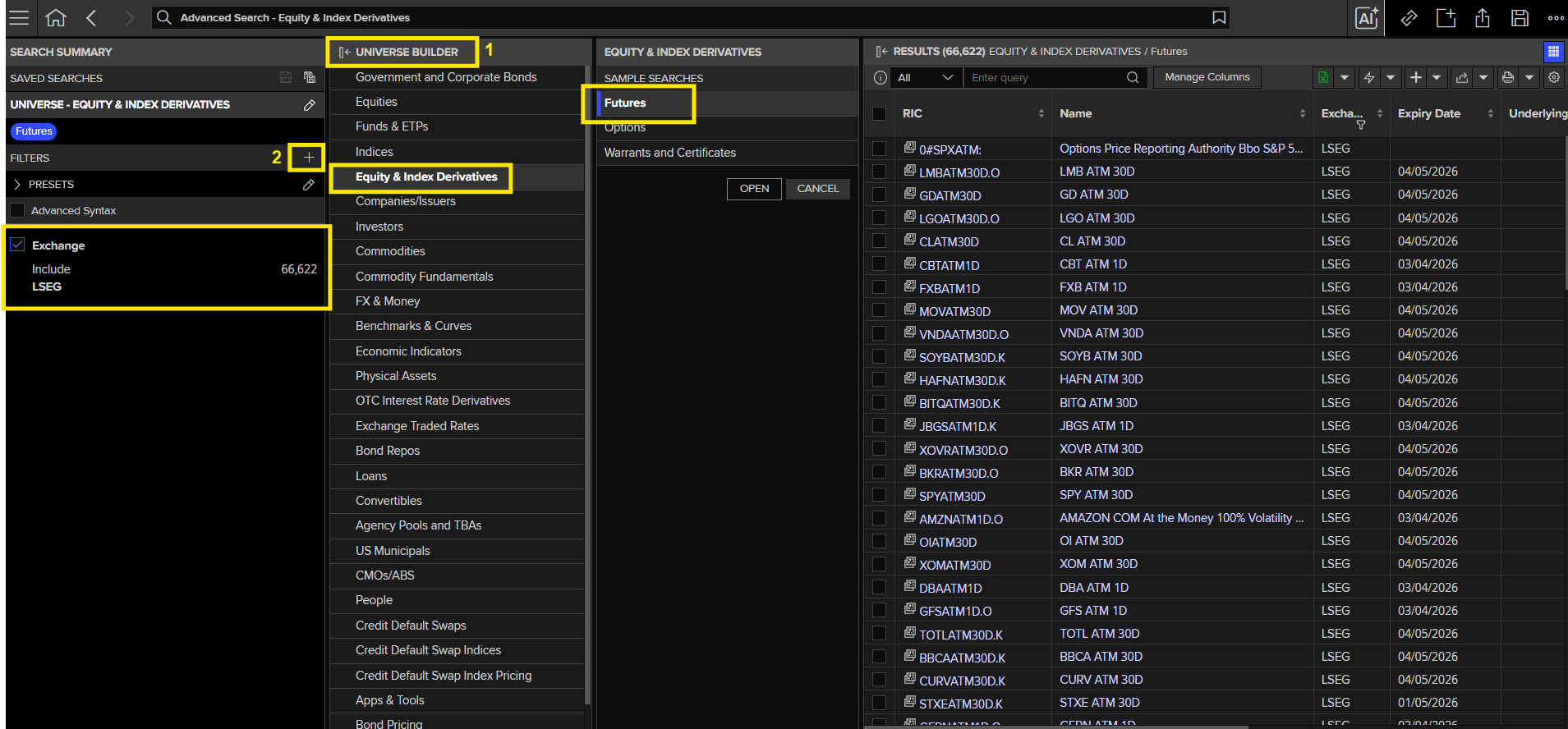
You can also search programmatically. For the query, you can use the Export Query option on the Advanced Search app and feed into the below code.
Note: The select parameter would have many fields but you can choose the ones you need to be displayed.
import lseg.data as ld
from lseg.data.content import search
ld.open_session()
ld.discovery.search(
    view=ld.discovery.Views.EQUITY_QUOTES,
    top=10,  # you can control the output. Optional
    filter="(AssetState eq 'AC' and SearchAllCategoryv2 eq 'Futures' and (ExchangeName xeq 'LSEG'))",
    select="AssetState,RIC,ExchangeName,ExpiryDate"
)
| AssetState | RIC | ExchangeName | ExpiryDate | |
|---|---|---|---|---|
| 0 | AC | 0#SPXATM: | LSEG | NaT |
| 1 | AC | SPCXATM9M.O | LSEG | 2027-01-06 |
| 2 | AC | TOTLATM30D.K | LSEG | 2026-07-15 |
| 3 | AC | VNMATM30D | LSEG | 2026-07-15 |
| 4 | AC | MSOSATM30D.K | LSEG | 2026-07-13 |
| 5 | AC | XOVRATM30D.O | LSEG | 2026-07-15 |
| 6 | AC | CATATM30D | LSEG | 2026-07-13 |
| 7 | AC | NVDSATM30D.O | LSEG | 2026-07-15 |
| 8 | AC | VISATM30D | LSEG | 2026-07-15 |
| 9 | AC | TBFATM30D | LSEG | 2026-07-15 |
Method 02 - APPS
These are tools which are useful for viewing a group of futures contracts by various categories.
| Apps | Description | Why Start Here |
|---|---|---|
| INFOV | World Index Futures - Global Equity Index Futures basket | Ideal for a global view with various filters to drill down to the required result |
| BDFC | Bond Futures - Monitor and analyse bond futures basket | Provides a broad overview of Bond Futures in one place with various filters to drill down |
| Commodity Futures Asia | Commodity Futures for the Asian Time Zone | Ideal for Asian Commodity Futures covering all commodities like Oil, Metals, etc |
| Commodity Future Europe | Commodity Futures for the European Time Zone | Ideal for European Commodity Futures covering all commodities like Oil, Metals, etc |
| Commodity Futures Americas | Commodity Futures for the American Time Zone | Ideal for American Commodity Futures covering all commodities like Oil, Metals, etc |
| Press F4 to open Quote app | Live pricing for one or more futures | Provides real time pricing feeds for individual or chain RICs. (Note: Not ideal for expired contracts) |
Method 03 - API
The same data can be accessed programmatically within Workspace using the CODEBK app (Codebook) or onto your local machine app in your preferred language either in Python, .Net or TypeScript. You can refer the developers.lseg.com for complete documentation, examples and code samples.
Getting the latest info:
import lseg.data as ld
ld.open_session()

latest_futures_det = ld.get_data(
    universe=['FEIZ6'],
    fields=['DSPLY_NAME', 'CONTR_MNTH', 'TRDPRC_1', 'BID', 'ASK', 'HIGH_1', 'LOW_1', 'OPINT_1', 'ACVOL_1'],   # if you skip the fields parameter, all the fields available will be displayed.
    header_type=ld.HeaderType.NAME  # optional
)
display(latest_futures_det)
ld.close_session()
| Instrument | DSPLY_NAME | CONTR_MNTH | TRDPRC_1 | BID | ASK | HIGH_1 | LOW_1 | OPINT_1 | ACVOL_1 | |
|---|---|---|---|---|---|---|---|---|---|---|
| 0 | FEIZ6 | EURIBOR 3M DEC6 | DEC6 | 97.365 | 97.36 | 97.365 | 97.39 | 97.355 | 874050 | 266020 |
The function is smart enough to expand a chain and display data for all its constituents too:
import lseg.data as ld
ld.open_session()

latest_futures_det = ld.get_data(
    universe=['0#FEI:'],
    fields=['DSPLY_NAME', 'CONTR_MNTH', 'TRDPRC_1', 'BID', 'ASK', 'HIGH_1', 'LOW_1', 'OPINT_1', 'ACVOL_1'],   # if you skip the fields parameter, all the fields available will be displayed.
    header_type=ld.HeaderType.NAME  # optional
)
display(latest_futures_det)
ld.close_session()
c:\Users\ukhandel2\OneDrive - London Stock Exchange Group\Work\Learnings\Python\Virtual Environments.learning_adc\Lib\site-packages\lseg\data_tools_dataframe.py:177:FutureWarning: Downcasting object dtype arrays on .fillna, .ffill, .bfill is deprecated and will change in a future version. Call result.infer_objects(copy=False) instead. To opt-in to the future behavior, set pd.set_option('future.no_silent_downcasting', True)
| Instrument | DSPLY_NAME | CONTR_MNTH | TRDPRC_1 | BID | ASK | HIGH_1 | LOW_1 | OPINT_1 | ACVOL_1 | |
|---|---|---|---|---|---|---|---|---|---|---|
| 0 | FEIM6 | EURIBOR 3M JUN6 | JUN6 | 97.645 | 97.64 | 97.645 | 97.65 | 97.635 | 701508 | 56032 |
| 1 | FEIN6 | EURIBOR 3M JUL6 | JUL6 | 97.605 | 97.6 | 97.605 | 97.615 | 97.6 | 82577 | 23659 |
| 2 | FEIQ6 | EURIBOR 3M AUG6 | AUG6 | 97.52 | 97.52 | 97.525 | 97.54 | 97.52 | 29824 | 4936 |
| 3 | FEIU6 | EURIBOR 3M SEP6 | SEP6 | 97.46 | 97.455 | 97.46 | 97.485 | 97.455 | 631859 | 277605 |
| 4 | FEIV6 | EURIBOR 3M OCT6 | OCT6 | 97.425 | 97.415 | 97.425 | 97.44 | 97.415 | 4717 | 1400 |
| 5 | FEIX6 | EURIBOR 3M NOV6 | NOV6 | 97.385 | 97.385 | 97.39 | 97.41 | 97.385 | 740 | 181 |
| 6 | FEIZ6 | EURIBOR 3M DEC6 | DEC6 | 97.365 | 97.36 | 97.365 | 97.39 | 97.355 | 874050 | 266035 |
| 7 | FEIH7 | EURIBOR 3M MAR7 | MAR7 | 97.33 | 97.325 | 97.33 | 97.35 | 97.315 | 461211 | 189173 |
| 8 | FEIM7 | EURIBOR 3M JUN7 | JUN7 | 97.335 | 97.33 | 97.335 | 97.37 | 97.325 | 450156 | 139090 |
| 9 | FEIU7 | EURIBOR 3M SEP7 | SEP7 | 97.365 | 97.355 | 97.365 | 97.39 | 97.35 | 359284 | 143611 |
| 10 | FEIZ7 | EURIBOR 3M DEC7 | DEC7 | 97.4 | 97.395 | 97.4 | 97.43 | 97.39 | 432802 | 125480 |
| 11 | FEIH8 | EURIBOR 3M MAR8 | MAR8 | 97.42 | 97.415 | 97.42 | 97.445 | 97.405 | 339025 | 125229 |
| 12 | FEIM8 | EURIBOR 3M JUN8 | JUN8 | 97.415 | 97.41 | 97.415 | 97.435 | 97.405 | 230927 | 114847 |
| 13 | FEIU8 | EURIBOR 3M SEP8 | SEP8 | 97.4 | 97.395 | 97.4 | 97.415 | 97.39 | 201455 | 87865 |
| 14 | FEIZ8 | EURIBOR 3M DEC8 | DEC8 | 97.375 | 97.37 | 97.375 | 97.39 | 97.365 | 216406 | 81245 |
| 15 | FEIH9 | EURIBOR 3M MAR9 | MAR9 | 97.355 | 97.35 | 97.355 | 97.365 | 97.345 | 165681 | 40942 |
| 16 | FEIM9 | EURIBOR 3M JUN9 | JUN9 | 97.33 | 97.325 | 97.33 | 97.34 | 97.32 | 87917 | 42405 |
| 17 | FEIU9 | EURIBOR 3M SEP9 | SEP9 | 97.31 | 97.305 | 97.31 | 97.315 | 97.3 | 60839 | 19646 |
| 18 | FEIZ9 | EURIBOR 3M DEC9 | DEC9 | 97.28 | 97.275 | 97.28 | 97.29 | 97.27 | 45438 | 20592 |
| 19 | FEIH0 | EURIBOR 3M MAR0 | MAR0 | 97.255 | 97.25 | 97.255 | 97.265 | 97.245 | 37010 | 14223 |
| 20 | FEIM0 | EURIBOR 3M JUN0 | JUN0 | 97.22 | 97.215 | 97.22 | 97.235 | 97.215 | 31733 | 11323 |
| 21 | FEIU0 | EURIBOR 3M SEP0 | SEP0 | 97.19 | 97.185 | 97.19 | 97.2 | 97.185 | 28728 | 5911 |
| 22 | FEIZ0 | EURIBOR 3M DEC0 | DEC0 | 97.16 | 97.155 | 97.16 | 97.17 | 97.15 | 23543 | 3698 |
| 23 | FEIH31 | EURIBOR 3M MAR1 | MAR1 | 97.13 | 97.12 | 97.13 | 97.14 | 97.12 | 11175 | 2911 |
| 24 | FEIM31 | EURIBOR 3M JUN1 | JUN1 | 97.095 | 97.09 | 97.095 | 97.105 | 97.085 | 2554 | 2335 |
| 25 | FEIU31 | EURIBOR 3M SEP1 | SEP1 | <NA> | 97.05 | 97.06 | <NA> | <NA> | 588 | <NA> |
| 26 | FEIZ31 | EURIBOR 3M DEC1 | DEC1 | <NA> | 97.015 | 97.03 | <NA> | <NA> | 30 | <NA> |
| 27 | FEIH32 | EURIBOR 3M MAR2 | MAR2 | <NA> | 96.975 | 97.005 | <NA> | <NA> | <NA> | <NA> |
Accessing the history:
import lseg.data as ld
ld.open_session()

latest_futures_det = ld.get_history(
    universe=['FEIZ6'],
    fields=['TRDPRC_1', 'BID', 'ASK', 'HIGH_1', 'LOW_1', 'OPINT_1'],   # if you skip the fields parameter, all the fields available will be displayed.
    interval='1D',          # optional
    start='YYYY-MM-DD',     # optional
    end='YYYY-MM-DD'        # optional
)
display(latest_futures_det)
ld.close_session()
HELP App:
On Workspace, if you are stuck and need any documentation, steps or any kind of support, you can check in the HELP app. Just search for HELP to navigate.