Chapter 2 - Simple Ways of Finding Data
import lseg.data as ld
from lseg.data.content import search

ld.open_session()
In Workspace, search is the primary way to discover instruments, open content, and move directly into analysis. Most day-to-day lookup starts in the main Search bar.
Overview
This chapter introduces a two-level search workflow:
- Main Workspace Search bar for fast discovery and navigation
- Search App for structured, criteria-based retrieval of instrument sets
Use the main Search bar when you need speed. Use the Search App when you need precision, filtering, and repeatability.
The Main Workspace Search Bar
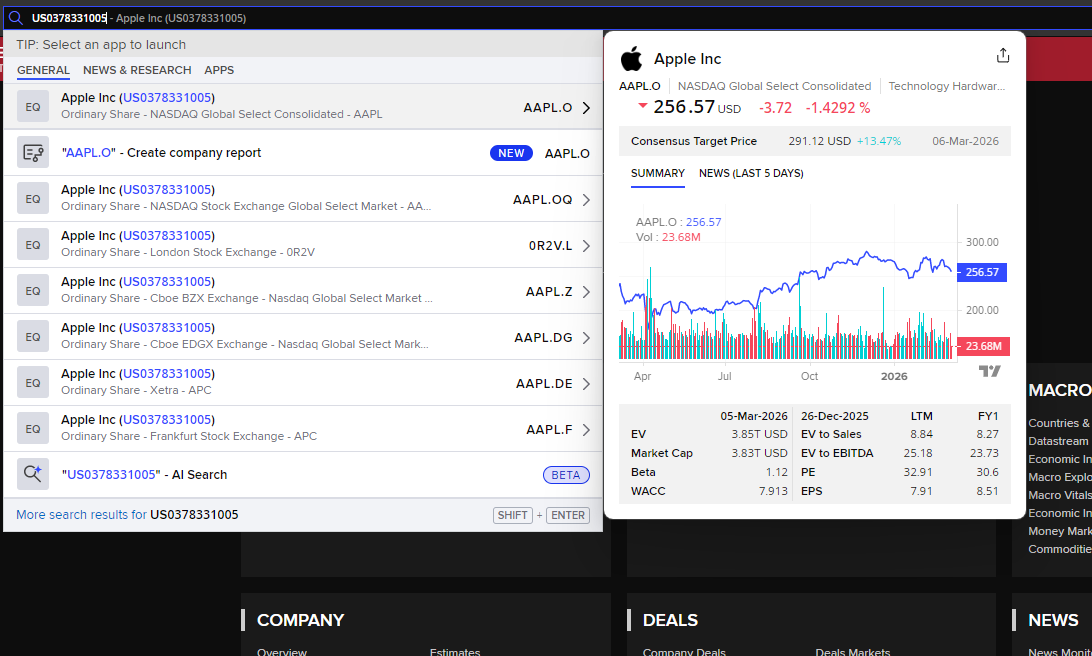
The main Search bar is optimized for immediate intent detection. As you type, autosuggest proposes likely matches across instruments, apps, and actions.
What it does well:
- Recognizes partial entries (name fragments, tickers, RICs, ISINs)
- Ranks likely results as you type
- Lets you launch the relevant destination directly (for example, Quote)
- Reduces click depth by combining lookup and navigation in one place
Typical flow:
- Start typing a company name or identifier
- Review autosuggest results
- Select the instrument-level result to open Quote, chart, news, or related apps
Search Modes You Can Use Immediately
The same entry point supports different lookup intents:
| Intent | Example Input | Typical Outcome |
|---|---|---|
| Direct instrument lookup | 7256.T | Opens instrument quote context |
| Name discovery | Toyota | Returns best matching companies and listings |
| Identifier lookup | US0378331005 | Resolves an instrument from ISIN |
| Command-style navigation | news Toyota | Opens relevant app or scoped result set |
Autosuggest is especially useful when you know only part of a name or code.
When To Move From Search Bar To Search App
Use the Search App when you need a family of RICs rather than a single instrument.
This is the right tool for:
- Building a fixed income candidate list by issuer, maturity, coupon, and currency
- Finding equity sets by exchange, country, sector, and market cap constraints
- Applying multiple criteria, then refining or exporting results
In short:
- Main Search bar = quickest path to one item
- Search App = controlled retrieval of many items
Search App Workflow For RIC Families
- Open Search App from Workspace.
- Choose an asset class (for example, Equities or Fixed Income).
- Add criteria fields relevant to your use case.
- Run the query and review the returned instrument set.
- Refine criteria until the result universe is fit for purpose.
- Open, export, or pass the resulting identifiers into downstream workflows.
From Visual Exploration to Programmatic Precision
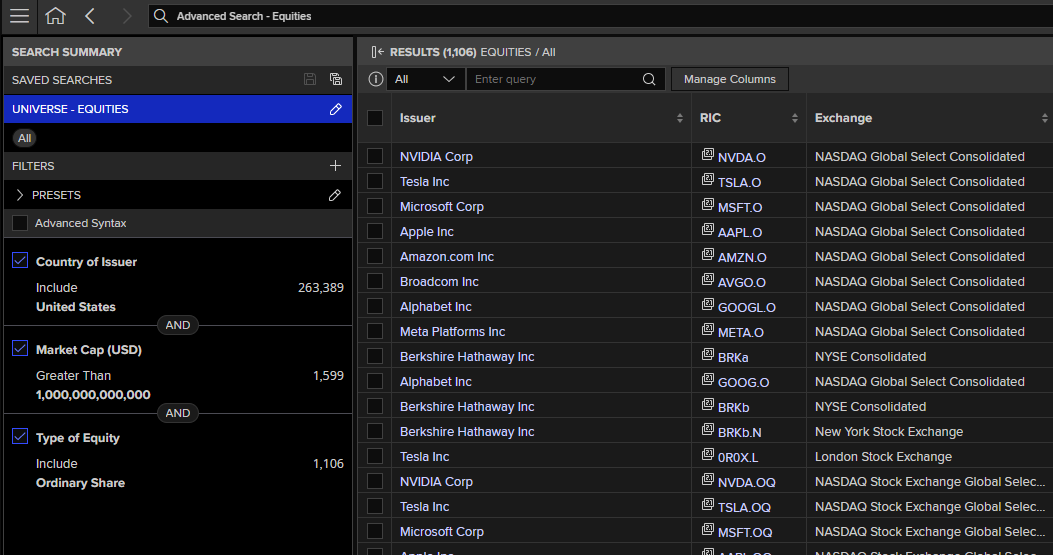
The Search App excels at interactive filtering and visual confirmation. You can narrow down instrument families using business-friendly criteria like country, sector, and market cap. However, some filtering capabilities exist only at the LSEG Data Library level and are not exposed in the Search App UI.
A practical example: when building an equities universe, the Search App helps you visually isolate mega-cap technology companies across US exchanges. But to guarantee that each company returns only its primary listing (excluding all secondary exchange listings and depositary receipts), you need to add the IsPrimaryRIC filter—available only in the LSEG Data Libraries.
The best practice: Use the Search App to explore visually and confirm your criteria are sensible, then use the LSEG Data Library to enforce programmatic precision. This two-step approach combines the clarity of interactive filtering with the rigor of data-layer constraints.
# Use the LSEG Data Library for Python to replicate the above search.
# However, utilize the IsPrimaryRIC filter to only show unique companies.
# In addition, we can also present the collection to be sorted based on Market Capitalisation in descending order.
ld.discovery.search(
    view = search.Views.EQUITY_QUOTES,
    filter = "MktCapCompanyUsd gt 1000000000000 and "
             "RCSAssetCategoryLeaf xeq 'Ordinary Share' and "
             "RCSIssuerCountryLeaf xeq 'United States' and "
             "IsPrimaryRIC eq true",
    order_by= "MktCapCompanyUsd desc",
    select = "IssuerCommonName, TickerSymbol, RIC, MktCapCompanyUsd, ExchangeName"
)
| IssuerCommonName | TickerSymbol | RIC | MktCapCompanyUsd | ExchangeName | |
|---|---|---|---|---|---|
| 0 | NVIDIA Corp | NVDA | NVDA.O | 4455162000000 | NASDAQ Global Select Consolidated |
| 1 | Apple Inc | AAPL | AAPL.O | 3826966563870 | NASDAQ Global Select Consolidated |
| 2 | Alphabet Inc | GOOGL | GOOGL.O | 3639908500000 | NASDAQ Global Select Consolidated |
| 3 | Microsoft Corp | MSFT | MSFT.O | 3049557348931 | NASDAQ Global Select Consolidated |
| 4 | Amazon.com Inc | AMZN | AMZN.O | 2350303575277 | NASDAQ Global Select Consolidated |
| 5 | Meta Platforms Inc | META | META.O | 1670948452854 | NASDAQ Global Select Consolidated |
| 6 | Broadcom Inc | AVGO | AVGO.O | 1575866481195 | NASDAQ Global Select Consolidated |
| 7 | Tesla Inc | TSLA | TSLA.O | 1521798791111 | NASDAQ Global Select Consolidated |
| 8 | Berkshire Hathaway Inc | BRK.A | BRKa | 1079607225373 | NYSE Consolidated |
Example Criteria Patterns
Equities Universe Pattern
- Instrument type: Equities
- Country or listing market: selected market
- Sector/industry: selected classification
- Size/liquidity: optional constraints
Fixed Income Universe Pattern
- Instrument type: Bonds
- Issuer: exact or partial issuer match
- Maturity: date range
- Coupon: range filter
- Currency: ISO 4217 code
These patterns are reusable and can be adapted for recurring screening tasks.
Practical Guidance
- Start with the main Search bar for most daily lookups.
- Use autosuggest to confirm instrument identity before opening content.
- Escalate to Search App when you need structured screening and bulk retrieval.
- Keep criteria explicit so results are reproducible across users and sessions.
This search-first workflow is the foundation for all later chapters that consume instrument identifiers for pricing, analytics, and monitoring.
Glossary
| Term | Definition |
|---|---|
| Workspace Search bar | The primary global search input used for instrument lookup and navigation |
| Autosuggest | Real-time ranked suggestions shown while typing |
| Search App | Advanced search interface for criteria-based retrieval of instrument sets |
| RIC | Reuters Instrument Code used to identify instruments in LSEG workflows |
| Instrument universe | A result set of instruments matching defined search criteria |