Chapter 3 – The structure of LSEG data
import warnings
warnings.filterwarnings('ignore')
To handle the complexity and diversity of financial markets and their instrument types, LSEG has designed a flexible data structure that supports all asset classes.
All data is identified by codes, so to find a piece of information, you need to know the right code. All codes in this guide appear in a box like this: LSEG.
In this guide, the Enter (Return) key on your keyboard is the default.
What are RICs and pages?
There are two main types of code you need to know:
-
RICs – Instrument Codes that identify individual financial instruments.
- Example: the spot rate of the Swiss franc is
CHF=. - The code for Microsoft stock on NASDAQ is
MSFT.O.
- Example: the spot rate of the Swiss franc is
-
Pages – full pages of information provided by LSEG or by other contributors to the LSEG network.
- They can include text information or sets of different prices.
- Example:
FXFXis the code for all available spot rates.
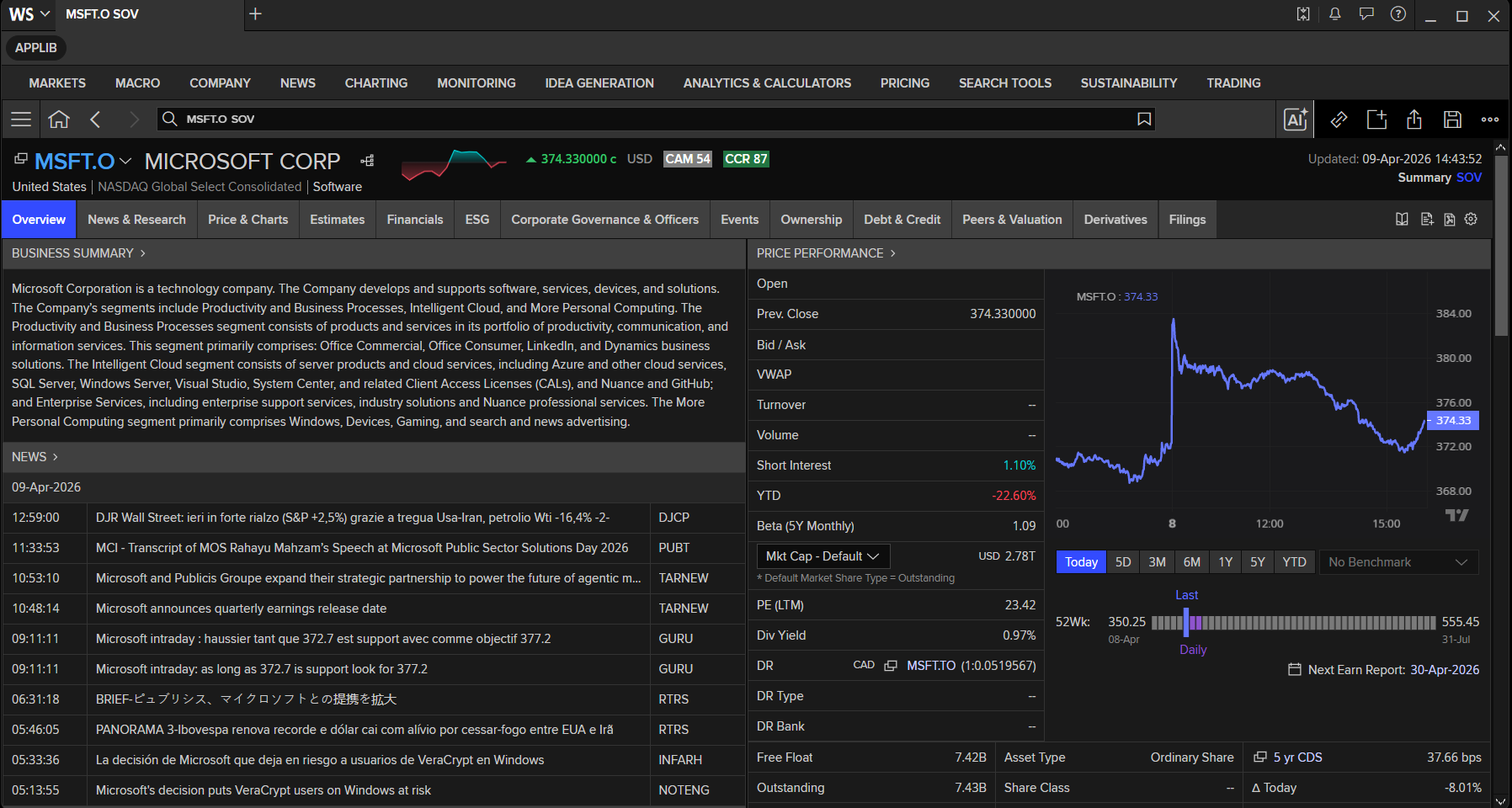
You can open RIC and Page data in the Workspace by typing the instrument code or name in the Workspace Search Bar.
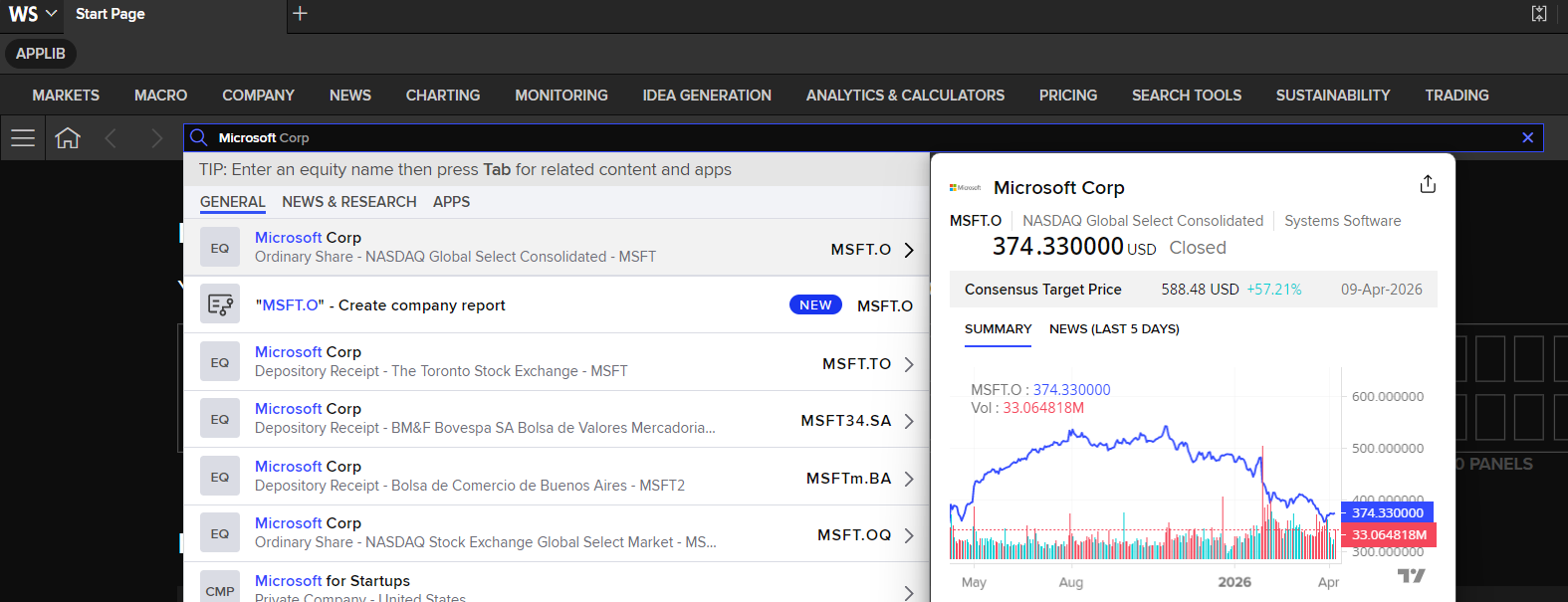
The Workspace then displays the Summary Overview (SOV) app for the code or name you entered. You can access all instrument data from this overview page.
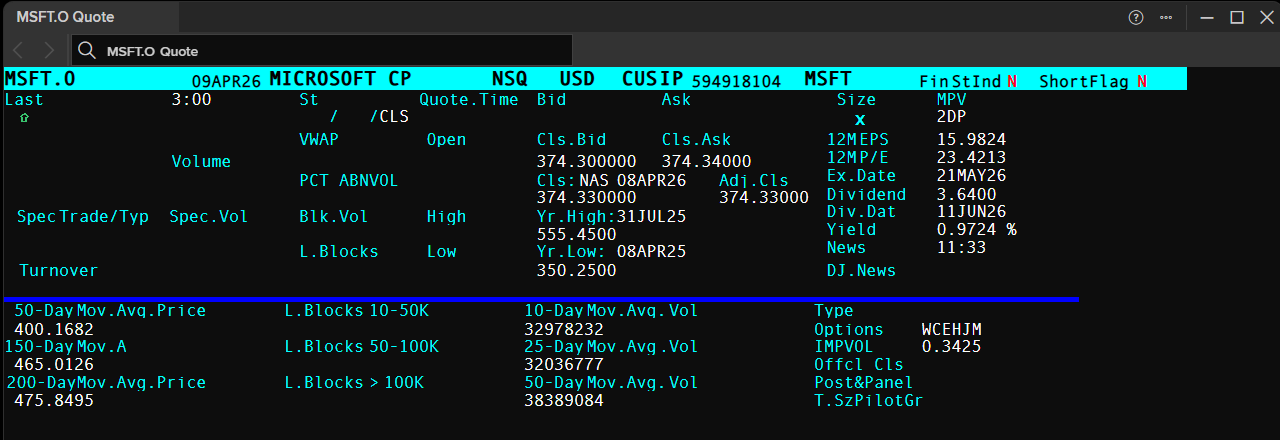
Alternatively, you can open the Quote (Q) app to view Quote data only by pressing the F4 button.
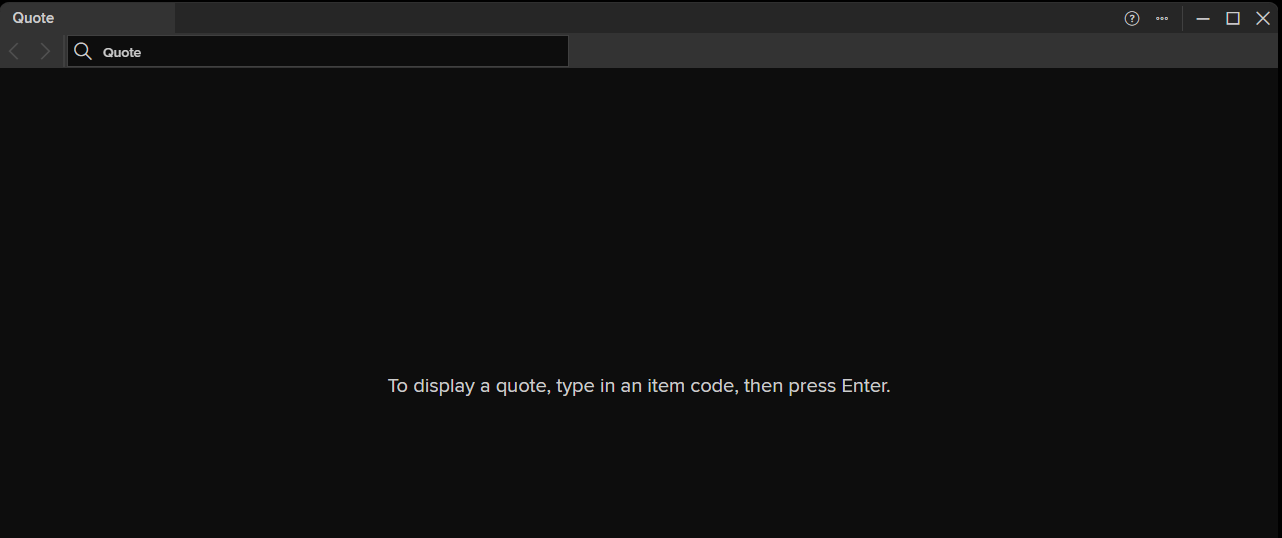
From there, enter the RIC code, Page code, or instrument name to retrieve the Quote data.
All of the RIC and page data shown in this chapter — and throughout this guide — can be retrieved programmatically using the Data Library for Python. The library provides a simple, unified interface for accessing LSEG content, including real-time and historical pricing, fundamental and reference data, news, and more — all from within your Python environment or Jupyter Notebook.
To get started with the Data Library for Python, refer to the following resources:
- Quickstart — set up and run your first request in minutes.
- Tutorials — step-by-step guides covering common use cases.
- Library Reference Guide — full API documentation for all methods and parameters.
- Examples on GitHub — a comprehensive collection of ready-to-run example notebooks.
The first step is importing the library
import lseg.data as ld
import pandas as pd
Before we move on, I am expecting that you have open and log in to the LSEG Workspace Desktop application in the same machine that run this Jupyter Notebook.
Open the Data Library Session
Next, open the session with open_session() function.
ld.open_session()
Next, use the get_data method and input your interested RICs and Fields. This method allows you to retrieve pricing snapshots, as well as Fundamental and Reference data, through a single function call.
# Get BID and ASK fields for CHF= (Swiss Franc spot rate) and MSFT.O (Microsoft on NASDAQ)
df = ld.get_data(
    universe=['CHF=', 'PTT.BK'],
    fields=['BID', 'ASK','TR.CommonName']
)
df
| Instrument | Company Common Name | BID | ASK | |
|---|---|---|---|---|
| 0 | CHF= | Swiss Franc Spot Sourced Worldwide | 0.7905 | 0.7908 |
| 1 | PTT.BK | PTT PCL | 35.0 | 35.25 |
The get_data method's universe property also supports page RICs. For more details, see the Pages section below.
The get_data method is part of the library's Access layer, which provides the simplest way to retrieve the most commonly used data content. Other notable Access layer methods include get_history for pricing history, and get_headlines and get_story for news headlines and stories.
To learn more about the Access layer's capabilities and API interfaces, see the following resources:
- Data Library for Python tutorials
- The Data Library for Python – Quick Reference Guide (Access layer)
- Access Layer example code (GitHub)
- Access Layer tutorials (GitHub)
When to use upper or lower case
LSEG Workspace allows pages and RICs to be entered in either upper- or lower-case.
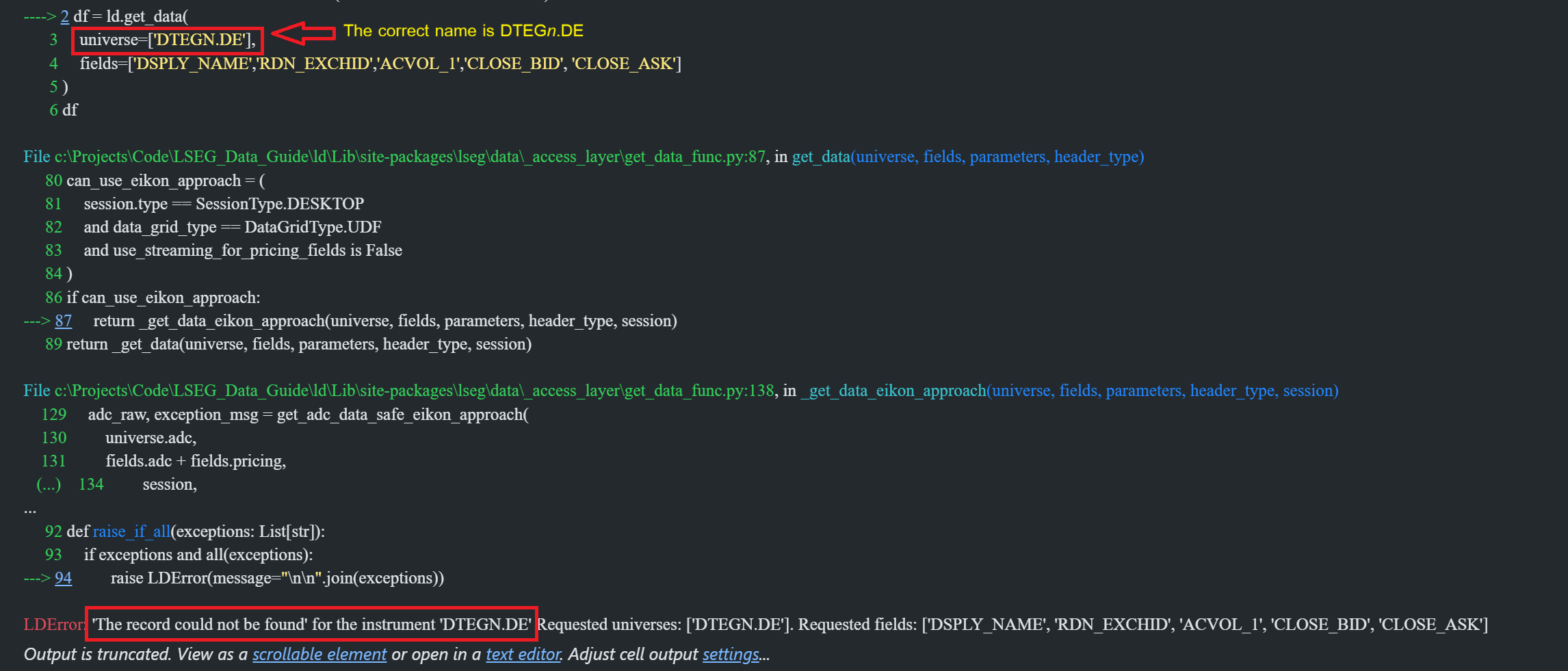
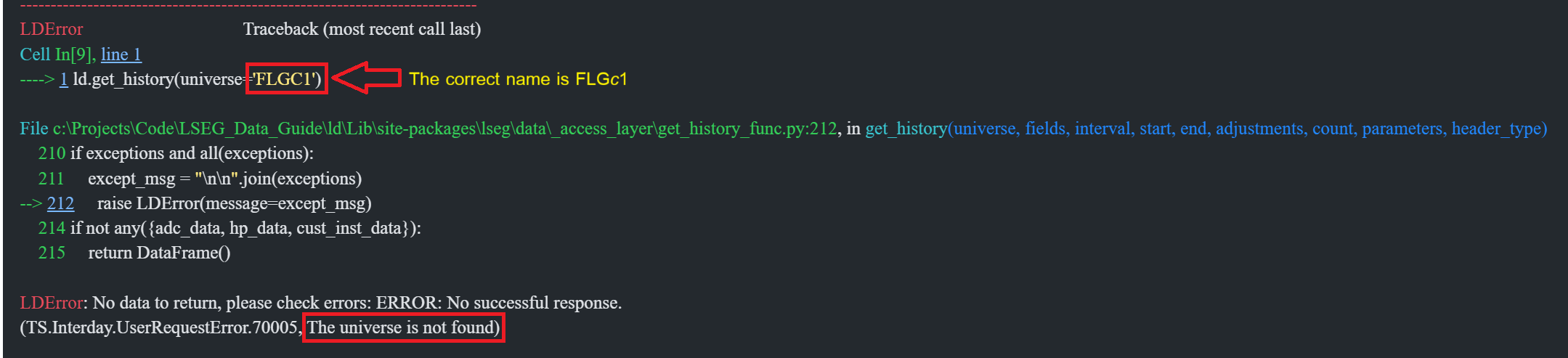
There are exceptions: codes that consist of mixed upper- and lower-case letters — such as the continuation future FLGc1 — or RICs that contain brokerage characters — such as DTEGn.DE — must be entered using the exact syntax.
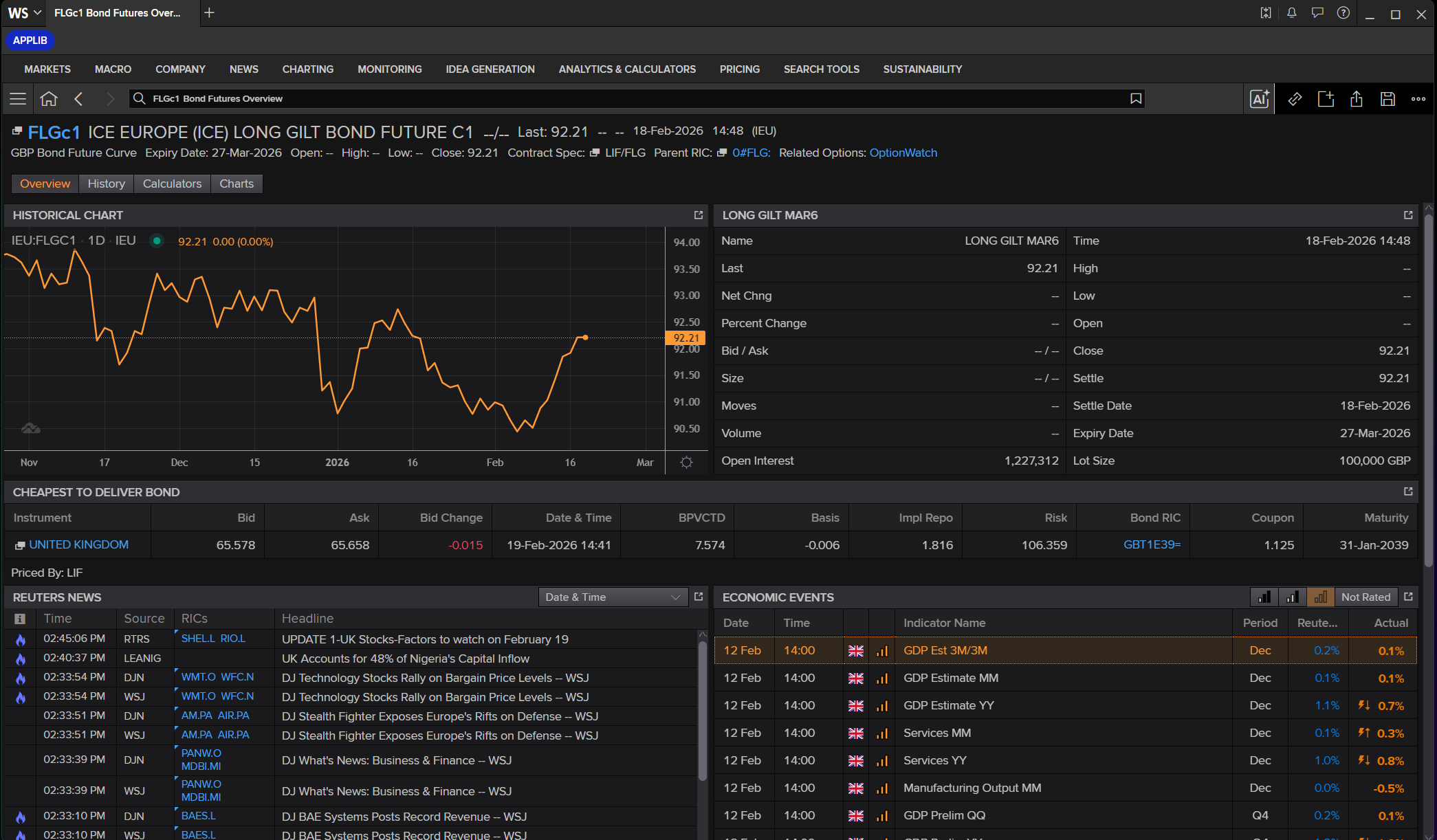
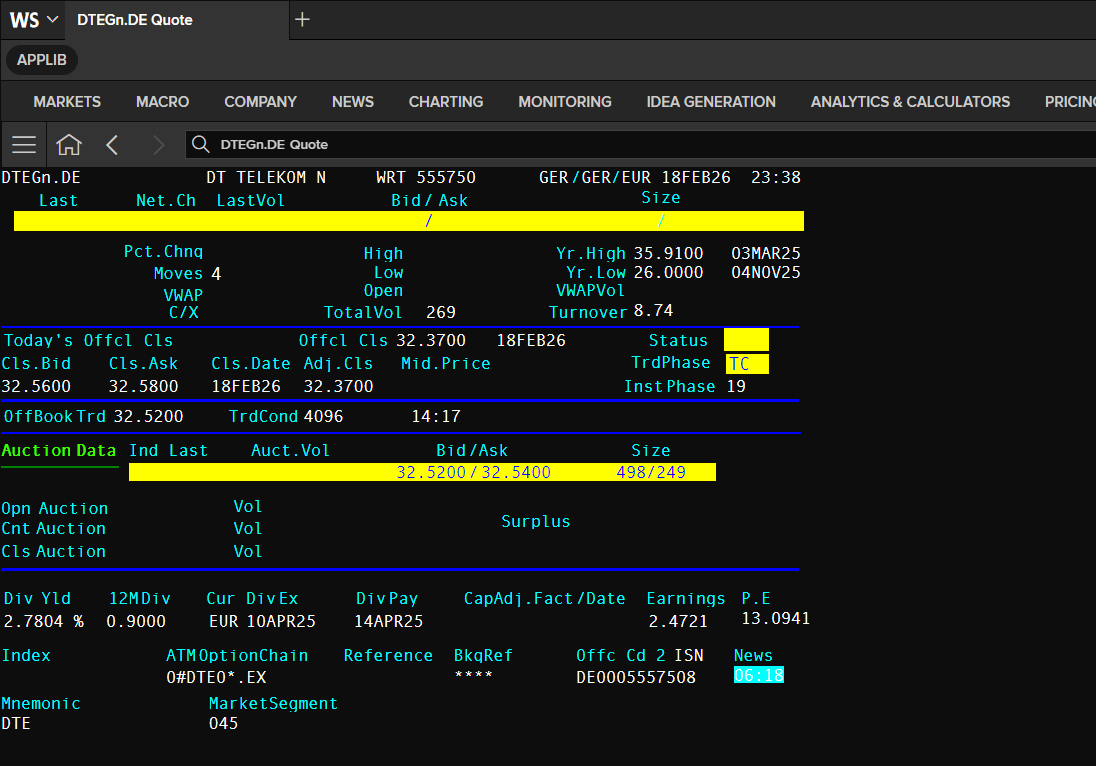
Further information about brokerage characters and continuation futures is provided in the relevant market sections of this guide.
The Workspace application can detect certain input errors and apply corrections automatically, as shown below. However, the exact syntax should always be used when entering codes.
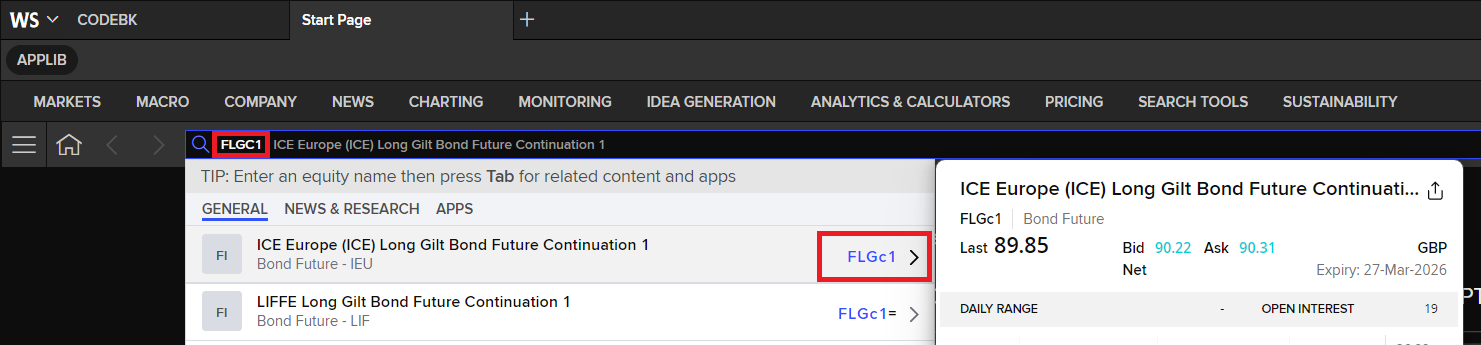
In contrast, RIC names are always case-sensitive when accessed via the Data Library. The RIC must be provided exactly as defined; an incorrect case will result in an error.
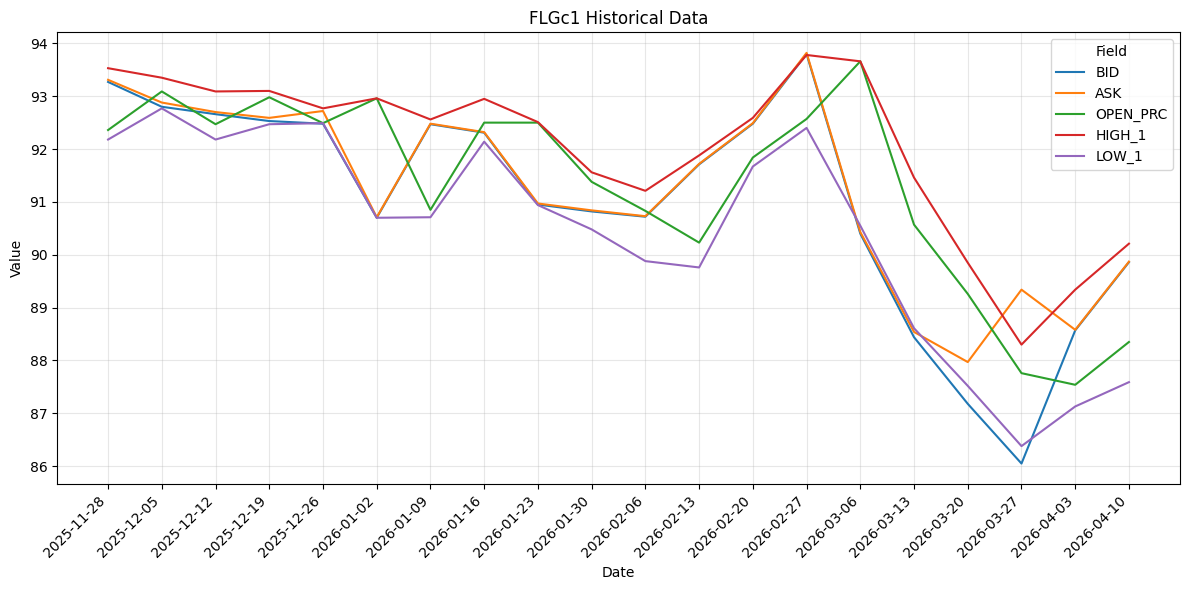
Historical data can be retrieved using the Data Library get_history method, as demonstrated below. This method supports pricing history, as well as Fundamental and Reference data.
The RIC name supplied to the universe property must follow the exact syntax described above.
# Get historical data for FLGc1 (ICE EUROPE (ICE) LONG GILT BOND FUTURE C1)
df_history = ld.get_history(
    fields=['BID', 'ASK', 'OPEN_PRC', 'HIGH_1', 'LOW_1'],
    universe='FLGc1',
    interval='weekly',
    count=20
)
df_history.head()
| FLGc1 | BID | ASK | OPEN_PRC | HIGH_1 | LOW_1 |
|---|---|---|---|---|---|
| Date | |||||
| 2025-11-28 | 93.27 | 93.31 | 92.36 | 93.53 | 92.18 |
| 2025-12-05 | 92.8 | 92.88 | 93.09 | 93.35 | 92.77 |
| 2025-12-12 | 92.66 | 92.7 | 92.47 | 93.09 | 92.18 |
| 2025-12-19 | 92.53 | 92.59 | 92.98 | 93.1 | 92.47 |
| 2025-12-26 | 92.48 | 92.72 | 92.49 | 92.77 | 92.49 |
The retrieved historical data can be visualised using any Python plotting library, such as Matplotlib, Plotly, seaborn, or bokeh.
The following example demonstrates visualisation using the Matplotlib library.
import matplotlib.pyplot as plt

# Select only numeric columns from df_history to plot as line series
plot_df = df_history.select_dtypes(include='number').copy()

# Ensure the index is a proper datetime type for correct date formatting on x-axis
if not pd.api.types.is_datetime64_any_dtype(plot_df.index):
    plot_df.index = pd.to_datetime(plot_df.index)

# Stop early if there is no numeric data available for plotting
if plot_df.empty:
    raise ValueError('df_history has no numeric columns to plot.')

# Save the original datetime index labels before resetting
date_labels = [d.strftime('%Y-%m-%d') for d in plot_df.index]

# Reset index to integers so x-tick positions are 0, 1, 2, ...
# This avoids matplotlib date-float misalignment when setting custom tick labels
plot_df = plot_df.reset_index(drop=True)

# Create a multi-line chart for all available numeric history fields
fig, ax = plt.subplots(figsize=(12, 6))
plot_df.plot(ax=ax, linewidth=1.5)
ax.set_title('FLGc1 Historical Data')
ax.set_xlabel('Date')
ax.set_ylabel('Value')
ax.grid(True, alpha=0.3)

# Place one tick per data point and label each with the full date (year-month-day)
ax.set_xticks(range(len(date_labels)))
ax.set_xticklabels(date_labels, rotation=45, ha='right')

# Add legend and adjust layout so labels are fully visible
plt.legend(title='Field')
plt.tight_layout()
plt.show()
The same as Data Library get_data method. The RIC name in a universe property must be typed exactly that syntax too.
# Get Real-Time Data for  DTEGn.DE (DEUTSCHE TELEKOM AG)
df = ld.get_data(
    universe=['DTEGn.DE'],
    fields=['DSPLY_NAME','RDN_EXCHID','ACVOL_1','CLOSE_BID', 'CLOSE_ASK']
)
df
| Instrument | DSPLY_NAME | RDN_EXCHID | ACVOL_1 | CLOSE_BID | CLOSE_ASK | |
|---|---|---|---|---|---|---|
| 0 | DTEGn.DE | DT TELEKOM N | GER | <NA> | 31.27 | 31.29 |
If you input the RICs or pages in a wrong syntax (or wrong cases), the Library always throws error as the following examples:
Example: ld.get_data
Example: ld.get_history
Instrument Codes (RICs)
Important note: RICs are protected by copyright, database rights and trademarks owned by LSEG. You are only allowed to use RICs in the manner and for the purposes specified in your agreement with LSEG. Unless you have agreed any additional uses of RICs with LSEG, this will essentially be only for the retrieval of LSEG data. If you have any questions about your rights to use RICs, please contact your LSEG sales representative.
The term RIC is used to describe the unique codes used by LSEG to identify a piece of LSEG data. They generally represent either:
- One financial instrument, or
- A group of related instruments.
These codes are also known as logical records, as they provide a structured means of capturing and displaying data on the LSEG network.
The information displayed when you enter a RIC depends on the type of instrument it defines. For example:
- The display you get for a RIC on a stock traded on the London Stock Exchange is different from the display you get when you enter the RIC for a bond.
- A bond display will show maturity date, coupon, price or yield.
- A stock display will show bid, ask and last traded price.
Advantages of RICs
- Structured coding (simplifies data manipulation).
- Clearly identifiable.
- Easily transferred into spreadsheets, LSEG Graphics or the Graphics Object (RGO) in LSEG Workspace for further processing.
- Market-consistent data location and format.
RICs exist in two forms:
- Full quote.
- Chain or tile.
Full quotes
A full quote provides full information on the requested financial instrument.
Example:
EUR=– euro spot rate.
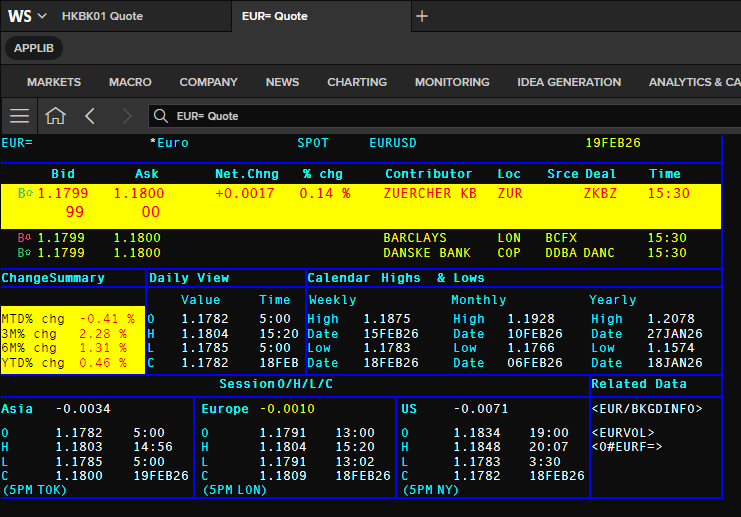
You can get full quote RIC real-time pricing snapshot and fundamental data using the library get_data method.
# Get data for EUR= with selected fields
df_eur = ld.get_data(
    universe=['EUR='],
    fields=['TIMACT', 'NETCHNG_1', 'CURRENCY', 'BID', 'ASK', 'ACVOL_1', 'QUOTE_DATE']
)
df_eur
| Instrument | TIMACT | NETCHNG_1 | CURRENCY | BID | ASK | ACVOL_1 | QUOTE_DATE | |
|---|---|---|---|---|---|---|---|---|
| 0 | EUR= | 04:36:00 | 0.0008 | USD | 1.167 | 1.1671 | 14880 | 2026-04-09 |
The full quote RICs can be used with the Data Library get_history method too.
df_history_eur = ld.get_history(
    universe=['EUR='],
    interval='weekly',
    start='2024-12-15',
    end='2025-02-15'
)
df_history_eur
| EUR= | AMERHI_BID | ASIACL_BID | OPEN_ASK | BID_HIGH_1 | EURHI_BID | NUM_BIDS | ASK_LOW_1 | ASIAHI_BID | EURLO_BID | ASIAOP_BID | ... | EUROP_BID | ASK | AMERLO_BID | ASK_HIGH_1 | AMERCL_BID | BID | ASIALO_BID | MID_OPEN | MID_HIGH | MID_LOW |
|---|---|---|---|---|---|---|---|---|---|---|---|---|---|---|---|---|---|---|---|---|---|
| Date | |||||||||||||||||||||
| 2024-12-20 | 1.0522 | 1.0382 | 1.0498 | 1.0534 | 1.0524 | 351289 | 1.0344 | 1.0534 | 1.0341 | 1.0496 | ... | 1.0518 | 1.0431 | 1.0343 | 1.0536 | 1.0429 | 1.0429 | 1.0341 | 1.0512 | 1.0512 | 1.03525 |
| 2024-12-27 | 1.0443 | 1.0421 | 1.0427 | 1.0445 | 1.0443 | 212987 | 1.0384 | 1.0445 | 1.0382 | 1.0423 | ... | 1.0438 | 1.0429 | 1.0382 | 1.0448 | 1.0427 | 1.0427 | 1.0387 | 1.04055 | 1.0428 | 1.0398 |
| 2025-01-03 | 1.0458 | 1.028 | 1.0435 | 1.0458 | 1.0458 | 251970 | 1.0226 | 1.0433 | 1.0223 | 1.0431 | ... | 1.0425 | 1.031 | 1.0223 | 1.0459 | 1.0308 | 1.0308 | 1.0257 | 1.04075 | 1.04075 | 1.0266 |
| 2025-01-10 | 1.0436 | 1.0296 | 1.0305 | 1.0436 | 1.0436 | 310754 | 1.0217 | 1.0424 | 1.0214 | 1.0301 | ... | 1.0308 | 1.0247 | 1.0214 | 1.0439 | 1.0244 | 1.0244 | 1.0279 | 1.03905 | 1.03905 | 1.02455 |
| 2025-01-17 | 1.0354 | 1.0284 | 1.0242 | 1.0354 | 1.0354 | 329766 | 1.0179 | 1.0309 | 1.0176 | 1.024 | ... | 1.0219 | 1.0272 | 1.0187 | 1.0356 | 1.0271 | 1.0271 | 1.0206 | 1.0245 | 1.0308 | 1.0245 |
| 2025-01-24 | 1.0521 | 1.0458 | 1.0278 | 1.0521 | 1.052 | 324152 | 1.0267 | 1.047 | 1.0297 | 1.0274 | ... | 1.0302 | 1.0495 | 1.0308 | 1.0525 | 1.0493 | 1.0493 | 1.0265 | 1.0416 | 1.0494 | 1.04085 |
| 2025-01-31 | 1.0532 | 1.0404 | 1.0487 | 1.0532 | 1.0532 | 416705 | 1.0351 | 1.0493 | 1.0358 | 1.0485 | ... | 1.0462 | 1.0365 | 1.0349 | 1.0535 | 1.0362 | 1.0362 | 1.0375 | 1.0492 | 1.0492 | 1.03635 |
| 2025-02-07 | 1.0442 | 1.0388 | 1.029 | 1.0442 | 1.0442 | 505897 | 1.015 | 1.0409 | 1.0212 | 1.0286 | ... | 1.0239 | 1.0328 | 1.0242 | 1.0445 | 1.0327 | 1.0327 | 1.0142 | 1.03445 | 1.04025 | 1.03275 |
| 2025-02-14 | 1.0514 | 1.0465 | 1.0326 | 1.0514 | 1.0514 | 394976 | 1.0281 | 1.0472 | 1.0298 | 1.0322 | ... | 1.0316 | 1.0495 | 1.0303 | 1.0515 | 1.0491 | 1.0491 | 1.0279 | 1.03075 | 1.0493 | 1.03075 |
| 2025-02-21 | 1.0503 | 1.0492 | 1.0491 | 1.0506 | 1.0499 | 362036 | 1.0401 | 1.0506 | 1.0403 | 1.0487 | ... | 1.0489 | 1.046 | 1.04 | 1.0508 | 1.0458 | 1.0458 | 1.0417 | 1.0484 | 1.05015 | 1.0422 |
10 rows × 25 columns
Additionally, the Library news.get_headlines and news.get_story methods support the full quote RICs too. Please see more detail on Chapter 12: News.
from datetime import timedelta
from IPython.display import HTML


nvdia_headlines = ld.news.get_headlines('R:LSEG.L and AND Language:LEN'  , start='20-02-2025', end=timedelta(days=-4), count=5)
nvdia_headlines
| headline | storyId | sourceCode | |
|---|---|---|---|
| versionCreated | |||
| 2026-04-03 19:54:05.607 | GTN Appoints Franklin Yang, Former BNP Paribas... | urn:newsml:reuters.com:20260403:nNRA02r04w:1 | NS:DATMTR |
| 2026-04-03 12:52:41.296 | London Stock Exchange (LSEG.L) is trading 1.11... | urn:newsml:newsroom:20260403:nNRA02mkl7:0 | NS:STOCKP |
| 2026-04-02 19:36:59.983 | LSEG and Dell Technologies Ink Deal to Strengt... | urn:newsml:newsroom:20260402:nNRA02cslm:0 | NS:NEWMAR |
| 2026-04-02 14:18:48.872 | Tradeweb Markets (TW) is trading 0.76 percent ... | urn:newsml:newsroom:20260402:nNRA0285pf:0 | NS:STOCKP |
| 2026-04-02 13:22:23.499 | London Stock Exchange Group Charts Growth Thro... | urn:newsml:newsroom:20260402:nNRA027cjr:0 | NS:NEWWIR |
story_id = nvdia_headlines['storyId'].iloc[4]
print(f'Story ID = {story_id}')

story = ld.news.get_story(story_id, format=ld.news.Format.HTML)
HTML(story)
Story ID = urn:newsml:newsroom:20260402:nNRA027cjr:0
NEWS BITES - CORPORATE WIRE
UNITED STATES EDITION
02 April 2026 09:17 EDT
As of 31st March 2026, London Stock Exchange Group remains a central operator of global market infrastructure, spanning exchanges, data and post trade services. Revenue is built on three pillars capital markets, post trade and data analytics, with recurring subscriptions representing a large majority of income. LSEG footprint covers Europe, North America and Asia, with US exposure via data clients and partnerships rather than direct exchange ownership, and Refinitiv enabling access to North American buy side and sell side firms. A Microsoft cloud data delivery partnership targets asset managers with trillions in assets under management. Growth blends organic technology driven expansion with selective M and A activity. The Workspace platform unifies data, analytics and trading tools to compete with Bloomberg, while AI and machine learning bolster risk management and surveillance in response to regulatory changes. Key risks include regulatory scrutiny on data market power, sensitivity to trading volumes and potential delays from integration. North American investors should monitor quarterly recurring revenue trends, the pace of M&A activity and US client ASV growth.
London Stock Exchange Stock Dashboard Adr:LSEGY
| Last | $29.61 | EPS (FY2025) | $2.38 |
| 52-Week Price Range | $24.07 - $39.79 | Shares Outstanding | 2,060,000,000 |
| Ave Daily Volume | 1,001,640 ADRs | Institutional Ownership | % of shares outstanding 0.02% |
| Today's Volume [VI] | 856,900 [0.9] | Dividend Yield % (TTM) | 1.5 |
| Market Cap | $61 billion | DPS (past 12 months) | $0.4 or 44c |
| Exchange | INTERNATIONAL DEPOSITORY RECEIPTS [USOTC] | Sector | Diversified Financial Services [Rank by MCap 7 of 118 stocks] |
| P/E | 9.4 |
IN TODAY'S REPORT:
SECTION 1 LONDON STOCK EXCHANGE ACTIVITIES
SECTION 1 London Stock Exchange Activities
Activities
The London Stock Exchange Group (LSEG) is a premier global provider of financial market infrastructure, data, and analytics, headquartered in London. Its core business activities include operating the London Stock Exchange, one of the world's oldest and most established venues for trading equities, bonds, derivatives, and exchange-traded funds, while also offering clearing, settlement, and listing services to facilitate capital raising for companies worldwide. LSEG extends its operations through information services, providing real-time market data and advanced analytics to investors and institutions. The fastest-growing segments are data and analytics, fueled by surging demand for AI-driven insights and ESG (Environmental, Social, and Governance) data, as well as technology solutions that support digital platforms and fintech innovations. This diversification positions LSEG as a key player in the evolving financial ecosystem, driving efficiency and innovation across global markets. It is the International Depository Receipt (IDR) market's 7th largest Diversified financial services company by market capitalisation.
COMPANY IDENTIFIERS
Contact: 44-20-7797-1000
Physical Address: 10 Paternoster Square London, EC4M 7LS United Kingdom
State/Province/Country: United Kingdom
Country of Incorporation: United Kingdom
Exchange: OT
London Stock Exchange
ISIN: US54211Y1073
RIC: LNSTY.PK
CIK: 1657036
CUSIP: 54211Y107
Source: www.BuySellSignals.com
Searching Other Symbol Types from RIC Code
The Data Library Content Layer symbol_conversion module lets you retrieve associate ISIN, PermID, Ticker, etc. symbol types from the input RIC code.
What is the Content Layer?
The Content Layer exposes the same data as the Access layer through more granular, object-oriented API interfaces. It offers additional capabilities not available via the Access layer, including:
- Richer responses with metadata and sentiment scores (where available).
- Support for asynchronous and event-driven operating modes, in addition to synchronous.
- Interfaces modelled around logical market data objects, such as Level 1 Market Price Data (snapshot/streaming), News, Historical Pricing, Bond Analytics, Environmental & Social Governance (ESG), Search, IPA, and more.
from lseg.data.content import symbol_conversion

response = symbol_conversion.Definition(symbols=['NVDA.O','AAPL.O','MSFT.O','AMZN.O','GOOG.O','AVGO.O','META.O']).get_data()
response.data.df
| DocumentTitle | RIC | IssueISIN | CUSIP | TickerSymbol | IssuerOAPermID | |
|---|---|---|---|---|---|---|
| NVDA.O | NVIDIA Corp, Ordinary Share, NASDAQ Global Sel... | NVDA.O | US67066G1040 | 67066G104 | NVDA | 4295914405 |
| AAPL.O | Apple Inc, Ordinary Share, NASDAQ Global Selec... | AAPL.O | US0378331005 | 037833100 | AAPL | 4295905573 |
| MSFT.O | Microsoft Corp, Ordinary Share, NASDAQ Global ... | MSFT.O | US5949181045 | 594918104 | MSFT | 4295907168 |
| AMZN.O | Amazon.com Inc, Ordinary Share, NASDAQ Global ... | AMZN.O | US0231351067 | 023135106 | AMZN | 4295905494 |
| GOOG.O | Alphabet Inc, Ordinary Share, Class C, NASDAQ ... | GOOG.O | US02079K1079 | 02079K107 | GOOG | 5030853586 |
| AVGO.O | Broadcom Inc, Ordinary Share, NASDAQ Global Se... | AVGO.O | US11135F1012 | 11135F101 | AVGO | 5060689053 |
| META.O | Meta Platforms Inc, Ordinary Share, Class A, N... | META.O | US30303M1027 | 30303M102 | META | 4297297477 |
Chains and tiles
A chain or tile is a code that displays a set of related instruments, such as options on a specific stock. With a chain or tile, you can display a whole set of instruments using a single code.
So what is the difference between a chain and a tile?
All market sectors make use of either chains or tiles, but not both:
- FX and money markets use tiles.
- Most other market sectors use chains.
Both chains and tiles can show:
- All constituents of an index.
- All delivery months of a future.
- European spot rates.
- All at-the-money strikes of an option.
- All world indices.
A chain is defined either by LSEG or by the organization that contributes the data. A chain’s content, format and fields displayed can only be changed by the owners of the chain (within certain limitations).
When you have a chain or tile on display:
- Double-click on the code for any individual instrument to view a full quote for that instrument.
- You can copy one or more instrument codes and paste them into a spreadsheet for further processing.
Check the difference between a RIC and a chain RIC document on the LSEG My Account website for more detail.
How to display a chain
There are various ways of displaying a chain:
- Double-click any of the chain codes displayed in angle brackets, such as
<0#.INDEX>(all chain codes, when displayed, can be recognized by the0#at the beginning). - Enter the full command including the
0#and pressEnter, for example0#.INDEX.
If you have any problems when calling up chains, make sure you have used the correct syntax. See the chapter on Error messages / permissioning for further information.
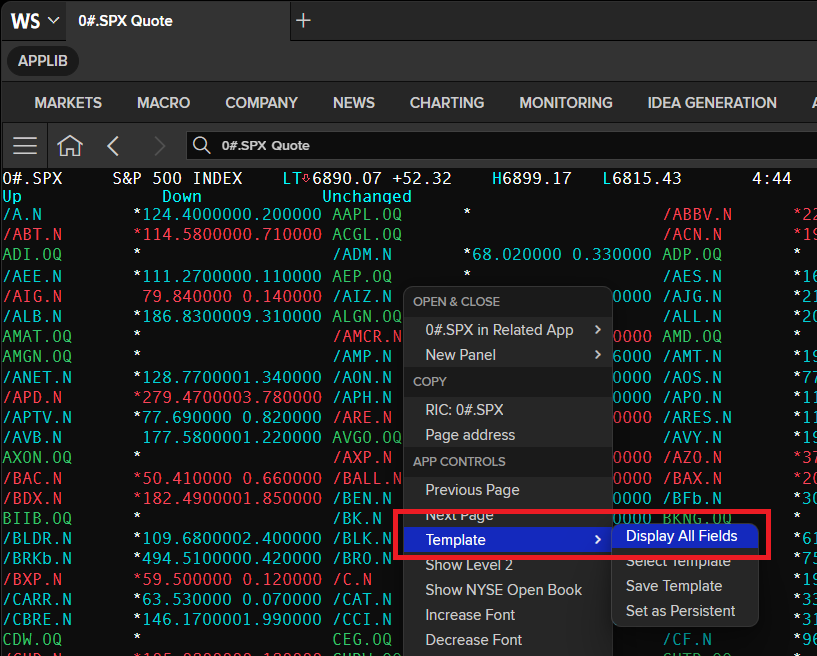
Here is an example display of the S&P 500 INDEX chain:
0#.SPX Quote
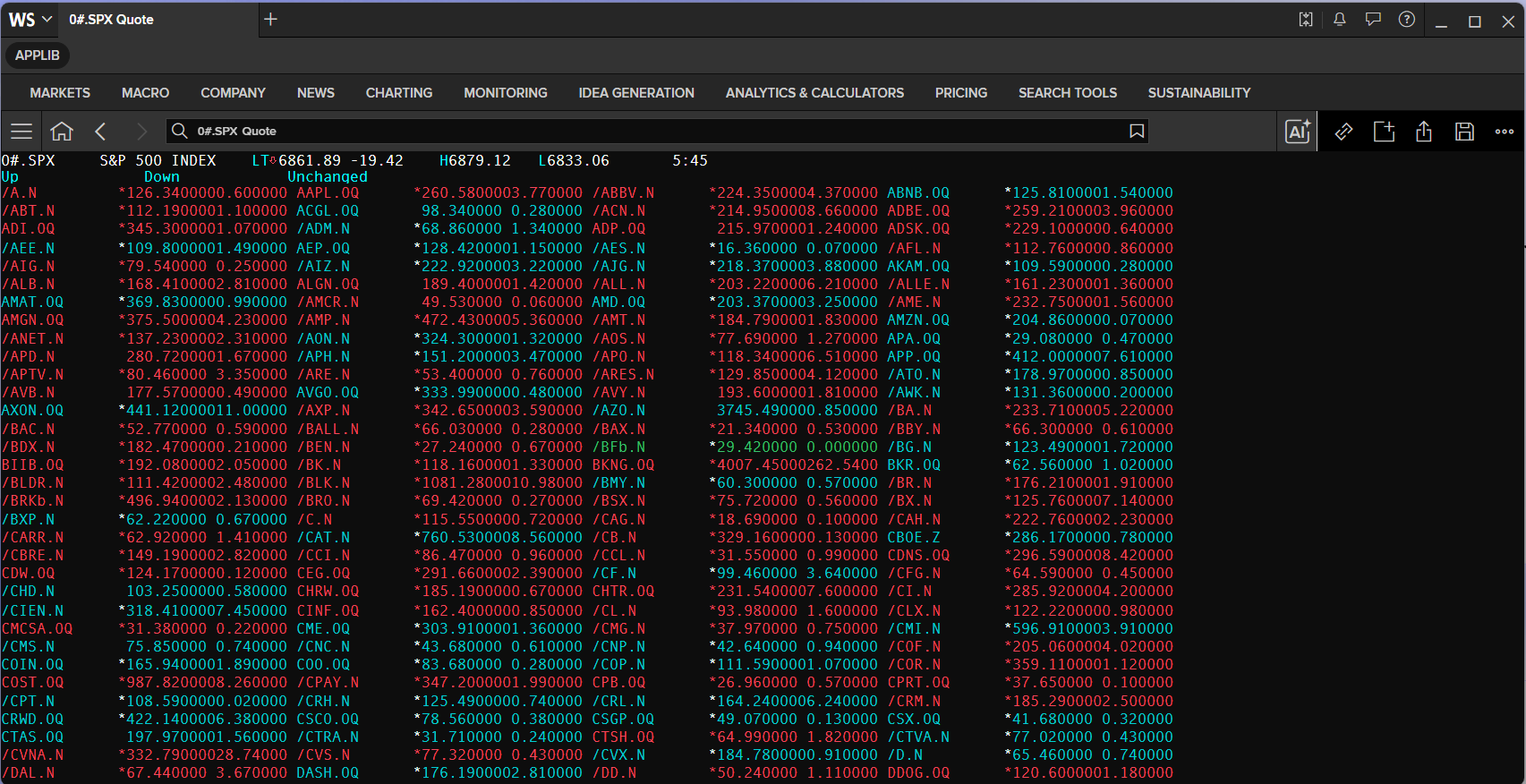
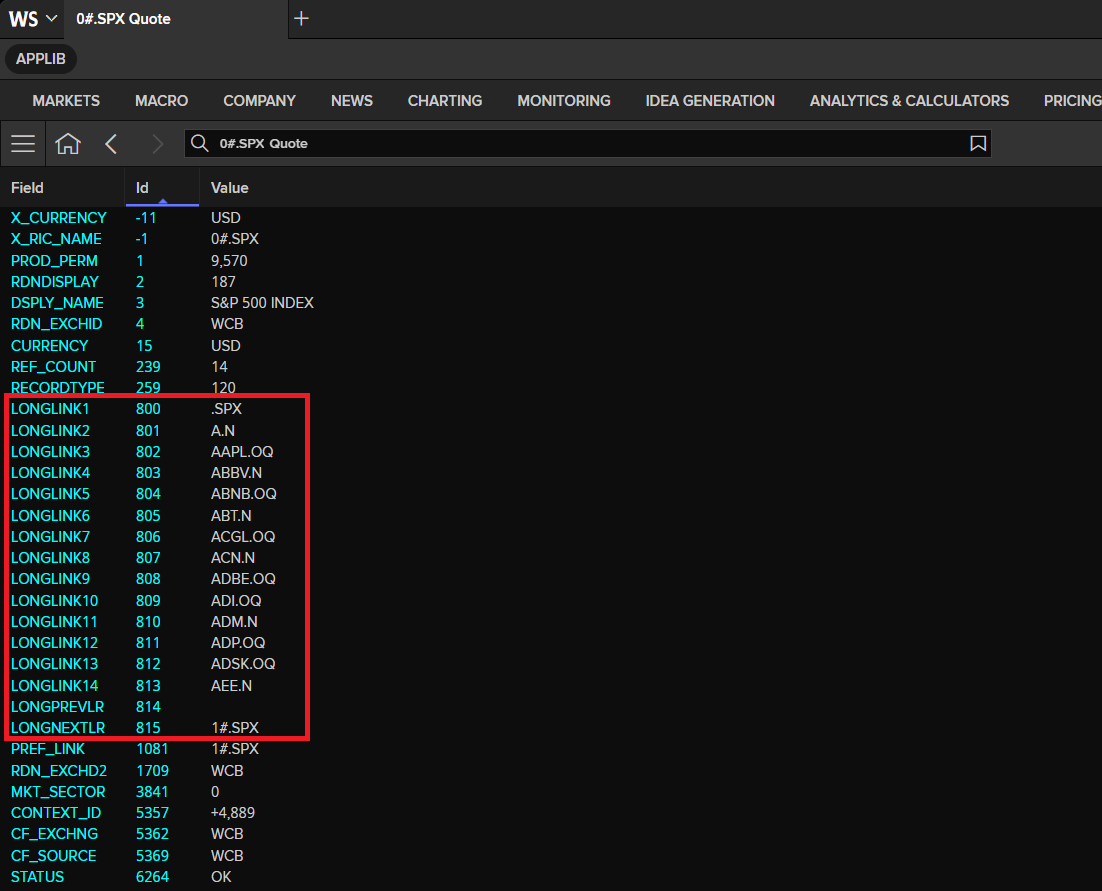
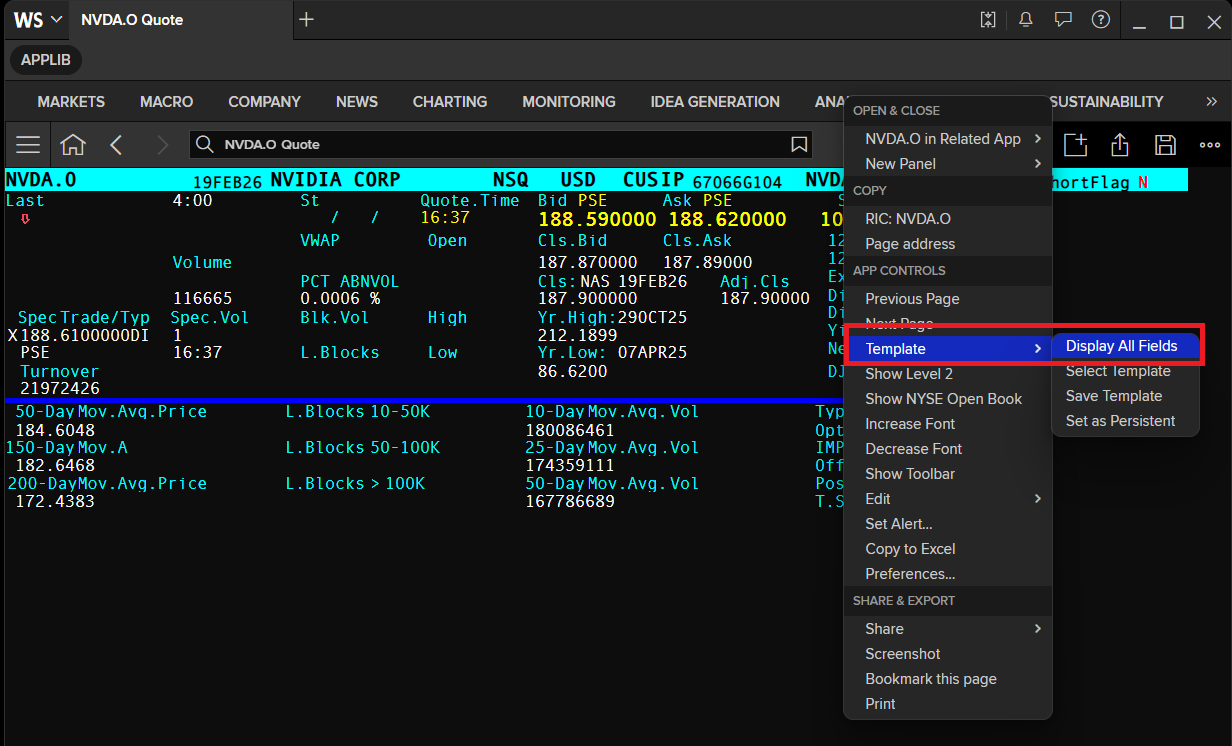
You can verify if the RIC is a Chain RIC by checking if the RIC contains the LONGLINK1 to LONGLINK14 fields. To check the RIC field, right-click on the Quote app and choose the Template --> Display All Fields option to display the RIC data as all the fields available.
You can use the Data Library Chain object to get chain's constituent RICs
from lseg.data.discovery import Chain
Chain_RIC = '0#.SPX'
# Get Chain constituents RICs
spx = Chain(Chain_RIC)

print(f'Listing first 20 constituents of S&P 500 INDEX chain ({Chain_RIC}):')
for constituent in spx.constituents[:20]:
    print(constituent)
Listing first 20 constituents of S&P 500 INDEX chain (0#.SPX): A.N AAPL.OQ ABBV.N ABNB.OQ ABT.N ACGL.OQ ACN.N ADBE.OQ ADI.OQ ADM.N ADP.OQ ADSK.OQ AEE.N AEP.OQ AES.N AFL.N AIG.N AIZ.N AJG.N AKAM.OQ
The Chain.constituents property returns constituent RICs as a Python List which can be used with the Data Library get_data and get_history methods.
The example of get_data method with Chain.constituents list is as follows:
print('Getting data for the first 10 constituents of S&P 500 INDEX chain data:')
ld.get_data(spx.constituents[:10], ['BID', 'ASK', 'TR.Revenue','TR.Volume','TR.Commonname'])
Getting data for the first 10 constituents of S&P 500 INDEX chain data:
| Instrument | Revenue | Volume | Company Common Name | BID | ASK | |
|---|---|---|---|---|---|---|
| 0 | A.N | 6948000000 | 501661 | Agilent Technologies Inc | 0.0 | 0.0 |
| 1 | AAPL.OQ | 416161000000 | 14776674 | Apple Inc | 258.1 | 258.75 |
| 2 | ABBV.N | 61160000000 | 1766994 | AbbVie Inc | 0.0 | 0.0 |
| 3 | ABNB.OQ | 12241000000 | 1475345 | Airbnb Inc | 129.21 | 134.0 |
| 4 | ABT.N | 44328000000 | 2579998 | Abbott Laboratories | 0.0 | 0.0 |
| 5 | ACGL.OQ | <NA> | 728885 | Arch Capital Group Ltd | 97.02 | 100.02 |
| 6 | ACN.N | 69672977000 | 1417956 | Accenture PLC | 0.0 | 0.0 |
| 7 | ADBE.OQ | 23769000000 | 1510638 | Adobe Inc | 239.14 | 239.46 |
| 8 | ADI.OQ | 11019707000 | 1676872 | Analog Devices Inc | 340.0 | 346.0 |
| 9 | ADM.N | 80269000000 | 1068529 | Archer-Daniels-Midland Co | 0.0 | 0.0 |
The example of get_history method with Chain.constituents list is as follows:
df_history_spx = ld.get_history(
    universe=spx.constituents[:10],
    fields=['TRDPRC_1','HIGH_1','LOW_1','BID','ASK'],
)
df_history_spx
| A.N | AAPL.OQ | ... | ADI.OQ | ADM.N | |||||||||||||||||
|---|---|---|---|---|---|---|---|---|---|---|---|---|---|---|---|---|---|---|---|---|---|
| TRDPRC_1 | HIGH_1 | LOW_1 | BID | ASK | TRDPRC_1 | HIGH_1 | LOW_1 | BID | ASK | ... | TRDPRC_1 | HIGH_1 | LOW_1 | BID | ASK | TRDPRC_1 | HIGH_1 | LOW_1 | BID | ASK | |
| Date | |||||||||||||||||||||
| 2026-03-11 | 115.42 | 116.39 | 114.16 | 115.39 | 115.4 | 260.81 | 262.13 | 259.58 | 260.77 | 260.86 | ... | 319.22 | 321.46 | 316.47 | 319.12 | 319.28 | 70.83 | 71.42 | 68.91 | 70.85 | 70.86 |
| 2026-03-12 | 111.63 | 114.19 | 111.0 | 111.58 | 111.67 | 255.76 | 258.78 | 254.19 | 255.75 | 255.76 | ... | 307.27 | 314.14 | 304.33 | 307.17 | 307.25 | 72.5 | 73.7 | 70.52 | 72.5 | 72.51 |
| 2026-03-13 | 111.51 | 113.3 | 111.07 | 111.51 | 111.54 | 250.12 | 256.32 | 249.52 | 250.01 | 250.16 | ... | 306.07 | 311.13 | 303.57 | 306.07 | 306.19 | 71.98 | 73.66 | 71.42 | 71.97 | 71.98 |
| 2026-03-16 | 111.83 | 114.07 | 111.455 | 111.81 | 111.82 | 252.82 | 253.88 | 249.88 | 252.77 | 252.8 | ... | 310.92 | 313.72 | 309.29 | 310.84 | 310.93 | 70.75 | 72.1 | 70.39 | 70.74 | 70.75 |
| 2026-03-17 | 112.75 | 114.87 | 112.67 | 112.72 | 112.75 | 254.23 | 255.125 | 252.18 | 254.21 | 254.24 | ... | 313.66 | 315.29 | 310.72 | 313.41 | 313.65 | 72.12 | 73.12 | 71.1 | 72.12 | 72.13 |
| 2026-03-18 | 111.5 | 112.41 | 110.34 | 111.46 | 111.5 | 249.94 | 254.9 | 249.0 | 249.88 | 249.91 | ... | 308.59 | 316.8 | 307.88 | 308.55 | 308.59 | 70.87 | 72.18 | 70.87 | 70.87 | 70.89 |
| 2026-03-19 | 111.75 | 112.45 | 110.51 | 111.69 | 111.74 | 248.96 | 251.83 | 247.32 | 248.86 | 248.89 | ... | 310.44 | 313.38 | 300.91 | 310.32 | 310.44 | 68.64 | 70.55 | 68.25 | 68.63 | 68.66 |
| 2026-03-20 | 111.3 | 112.24 | 110.2 | 111.27 | 111.28 | 247.99 | 249.18 | 246.02 | 248.16 | 248.2 | ... | 309.43 | 312.14 | 306.12 | 309.57 | 309.58 | 66.17 | 68.82 | 65.1 | 66.16 | 66.17 |
| 2026-03-23 | 112.02 | 113.42 | 111.55 | 112.01 | 112.02 | 251.49 | 254.56 | 250.28 | 251.43 | 251.44 | ... | 312.19 | 317.44 | 311.86 | 312.17 | 312.19 | 67.99 | 68.46 | 66.02 | 67.98 | 68.0 |
| 2026-03-24 | 114.2 | 115.18 | 110.59 | 114.18 | 114.2 | 251.64 | 254.82 | 249.55 | 251.73 | 251.75 | ... | 321.83 | 324.58 | 311.94 | 321.81 | 321.96 | 71.44 | 71.58 | 68.31 | 71.44 | 71.45 |
| 2026-03-25 | 112.98 | 116.04 | 111.91 | 113.04 | 113.05 | 252.62 | 254.98 | 251.6 | 252.55 | 252.57 | ... | 322.03 | 328.16 | 320.73 | 321.96 | 322.03 | 71.66 | 71.88 | 70.51 | 71.68 | 71.69 |
| 2026-03-26 | 113.48 | 114.52 | 113.27 | 113.48 | 113.53 | 252.89 | 257.0 | 250.8 | 252.88 | 252.89 | ... | 313.42 | 321.12 | 312.47 | 313.3 | 313.44 | 72.33 | 73.67 | 71.29 | 72.31 | 72.33 |
| 2026-03-27 | 110.24 | 113.53 | 109.9 | 110.21 | 110.27 | 248.8 | 255.46 | 248.1 | 248.61 | 248.62 | ... | 307.44 | 312.94 | 306.19 | 307.42 | 307.53 | 72.23 | 74.13 | 71.73 | 72.2 | 72.21 |
| 2026-03-30 | 112.01 | 112.95 | 111.28 | 112.04 | 112.05 | 246.63 | 250.84 | 245.52 | 246.53 | 246.55 | ... | 303.1 | 314.03 | 300.56 | 302.94 | 303.08 | 71.75 | 74.0 | 71.59 | 71.75 | 71.76 |
| 2026-03-31 | 113.98 | 115.17 | 112.39 | 113.98 | 114.01 | 253.79 | 255.48 | 247.11 | 253.65 | 253.8 | ... | 318.14 | 319.27 | 306.57 | 317.92 | 318.1 | 72.69 | 73.34 | 71.67 | 72.67 | 72.68 |
| 2026-04-01 | 114.54 | 115.64 | 114.01 | 114.5 | 114.53 | 255.63 | 256.18 | 253.33 | 255.67 | 255.75 | ... | 320.58 | 325.74 | 317.23 | 320.52 | 320.58 | 72.37 | 73.83 | 71.71 | 72.34 | 72.36 |
| 2026-04-02 | 115.48 | 117.26 | 112.99 | 115.41 | 115.42 | 255.92 | 256.13 | 250.65 | 255.87 | 255.93 | ... | 318.34 | 321.69 | 311.59 | 318.24 | 318.41 | 73.83 | 73.985 | 72.45 | 73.83 | 73.86 |
| 2026-04-06 | 114.84 | 115.4 | 113.24 | 114.84 | 114.9 | 258.86 | 262.16 | 256.48 | 258.88 | 258.95 | ... | 327.36 | 327.46 | 319.06 | 327.35 | 327.38 | 73.38 | 73.83 | 72.63 | 73.35 | 73.38 |
| 2026-04-07 | 113.88 | 114.55 | 112.95 | 113.87 | 113.89 | 253.5 | 256.04 | 245.7 | 253.49 | 253.5 | ... | 327.41 | 327.51 | 321.195 | 327.36 | 327.44 | 72.15 | 73.61 | 71.64 | 72.15 | 72.17 |
| 2026-04-08 | 116.92 | 118.13 | 116.26 | 116.91 | 116.94 | 258.9 | 259.73 | 256.53 | 258.91 | 258.96 | ... | 346.21 | 348.98 | 342.05 | 346.26 | 346.32 | 71.72 | 71.75 | 67.67 | 71.72 | 71.73 |
20 rows × 50 columns
How to display a tile
Tile names are not preceded by 0#.
A tile can be called up in the display application just like any ordinary page or RIC, simply by typing the tile name and pressing Enter.
Example:
EFX=– European spot rates.
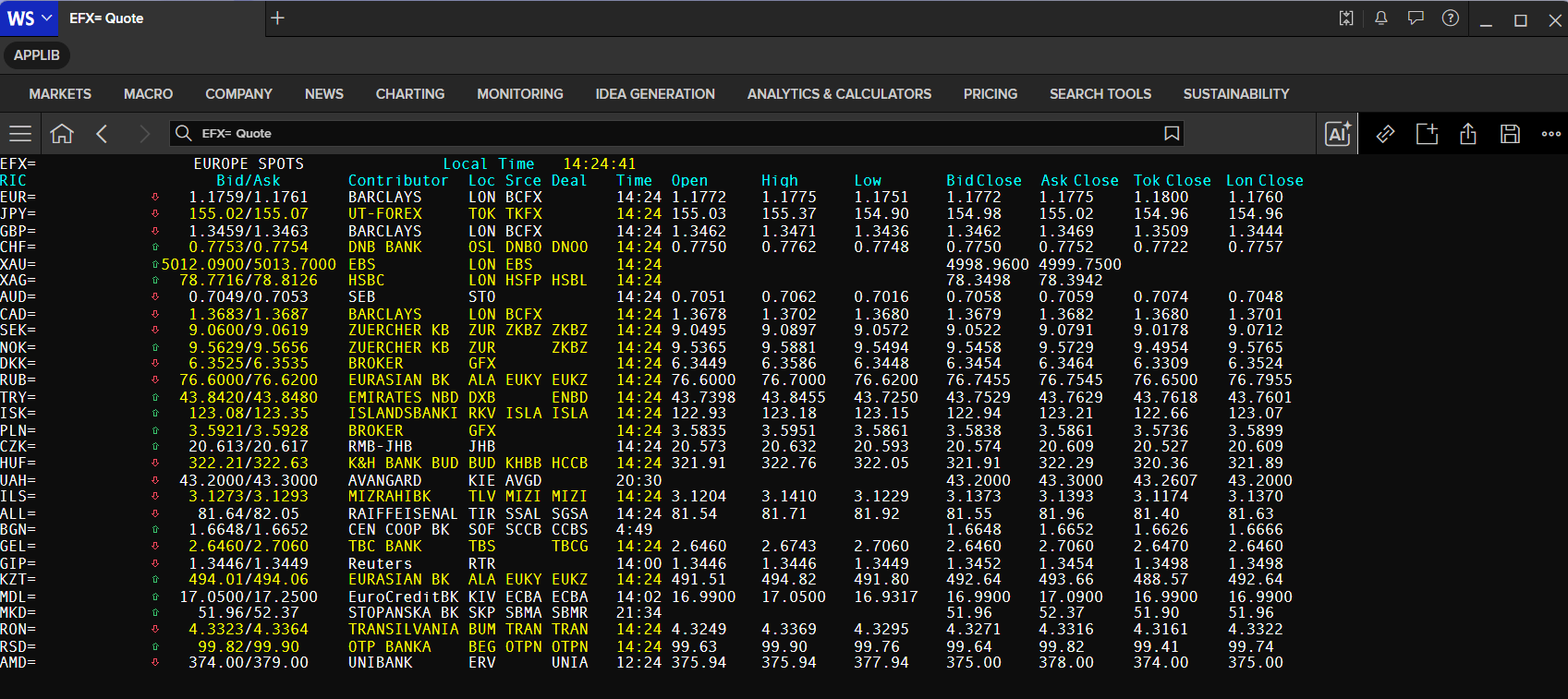
If you check the tile RIC fields, you see the LONGLINK1 to LONGLINK14 fields too.
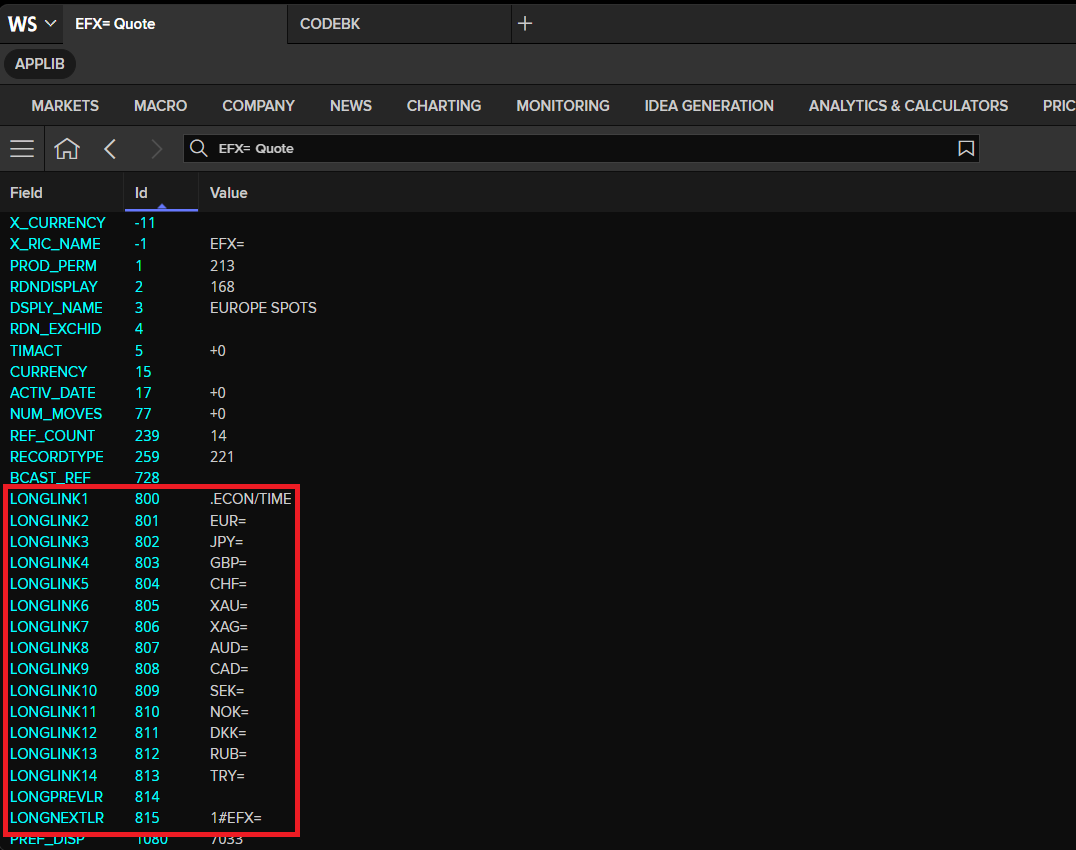
For markets such as foreign exchange and money markets, which use a lot of tiles to show market information, this is more intuitive than calling up a chain.
By double-clicking on any field in the tile display, you retrieve a full quote with more information.
For more information on tiles, see the MONEY speed-guide.
The Data Library Chain object also supports the tile RIC too.
efx = Chain('EFX=')
print(f'EFX= Tile constituent RICs are: {efx.constituents}')
EFX= Tile constituent RICs are: ['EUR=', 'JPY=', 'GBP=', 'CHF=', 'XAU=', 'XAG=', 'AUD=', 'CAD=', 'SEK=', 'NOK=', 'DKK=', 'RUB=', 'TRY=', 'ISK=', 'PLN=', 'CZK=', 'HUF=', 'UAH=', 'ILS=', 'ALL=', 'BGN=', 'GEL=', 'GIP=', 'KZT=', 'MDL=', 'MKD=', 'RON=', 'RSD=', 'AMD=']
efx_data = ld.get_data(
    universe=efx.constituents,
    fields=['BID', 'ASK', 'CF_SOURCE','TR.InstrumentDescription']
)
efx_data
| Instrument | Instrument Description | BID | ASK | CF_SOURCE | |
|---|---|---|---|---|---|
| 0 | EUR= | Euro/US Dollar FX Spot Rate | 1.167 | 1.1671 | ZUERCHER KB |
| 1 | JPY= | US Dollar/Japanese Yen FX Spot Rate | 158.67 | 158.72 | BARCLAYS |
| 2 | GBP= | UK Pound Sterling/US Dollar FX Spot Rate | 1.3402 | 1.3406 | BARCLAYS |
| 3 | CHF= | US Dollar/Swiss Franc FX Spot Rate | 0.7906 | 0.7907 | HSBC |
| 4 | XAU= | Gold Spot Multi-Contributor | 4719.03 | 4720.63 | HSBC LON |
| 5 | XAG= | Silver Spot Multi-Contributor | 74.0626 | 74.1146 | HSBC LON |
| 6 | AUD= | Australian Dollar/US Dollar FX Spot Rate | 0.7045 | 0.7047 | BARCLAYS |
| 7 | CAD= | US Dollar/Canadian Dollar FX Spot Rate | 1.3845 | 1.385 | BARCLAYS |
| 8 | SEK= | US Dollar/Swedish Krona FX Spot Rate | 9.3196 | 9.3238 | ZUERCHER KB |
| 9 | NOK= | US Dollar/Norwegian Krone FX Spot Rate | 9.5756 | 9.5811 | ZUERCHER KB |
| 10 | DKK= | US Dollar/Danish Krone FX Spot Rate | 6.403 | 6.4034 | DANSKE BANK |
| 11 | RUB= | US Dollar/Russian Rouble FX Spot Rate | 78.5455 | 78.5545 | Commerzbank |
| 12 | TRY= | US Dollar/Turkish Lira FX Spot Rate | 44.4647 | 44.5352 | BROKER |
| 13 | ISK= | US Dollar/Iceland Krona FX Spot Rate | 123.08 | 123.35 | ISLANDSBANKI |
| 14 | PLN= | US Dollar/Polish Zloty FX Spot Rate | 3.6419 | 3.6458 | BROKER |
| 15 | CZK= | US Dollar/Czech Koruna FX Spot Rate | 20.881 | 20.917 | DANSKE BANK |
| 16 | HUF= | US Dollar/Hungarian Forint FX Spot Rate | 322.55 | 323.09 | DANSKE BANK |
| 17 | UAH= | US Dollar/Ukraine Hryvnia FX Spot Rate | 43.4 | 43.5 | AVANGARD |
| 18 | ILS= | US Dollar/Israeli Shekel FX Spot Rate | 3.0916 | 3.0936 | MIZRAHIBK |
| 19 | ALL= | US Dollar/Albanian Lek FX Spot Rate | 81.6 | 82.65 | PROCREDIT AL |
| 20 | BGN= | US Dollar/Bulgarian Lev FX Spot Rate | 1.6648 | 1.6652 | CEN COOP BK |
| 21 | GEL= | US Dollar/Georgian Lari FX Spot Rate | 2.661 | 2.721 | TBC BANK |
| 22 | GIP= | Gibraltar Pound/US Dollar FX Spot Rate | 1.3418 | 1.3422 | Reuters |
| 23 | KZT= | US Dollar/Kazakhstan Tenge FX Spot Rate | 476.78 | 477.66 | LSEG |
| 24 | MDL= | US Dollar/Molodovan Leu FX Spot Rate | 17.03 | 17.13 | COUGAR |
| 25 | MKD= | US Dollar/North Macedonian Denar FX Spot Rate | 53.11 | 53.54 | STOPANSKA BK |
| 26 | RON= | US Dollar/Romanian New Leu FX Spot Rate | 4.363 | 4.3676 | BCR |
| 27 | RSD= | US Dollar/Serbian Dinar FX Spot Rate | 100.44 | 100.73 | ERSTE BANK |
| 28 | AMD= | US Dollar/Armenian Dram FX Spot Rate | 375.32 | 377.32 | COUGAR |
Pages
Pages consist of text-based data presented in a page-like format, originally designed for terminal screen displays prevalent during the 1980s and 1990s.
Pages are primarily used for:
- Speed-guides.
- Over-the-counter traded instruments.
- Emerging markets.
Note: Most of the data available through page RICs or speed-guides can now be accessed directly via the Workspace Search or dedicated ** Workspace Apps**.
Not all pages are owned by LSEG; some are owned by contributors to the LSEG network. Many of these are market players who want to offer their current rates or comment on the state of the market. There are also specialist data providers who offer expert analysis and market commentary.
In some cases, access to these pages is restricted. Brokers, for example, will not be able to see the pages of their competitors. In such cases, it is up to the owner of the page to grant access to the user.
To gain access rights to one of these pages, please contact your LSEG representative.
Page formats
Some pages are larger than others:
- 64 x 14 (64 characters across x 14 rows down)
- 80 x 25 (80 characters across x 25 rows down)
All pages are accessed the same way: type Quote RIC code and press Enter.
If you are interested in displaying your data on the LSEG network, you'll find more information about customer-owned pages in the Contributed data chapter of this guide. Alternatively, contact your local LSEG representative to discuss which contribution methods suit you best.
Example of Pages RICs:
HOLIDAYBROKER
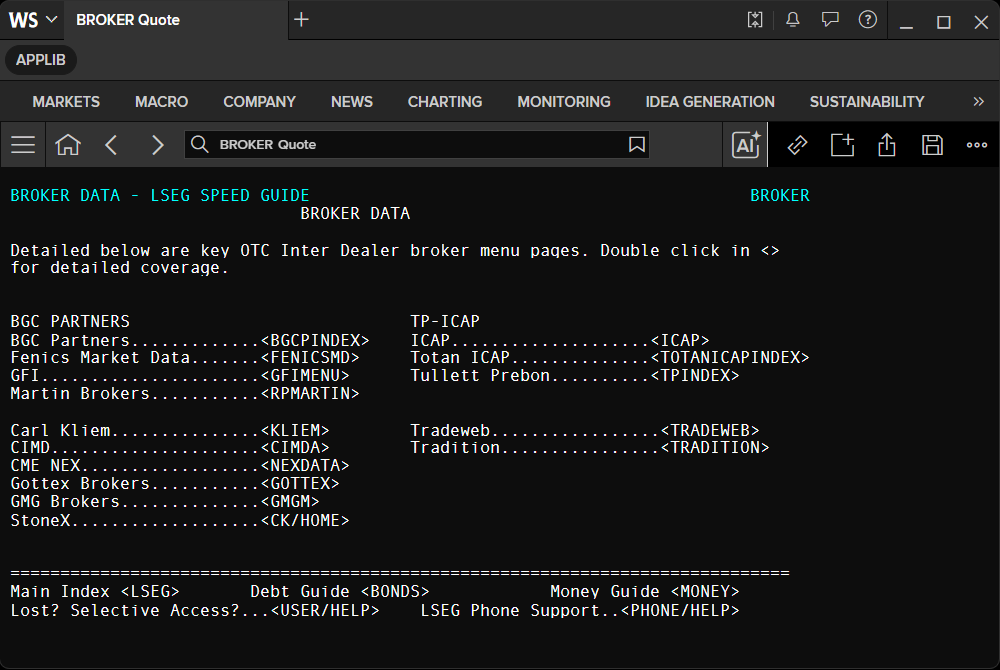
The page lets you navigate through its row and column menu by clicking the one you want to see. Let's demonstrate by clicking on the ICAP menu.
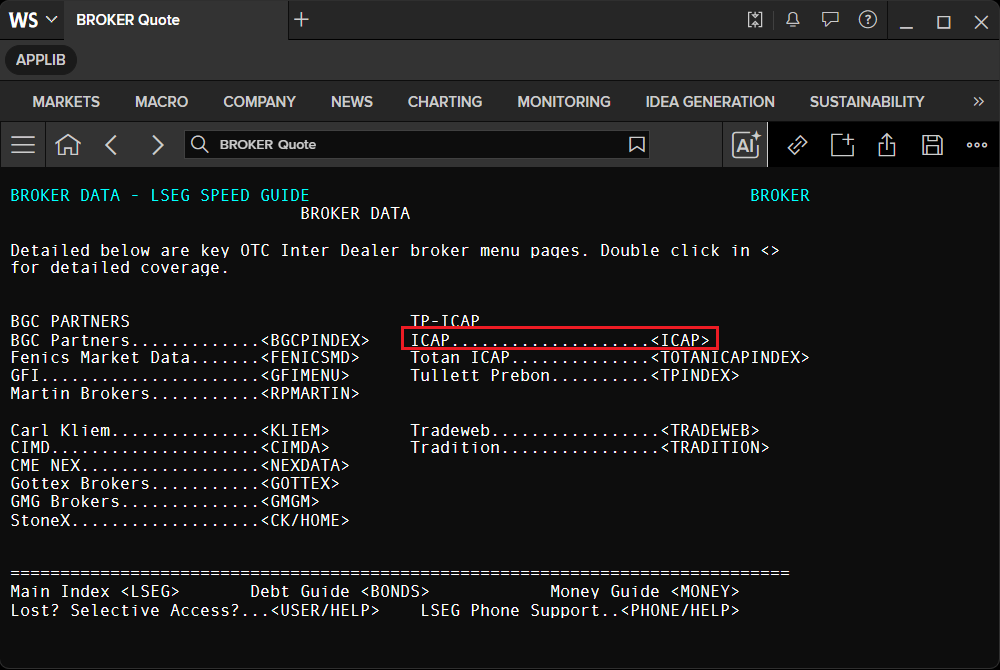
The page moves to ICAP page RIC which you can continue navigate until you found the data you need.
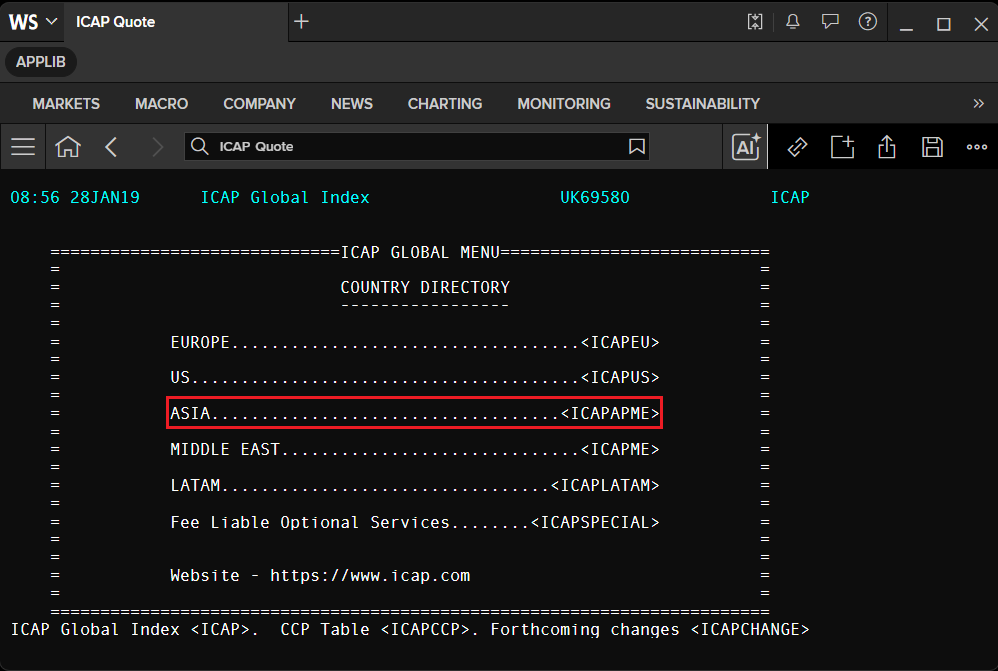
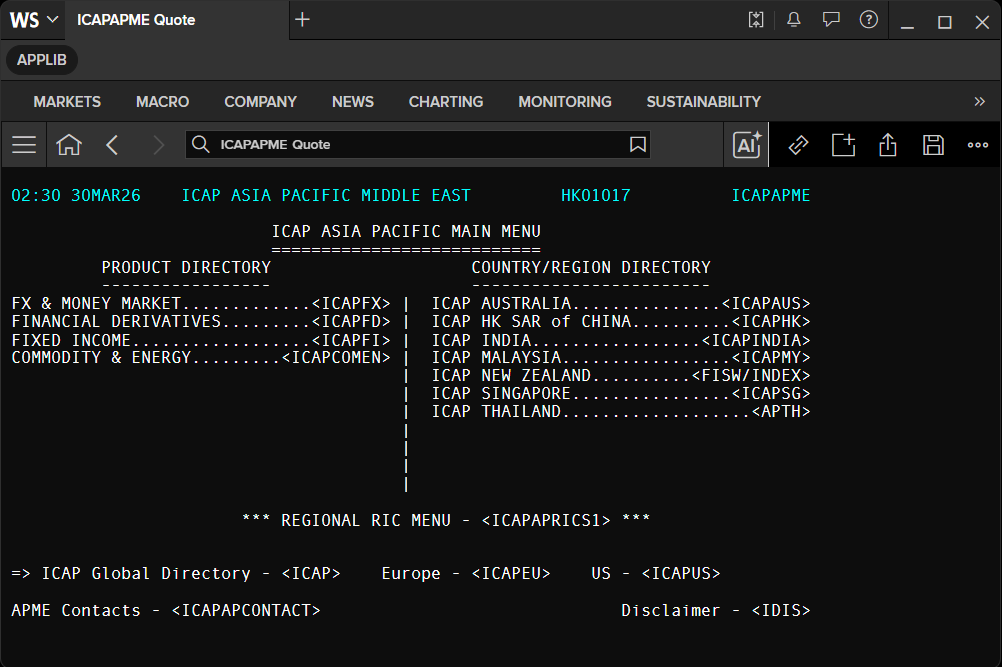
You can check if the RIC is the PAGE RIC by checking its fields. If the RIC contains the following types of fields, it is the Page RIC.
- ROW64_1 to ROW64_14 (
64 x 14(64 characters across × 14 rows down)) - ROW80_1 to ROW80_25 (
80 x 25(80 characters across × 25 rows down))
Note: To check the RIC fields, right-click on the Quote app and choose the Template --> Display All Fields option to display the RIC data as all the fields available.
Example with BROKER Page RIC.
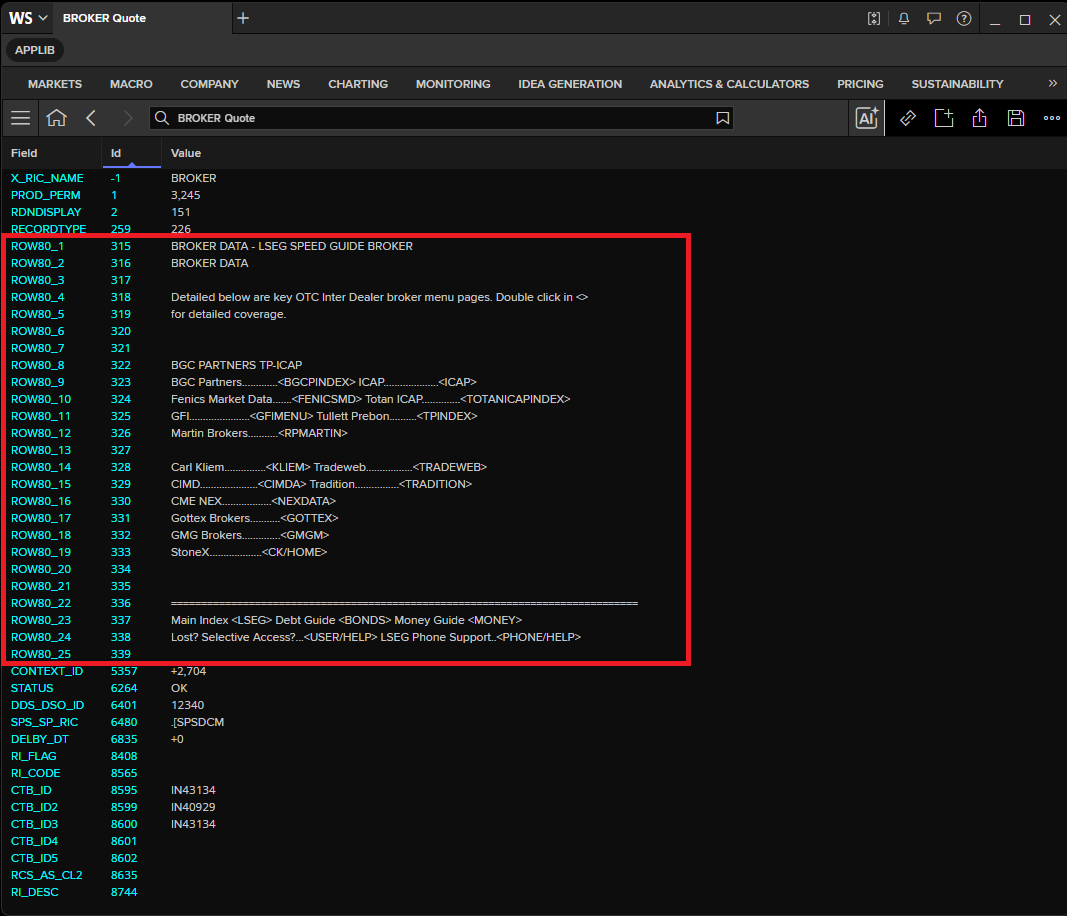
The pages RIC can be retrieve programmatically to get each row data with the Data Library.
def get_page_data(universe):
    # Build field lists for both possible page layouts:
    #   ROW64_* — 64-character wide rows (fields 1–14)
    #   ROW80_* — 80-character wide rows (fields 1–25)
    row64_fields = [f"ROW64_{i}" for i in range(1, 15)]
    row80_fields = [f"ROW80_{i}" for i in range(1, 26)]

    # Fetch all fields in a single API call.
    # A page RIC uses exactly one layout, so the other layout's columns return as all-NaN.
    df_result = ld.get_data(universe=universe, fields=row64_fields + row80_fields)

    # Drop columns that are entirely NaN to keep only the active layout's data.
    return df_result.dropna(axis='columns', how='all')
# Request page rows based on detected format
df = get_page_data('BROKER')

# Print each returned row field and its value
for col in df.columns:
    print(f'{col}: {df[col].values[0]}')
    Instrument: BROKER
    ROW80_1: BROKER DATA - LSEG SPEED GUIDE                                            BROKER
    ROW80_2:                              BROKER DATA
    ROW80_3:
    ROW80_4: Detailed below are key OTC Inter Dealer broker menu pages. Double click in <>
    ROW80_5: for detailed coverage.
    ROW80_6:
    ROW80_7:
    ROW80_8: BGC PARTNERS                            TP-ICAP
    ROW80_9: BGC Partners.............<BGCPINDEX>    ICAP....................<ICAP>
    ROW80_10: Fenics Market Data.......<FENICSMD>     Totan ICAP..............<TOTANICAPINDEX>
    ROW80_11: GFI......................<GFIMENU>      Tullett Prebon..........<TPINDEX>
    ROW80_12: Martin Brokers...........<RPMARTIN>
    ROW80_13:
    ROW80_14: Carl Kliem...............<KLIEM>        Tradeweb.................<TRADEWEB>
    ROW80_15: CIMD.....................<CIMDA>        Tradition................<TRADITION>
    ROW80_16: CME NEX..................<NEXDATA>
    ROW80_17: Gottex Brokers...........<GOTTEX>
    ROW80_18: GMG Brokers..............<GMGM>
    ROW80_19: StoneX...................<CK/HOME>
    ROW80_20:
    ROW80_21:
    ROW80_22: ==============================================================================
    ROW80_23: Main Index <LSEG>       Debt Guide <BONDS>            Money Guide <MONEY>
    ROW80_24: Lost? Selective Access?...<USER/HELP>    LSEG Phone Support..<PHONE/HELP>
    ROW80_25:
# Request page rows based on detected format
df = get_page_data('ICAP')

# Print each returned row field and its value
for col in df.columns:
    print(f'{col}: {df[col].values[0]}')
    Instrument: ICAP
    ROW80_1: 08:56 28JAN19      ICAP Global Index                   UK69580              ICAP
    ROW80_2:
    ROW80_3:
    ROW80_4:     =============================ICAP GLOBAL MENU===========================
    ROW80_5:     =                                                                      =
    ROW80_6:     =                            COUNTRY DIRECTORY                         =
    ROW80_7:     =                            -----------------                         =
    ROW80_8:     =                                                                      =
    ROW80_9:     =           EUROPE...................................<ICAPEU>          =
    ROW80_10:     =                                                                      =
    ROW80_11:     =           US.......................................<ICAPUS>          =
    ROW80_12:     =                                                                      =
    ROW80_13:     =           ASIA...................................<ICAPAPME>          =
    ROW80_14:     =                                                                      =
    ROW80_15:     =           MIDDLE EAST..............................<ICAPME>          =
    ROW80_16:     =                                                                      =
    ROW80_17:     =           LATAM.................................<ICAPLATAM>          =
    ROW80_18:     =                                                                      =
    ROW80_19:     =           Fee Liable Optional Services........<ICAPSPECIAL>          =
    ROW80_20:     =                                                                      =
    ROW80_21:     =                                                                      =
    ROW80_22:     =           Website - https://www.icap.com                             =
    ROW80_23:     =                                                                      =
    ROW80_24:     ========================================================================
    ROW80_25: ICAP Global Index <ICAP>.  CCP Table <ICAPCCP>. Forthcoming changes <ICAPCHANGE>
Some page RICs, such as HOLIDAY, display market holidays for each country. Rather than reading this data row by row from the page, you can retrieve it programmatically using the Data Library's dates_and_calendars module.
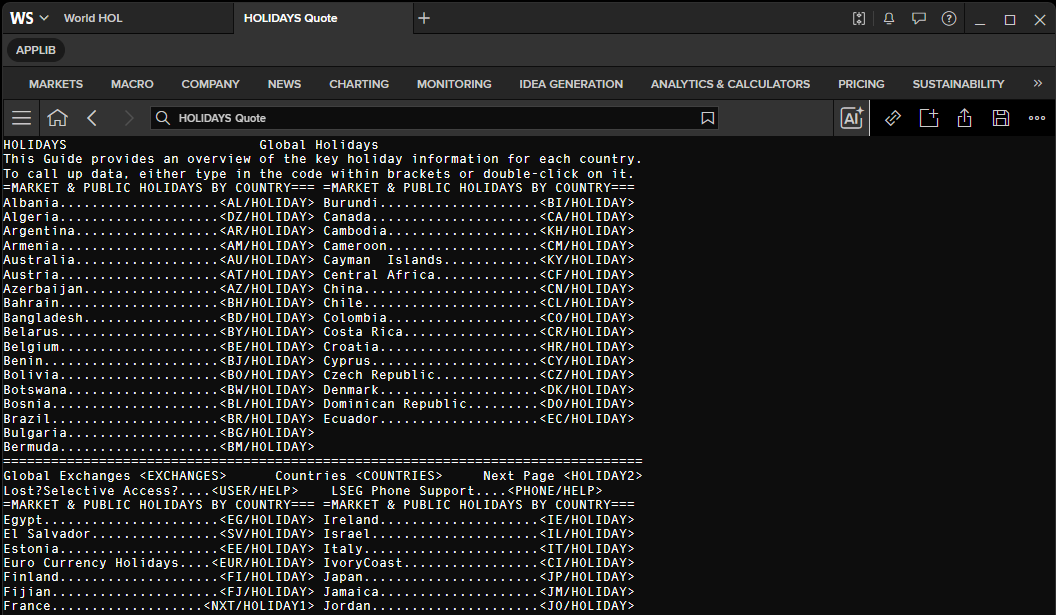
Please find more example usages of the dates_and_calendars module from Access layer - Dates & Calendars example page on GitHub.
holidays = ld.dates_and_calendars.holidays(
    start_date="2026-01-01",
    end_date="2026-12-31",
    calendars=["USA", "CHN"]
)

holidays.df.head(10)
| name | calendars | countries | tag | date | |
|---|---|---|---|---|---|
| 0 | New Year's Day | [USA] | [USA] | None | 2026-01-01 |
| 1 | New Year's Day (Day 1) | [CHN] | [CHN] | None | 2026-01-01 |
| 2 | Martin Luther King's Birthday | [USA] | [USA] | None | 2026-01-19 |
| 3 | Washington's Birthday | [USA] | [USA] | None | 2026-02-16 |
| 4 | Chinese New Year '26 (Day 1) | [CHN] | [CHN] | None | 2026-02-16 |
| 5 | Memorial Day | [USA] | [USA] | None | 2026-05-25 |
| 6 | Juneteenth National Independence Day | [USA] | [USA] | None | 2026-06-19 |
| 7 | Dragon Boat Festival '26 | [CHN] | [CHN] | None | 2026-06-19 |
| 8 | Independence Day | [USA] | [USA] | None | 2026-07-04 |
| 9 | Labor Day | [USA] | [USA] | None | 2026-09-07 |
Speed-guides
Speed-guides are key to finding any data item worldwide on any LSEG data feed.
They are pages provided by LSEG that give easy access to codes for different markets.
You can find anything you want by starting with by typing the page RIC on the search bar and press Enter.
Example with REUTERS LSEG's main speed-guide RIC.
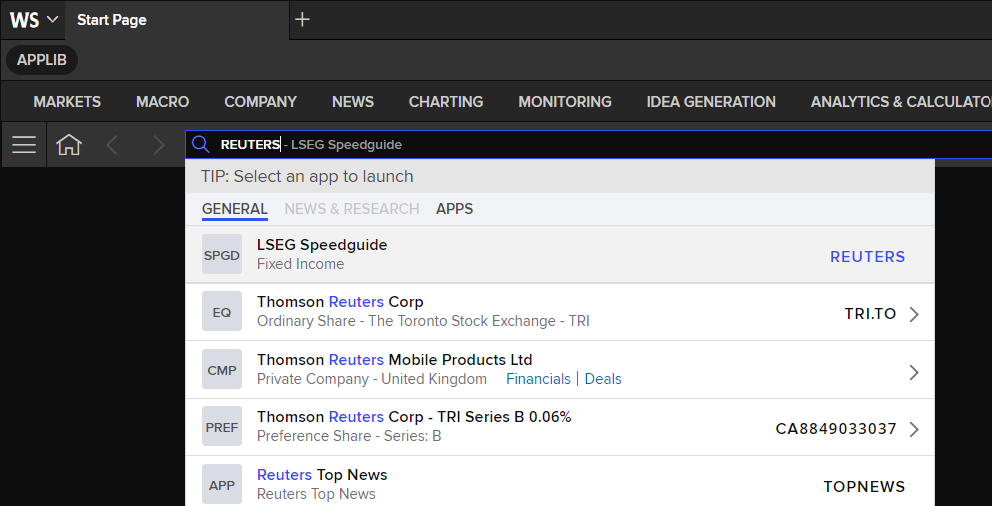
The page REUTERS contains all top-level market pages.
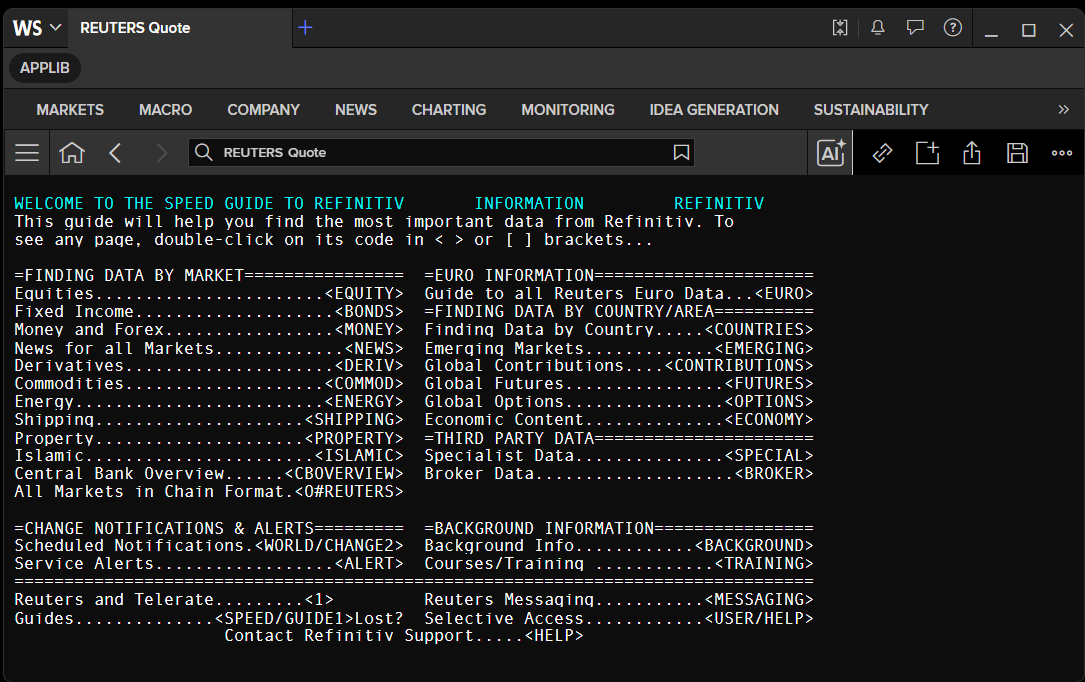
While speed-guides and page RICs remain accessible, LSEG Workspace now offers dedicated applications that provide a significantly richer and more intuitive experience. It is strongly recommended to leverage these apps wherever possible, as they present the same underlying data with enhanced visualisation, easier navigation, and additional analytical capabilities.
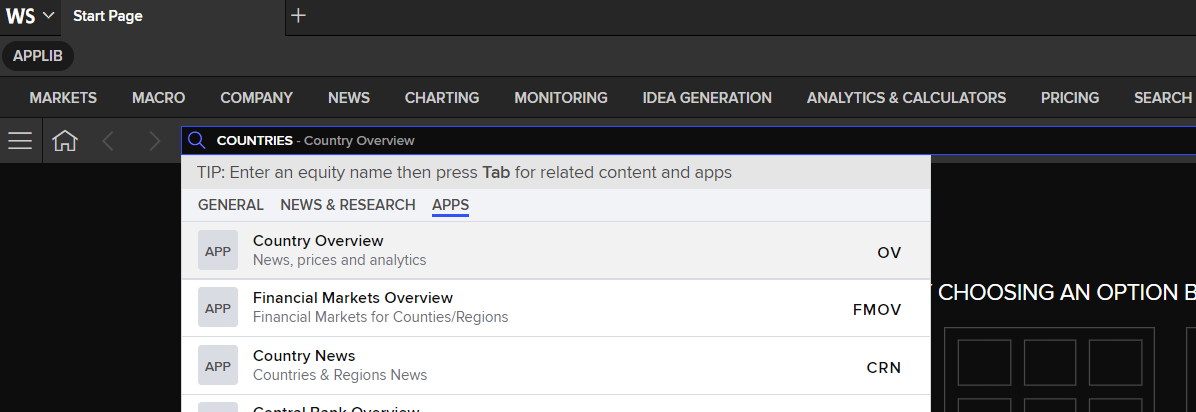
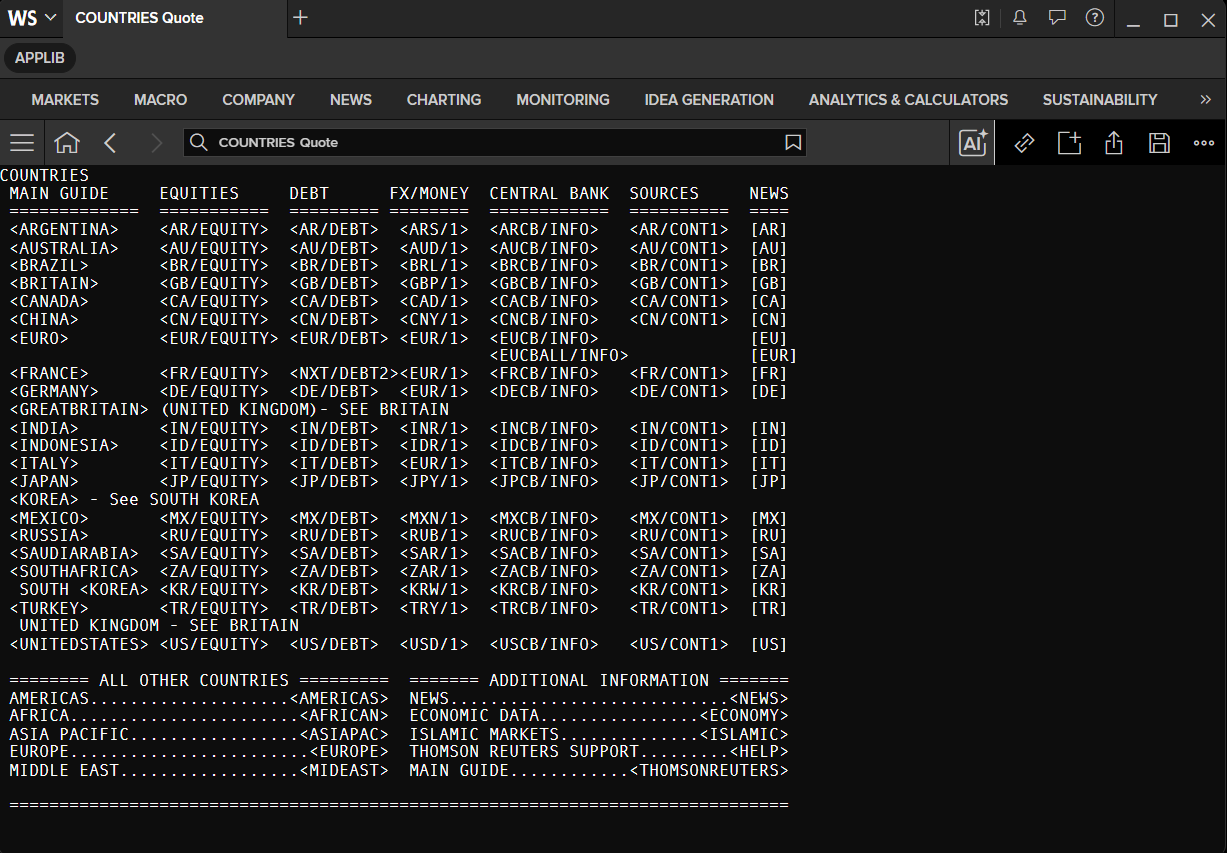
For example, the COUNTRIES speed-guide is now superseded by the World OV app, which offers a structured, region-by-region breakdown of market data, news, investment information, and research — all within a single, integrated interface.
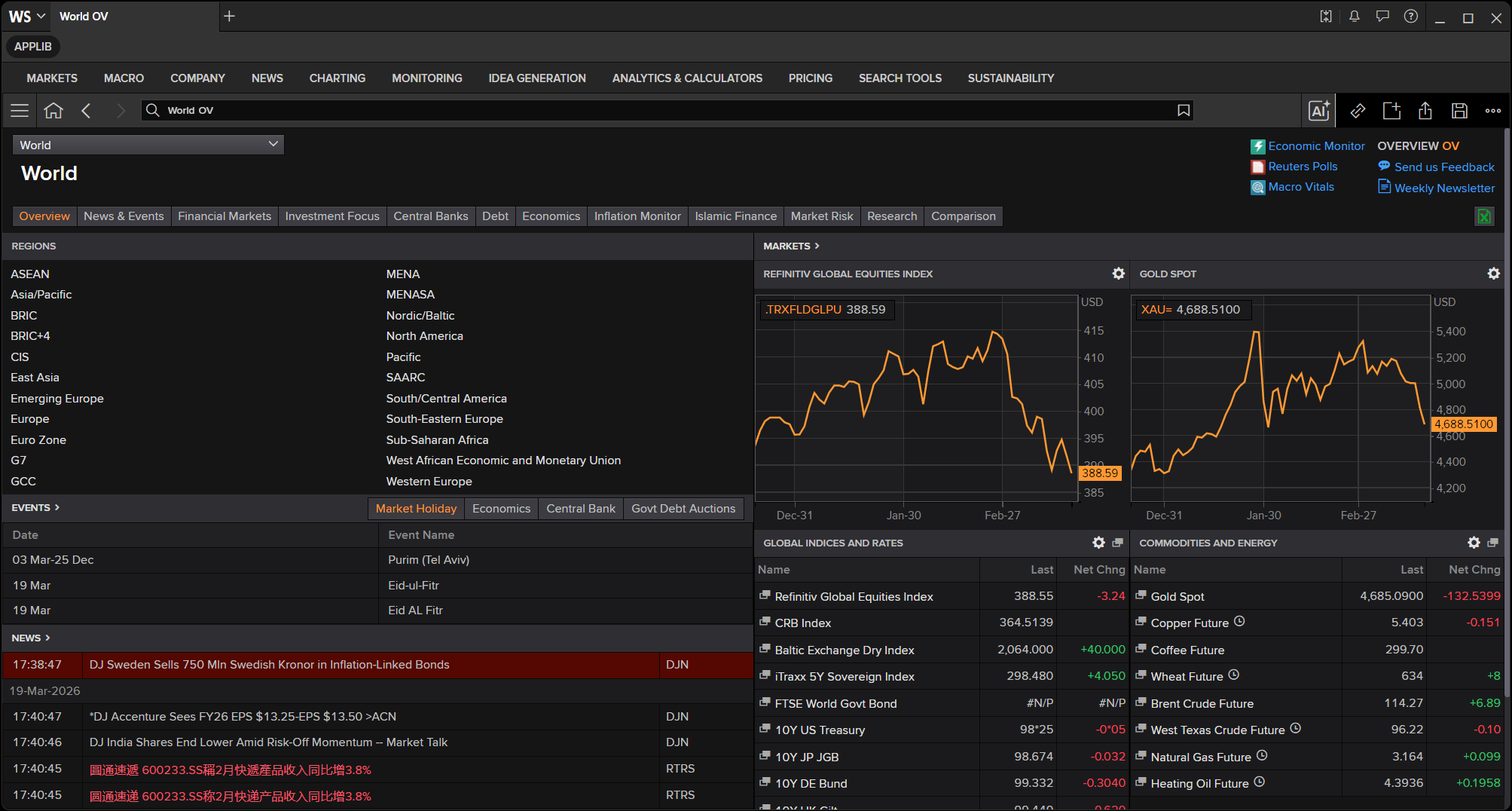
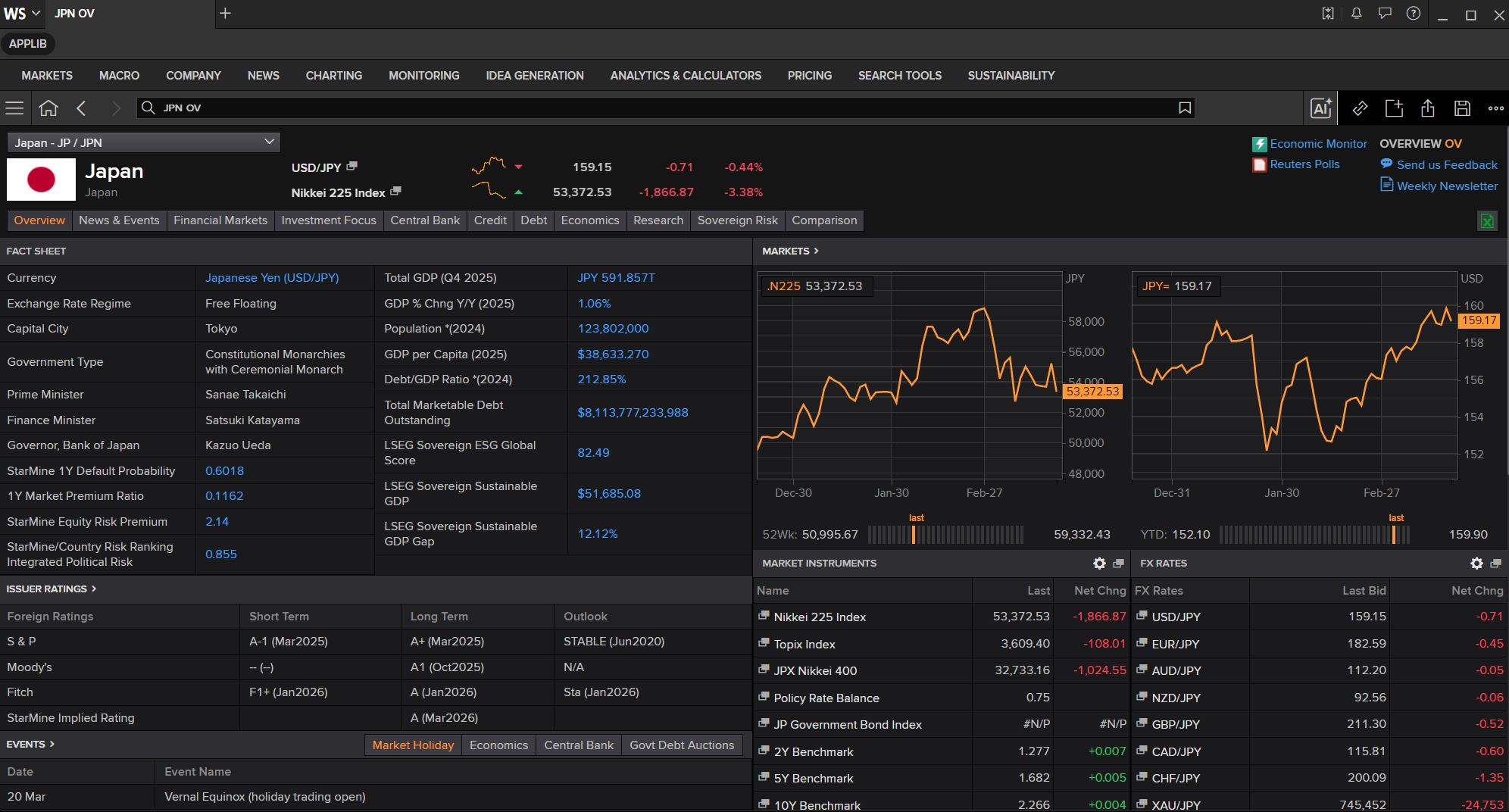
From the World OV app, you can drill down into individual regions to explore market performance, news, investment data, and research content.
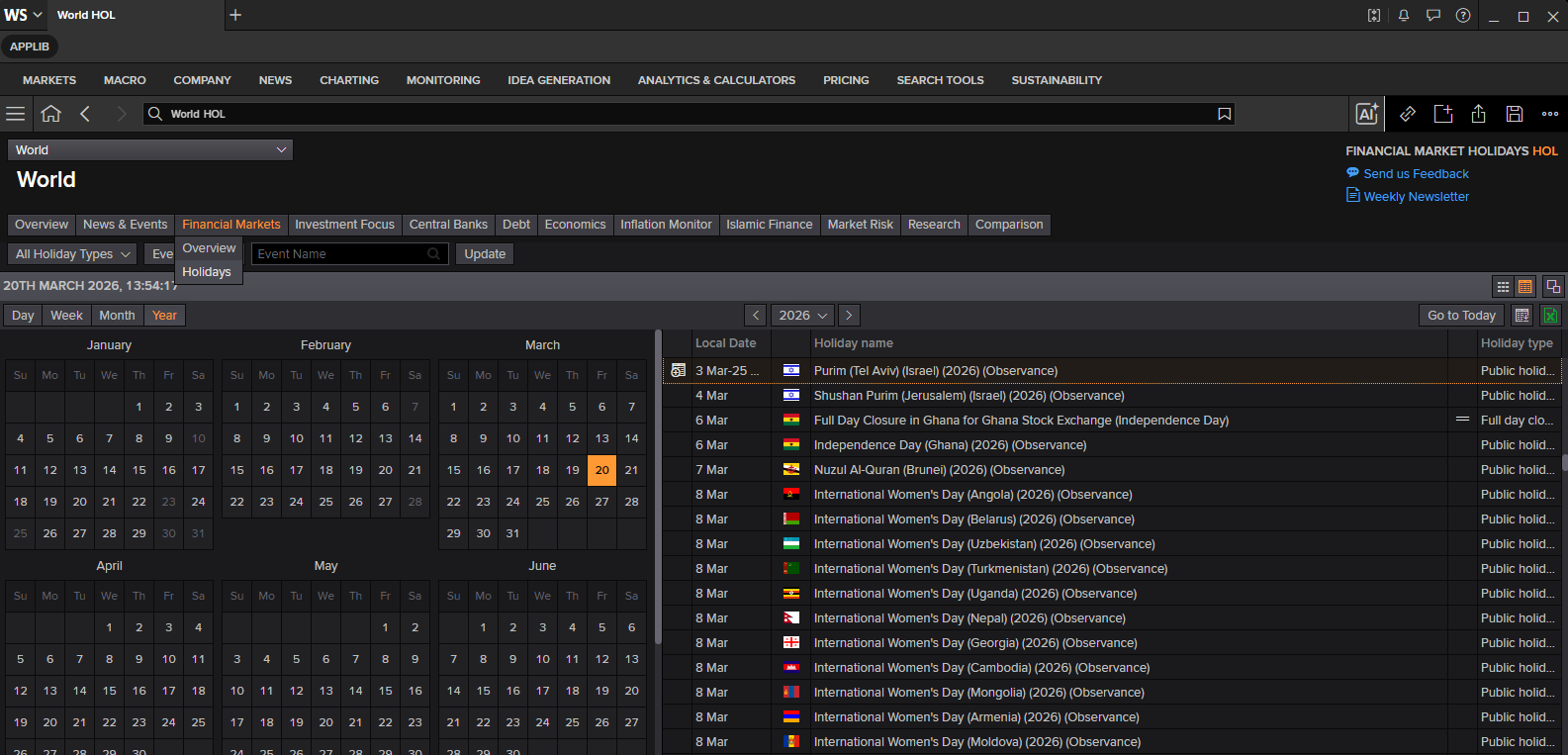
This World OV app also lets you navigate to the World Holiday (short cut World HOL app), the same information as HOLIDAY page above too.
The COUNTRIES speed-guide remains available for users who prefer the traditional page-based interface.
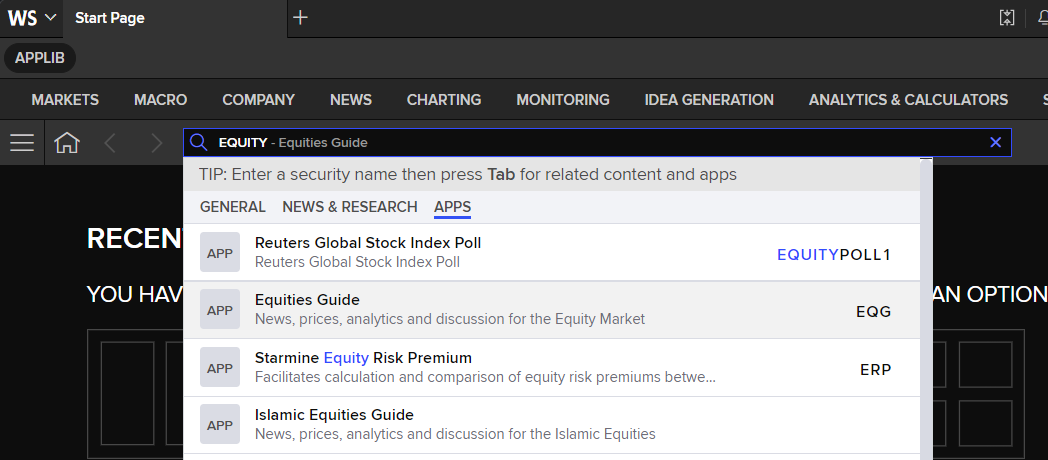
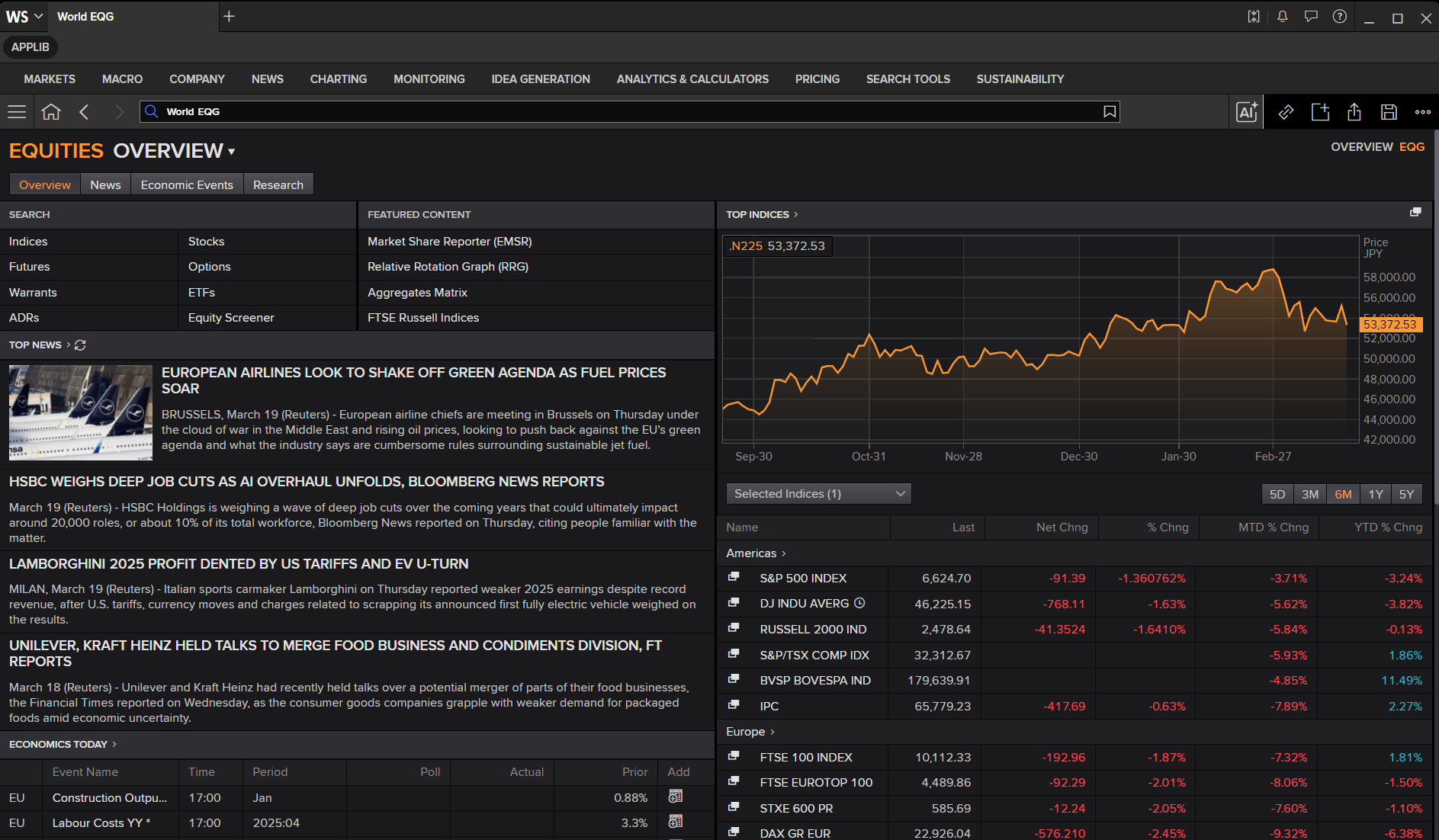
Similarly, the EQUITY speed-guide — accessible from the main REUTERS page — is now complemented by the EQG app, which delivers a more comprehensive and navigable equity market overview.
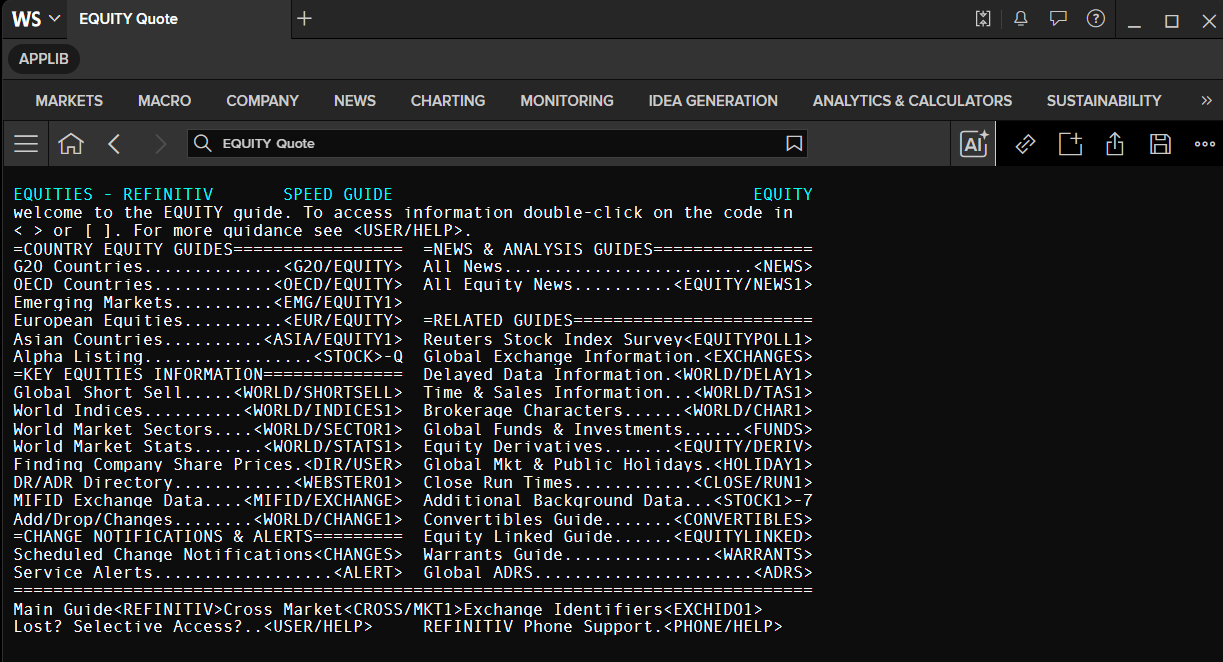
The EQUITY speed-guide page remains available as well.
Note: Certain data is available exclusively through page RICs and has not yet been migrated to a dedicated app. In such cases, use the Workspace search bar to locate the relevant RIC or speed-guide directly.
Example:
NXT/DEBT1(Euronext debt guide)
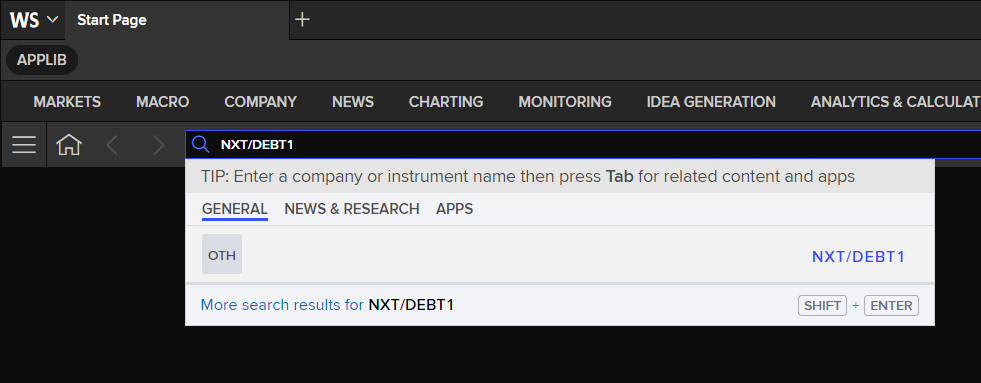
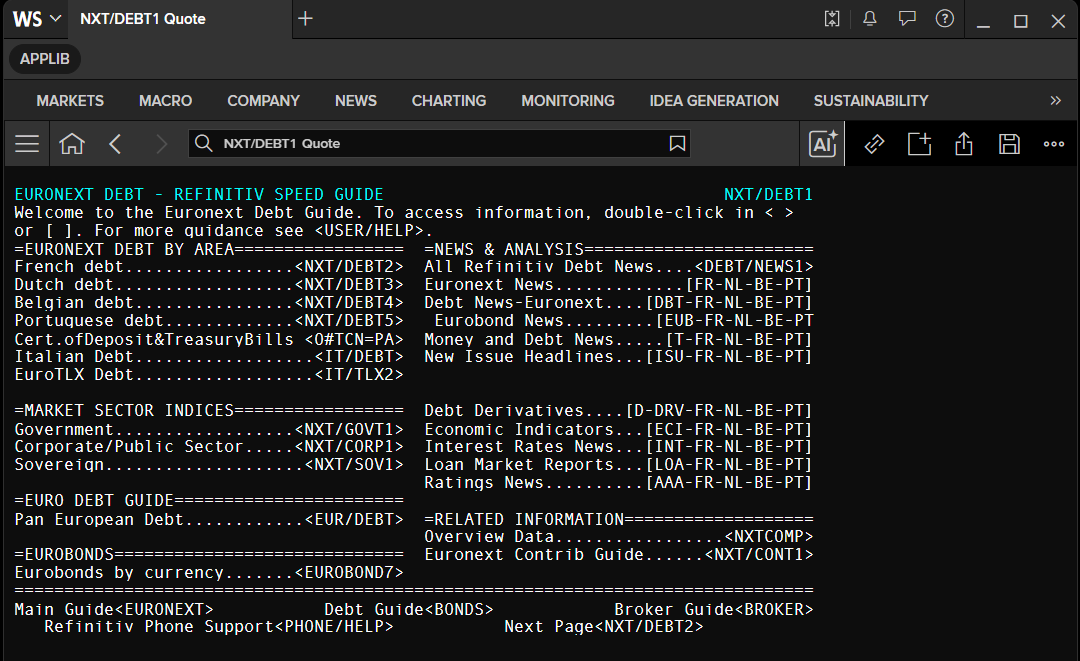
To navigate further, double-click on any code within the displayed page to load the next level of information. This process can be repeated until you reach the desired data. Alternatively, you may type the speed-guide code directly into the search bar and press Enter.
# Request page rows based on detected format
df = get_page_data('NXT/DEBT1')

# Print each returned row field and its value
for col in df.columns:
    print(f'{col}: {df[col].values[0]}')
    Instrument: NXT/DEBT1
    ROW80_1: EURONEXT DEBT - REFINITIV SPEED GUIDE                                  NXT/DEBT1
    ROW80_2: Welcome to the Euronext Debt Guide. To access information, double-click in < >
    ROW80_3: or [ ]. For more guidance see <USER/HELP>.
    ROW80_4: =EURONEXT DEBT BY AREA=================  =NEWS & ANALYSIS=======================
    ROW80_5: French debt.................<NXT/DEBT2>  All Refinitiv Debt News....<DEBT/NEWS1>
    ROW80_6: Dutch debt..................<NXT/DEBT3>  Euronext News.............[FR-NL-BE-PT]
    ROW80_7: Belgian debt................<NXT/DEBT4>  Debt News-Euronext....[DBT-FR-NL-BE-PT]
    ROW80_8: Portuguese debt.............<NXT/DEBT5>   Eurobond News.........[EUB-FR-NL-BE-PT
    ROW80_9: Cert.ofDeposit&TreasuryBills <0#TCN=PA>  Money and Debt News.....[T-FR-NL-BE-PT]
    ROW80_10: Italian Debt..................<IT/DEBT>  New Issue Headlines...[ISU-FR-NL-BE-PT]
    ROW80_11: EuroTLX Debt..................<IT/TLX2>
    ROW80_12:
    ROW80_13: =MARKET SECTOR INDICES=================  Debt Derivatives....[D-DRV-FR-NL-BE-PT]
    ROW80_14: Government..................<NXT/GOVT1>  Economic Indicators...[ECI-FR-NL-BE-PT]
    ROW80_15: Corporate/Public Sector.....<NXT/CORP1>  Interest Rates News...[INT-FR-NL-BE-PT]
    ROW80_16: Sovereign....................<NXT/SOV1>  Loan Market Reports...[LOA-FR-NL-BE-PT]
    ROW80_17:                                          Ratings News..........[AAA-FR-NL-BE-PT]
    ROW80_18: =EURO DEBT GUIDE=======================
    ROW80_19: Pan European Debt............<EUR/DEBT>  =RELATED INFORMATION===================
    ROW80_20:                                          Overview Data.................<NXTCOMP>
    ROW80_21: =EUROBONDS=============================  Euronext Contrib Guide......<NXT/CONT1>
    ROW80_22: Eurobonds by currency.......<EUROBOND7>
    ROW80_23: ================================================================================
    ROW80_24: Main Guide<EURONEXT>           Debt Guide<BONDS>            Broker Guide<BROKER>
    ROW80_25:    Refinitiv Phone Support<PHONE/HELP>           Next Page<NXT/DEBT2>
Field numbers
Every FID has a unique field number, which you can use as an alternative to the FID.
- Example: the field number for the closing price is
21.
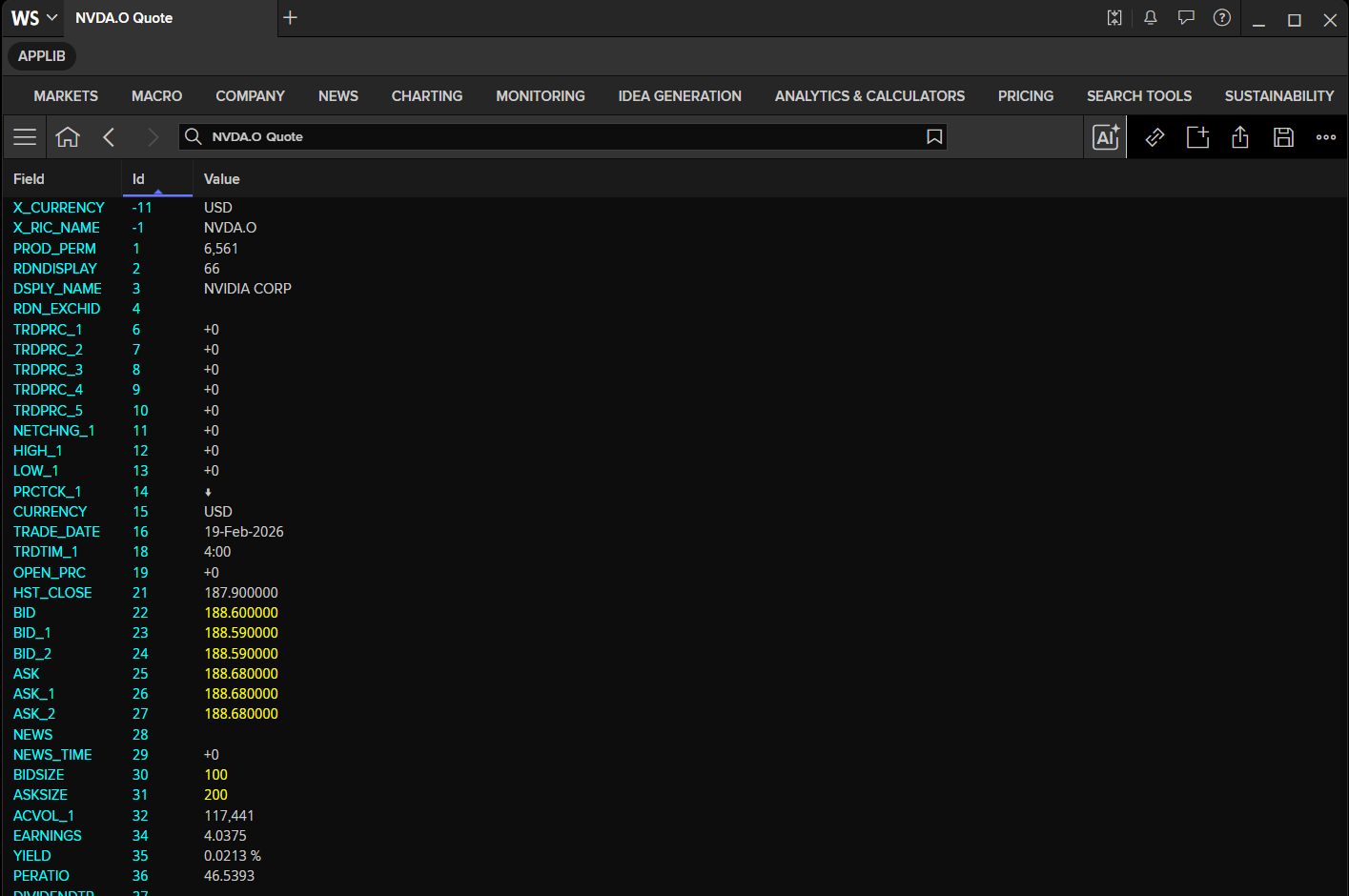
You can find each RIC's FIDs and Field Names details using the LSEG Workspace built-in app named Data Item Browser (type DIB in a search bar). Please find more detail on how to use the Data Item Browser application via this video.
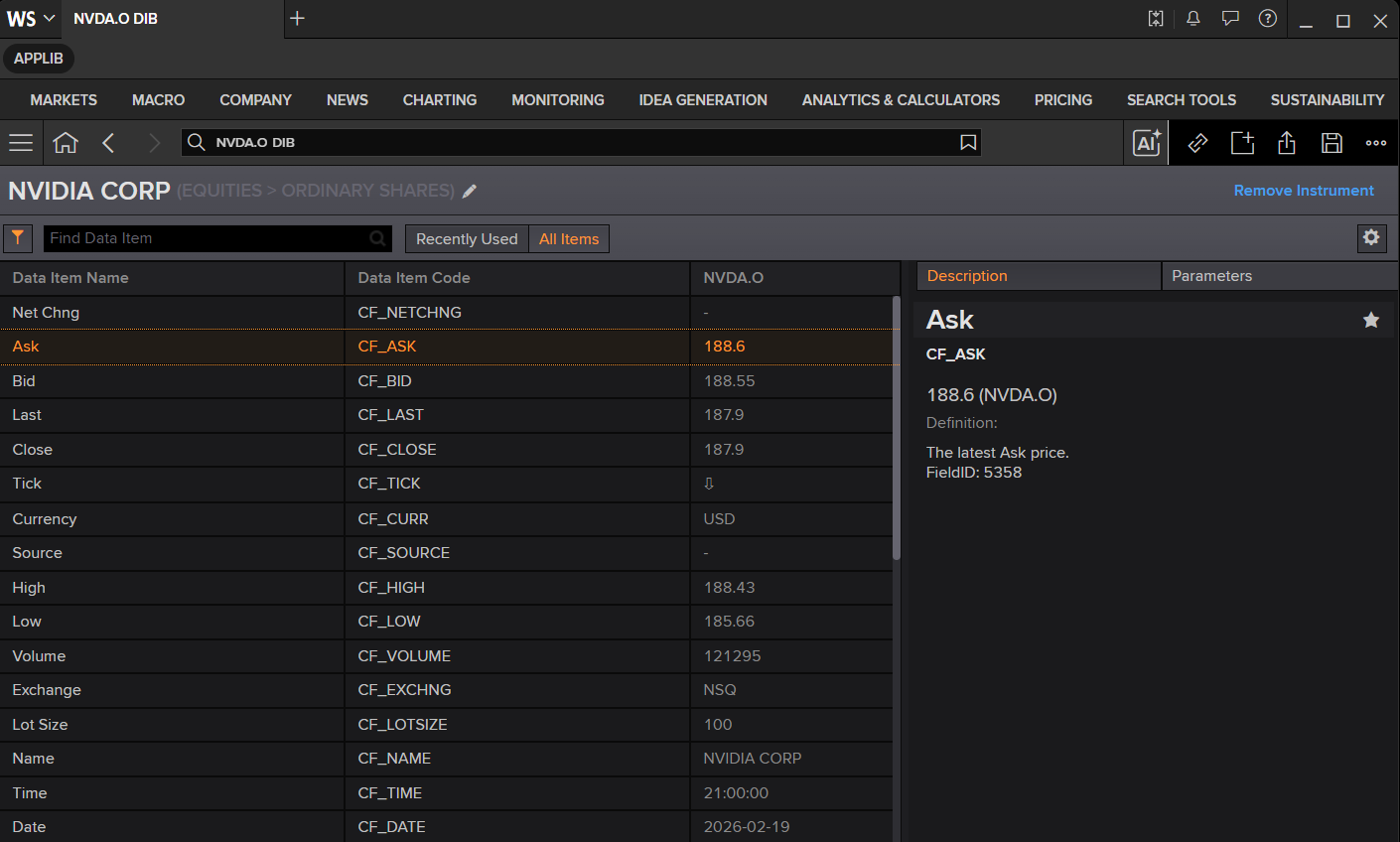
The another way to check the RIC's fields is by right-click on the Quote app and choose the Template --> Display All Fields option to display the RIC data as all the fields available.
In brief: RICs and pages
-
LSEG uses RICs and pages to display data.
-
RICs (Instrument Codes) are codes that provide a structured means of retrieving data.
- Full quotes – show all information about one financial instrument.
- Chains and tiles – show key information on several financial instruments.
-
To call up full quotes and tiles, type the code, then space and
qand pressEnter(Example:EUR= Q).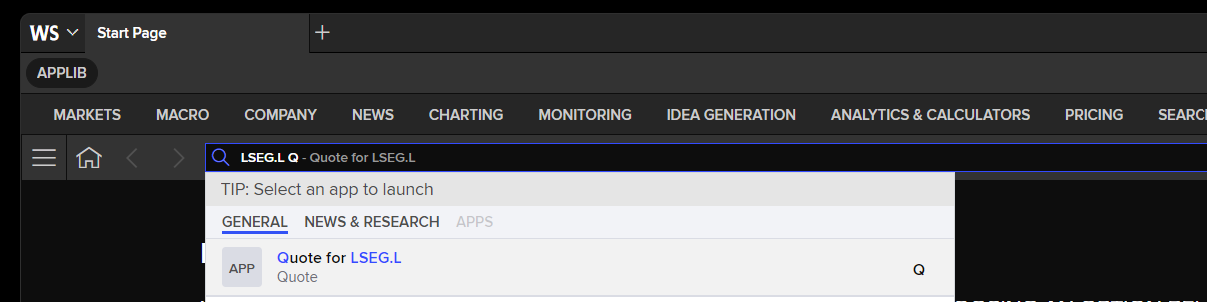
-
To call up chains (identified by
0#.): type the code with0#.and pressEnter(the chain key).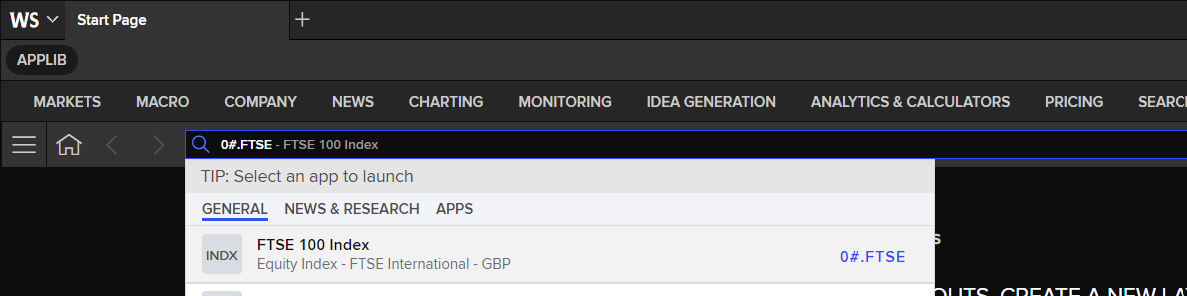
-
Pages are used by LSEG for speed-guides such as
REUTERS, and by financial institutions (banks, brokers) to display prices or market commentary.- See
CONTRIBUTIONSandBROKER.
- See
-
Pages are also used by third-party data providers, who take advantage of the LSEG network to provide specialist data or commentary.
The Data Library get_data and get_history methods support both full quote, chain, and page RICs. However, to expand the chain RICs, use the library Chain object together with the get_data and get_history methods.
The general RIC structure
RICs are built from different elements that are used to identify different aspects of the information you want to view. A RIC generally includes some, but not necessarily all, of the following elements:
- A RIC root.
- Period or time intervals.
- The instrument identifier.
- One or more delimiters.
- A source code.
These elements are necessary because of the diversity of markets that LSEG covers, and to avoid duplication of codes.
The RIC root
Because there are often several different issues or financial instruments based around a single entity, the RIC root identifies the most basic aspect of the instrument.
Examples:
- Money RIC roots:
- The RIC root for the euro one-month deposit (
EUR1MD=) isEUR.
- The RIC root for the euro one-month deposit (
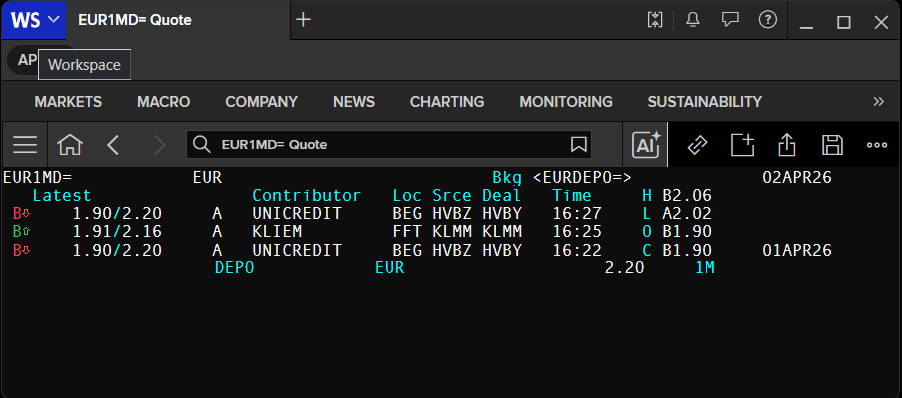
ld.get_data(
    universe=['EUR1MD='],
    fields=['BID','ASK','OPEN_PRC','HST_CLOSE','HSTCLSDATE']
)
| Instrument | BID | ASK | OPEN_PRC | HST_CLOSE | HSTCLSDATE | |
|---|---|---|---|---|---|---|
| 0 | EUR1MD= | 2.05 | 2.25 | 2.05 | 2.02 | 2026-04-08 |
What is the advantage of knowing about RIC roots?
If you know the RIC root and the other elements that make up specific instrument or code types, then you can combine these to get the code you need.
Example:
RIC roots are also useful when you use data in spreadsheets:
- You can split RICs into their components and therefore make efficient use of live links in Workspace Quote app.
Example: split the cross-rate GBPMYR=R into components:
GBP– base currency.MYR– counter-currency.=R– LSEG calculated cross-rate.
If you change MYR to another currency (for example HKD) in the relevant the Quote app, Workspace will immediately update the information.
This also works well for benchmarks in different countries or many other instruments.
result = ld.get_history(
    universe=['GBPTHB=R'],
    interval='monthly',
    start='2024-01-01',
    end='2025-01-30'
)
result
| GBPTHB=R | OPEN_ASK | BID_HIGH_1 | NUM_BIDS | ASK_LOW_1 | BID_LOW_1 | ASK | ASK_HIGH_1 | BID | OPEN_BID | MID_PRICE | MID_OPEN | MID_HIGH | MID_LOW |
|---|---|---|---|---|---|---|---|---|---|---|---|---|---|
| Date | |||||||||||||
| 2024-01-31 | 43.802 | 45.547 | 3328373 | 43.175 | 43.14 | 45.16 | 45.598 | 45.07 | 43.724 | 45.115 | 43.77 | 45.47 | 43.2435 |
| 2024-02-29 | 45.157 | 45.78 | 2744887 | 44.679 | 44.604 | 45.331 | 45.831 | 45.291 | 45.077 | 45.311 | 45.037 | 45.587 | 44.828 |
| 2024-03-31 | 45.335 | 46.173 | 2311432 | 45.268 | 45.222 | 45.946 | 46.213 | 45.906 | 45.288 | 45.926 | 45.37 | 46.0525 | 45.3475 |
| 2024-04-30 | 45.971 | 46.564 | 2444213 | 45.42 | 45.362 | 46.47 | 46.595 | 46.392 | 45.932 | 46.431 | 45.909 | 46.483 | 45.5205 |
| 2024-05-31 | 46.478 | 46.962 | 2414957 | 45.558 | 45.484 | 46.893 | 47.015 | 46.841 | 46.388 | 46.867 | 46.287 | 46.867 | 45.832 |
| 2024-06-30 | 46.856 | 47.015 | 1960824 | 46.271 | 46.231 | 46.512 | 47.059 | 46.472 | 46.805 | 46.492 | 46.8955 | 46.8955 | 46.4635 |
| 2024-07-31 | 46.523 | 47.071 | 2183933 | 45.643 | 45.559 | 45.732 | 47.111 | 45.677 | 46.465 | 45.7045 | 46.463 | 46.9745 | 45.7045 |
| 2024-08-31 | 45.732 | 45.704 | 2241814 | 44.404 | 44.335 | 44.761 | 45.784 | 44.523 | 45.677 | 44.642 | 45.342 | 45.342 | 44.5745 |
| 2024-09-30 | 44.73 | 45.064 | 2315488 | 43.017 | 42.97 | 43.388 | 45.094 | 43.305 | 44.5 | 43.3465 | 44.9875 | 44.9875 | 43.3 |
| 2024-10-31 | 43.378 | 43.993 | 2546890 | 43.081 | 43.013 | 43.641 | 44.081 | 43.582 | 43.315 | 43.6115 | 43.231 | 43.979 | 43.1675 |
| 2024-11-30 | 43.641 | 44.708 | 2656507 | 43.171 | 43.07 | 43.762 | 44.742 | 43.65 | 43.582 | 43.706 | 43.915 | 44.438 | 43.1835 |
| 2024-12-31 | 43.8 | 43.831 | 2261474 | 42.524 | 42.453 | 43.043 | 43.879 | 42.863 | 43.667 | 42.953 | 43.663 | 43.663 | 42.703 |
| 2025-01-31 | 43.06 | 43.405 | 2652863 | 41.637 | 41.488 | 41.923 | 43.478 | 41.841 | 42.887 | 41.882 | 42.9415 | 43.3475 | 41.744 |
Period or time intervals
The delivery period is a characteristic of the transaction, as opposed to maturity or expiration, which are characteristics of the instrument.
Examples of period or time intervals used in FX and money RICs:
ON– Overnight.TN– Tomorrow-next.SN– Spot-next.SW– Spot week.1M,2M,3M,6M,9M– one, two, three, six, nine months.1Y,2Y– one or two years.3X6,1X4– FRA periods (3 vs 6 months, etc.).
Examples in RICs:
EURON=EURSW=JPY3X6F=USD1YD=
These are primarily used in foreign exchange and money market RICs. For more information, see the Foreign exchange and money markets chapter.
These RICs are supported by the Data Library too.
result = ld.get_history(
    universe=['EURON='],
    interval='daily',
    start='2025-02-10',
    end='2025-02-20'
)
result
| EURON= | BID | ASK | BID_HIGH_1 | BID_LOW_1 | OPEN_BID | MID_PRICE | NUM_BIDS | ASK_LOW_1 | ASK_HIGH_1 | ASIAOP_BID | ... | EURLO_BID | EURCL_BID | AMEROP_BID | AMERHI_BID | AMERLO_BID | AMERCL_BID | OPEN_ASK | DAYS_MAT | MATUR_DATE | START_DT |
|---|---|---|---|---|---|---|---|---|---|---|---|---|---|---|---|---|---|---|---|---|---|
| Date | |||||||||||||||||||||
| 2025-02-11 | 0.476 | 0.484 | 0.52 | 0.0 | 0.435 | 0.48 | 16884 | 0.399 | 0.83 | 0.435 | ... | 0.0 | 0.473 | 0.464 | 0.52 | 0.254 | 0.476 | 0.495 | 1 | 20250212 | 20250211 |
| 2025-02-12 | 0.42 | 0.52 | 0.52 | 0.0 | 0.445 | 0.47 | 16744 | 0.395 | 0.69 | 0.445 | ... | 0.0 | 0.455 | 0.46 | 0.52 | 0.258 | 0.42 | 0.494 | 1 | 20250213 | 20250212 |
| 2025-02-13 | 0.472 | 0.481 | 0.52 | 0.25 | 0.462 | 0.4765 | 16288 | 0.404 | 0.69 | 0.462 | ... | 0.25 | 0.471 | 0.447 | 0.52 | 0.256 | 0.472 | 0.486 | 1 | 20250214 | 20250213 |
| 2025-02-14 | 1.841 | 1.876 | 2.12 | 0.427 | 0.427 | 1.8585 | 19028 | 0.49 | 2.52 | 0.427 | ... | 1.462 | 2.12 | 1.865 | 2.12 | 1.65 | 1.841 | 0.527 | 4 | 20250218 | 20250214 |
| 2025-02-17 | -0.015 | 0.015 | 0.52 | -0.19 | -0.19 | 0.0 | 9766 | -0.09 | 0.68 | -0.19 | ... | -0.015 | -0.015 | 0.42 | 0.52 | -0.05 | -0.015 | -0.09 | 0 | <NA> | <NA> |
| 2025-02-18 | 0.4575 | 0.4875 | 1.81 | -0.015 | -0.004 | 0.4725 | 22304 | 0.004 | 1.91 | -0.004 | ... | -0.015 | 0.47 | 0.4575 | 0.52 | 0.327 | 0.4575 | 0.004 | 1 | 20250219 | 20250218 |
| 2025-02-19 | 0.45 | 0.48 | 0.52 | -0.015 | 0.452 | 0.465 | 23224 | 0.015 | 0.7 | 0.452 | ... | 0.25 | 0.45 | 0.4625 | 0.52 | 0.328 | 0.45 | 0.502 | 1 | 20250220 | 20250219 |
| 2025-02-20 | 0.462 | 0.471 | 0.53 | -0.015 | 0.463 | 0.4665 | 22432 | 0.015 | 0.849 | 0.463 | ... | 0.0 | 0.4401 | 0.466 | 0.53 | 0.315 | 0.462 | 0.493 | 1 | 20250221 | 20250220 |
8 rows × 25 columns
ld.get_data(
    universe=['JPY3X6F='],
    fields=['BID','ASK','OPEN_PRC','HST_CLOSE','HSTCLSDATE']
)
| Instrument | BID | ASK | OPEN_PRC | HST_CLOSE | HSTCLSDATE | |
|---|---|---|---|---|---|---|
| 0 | JPY3X6F= | 1.0125 | 1.0325 | 1.0125 | 1.01125 | 2026-04-08 |
RIC Structure and Delimiters
Instrument codes are built from different elements that identify specific aspects of the data you want to view. They may include some — but not necessarily all — of the following elements, depending on the market and instrument type.
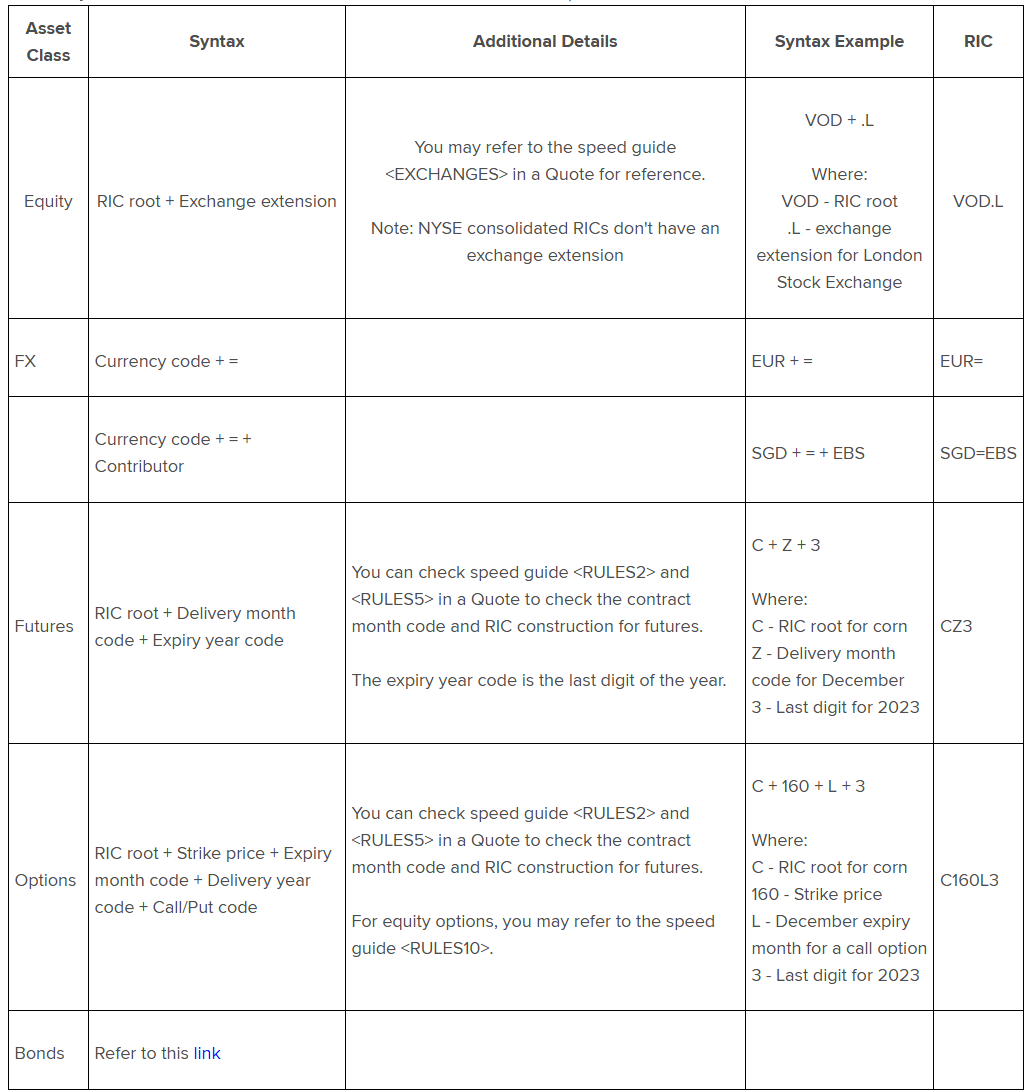
For more information, refer to the What are the different RIC structures in LSEG Workspace? document.
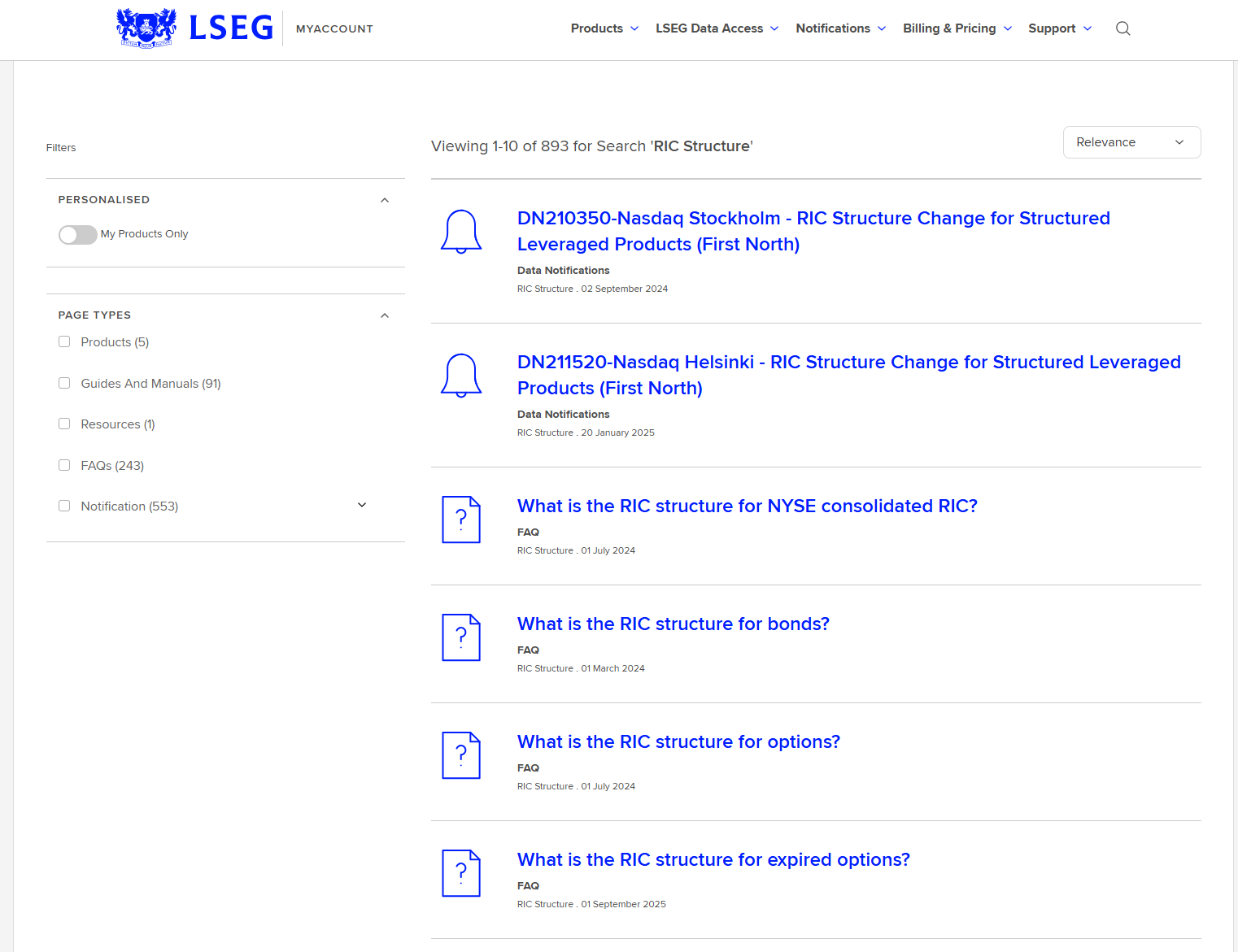
You can also search for RIC Structure on the LSEG MyAccount website to find RIC structure details and supported delimiters for other asset classes.
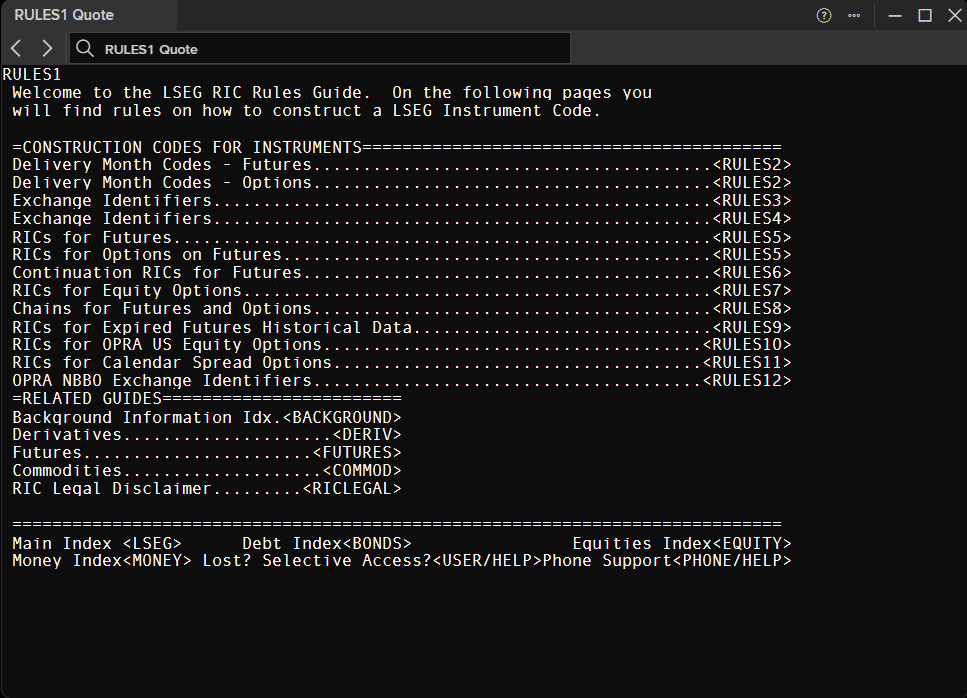
Alternatively, refer to the Speed Guide pages via the RULES1 RIC in the Quote application.
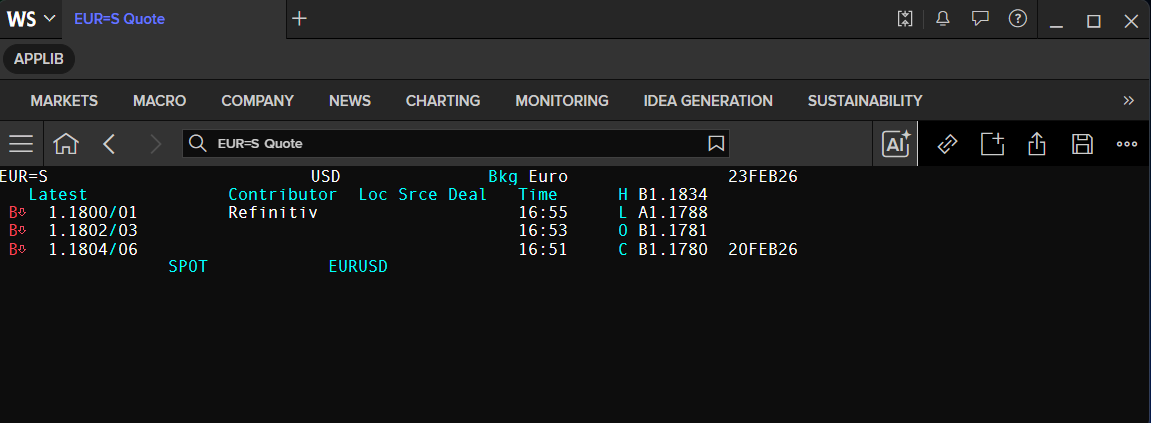
The following table lists some of the supported RIC delimiters:
| Separator | Instrument / Use | Example |
|---|---|---|
= | FX, money and capital markets | JPY1MD= |
/ | Prefix for closing or delayed data | /.FTSE |
/ | Within speed-guide names | WORLD/INDICES1 |
=X | Delayed FX (10-minute delay) | EUR=X |
=S | Snapshot FX (2-minute snapshot) | EUR=S |
. | Equities and equity options | LSEG.L |
: | Futures chains | 0#HSI: |
- | Physical commodities (type / specification / delivery location) | 0#AMI-JAG-TR |
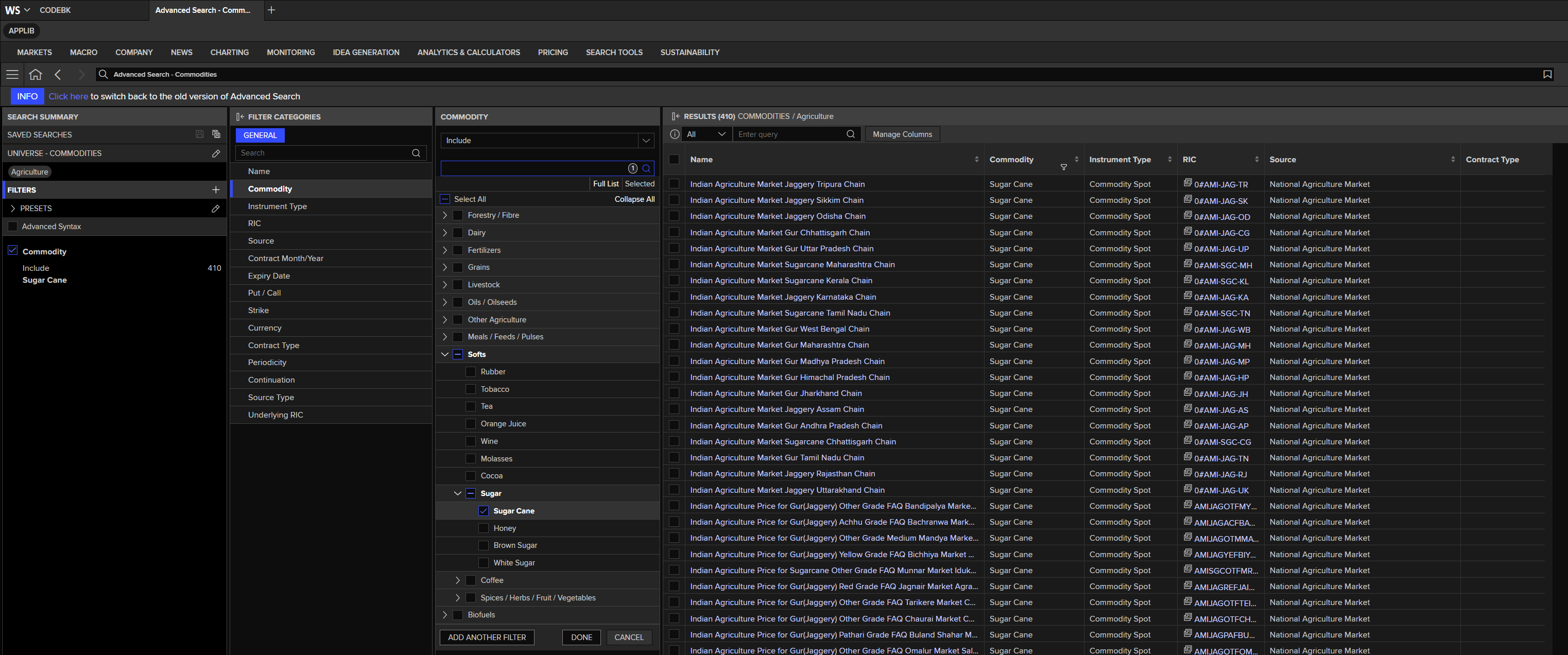
You can also use the Workspace Search app to find the data you need. The example below shows a search for sugar commodities RICs.
Source codes
The source code indicates the source of the data. It is usually the last component of a RIC.
The most common source codes are:
- Contributor code or Market Maker identifier.
- Exchange identifier.
Contributor code or Market Maker identifier
A contributor code identifies any organization that contributes information to the LSEG network. A Market Maker identifier is used to identify a Market Maker who contributes quotes to a particular instrument.
- The code is unique and consists of four upper-case letters.
Example:
EURTWI=DBBL– EURO Currency Index supplied by Deutsche Bank in London (DBBL).
You can use the Workspace Advanced Search to search for contributed data. Please find more detail on the Chapter 11 – Contributed data.
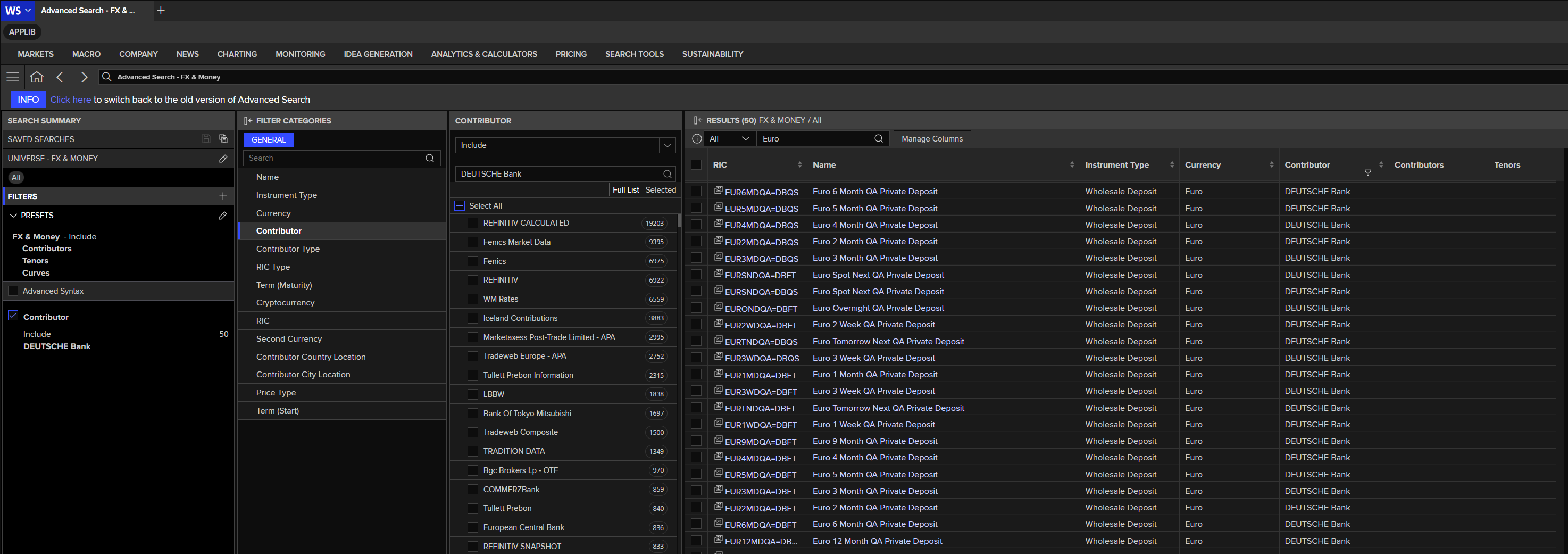
Once you have your interested RIC code, you can use the Data Library to get data dynamically.
ld.get_data('EURTWI=DBBL',fields=['BID', 'ASK'])
| Instrument | BID | ASK | |
|---|---|---|---|
| 0 | EURTWI=DBBL | 128.53 | 128.58 |
Exchange identifier
The exchange identifier identifies the exchange where an instrument is traded. It consists of up to three upper- or lower-case letters.
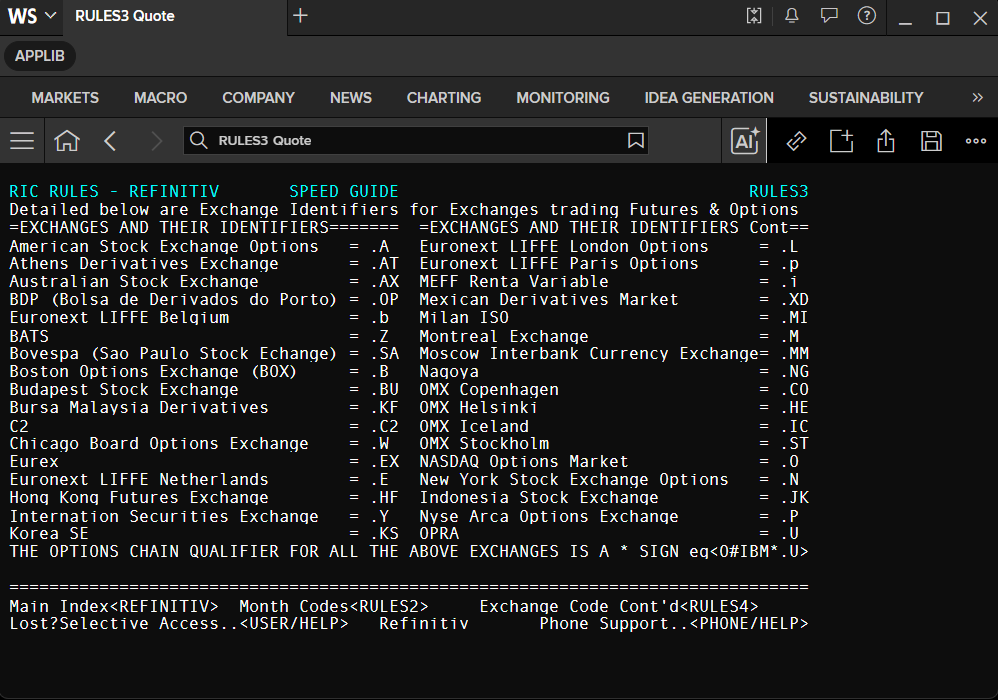
- Exchange identifiers for cash prices: page
STOCLand beyond. - Identifiers for derivatives exchanges: page
RULES3.
Example:
VOD.L– Vodafone group:VOD– RIC root..– delimiter.L– exchange identifier for London Stock Exchange.
In brief: general RIC structure
A RIC can often be constructed just by knowing its components, which is an effective way of working in data display or spreadsheet applications.
Diverse market conventions and instrument types make it necessary to have different RIC structures for each market, but the main elements are:
-
RIC root
- Examples:
RTR,SUG,EUR,CHF.
- Examples:
-
Period and time intervals
- Examples:
ON,SN,SW,1M,2M,3M,6M,9M,1Y,2Y,1X4,2X5,1X6.
- Examples:
-
Delimiters
- Characters such as
+,=,.,/,:,!,*,^.
- Characters such as
-
Source codes
- Contributor / Market Maker identifier.
- Exchange identifier.
Tip 1: To see a full quote from a chain, just double-click on the item.
Tip 2: All news stories for all companies in an index chain can be viewed by activating the window with the chained information and pressing the News key (
F9).
Troubleshooting
Question 1: I got the record could not be found message instead of data from the Workspace desktop application and ld.get_data method.
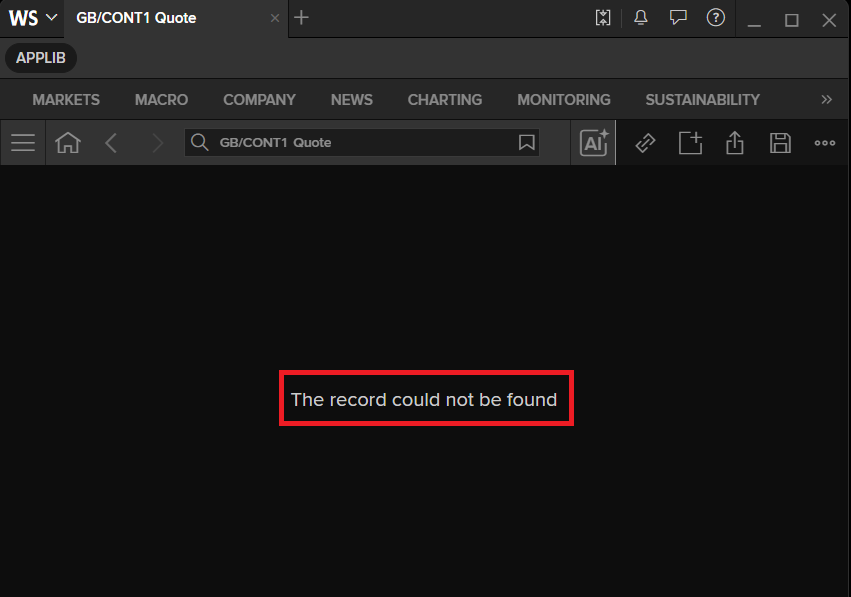
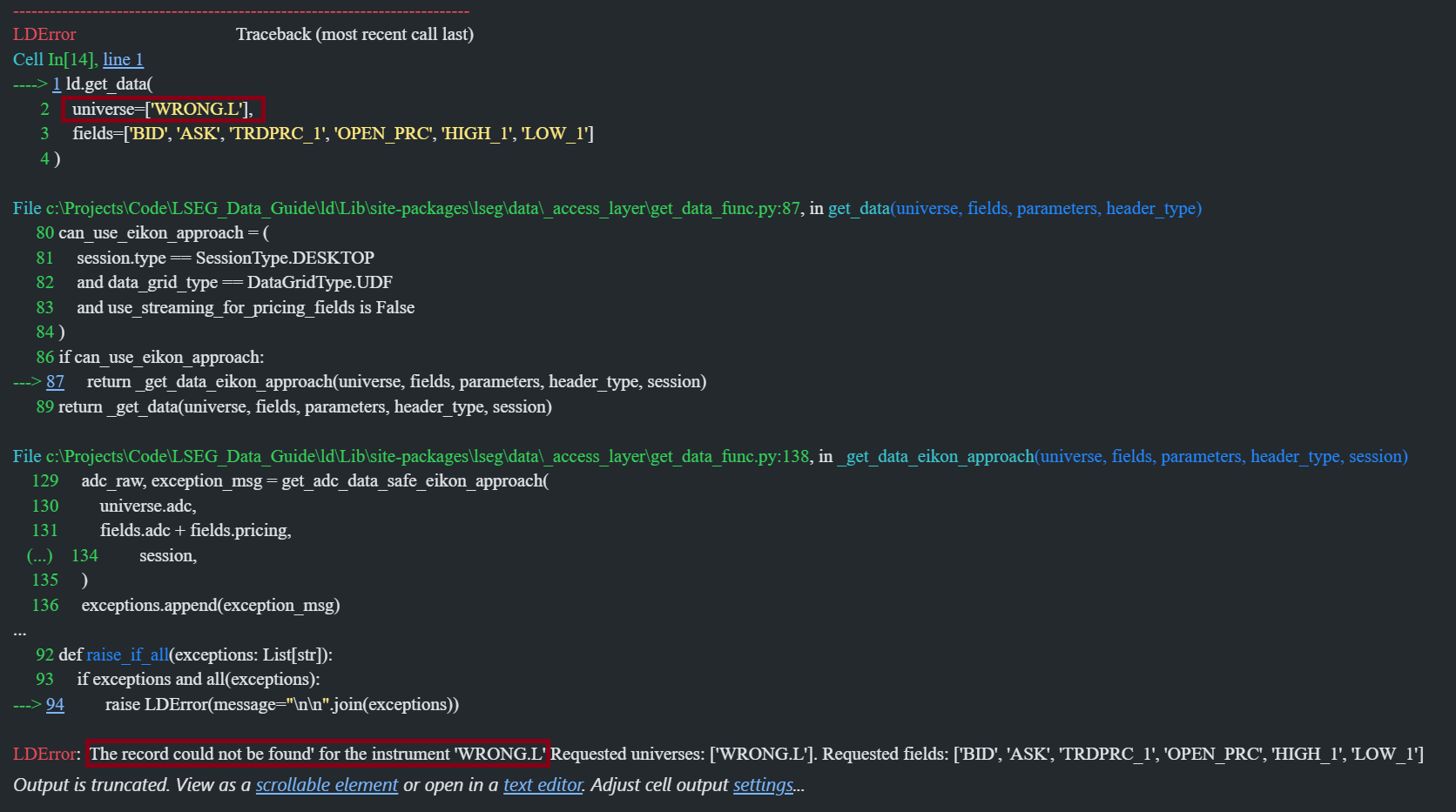
Answer: The the record could not be found error message means the inputted instrument is not available on the Workspace platform or you have input invalid instrument name (invalid syntax, wrong case letter, etc.).
Question 2: I got The universe is not found message instead of data from ld.get_history method.
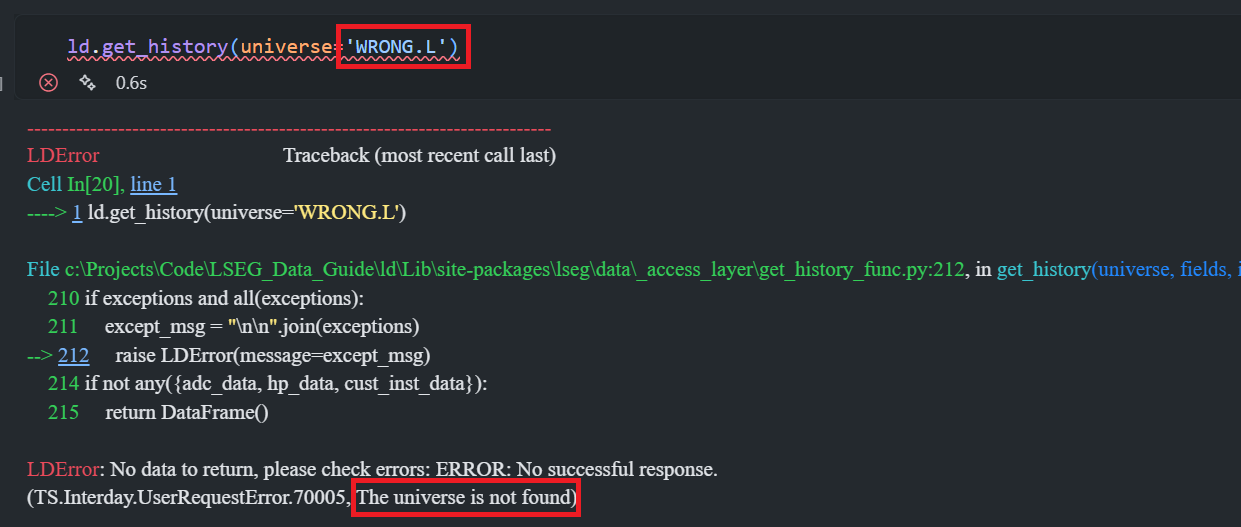
Answer: The The universe is not found error message has the same meaning as the the record could not be found for the historical data request.
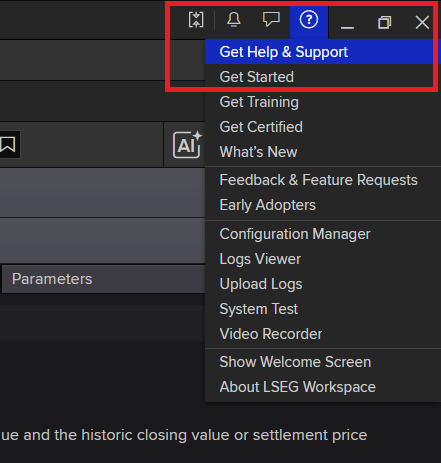
If you got the error messages above, please contact the Workspace Support Team to verify the instrument names that you need. To contact the LSEG Help Desk, please click on the Get Help & Support option on the ? menu of LSEG Workspace.
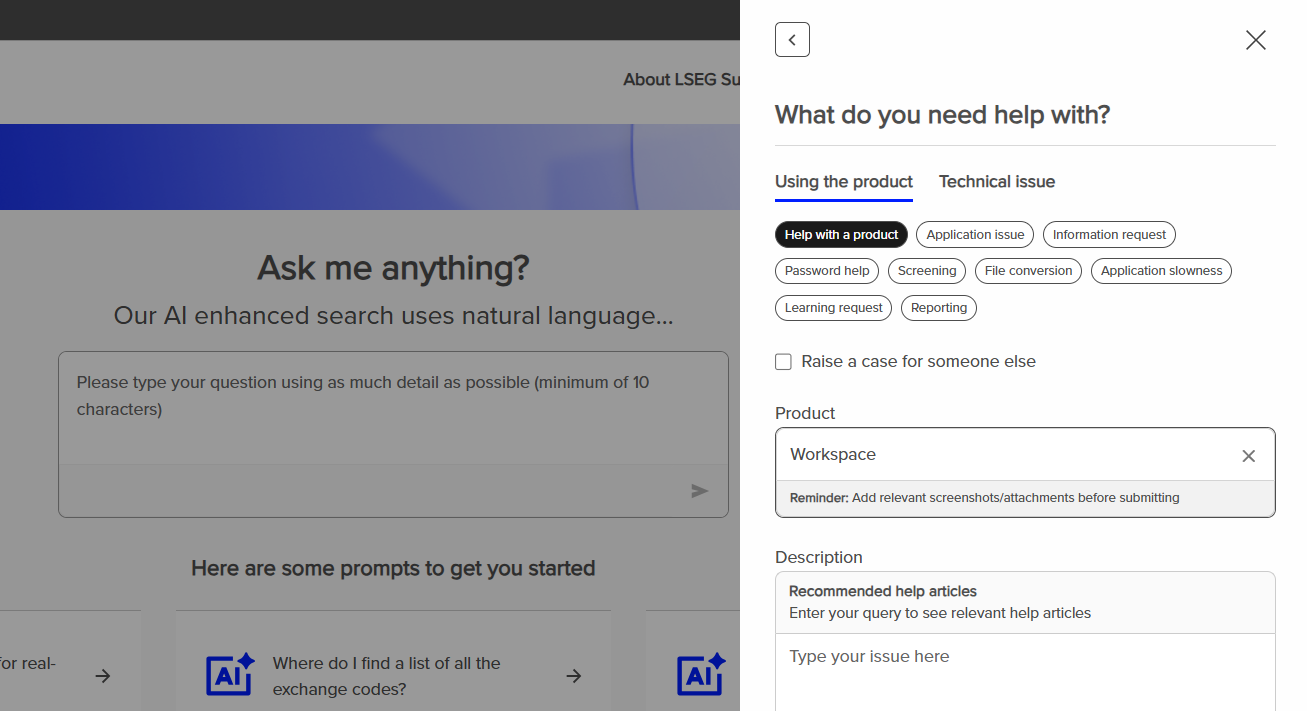
Alternatively, you can submit a support ticket via LSEG Support website.
Question 3: I got The access to field(s) denied. message from the Data Library. I can get that field via the Workspace Desktop application.
Answer: This is a permission issue. Please note that some instruments data and fields are available via the Workspace desktop or Excel application only, not API/Library. The reason is some data is not entitlement for programmatic consumption or the source of data can be different between the Workspace application and the Library. Some users may have a permission to access the data in Workspace, but not via the Data Library.
Please contact the Workspace Support Team to verify the field and RIC entitlement.
Ending the Data Library Session
To end the Data Library session, please use the ld.close_session method.
ld.close_session()