
Upgrading to Workspace
We will be discontinuing the Eikon Desktop soon in favour of our next generation data and analytics workflow solution, LSEG Workspace. This page is designed to help you assess any changes you may need to make to programmatic (API) workflows. We also provide resources here to help you make those changes as well.
Upgrading to Workspace


Other related resources
Custom Application COM API Upgrade:
RSearch.dll
Prerequisites
COM Prerequisites
VBA Prerequisites
Open a new single sheet Excel workbook.
Save As with an appropriate name (e.g. AdxRtSourceList.xls or AdxRtSourceList.xlsm in Office 2007 or higher).
Go to the VBE (Visual Basic Editor), ensure the Project Explorer is visible and select the project for the workbook.
<ALT><F11> or Tools, Macro, Visual Basic Editor in Excel 2003 or Developer, Visual Basic in Excel 2007 and above, View, Project Explorer If the Developer header is not visible in Excel 2007 and above, go to the Excel Office Button, select Excel Options (lower right), Popular, and check the 'Show Developer tab in the Ribbon' box.
In the VBE, click on File, Import File and import PLVbaApis.bas.
The .bas location is C:\Program Files (x86)\Thomson Reuters\Eikon\Z\Bin (Z may be X or Y, depending on the last Eikon update). The .bas is loaded as a new VB project module, PLVbaApis.
In the PLVbaAPis module, comment out the sections which aren't required.
E.G.: when dealing with AdxRtSourceList, part of the real time library AdfinXRtLib, the AdfinX Real Time section can remain uncommented.
In the VBE, go Tools, References and ensure that AdfinX Real Time Library is checked.
If it is not in the list the library is called rtx.dll and its location for Eikon 4 is ">C:\Program Files (x86)\Thomson Reuters\Eikon\Z\Bin (Z may be X or Y, depending on the last Eikon update).
Documentation on using the COM API in the Microsoft Office suite is available here: COM APIs for Microsoft Office. Users were also able to use the COM APIs outside of Microsoft Office suite for example in a standalone app: COM APIs for use in custom applications. A list of the prerequisites in question can be found in the index of this article.
Python Prerequisites
If you are new to Python, don't hesitate to install it on your machine and try it out yourself as outlined in this 3rd party tutorial. Otherwise, you can simply use Codebook as outlined in this Tutorial Video.
Python works with libraries that one can import to use functionalities that are not natively supported by the base coding package. Some popular distributuions of python include many of the popular packages that one could use for various tasks - Anaconda is the most popular such distribution.
The RD Library allows for code portability across the desktop and enterprise platforms - with only small changes in authentication credentials. These credentials are stored in a config file - but if you are just using the desktop you need not concern yourself with this as a desktop session is the default credential setup.
<refinitiv.data.session.Definition object at 0x7fa34230ac18 {name='workspace'}>
Prerequisites
COM Prerequisites
VBA Prerequisites
Open a new single sheet Excel workbook.
Save As with an appropriate name (e.g. AdxRtSourceList.xls or AdxRtSourceList.xlsm in Office 2007 or higher).
Go to the VBE (Visual Basic Editor), ensure the Project Explorer is visible and select the project for the workbook.
<ALT><F11> or Tools, Macro, Visual Basic Editor in Excel 2003 or Developer, Visual Basic in Excel 2007 and above, View, Project Explorer If the Developer header is not visible in Excel 2007 and above, go to the Excel Office Button, select Excel Options (lower right), Popular, and check the 'Show Developer tab in the Ribbon' box.
In the VBE, click on File, Import File and import PLVbaApis.bas.
The .bas location is C:\Program Files (x86)\Thomson Reuters\Eikon\Z\Bin (Z may be X or Y, depending on the last Eikon update). The .bas is loaded as a new VB project module, PLVbaApis.
In the PLVbaAPis module, comment out the sections which aren't required.
E.G.: when dealing with AdxRtSourceList, part of the real time library AdfinXRtLib, the AdfinX Real Time section can remain uncommented.
In the VBE, go Tools, References and ensure that AdfinX Real Time Library is checked.
If it is not in the list the library is called rtx.dll and its location for Eikon 4 is ">C:\Program Files (x86)\Thomson Reuters\Eikon\Z\Bin (Z may be X or Y, depending on the last Eikon update).
Documentation on using the COM API in the Microsoft Office suite is available here: COM APIs for Microsoft Office. Users were also able to use the COM APIs outside of Microsoft Office suite for example in a standalone app: COM APIs for use in custom applications. A list of the prerequisites in question can be found in the index of this article.
Python Prerequisites
If you are new to Python, don't hesitate to install it on your machine and try it out yourself as outlined in this 3rd party tutorial. Otherwise, you can simply use Codebook as outlined in this Tutorial Video.
Python works with libraries that one can import to use functionalities that are not natively supported by the base coding package. Some popular distributuions of python include many of the popular packages that one could use for various tasks - Anaconda is the most popular such distribution.
The RD Library allows for code portability across the desktop and enterprise platforms - with only small changes in authentication credentials. These credentials are stored in a config file - but if you are just using the desktop you need not concern yourself with this as a desktop session is the default credential setup.
<refinitiv.data.session.Definition object at 0x7fa34230ac18 {name='workspace'}>
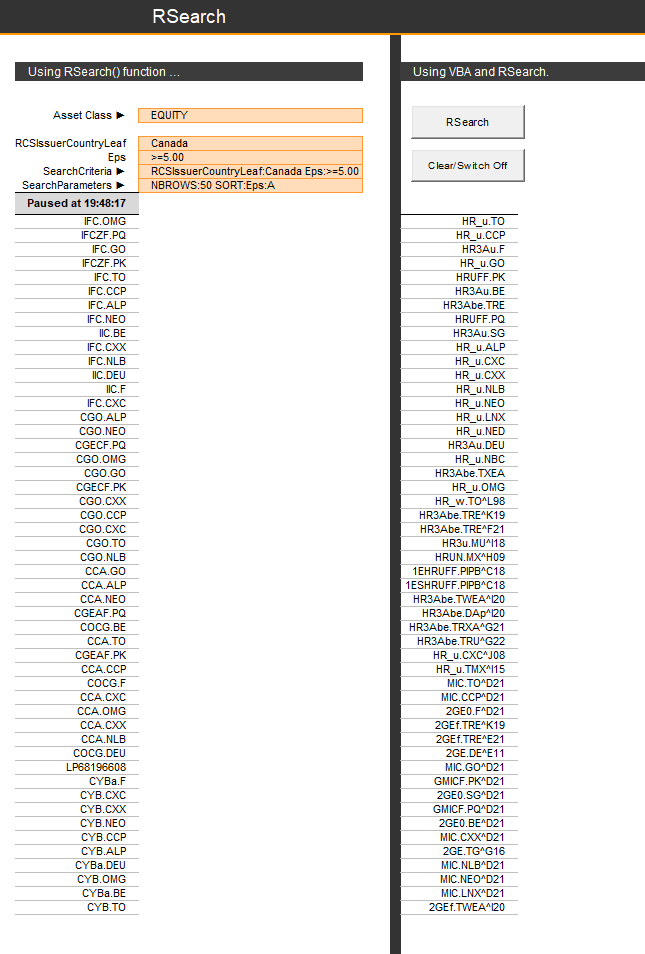
RSearch is a powerful COM API function. It was best exemplified in Tutorial 7 - Instrument Search - RSearch's Excel Workbook.
VBA
Creating the sub cmdRSearch_Click:
' Instantiate the RSearch manager
Set myRSrchMgr = CreateRSearchMgr()
If Not myRSrchMgr Is Nothing Then
' Initialize RSearch session (we do not provide any logger here)
' NOTE - This will error if Eikon for Excel is not logged in.
myRSrchCookie = myRSrchMgr.Initialize(RS_CT_EIKON)
' Create a RSearch query using the session cookie
Set myRSrchQry = myRSrchMgr.CreateRSearchQuery(myRSrchCookie)
If Not myRSrchMgr Is Nothing Then
With myRSrchQry
'Initialize the RSearch query with the criteria to use for the search
.AssetClass = [AssetClass].Value
.SearchCriteria = [SearchCriteria].Value '"EPS:>5 RCSIssuerCountryLeaf:Canada"
.SearchParameters = [SearchParameters].Value '"NBROWS:50 SORT:EPS:A"
' Send the query
.Send
End With
End If
End If
Then you can check the status of the query with 'myRSrchQry_OnUpdate'.
Python
RSearch is a powerful COM API function, and we're happy to announce that the Python equivalent - Search API - is even more powerful. For the full works on it, please do read Nick Zicone's article 'Building Search into your Application Workflow'.
The code below is a simple example of how one may use the Search API in Python. The last example requests M&A data using the filters specified above and orders the data by the announcement date in descending order. More on how you can use search, including guidance, examples, and tips to determine the possible approaches, from simple discovery through experimentation to more advanced techniques, are presented in this article. More is shown here.
| CommonName | IssuerCommonName | IssueCouponRate | Currency | IssuerCountryName | |
| 0 | TTN 2.375 11/16/24 '24 | Titan Global Finance PLC | 2.375 | EUR | United Kingdom |
| 1 | BNP 4.000 10/21/23 | Banca Nazionale del Lavoro SpA | 4 | EUR | Italy |
| CommonName | PriceCloseUsd | MktCapCompanyUsd | |
| 0 | APPLE ORD | 151.03 | 2.38959E+12 |
| 1 | MICROSOFT ORD | 255.29 | 1.90033E+12 |
| 2 | ALPHABET CL A ORD | 93.65 | 1.20158E+12 |
| 3 | SAUDI ARABIAN OIL ORD | 8.526739 | 1.87588E+12 |
| 4 | ALPHABET CL C ORD | 94.02 | 1.20158E+12 |
Number of M&A deals for the specified period is 326
| TransactionAnnouncementDate | TargetCompanyName | TargetRIC | |
| 0 | 15/11/2021 | CyrusOne Inc | [CONE.O^C22] |
| 1 | 15/11/2021 | CoreSite Realty Corp | [COR^L21] |
| 2 | 15/11/2021 | LAACO Ltd | [LAACZ.PK^L21] |
| 3 | 15/11/2021 | Casper Sleep Inc | [CSPR.K^A22] |
| 4 | 08/11/2021 | McAfee Corp | [MCFE.O^C22] |
A more complex method may be to create a function that incorporates that search function, outputing an excel file. This is a real-life use case replicating RSearch functionality's in looking for Government and Corporate Debt Instruments; the function is rather large, so we put it online for you to access.
The RD Library has also added a number of ease-of-use features as the Search API is very comprehensive - but with that comes some complexity. Search Templates is one such useful feature.
The "Mines" and "VesselsBoundFor" templates shown here are template examples that you can modify and adapt to your needs. They are defined in the "search-templates.config.json" configuration file. Below is a brief description of the parameters you can use for each template definition.
Search templates are defined using the following JSON structure
- description (string): Description of the template.
- parameters (object): Parameters of the template. These parameters can be used as placeholders in the request_body of the template and as named parameters of the search() method of the template. Each parameter has a name, a description, and an optional default value.
- request_body (object): Body of the request sent to the Search REST API. This request body can include template parameters surrounded by '#{' and '}' (for example: “#{my_param}”). More details on the structure of the request body can be found in the Search API reference guide (access to this guide requires a Refinitiv Workspace account or RDP account to log in).
Template example
"MyTemplate": {
"description": "Search template example.",
"parameters": {
"name": {
"description": "Name of the person to search for.",
"default": "Edison"
}
},
"request_body": {
"Query": "#{name}",
"View":"People",
"Top":10
}
}
rd.discovery.search_templates["MyTemplate"].search(name="Pasteur")
<ConfigurationSet: 0x7fe91a3c3908>
Mine Search Template example
Get help about this template
Help on DiscoverySearchTemplate in module refinitiv.data.discovery._search_templates.search object:
class DiscoverySearchTemplate(refinitiv.data.discovery._search_templates.base.TargetTemplate)
| DiscoverySearchTemplate(name=None, *, placeholders_defaults: Union[Dict[str, Any], NoneType] = None, pass_through_defaults: Union[Dict[str, Any], NoneType] = None, optional_placeholders: Iterable[str] = None, ns: 'Namespace' = None, **search_defaults)
|
| Discovery search preset class
|
| Method resolution order:
| DiscoverySearchTemplate
| refinitiv.data.discovery._search_templates.base.TargetTemplate
| builtins.object
|
| Methods defined here:
|
| __repr__(self)
| Return repr(self).
|
| search(self, **kwargs) -> pandas.core.frame.DataFrame
| Please, use help() on a template object itself to get method documentation
|
| ----------------------------------------------------------------------
| Methods inherited from refinitiv.data.discovery._search_templates.base.TargetTemplate:
|
| __init__(self, name=None, *, placeholders_defaults: Union[Dict[str, Any], NoneType] = None, pass_through_defaults: Union[Dict[str, Any], NoneType] = None, optional_placeholders: Iterable[str] = None, ns: 'Namespace' = None, **search_defaults)
| Parameters
| ----------
| name : str, optional
| name of the template
| placeholders_defaults: dict, optional
| Dict of string template placeholders default values.
| pass_through_defaults: dict, optional
| default values for the Target parameters
| optional_placeholders: Iterable[str], optional
| names of placeholders that are optional without default values
| ns: Namespace
| Namespace in which template will operate. Used for subtemplates.
|
| ----------------------------------------------------------------------
| Data descriptors inherited from refinitiv.data.discovery._search_templates.base.TargetTemplate:
|
| __dict__
| dictionary for instance variables (if defined)
|
| __weakref__
| list of weak references to the object (if defined)
Map(center=[-26.416700363159, 27.666700363159], controls=(ZoomControl(options=['position', 'zoom_in_text', 'zo…
| RIC | RCSRegionLeaf | RCSCommodityTypeLeaf | DTSubjectName | PhysicalAssetStatus | Latitude | Longitude | |
| 0 | C}PX7309413492 | South Africa | Gold | South Deep | Normal Operation | -26.4167 | 27.6667 |
| 1 | C}PX7309413493 | South Africa | Gold | Target | Normal Operation | -27.76 | 26.63 |
| ... | ... | ... | ... | ... | ... | ... | ... |
| 91 | C}PX7310054031 | South Africa | Gold | Far West Gold Recoveries (FWGR) | Normal Operation | -26.3895 | 27.36032 |
| 92 | C}PX7310101973 | South Africa | Gold | Mine Waste Solutions | Normal Operation | -26.8417 | 26.8667 |
Conclusion
In conclusion, we can see that the Office COM API had many great uses, but limitations too. This was without mentioning its reliability on DLLs that can be heavy to run on a personal machine. But the Refinitiv Python Libraries (RD, RDP and EDAPI) can not only replicate these COM functionalities but enhance them in many instances, the simplest example being the Historical News functionality shown above.
Several COM API functionalities relying on a technology called Adfin was not replicated in Python in this article, but we will investigate them in another article - so stay tuned!
Further Resources
COM APIs: Overview | Quickstart Guide | Documentation | Downloads | Tutorials | Q&A Forum
RD Library: Overview | Quickstart Guide | Documentation | Tutorials | Q&A Forum