
Author

Jirapongse Phuriphanvichai
Developer Advocate
Platform Administration is an administrative portal that enables customer administrators to manage applications, service accounts, licenses, and entitlements for LSEG platforms.
A service account is a non-human account used by applications, services, and automated processes to access LSEG APIs and data. Each service account is associated with an application and must be configured with an authentication method before it can be used.
Platform Administration supports two service account authentication methods:
- Client Secret Authentication: Uses a service account ID and generated secret (password).
- JWT Assertion Authentication: Uses public/private key cryptography and signed JSON Web Tokens (JWTs).
This article explains how to create a service account using Client Secret Authentication, securely manage the generated secret, and use it to obtain access tokens for API access.
Note: For the JWT Assertion Authentication, please refer to this Setting Up JWT Assertion Authentication for a Service Account article.
Quick Decision Guide
Use Client Secret for simple internal applications, development environments, and scenarios where a shared secret can be securely stored. Use JWT Assertion for production, enterprise, or high-security environments, where asymmetric cryptography provides stronger security, easier key rotation, and better compliance.
In general, Client Secret prioritizes simplicity, while JWT Assertion prioritizes security.
Scenario |
Recommended Approach |
Simple internal service |
Client Secret |
Development environment |
Client Secret |
Short-term prototype |
Client Secret |
Production enterprise system |
JWT Assertion |
Banking / financial APIs |
JWT Assertion |
Service with certificate infrastructure |
JWT Assertion |
Note: This guidance is intended as a recommendation and is not mandatory.
What is Client Secret Authentication?
Client Secret Authentication is a service account authentication method that uses a Service Account ID and a Client Secret (password) to verify the identity of an application. It is the simplest authentication method available for service accounts and is commonly used by applications, scripts, and automated processes that need to access LSEG APIs and services.
When a service account is created in Platform Administration with the Secret authentication method, the platform generates a unique client secret. The Client Secret is displayed as a generated password during creation. The application uses the Service Account ID and Client Secret to authenticate with the LSEG authorization server and request an access token.
Prerequisites
Before creating a service account, ensure that:
- You have access to the Platform Administration application.
- An application has already been created under the appropriate location account.
- You have sufficient permissions to manage applications and service accounts.
Creating a Service Account with Client Secret Authentication
This section guides administrators through creating or selecting an application, adding a service account with Secret authentication, choosing the appropriate access token type, and securely recording the generated service account ID and password. It also explains how to assign the required real-time, watchlist, data product, and optional exchange or specialist data licences so the account can retrieve an access token and access LSEG services.
Step 1: Navigate to Application Management
1. Sign in to the Platform Administration application.
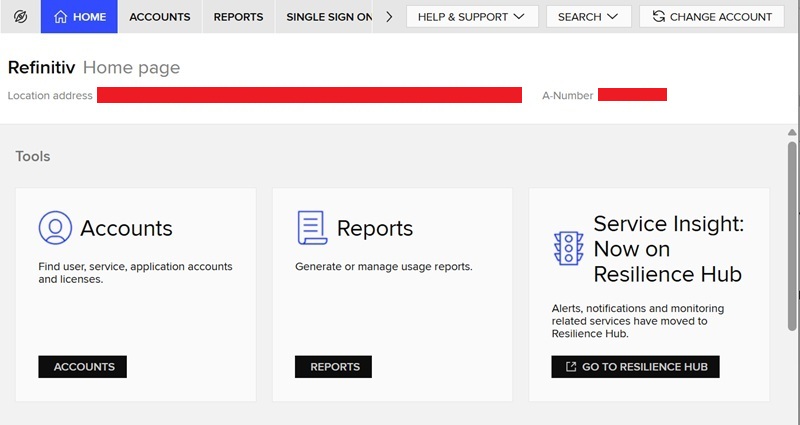
2. Select the appropriate Location Account.
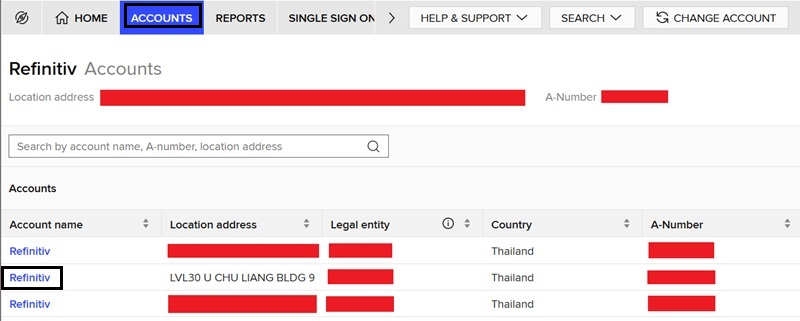
3. Open Application Management.
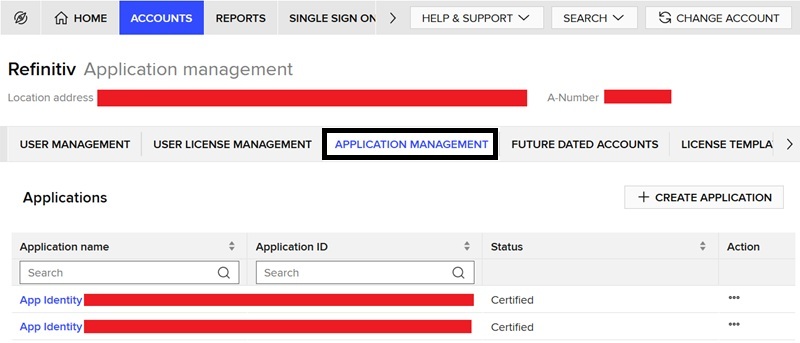
4. Create a new application or select the target application.
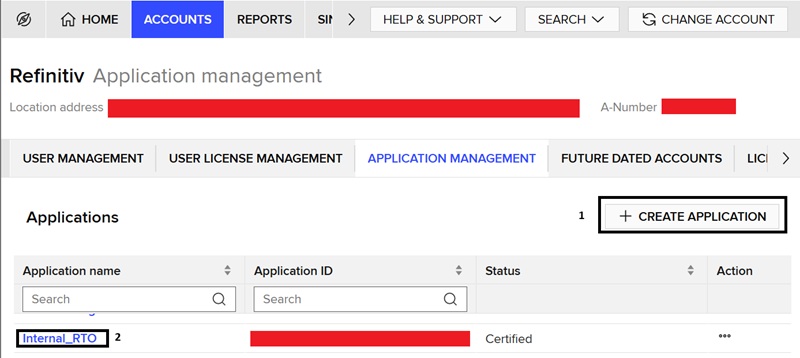
You can either (1) create a new application, or (2) select an existing application.
To create a new application, click on the CREATE APPLICATION button, enter an application name, and click on the ADD APPLICATION button.
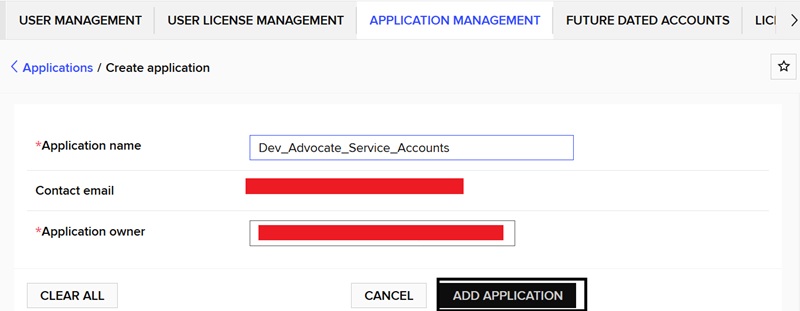
Then, click on the CERTIFY button to certify the application.
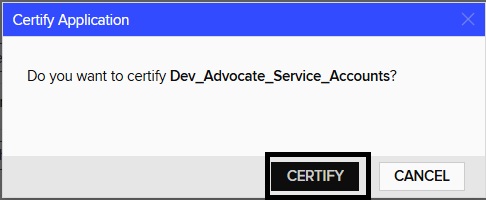
The new application will be created.
Step 2: Create a New Service Account
1. Open the application details page.
The application details page will be displayed when the application is created or selected.
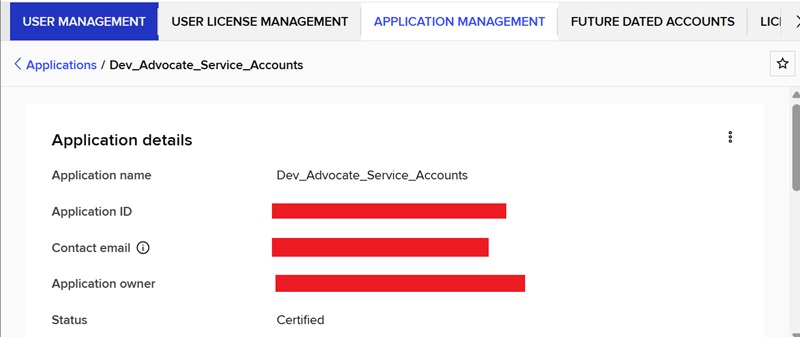
Scroll down to the Service accounts section.
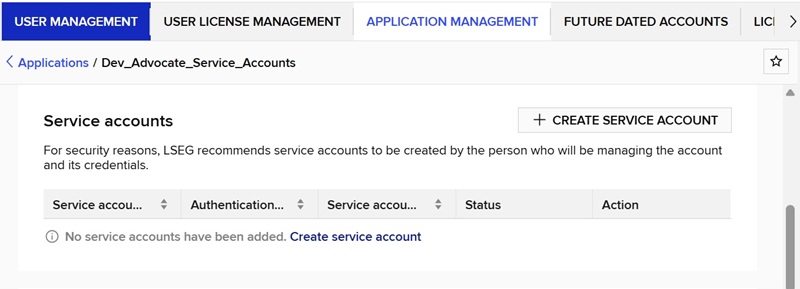
2. Create New Service Account.
Click on the CREATE SERVICE ACCOUNT button to create a new service account.
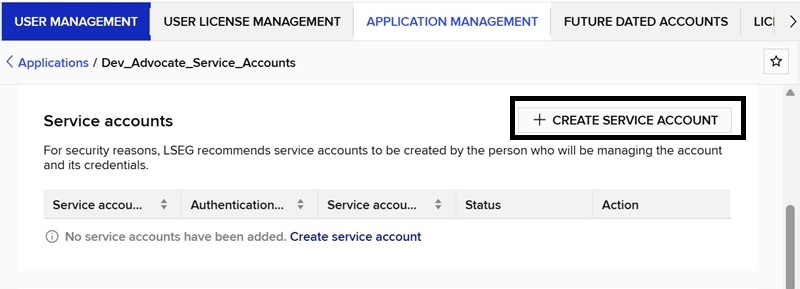
The service account creation form allows you to enter the account name and select the authentication method.
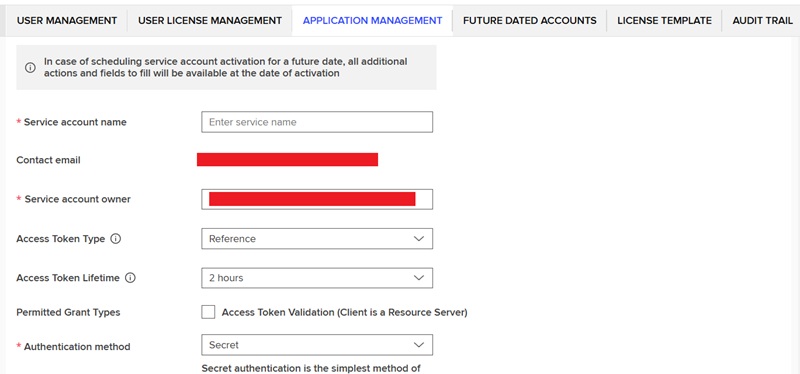
Step 3: Select the Secret Authentication Method
On the service account form:
- Enter a meaningful service account name.
- Select the Access Token Type (Reference or JWT). For the Real-Time Optimized connection, the Access Token type must be Reference.
- Select Secret as the authentication method.
- Review the entered information.
- Click Save.
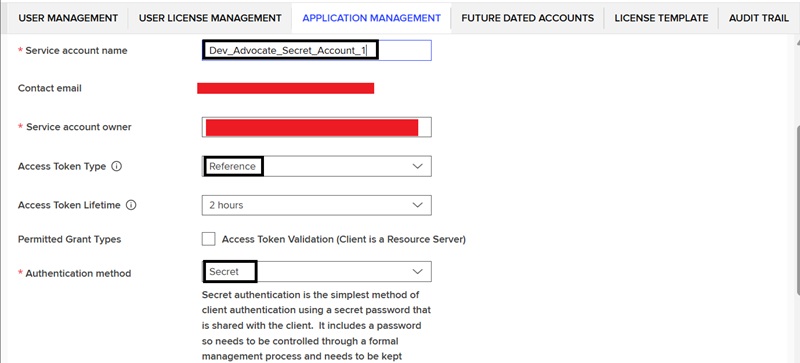
The Platform Administration guide describes:
Secret authentication is the simplest method of client authentication using a secret password that is shared with the client. It includes a password so needs to be controlled through a formal management process and needs to be kept confidential to the client. |
Step 4: Save and Record the Credentials
After the service account is successfully created, the platform displays:
- Service Account ID
- Generated Password (Secret)
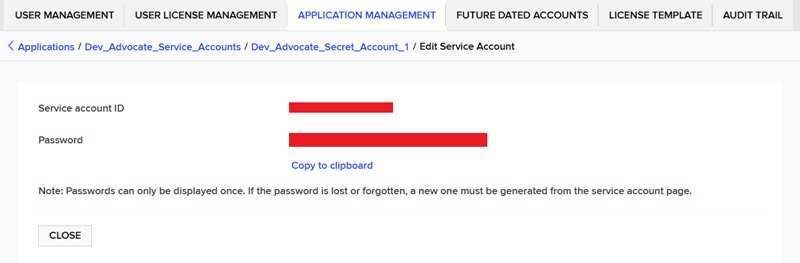
The password is displayed only once and should be copied and stored securely because it will be required by the application when requesting access tokens. The platform also provides an option to copy the password to the clipboard.
After saving the service account ID and Password, click on the CLOSE button to close this page. The service account details page will be displayed.
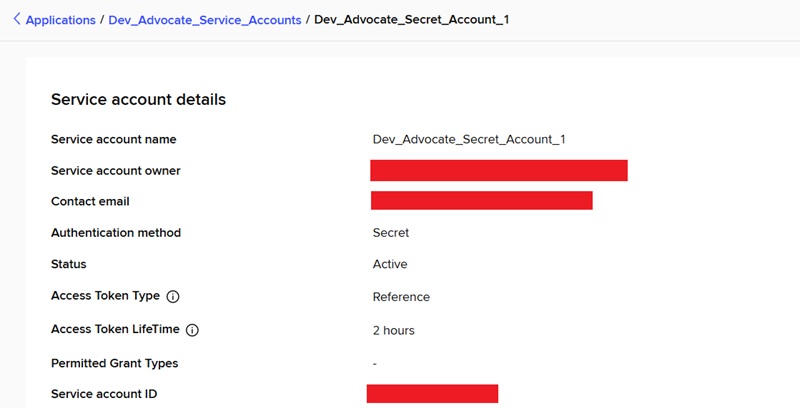
Step 5: Assigned Licenses
On the service account details page, scroll down to the Assigned licenses section and click on the MANAGE LICENSES button.
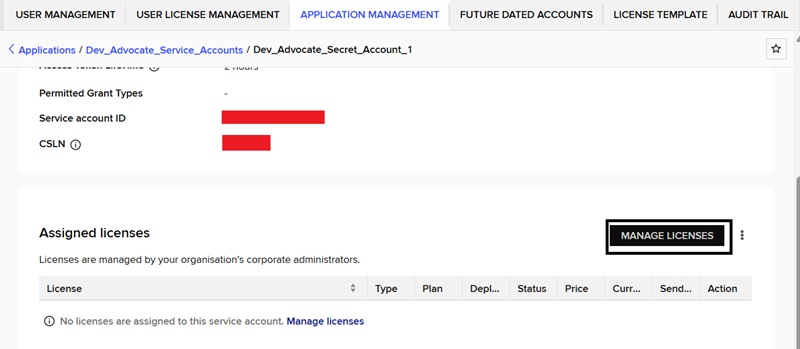
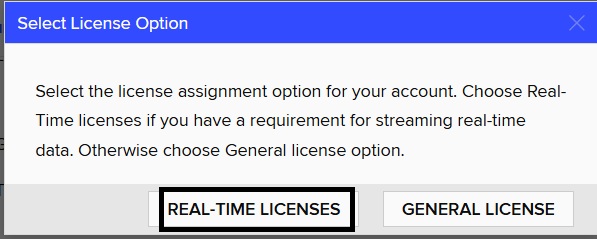
1. Select the License Option
Choose between the REAL-TIME LICENSES or GENERAL LICENSES. In this article, the REAL-TIME LICENSES is selected.
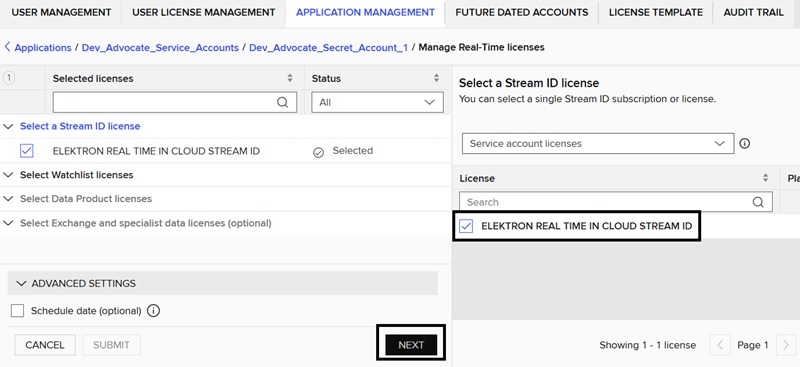
2. Select a Stream ID license
Select the ELEKTRON REAL TIME IN CLOUD STREAM ID license and then click on the NEXT button.
3. Select Watchlist licenses
Select the number of item watchlist for this service account and then click on the NEXT button.
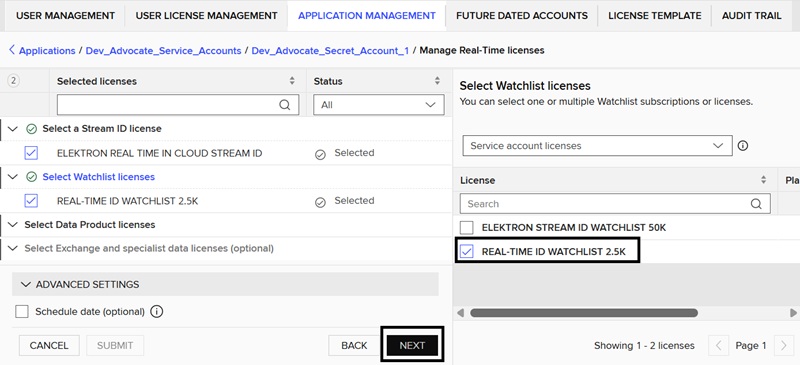
4. Select Data Product licenses
Select the required data product licenses and then click on the NEXT button.
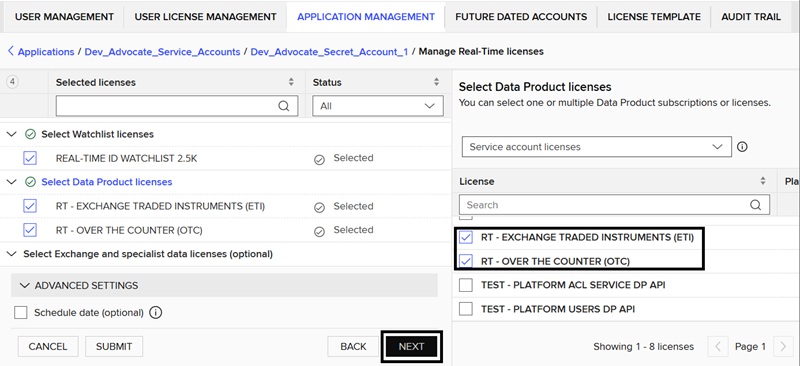
5. Select Exchange and specialist data licenses (optional)
Select the required exchange and specialist data licenses and then click on the SUBMIT button.
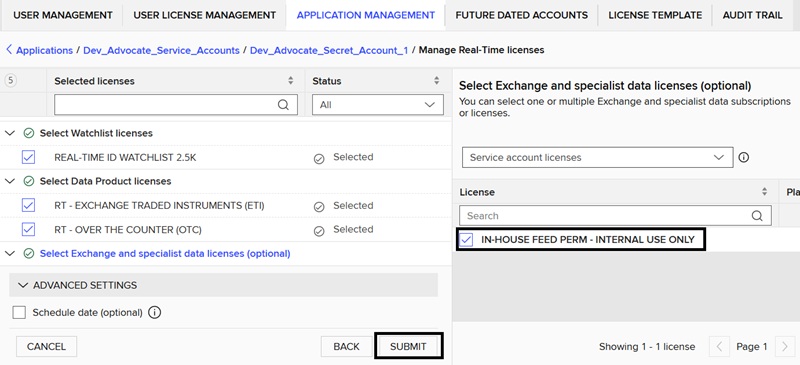
The service account details page will be displayed with the assigned licenses.
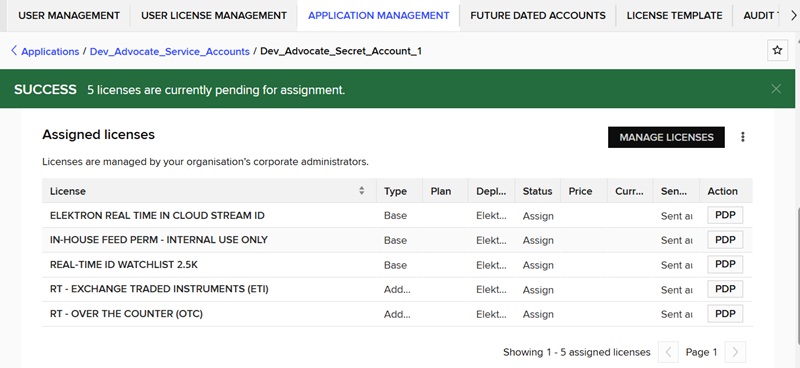
Now, this service account and secret (password) can be used to retrieve an access token from the LSEG Data Platform.
Managing a Service Account
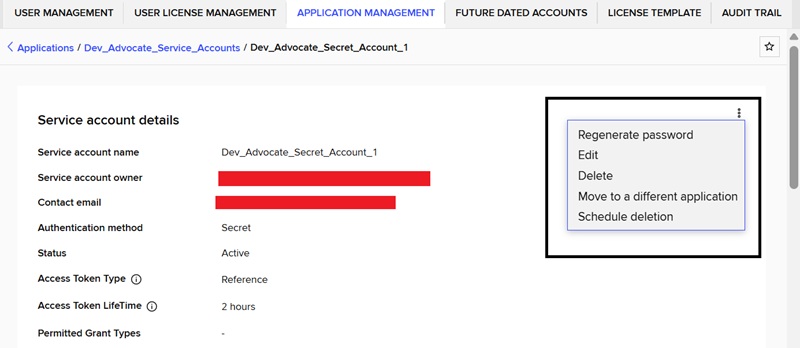
On the service account details page, users can choose to regenerate a password, edit or delete the account.
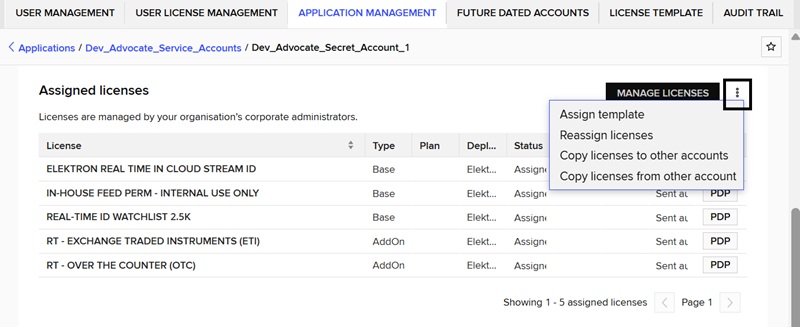
Moreover, the assigned licenses can also be modified.
Testing the account
The service account can be tested by sending a HTTP POST request message to the authentication service endpoint on the LSEG Data Platform.
Postman
1. Create a HTTP POST request message to the https://api.refinitiv.com/auth/oauth2/v2/token endpoint.
2. Set the Content-Type in the Body to x-www-form-urlencoded
3. Set the following keys and values in the body
Key |
Value |
grant_type |
client_credentials |
client_id |
<Service Account ID> |
client_secret |
<Secret Password> |
scope |
trapi |
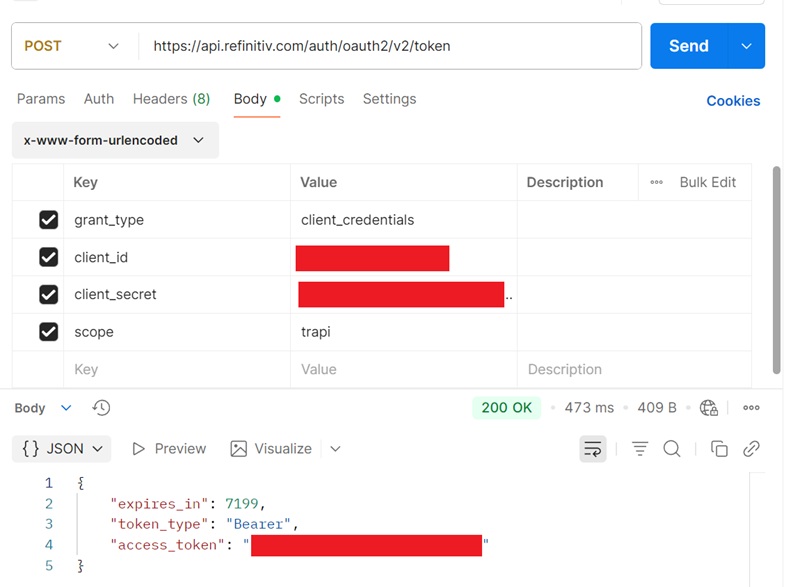
If the credentials are correct, the HTTP response status will be 200 OK, and the response body will contain an access token.
Curl
The following Curl command can also be used to test the account.

Real-Time SDKs and WebSocket APIs
The examples in Real-Time SDKs (C++, Java, and C#) and WebSocket APIs can also be used to test the client ID and client secret to retrieve an access token and connect to Real-Time Optimized.
Python WebSocket API
Run the market_price_rto_client_cred_auth.py example with the following parameters.
Real-Time SDKs: EMA
Run the Consumer Example #113 (Cons113) with the following parameters.
Security Best Practices
The following best practices are recommended when using Client Secret Authentication:
- Store client secrets in a secure secrets management solution.
- Never hardcode client secrets in source code.
- Do not store client secrets in configuration files that are committed to version control.
- Regenerate client secrets immediately if a compromise is suspected.
- Follow your organisation's credential rotation policy.
What are the differences between the Reference and JWT access token types?
Secret authentication type method supports either Reference (Not self-contained) or JWT (self-contained) accession token type. In the context of OAuth 2.0 access tokens, self-contained and not self-contained refer to whether the access token itself contains all the information needed to validate the user/client and authorization claims.
A reference token is typically an opaque string with no meaningful information embedded in it. For example:
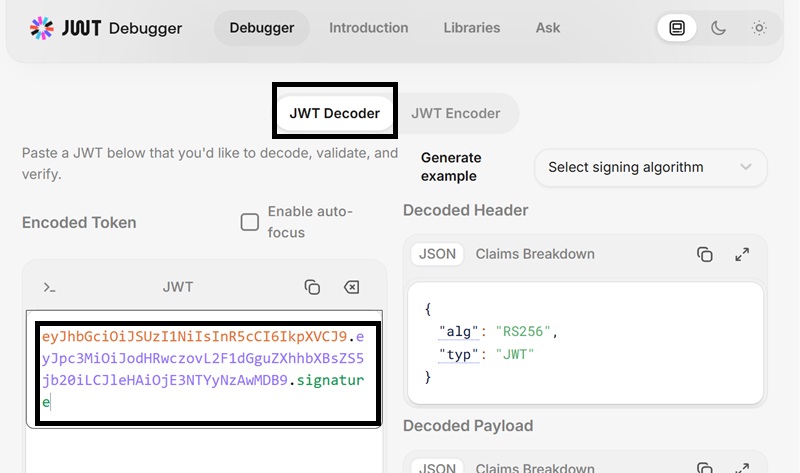
A JWT (JSON Web Token) is a self-contained token that includes the authorization information within the token itself. For example:
Users can use the online jwt.io tool to decode a JWT.
Recommended Usage
|
Troubleshooting
1. "Authentication failed (1026, Request for token validation failed:"The authentication server did not contain "active" in response."
The application will receive this error in the login response when connecting to the Real-Time Optimized server. This issue may occur if the Access Token Type configured for the service account is set to JWT. To connect to Real-Time Optimized, the Access Token Type must be set to Reference.
Solution:
Access the Platform Administrator website and change the service account's Access Token Type from JWT to Reference.
2. "Login Rejected. Watchlist size of 2500 for 'WS JSON2' connection is outside of range [20001,50000] supported for this ADS fanout tier for this type of connection."
The application will receive this error in the login response when connecting to the Real-Time Optimized server. This issue may occur if the selected watchlist license does not match the connected Real-Time Optimized server. There are three tiers of Real-Time Optimized servers, and the server tier can be identified by the suffix in the server name.
Server Tier |
Server Name Suffix |
Watchlist Size |
Small |
…-sm |
1 - 3000 |
Medium |
…-med |
3001 - 20000 |
Large |
…-lrg |
20001 – 50000 |
Solution:
Verify that the watchlist license assigned to the account matches the tier of the Real-Time Optimized server being used. The server tier can be determined from the suffix of the server name. Adjust the configuration accordingly and reconnect to the server.
Summary
The article explains how to create and configure a service account in LSEG Platform Administration using Client Secret Authentication. A service account is a non-human account used by applications and automated processes to access LSEG APIs and services. The authentication process uses a Service Account ID and a generated Client Secret to obtain OAuth 2.0 access tokens.
It walks administrators through creating an application, creating a service account, selecting Secret as the authentication method, choosing an Access Token Type (Reference or JWT), securely storing the generated credentials, and assigning the required licenses. It also demonstrates how to test the account using Postman or cURL by requesting an access token from the LSEG authentication service.
The article further explains the difference between Reference tokens (opaque, not self-contained) and JWT tokens (self-contained and containing authorization claims). For Real-Time Optimized (RTO) connections, the access token type must be Reference. The document concludes with troubleshooting guidance for common authentication and licensing issues related to Real-Time Optimized connectivity
References
- LSEG. Platform Administration User Guide. LSEG Platform Administration. Referenced for service account management, application management, authentication methods, and license assignment procedures.
- IETF. JSON Web Token (JWT) (RFC 7519). May 2015. Available at: https://datatracker.ietf.org/doc/html/rfc7519. Referenced for JWT structure, claims, and self-contained token concepts.
- JWT.IO. JSON Web Token Debugger and Decoder. Available at: https://jwt.io/. Referenced for JWT decoding and inspection examples.
- cURL Project. curl Command Line Tool Documentation. Available at: https://curl.se/docs/. Referenced for examples of testing OAuth token requests from the command line.
- Postman. API Platform Documentation. Available at: https://learning.postman.com/. Referenced for testing OAuth authentication workflows using HTTP POST requests.
- Register or Log in to applaud this article
- Let the author know how much this article helped you
If you require assistance, please
contact us here

Source Code
Related APIs
Related Articles
Request Free Trial
Call your local sales team
Americas
All countries (toll free): +1 800 427 7570
Brazil: +55 11 47009629
Argentina: +54 11 53546700
Chile: +56 2 24838932
Mexico: +52 55 80005740
Colombia: +57 1 4419404
Europe, Middle East, Africa
Europe: +442045302020
Africa: +27 11 775 3188
Middle East & North Africa: 800035704182
Asia Pacific (Sub-Regional)
Australia & Pacific Islands: +612 8066 2494
China mainland: +86 10 6627 1095
Hong Kong & Macau: +852 3077 5499
India, Bangladesh, Nepal, Maldives & Sri Lanka:
+91 22 6180 7525
Indonesia: +622150960350
Japan: +813 6743 6515
Korea: +822 3478 4303
Malaysia & Brunei: +603 7 724 0502
New Zealand: +64 9913 6203
Philippines: 180 089 094 050 (Globe) or
180 014 410 639 (PLDT)
Singapore and all non-listed ASEAN Countries:
+65 6415 5484
Taiwan: +886 2 7734 4677
Thailand & Laos: +662 844 9576