
Author

Jirapongse Phuriphanvichai
Developer Advocate
Typically, developers use Real-Time SDKs to build applications that retrieve real-time financial data, such as Level I and Level II market data, as well as news from live data feeds. It may seem that Real-Time SDKs can only retrieve real-time data. However, thanks to the Open Message Model (OMM) supported by these SDKs, developers can define custom domains to access various types of data beyond real-time information.
This article defines a custom domain to consume data from REST services. Therefore, developers can use this custom domain to consume different kinds of services or data provided by LSEG REST APIs including:
- Historical data from LSEG Data Platform and Tick History
- Fundamental data from LSEG Data Platform and Datascope Select
- Historical news from LSEG Data Platform
- Search features from LSEG Data Platform and Datascope Select
By using data from this custom domain, developers can expand the functionality of real-time applications. The added capabilities can help improve the analysis process and allow the applications to better server different customer groups or market segments.
REST API Custom Domain
You might be wondering why we need to use the REST API custom domain with Real-Time SDKs to access REST services, especially since developers can generally access any REST service directly using any HTTP client libraries. There are several benefits to using the REST API custom domain with Real-Time SDKs.
- Network settings: REST services are typically hosted on Internet, so all consumer applications must be allowed to directly connect to it. This may violate the company’s network or security policies. However, with the REST API custom domain, consumer applications can use existing Real-Time Distribution System (RTDS) connections to access data from REST services.
- Integration: For developers familiar with RTSDKs, integrating the new REST workflow into applications requires less effort, and REST responses are asynchronously dispatched to applications.
- Reliability and scalability: The REST API data feed is deployed on Real-Time Distribution System (RTDS), allowing it to benefit from the RTDS’s reliability and scalability.
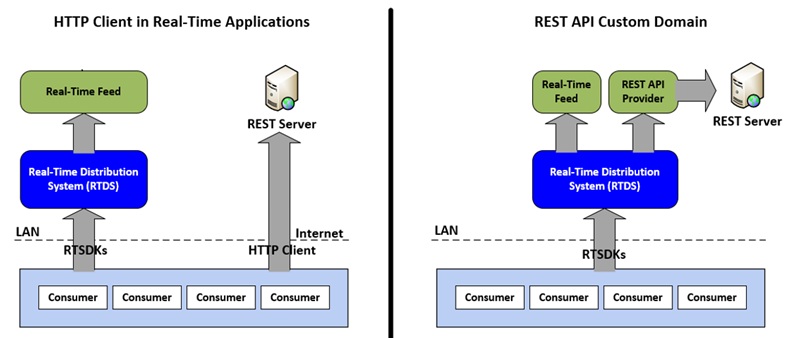
Figure 1: HTTP Client Real-Time Applications VS REST API Custom Domain
The REST API custom domain utilizes private streams and generic messages in the Open Message Model. The messages’ specifications are defined as follows:
Request Message
A request message is encoded and sent by Open Message Model consumer applications. The request specifies a REST server to which the consumer would like to connect. The attribute information contains an element entry named “Instance”, which is used to uniquely identify a consumer application.
| Component | Description/Value |
|---|---|
| DomainType | Required. The domain number of the REST API Custome Domain (200). |
| Interactions | Required.
|
| QoS | Optional. Specifies that QoS at which the stream is provide (Realtime/TickByTick). |
| WorstQoS | Not used. |
| Priority | Not used. |
| Extended Header | Not used. |
| ServiceId | Required. Specifies the ID of the service provided by the REST API provider. NOTE: The application should set either the ServiceName or ServiceId of the service, but not both. |
| ServiceName | Required. Specifies the name of the service provided by the REST API provider. NOTE: The application should set either the ServiceName or ServiceId of the service, but not both |
| Name | Required. Specifies the REST server (host name) to which an appliation would like to connect (https://api.refinitiv.com). |
| NameType | Not used. |
| Filter | Not used. |
| Attrib | Required. An element list that contains an element entry named "Instance". Its value is a unique string used to identify a consumer application. |
| Payload | Not used. |
The sample request message for https://api.refinitiv.com is:
<REQUEST domainType="200" streamId="3" containerType="NO_DATA" flags="0x144 (STREAMING|HAS_QOS|PRIVATE_STREAM)" qos="Qos: Realtime/TickByTick/Static - timeInfo: 0 - rateInfo: 0" dataSize="0">
<key flags="0x23 (HAS_SERVICE_ID|HAS_NAME|HAS_ATTRIB)" serviceId="5002" name="https://api.refinitiv.com" attribContainerType="ELEMENT_LIST">
<attrib>
<elementList flags="0x08 (HAS_STANDARD_DATA)">
<elementEntry name="Instance" dataType="ASCII_STRING" data="160576"/>
</elementList>
</attrib>
</key>
<dataBody>
</dataBody>
</REQUEST>
Refresh Message
A refresh message is sent by Open Message Model provider. Typically, it is used to indicate that a private stream has been opened and the REST API provider can establish a connection to the REST server specified in the request message.
| Component | Description/Value |
|---|---|
| DomainType | Required. The domain number of the REST API Custom Domain (200) |
| State | Required. Indicates the state of the stream and data (Open/Ok). The status text contains the HTTP response status code. |
| Solicited | Required. Indicates where the refresh was solicited. (True) |
| Indications | Required.
|
| QoS | Optional. Specifies the QoS at which the stream is provide (Realtime/TickByTick) |
| PartNum | Not used. |
| SeqNum | Not used. |
| ItemGroup | Not used. |
| PermissionDatra | Not used. |
| ExtendedHeader | Not used. |
| ServiceId | Required. Specifies the ID of the service provided by the REST API provider. NOTE: The application should set either the ServiceName or ServiceId of the service, but not both. |
| ServiceName | Required. Specifies the name of the service provided by the REST API provider. NOTE: The application should set either the ServiceName or ServiceId of the service, but not both. |
| NameType | Not used. |
| Name | Required. This should match the name in the request message. |
| Filter | Not used. |
| Attrib | Required. An element list that contains an element entry named “Instance”. Its value should match the Instance in the request message. |
| Payload | Not used |
The sample refresh message that indicates the opened stream for https://api.refinitiv.com is:
<REFRESH domainType="200" streamId="3" containerType="NO_DATA" flags="0x468 (HAS_MSG_KEY|SOLICITED|REFRESH_COMPLETE| DO_NOT_CACHE|PRIVATE_STREAM)" groupId="1" state="State: Open/Ok/None - text: '*200 OK'" dataSize="0">
<key flags="0x23 (HAS_SERVICE_ID|HAS_NAME|HAS_ATTRIB)" serviceId="5002" name="https://api.refinitiv.com" attribContainerType="ELEMENT_LIST">
<attrib>
<elementList flags="0x08 (HAS_STANDARD_DATA)">
<elementEntry name="Instance" dataType="ASCII_STRING" data="160576"/>
</elementList>
</attrib>
</key>
<dataBody>
</dataBody>
</REFRESH>
Status Message
A status message is sent by Open Message Model provider. Typically, it is used to indicate that the REST API provider can’t establish a connection to the REST server specified in the request message.
| Component | Description/Value |
|---|---|
| DomainType | Required. The domain number of the REST API Custom Domain (200) |
| State | Required. Indicates the state of the stream and data (Closed/Suspect). The status text contains the error information. |
| Indications | Required.
|
| QoS | Optional. Specifies the QoS at which the stream is provide (Realtime/TickByTick) |
| ItemGroup | Not used. |
| PermissionDatra | Not used. |
| ExtendedHeader | Not used. |
| ServiceId | Required. Specifies the ID of the service provided by the REST API provider. NOTE: The application should set either the ServiceName or ServiceId of the service, but not both. |
| ServiceName | Required. Specifies the name of the service provided by the REST API provider. NOTE: The application should set either the ServiceName or ServiceId of the service, but not both. |
| NameType | Not used. |
| Name | Required. This should match the name in the request message. |
| Filter | Not used. |
| Attrib | Required. An element list that contains an element entry named “Instance”. Its value should match the Instance in the request message. |
| Payload | Not used |
The sample status message that indicates the closed stream for an invalid host is:
<STATUS domainType="200" streamId="3" containerType="NO_DATA" flags="0xA8 (HAS_MSG_KEY|HAS_STATE|PRIVATE_STREAM)" state="State: Closed/Suspect/None - text: '*No such host is known. (<Invalid URL>:443)'" dataSize="0">
<key flags="0x23 (HAS_SERVICE_ID|HAS_NAME|HAS_ATTRIB)" serviceId="5002" name="https://<Invalid URL>" attribContainerType="ELEMENT_LIST">
<attrib>
<elementList flags="0x08 (HAS_STANDARD_DATA)">
<elementEntry name="Instance" dataType="ASCII_STRING" data="956493"/>
</elementList>
</attrib>
</key>
<dataBody>
</dataBody>
</STATUS>
Consumer’s Generic Message
A generic message is sent by a consumer and provider. For a consumer, it represents a HTTP request message, and it can be sent after the private stream has been opened.
| Component | Description/Value |
|---|---|
| DomainType | Required. The domain number of the REST API Custom Domain (200) |
| PartNum | Not used. |
| SeqNum | Required. Specify a unique, unsigned-integer identifier associated with this REST API request. |
| SecondarySeqNum | Not used. |
| PermissionDatra | Not used. |
| ExtendedHeader | Not used. |
| ServiceId | Not used. |
| ServiceName | Not used. |
| NameType | Not used. |
| Name | Required. Contains the HTTP method and request path. For example:
|
| Filter | Not used. |
| Attrib | Required. Specify an element list containing HTTP request’s headers. A header’s name is a name of an element entry and a string value of a header’s value is a value of an element entry |
| Payload | Optional. The type of payload (element list or opaque) depends on the value of the Content-Type header and HTTP method. If the Content-Type is application/x-www-form-urlencoded, the names and values are encoded in the payload as an element list. If the Content-Type is application/json, the JSON string is encoded in the payload as opaque. |
Examples
1. The HTTP GET message with the Authorization header and a query string in the request path
<GENERIC domainType="200" streamId="3" containerType="NO_DATA" flags="0x0C (HAS_MSG_KEY|HAS_SEQ_NUM)" seqNum="1" dataSize="0">
<key flags="0x22 (HAS_NAME|HAS_ATTRIB)" name="GET:/data/historical-pricing/v1/views/interday-summaries/JPY=?count=1&fields=BID" attribContainerType="ELEMENT_LIST">
<attrib>
<elementList flags="0x08 (HAS_STANDARD_DATA)">
<elementEntry name="Authorization" dataType="ASCII_STRING" data="Bearer <token>"/>
</elementList>
</attrib>
</key>
<dataBody>
</dataBody>
</GENERIC>
2. The HTTP GET message with the Authorization header and a query string in the body as an element list
<GENERIC domainType="200" streamId="3" containerType="ELEMENT_LIST" flags="0x0C (HAS_MSG_KEY|HAS_SEQ_NUM)" seqNum="1" dataSize="28">
<key flags="0x22 (HAS_NAME|HAS_ATTRIB)" name="GET:/data/historical-pricing/v1/views/interday-summaries/JPY=" attribContainerType="ELEMENT_LIST">
<attrib>
<elementList flags="0x08 (HAS_STANDARD_DATA)">
<elementEntry name="Authorization" dataType="ASCII_STRING" data="Bearer <token>"/>
</elementList>
</attrib>
</key>
<dataBody>
<elementList flags="0x08 (HAS_STANDARD_DATA)">
<elementEntry name="count" dataType="ASCII_STRING" data="1"/>
<elementEntry name="fields" dataType="ASCII_STRING" data="BID,ASK"/>
</elementList>
</dataBody>
</GENERIC>
3. The HTTP POST message with the application/x-www-form-urlencoded content type
<GENERIC domainType="200" streamId="3" containerType="ELEMENT_LIST" flags="0x0C (HAS_MSG_KEY|HAS_SEQ_NUM)" seqNum="1" dataSize="192">
<key flags="0x22 (HAS_NAME|HAS_ATTRIB)" name="POST:/auth/oauth2/v1/token" attribContainerType="ELEMENT_LIST">
<attrib>
<elementList flags="0x08 (HAS_STANDARD_DATA)">
<elementEntry name="Content-Type" dataType="ASCII_STRING" data="application/x-www-form-urlencoded"/>
</elementList>
</attrib>
</key>
<dataBody>
<elementList flags="0x08 (HAS_STANDARD_DATA)">
<elementEntry name="grant_type" dataType="ASCII_STRING" data="password"/>
<elementEntry name="username" dataType="ASCII_STRING" data="<username>"/>
<elementEntry name="password" dataType="ASCII_STRING" data="<password>"/>
<elementEntry name="client_id" dataType="ASCII_STRING" data="<client id>"/>
<elementEntry name="scope" dataType="ASCII_STRING" data="<scope>"/>
<elementEntry name="takeExclusiveSignOnControl" dataType="ASCII_STRING" data="true"/>
</elementList>
</dataBody>
</GENERIC>
4. The HTTP POST message with the Authorization header and the application/json content type
<GENERIC domainType="200" streamId="3" containerType="OPAQUE" flags="0x0C (HAS_MSG_KEY|HAS_SEQ_NUM)" seqNum="1" dataSize="45">
<key flags="0x22 (HAS_NAME|HAS_ATTRIB)" name="POST:/discovery/search/v1/" attribContainerType="ELEMENT_LIST">
<attrib>
<elementList flags="0x08 (HAS_STANDARD_DATA)">
<elementEntry name="Authorization" dataType="ASCII_STRING" data="Bearer <token>"/>
<elementEntry name="Content-Type" dataType="ASCII_STRING" data="application/json"/>
</elementList>
</attrib>
</key>
<dataBody>
<opaque data="<JSON String>" />
</dataBody>
</GENERIC>
Provider’s Generic Message
A generic message is sent by a consumer and provider. For a provider, it represents a HTTP response message, and it can be sent after receiving a generic message from a consumer.
| Component | Description/Value |
|---|---|
| DomainType | Required. The domain number of the REST API Custom Domain (200). |
| PartNum | Required. Specify the part number of multiple-part messages. Otherwise, it is 1. |
| Indications | Optional.
|
| SeqNum | Required. Specify a unique, unsigned-integer identifier associated with this REST API request. |
| SecondarySeqNum | Required. The HTTP status code. |
| PermissionDatra | Not used. |
| ExtendedHeader | Not used. |
| ServiceId | Not used. |
| ServiceName | Not used. |
| NameType | Not used. |
| Name | Required. The same value specified in the generic message sent by a consumer. |
| Filter | Not used. |
| Attrib | Required. Specify an element list containing HTTP request’s headers. A header’s name is a name of an element entry and a string value of a header’s value is a value of an element entry. |
| Payload | Optional. The opaque data that represents the content in a HTTP response. |
Examples
1. A single part generic message with the 200 HTTP status code, headers and opaque data
<GENERIC domainType="200" streamId="3" containerType="OPAQUE" flags="0x7C (HAS_MSG_KEY|HAS_SEQ_NUM|MESSAGE_COMPLETE|HAS_SECONDARY_SEQ_NUM|HAS_PART_NUM)" seqNum="1" secondarySeqNum="200" partNum="1" dataSize="314">
<key flags="0x22 (HAS_NAME|HAS_ATTRIB)" name="GET:/data/historical-pricing/v1/views/interday-summaries/JPY=?count=1&fields=BID" attribContainerType="ELEMENT_LIST">
<attrib>
<elementList flags="0x08 (HAS_STANDARD_DATA)">
<elementEntry name="Date" dataType="ASCII_STRING" data="Wed, 08 Jan 2025 09:37:58 GMT"/>
<elementEntry name="Connection" dataType="ASCII_STRING" data="keep-alive"/>
<elementEntry name="Access-Control-Allow-Origin" dataType="ASCII_STRING" data="*"/>
<elementEntry name="Access-Control-Expose-Headers" dataType="ASCII_STRING" data="authorization, content-encoding, content-length, content-type, x-tr-requestid, x-tr-correlationid, source, ts-expires"/>
<elementEntry name="Cache-Control" dataType="ASCII_STRING" data="no-store"/>
<elementEntry name="Pragma" dataType="ASCII_STRING" data="no-cache"/>
<elementEntry name="Source" dataType="ASCII_STRING" data="TimeSeriesCloudCache"/>
<elementEntry name="Strict-Transport-Security" dataType="ASCII_STRING" data="max-age=31536000; includeSubDomains"/>
<elementEntry name="Ts-Expires" dataType="ASCII_STRING" data="2025-01-08T10:06:36.964797000Z"/>
<elementEntry name="X-Amzn-Trace-Id" dataType="ASCII_STRING" data="Root=1-677e4776-2d3c12b57c008a1a5b0da93c"/>
<elementEntry name="X-Frame-Options" dataType="ASCII_STRING" data="DENY"/>
<elementEntry name="X-Served-By" dataType="ASCII_STRING" data="region=ap-southeast-1; cid=9e5f4ae70ffb4973a7171e38adf7bbd0"/>
<elementEntry name="X-Tr-Requestid" dataType="ASCII_STRING" data="12ae44ac-f3b1-4f41-be64-abd7ba899589"/>
</elementList>
</attrib>
</key>
<dataBody>
<opaque data="<Opaque Data>" />
</dataBody>
</GENERIC>
2. Multiple-part generic messages with the 200 HTTP status code, headers and opaque data
<GENERIC domainType="200" streamId="3" containerType="OPAQUE" flags="0x6C (HAS_MSG_KEY|HAS_SEQ_NUM|HAS_SECONDARY_SEQ_NUM|HAS_PART_NUM)" seqNum="4" secondarySeqNum="200" partNum="1" dataSize="10000">
<key flags="0x22 (HAS_NAME|HAS_ATTRIB)" name="GET:/RestApi/v1/Extractions/RawExtractionResults('0x09378ee2821aba44')/$value" attribContainerType="ELEMENT_LIST">
<attrib>
<elementList flags="0x08 (HAS_STANDARD_DATA)">
<elementEntry name="Code" dataType="INT" data="200"/>
<elementEntry name="x-amz-id-2" dataType="ASCII_STRING" data="fgJ1…"/>
<elementEntry name="x-amz-request-id" dataType="ASCII_STRING" data="2WY…"/>
<elementEntry name="Date" dataType="ASCII_STRING" data="Tue, 14 Jan 2025 11:01:02 GMT"/>
<elementEntry name="x-amz-expiration" dataType="ASCII_STRING" data="expiry-date="Tue, 11 Feb 2025 00:00:00 GMT", rule-id="Remove after 45 days""/>
<elementEntry name="ETag" dataType="ASCII_STRING" data=""03fe2a…""/>
<elementEntry name="x-amz-server-side-encryption" dataType="ASCII_STRING" data="AES256"/>
<elementEntry name="x-amz-meta-md5sum" dataType="ASCII_STRING" data="e09e94de2c84d50c…"/>
<elementEntry name="x-amz-version-id" dataType="ASCII_STRING" data="null"/>
<elementEntry name="Accept-Ranges" dataType="ASCII_STRING" data="bytes"/>
<elementEntry name="Server" dataType="ASCII_STRING" data="AmazonS3"/>
</elementList>
</attrib>
</key>
<dataBody>
<opaque data="<Opaque Data>">
</dataBody>
</GENERIC>
<GENERIC domainType="200" streamId="3" containerType="OPAQUE" flags="0x6C (HAS_MSG_KEY|HAS_SEQ_NUM|MESSAGE_COMPLETE|HAS_SECONDARY_SEQ_NUM|HAS_PART_NUM)" seqNum="4" secondarySeqNum="200" partNum="2" dataSize="9007">
<key flags="0x22 (HAS_NAME|HAS_ATTRIB)" name="GET:/RestApi/v1/Extractions/RawExtractionResults('0x09378ee2821aba44')/$value" attribContainerType="ELEMENT_LIST">
<attrib>
<elementList flags="0x08 (HAS_STANDARD_DATA)">
<elementEntry name="Code" dataType="INT" data="200"/>
<elementEntry name="x-amz-id-2" dataType="ASCII_STRING" data="fgJ1…"/>
<elementEntry name="x-amz-request-id" dataType="ASCII_STRING" data="2WY…"/>
<elementEntry name="Date" dataType="ASCII_STRING" data="Tue, 14 Jan 2025 11:01:02 GMT"/>
<elementEntry name="x-amz-expiration" dataType="ASCII_STRING" data="expiry-date="Tue, 11 Feb 2025 00:00:00 GMT", rule-id="Remove after 45 days""/>
<elementEntry name="ETag" dataType="ASCII_STRING" data=""03fe2a…""/>
<elementEntry name="x-amz-server-side-encryption" dataType="ASCII_STRING" data="AES256"/>
<elementEntry name="x-amz-meta-md5sum" dataType="ASCII_STRING" data="e09e94de2c84d50c…"/>
<elementEntry name="x-amz-version-id" dataType="ASCII_STRING" data="null"/>
<elementEntry name="Accept-Ranges" dataType="ASCII_STRING" data="bytes"/>
<elementEntry name="Server" dataType="ASCII_STRING" data="AmazonS3"/>
</elementList>
</attrib>
</key>
<dataBody>
<opaque data="<Opaque Data>">
</dataBody>
</GENERIC>
Close Message
A close message is sent by Open Message Model consumer applications to terminate a private stream that was created by a request message. Once closed, the application can no longer use that private stream.
| Component | Description/Value |
|---|---|
| DomainType | Required. The domain number of the REST API Custom Domain (200) |
| ExtendedHeader | Not used. |
| Payload | Not used |
Example
<CLOSE domainType="200" streamId="3" containerType="NO_DATA" flags="0x00" dataSize="0">
<dataBody>
</dataBody>
</CLOSE>
Provider and Consumer Examples
The Provider and Consumer sample applications are available on GitHub. The examples are developed by using the Real-Time SDK CSharp.
1. REST Interactive Provider (RESTIProv): This is an EMA C# interactive provider application that handles REST requests sent by REST Consumer applications. It must be deployed with RTDS components by configuring ADH or ADS POP to connect to the RESTIProv application. It provides the REST_API service, supports the HTTP GET and POST requests, and listens to the TCP 14002 port. The service name and listening TCP port settings can be changed via the EMAConfig.xml configuration file.
2. REST Data Platform Consumer (RESTConsDataPlatform): This is an EMA C# consumer application that demonstrates how to use the REST custom domain with the services on the LSEG Data Platform. It supports both the V1 and V2 authentication services and can request data from the historical pricing, search, and bulk real-time search endpoints. The example supports the following options.
Options:
-? Shows this usage
-clientId client ID for application making the request to (mandatory for V1 and V2oAuth).
-clientSecret client secret for application making the request to (mandatory for V2 oAuth client credentials).
-username username for application making the request to (mandatory for V1 oAuth).
-password password for application making the request to (mandatory for V1 oAuth).
-dacsUser DACS user name for connecting to ADS (mandatory).
-host ADS hostname or IP Adddress (optional) (default: localhost).
-port ADS RSSL port (optional) (default: 14002).
-service service name that supports the REST custom domain (optional) (default: REST_API).
-domainType domain ID of the REST custom domain (optional) (default: 200).
-endpoint the connected endpoint (optional: history, search, or bulk) (default: history).
The application contains hardcoded request messages for those endpoints.
For example:
2.1 Use the V2 credentials to consume data from the bulk real-time search endpoint.
-clientId <client-id> -clientSecret <client-secret> -endpoint bulk -dacsUser <DACS Username> -host <ADS Server> -port 14002 -service REST_API
2.2 Use the V1 credentials to consume data from the historical pricing endpoint.
-username <user-name> -password <password> -clientId <client-id> -dacsUser <DACS Username> -host <ADS Server> -port 14002 -service REST_API
2.3 Use the V1 credentials to search data from the search endpoint.
-username <user-name> -password <password> -clientId <client-id> -endpoint search -dacsUser <DACS Username> -host <ADS Server> -port 14002 -service REST_API
3. REST Datascope Select and Tick History Consumer (RESTConsDSS_TH: This EMA C# consumer application illustrates the use of the REST custom domain with DataScope Select and Tick History REST APIs. It supports the ExtractWithNotes and ExtractRaw endpoints for data extraction from both APIs. The example includes the following configuration options:
Options:
-? Shows this usage
-dssUsername DSS or Tick History Username (mandatory).
-dssPassword DSS or Tick History Password (mandatory).
-dacsUser DACS user name for connecting to ADS (mandatory).
-host ADS hostname or IP Adddress (optional) (default: localhost).
-port ADS RSSL port (optional) (default: 14002).
-service service name that supports the REST custom domain (optional) (default: REST_API).
-domainType domain ID of the REST custom domain (optional) (default: 200).
-endpoint the connected endpoint (optional: ExtractWithNotes, or ExtractRaw) (default: ExtractWithNotes).
-requestFile the text file containing a JSON request message (mandatory).
-outputFile the output file name for the ExtractRaw (optional) (default: output.csv.gz).
Request files are required to run the example. Each file contains a JSON request message used for data extraction.
For example:
3.1 Extract data from DSS using the ExtractWithNotes endpoint and the request message in the DSS_T&C_ExtractionWithNotes.json file.
-dssUsername <DSS Username> -dssPassword <DSS Password> -dacsUser <DACS Username> -host <ADS Server> -port 14002 -service REST_API -endpoint ExtractWithNotes -requestFile DSS_T&C_ExtractWithNotes.json
3.2 Extract data from Tick History using the ExtractRaw endpoint and the request message in the TH_EOD_ExtractRaw.json file.
-dssUsername <DSS Username> -dssPassword <DSS Password> -dacsUser <DACS Username> -host <ADS Server> -port 14002 -service REST_API -endpoint ExtractRaw -requestFile TH_EOD _ExtractRaw.json
Note: All example code is provided on an “as is” and “as available” basis for illustrative purposes only. LSEG makes no representations or warranties of any kind, express or implied, as to the operation of the example code, or the information, content, or materials used in connection with the example code. You expressly agree that your use of the example code is at your sole risk.
Summary
This document introduces the REST API Custom Domain for Real-Time SDKs, enabling developers to integrate REST services into real-time applications using the Open Message Model (OMM). By leveraging existing Real-Time Distribution System (RTDS) connections, this approach ensures compliance with network policies, simplifies integration for RTSDK users, and provides reliability and scalability.
Key points include:
- Purpose: Extend real-time applications to access data from LSEG REST APIs.
- Benefits: Network compliance, seamless integration, and robust performance.
- Message Types:
- Request: Initiates connection to REST server.
- Refresh: Confirms private stream establishment.
- Status: Reports connection errors.
- Generic: Represents HTTP requests/responses with headers and payloads.
- Close: Terminates private streams.
- Sample Applications:
- RESTIProv: Provider handling REST requests via RTDS.
- RESTConsDataPlatform: Consumer for LSEG Data Platform endpoints (historical pricing, search, bulk real-time).
- RESTConsDSS_TH: Consumer for DataScope Select and Tick History APIs.
By using this custom domain, developers can unify REST and real-time data access, enhancing analytical capabilities and supporting diverse market needs. Example code and configurations are available on GitHub for reference.
Get In Touch

Source Code
Related APIs
Related Articles
-
Introduction to the Refinitiv Real-Time SDK Warm Standby Feature
-
How to Run Refinitiv Real-Time SDK C/C++ Warm Standby Examples
-
Introduction to Interactive Source Blending (ISB) feature in ADH 3.0 or above using EMA C++
-
Resiliency in real-time feed applications
-
Learn how to create auto-expiring records on Refinitiv Real-Time
-
Publish Custom Data via Refinitiv Real-Time Distribution System by EMA
-
Introduction to the Real-Time SDK Preferred Host Feature
Request Free Trial
Call your local sales team
Americas
All countries (toll free): +1 800 427 7570
Brazil: +55 11 47009629
Argentina: +54 11 53546700
Chile: +56 2 24838932
Mexico: +52 55 80005740
Colombia: +57 1 4419404
Europe, Middle East, Africa
Europe: +442045302020
Africa: +27 11 775 3188
Middle East & North Africa: 800035704182
Asia Pacific (Sub-Regional)
Australia & Pacific Islands: +612 8066 2494
China mainland: +86 10 6627 1095
Hong Kong & Macau: +852 3077 5499
India, Bangladesh, Nepal, Maldives & Sri Lanka:
+91 22 6180 7525
Indonesia: +622150960350
Japan: +813 6743 6515
Korea: +822 3478 4303
Malaysia & Brunei: +603 7 724 0502
New Zealand: +64 9913 6203
Philippines: 180 089 094 050 (Globe) or
180 014 410 639 (PLDT)
Singapore and all non-listed ASEAN Countries:
+65 6415 5484
Taiwan: +886 2 7734 4677
Thailand & Laos: +662 844 9576