
Author

Financial analysts and developers frequently start their data‑driven workflows in Microsoft Excel using the RDP.Data function from the LSEG Workspace Excel Add‑In. As automation needs grow, many eventually need to migrate these formulas into Python for large‑scale processing, backtesting, analytics pipelines, or enterprise deployment.
This article walks you through how to translate an Excel =@RDP.Data formula into equivalent Python code using the LSEG Data Library for Python—the modern, supported interface for accessing LSEG financial data.
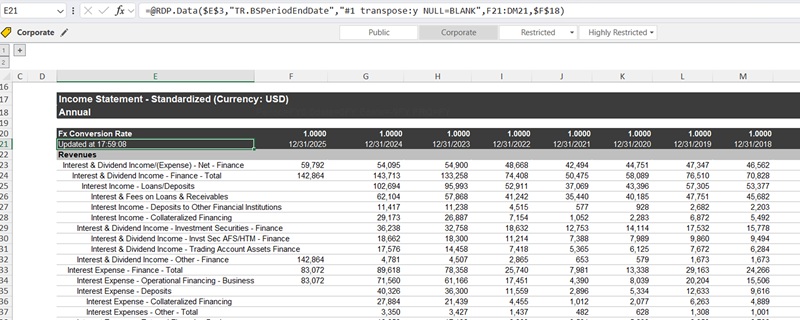
Understanding What =@RDP.Data Does in Excel
The RDP.Data worksheet function connects your Excel workbook to the LSEG Workspace application, enabling retrieval of:
- Real time market data
- Reference data
- Fundamental data
- Historical data
Note: The =@RDP.Data function is equivalent to the =@TR function used in the Eikon product so they can be used interchangeably.
The syntax generally looks like:
=RDP.Data("Instruments","Fields",["Parameters]",[Destination Cell],[Cell References])
The arguments of RDP.Data are:
Argument |
Description |
|---|---|
Instruments |
Mandatory. The instruments that you want to retrieve. You identify them by entering the instrument code. The instrument code is not case-sensitive, if the case is consistent. RDP.Data supports multiple instruments. The value of this parameter can be a range of Excel cells or another Workspace Excel function, such as an RDP.Search or another RDP.Data function. |
Fields |
Mandatory. The data you want to retrieve for the selected instruments. RDP.Data supports multiple fields. Fields can belong to different categories. The list of available fields depends on the selected instruments. The value of this parameter can be a range of Excel cells |
Parameters |
Optional. Parameters enable you to define how the data is requested, refreshed, and displayed. The list of available request parameters depends on the selected fields. |
Destination Cell |
Optional. Defines the position of the top-left corner of the table of data returned. If you do not specify a destination cell, then the destination cell is the same as the function cell. |
Cell References |
Optional. Used only for cell-referencing using the #value cell reference method
|
Note: Some parameters are used solely for formatting data in Excel, so they are not supported in the LSEG Data Library for Python.
For Example:
Use the list of instruments and fields in the Instruments and Fields arguments.
=@RDP.Data("IBM.N;LSEG.L","TR.CLOSEPRICE;TR.ACCUMULATEDVOLUME","SDate=0 EDate=-9 Frq=D CH=Fd RH=IN,date",B2)
Use the Excel cell range in the Instruments and Fields arguments.
=@RDP.Data($J$1:$J$2,$K$1:$K$2,"SDate=0 EDate=-9 Frq=D CH=Fd RH=IN,date",B2)
Specify the values of the SDate ad EDate parameters in the Cell References arguments.
=@RDP.Data("IBM.N;LSEG.L","TR.CLOSEPRICE;TR.ACCUMULATEDVOLUME","SDate=#1 EDate=#2 Frq=D CH=Fd RH=IN,date",B2,0,-9)
Specify the values for the SDate and EDate parameters in the Cell References arguments, and use the Excel cell reference ($L1) for the EDate parameter.
=@RDP.Data("IBM.N;LSEG.L","TR.CLOSEPRICE;TR.ACCUMULATEDVOLUME","SDate=#1 EDate=#2 Frq=D CH=Fd RH=IN,date",B2,0,$L1)
Generate the list of RICs using the RDP.Search function, and pass that list to the Instruments argument.
=@RDP.Data(RDP.Search("EQUITY","AssetState ne 'DC' and SearchAllCategoryv2 eq 'Equities' and (RCSIssuerCountryGenealogy eq 'M:DQ/G:AM/G:8W' and Eps gt 5)","NBROWS:5"),"TR.CLOSEPRICE;TR.ACCUMULATEDVOLUME","SDate=0 EDate=-9 Frq=D CH=Fd RH=IN,date",B2)
The Python Equivalent: ld.get_data()
In Python, the =@RDP.Data Excel function corresponds to the get_data() function in the LSEG Data Library for Python. The library can connect to an active LSEG Workspace Desktop session to retrieve data from the same endpoint used by the =@RDP.Data Excel function.
As part of the Access Layer, get_data() provides a unified interface for retrieving pricing snapshots, Fundamental data, and Reference data using one function call.
It accepts the following parameters:
| Parameters | Types | Descriptions |
|---|---|---|
| universe | str or list | Instruments to request |
| fields | str or list | Fields to request |
| parameters | dict (optional) | A dictionary of global parameters to request |
| header_type | HeaderType (optional) | The default value is HeaderType.TITLE.
|
For Example:
Specify string values for both the universe and fields parameters. The delimiter may be either a comma or a semicolon
ld.get_data(
universe = "IBM.N;LSEG.L",
fields = "TR.CLOSEPRICE.Date;TR.CLOSEPRICE;TR.ACCUMULATEDVOLUME",
parameters = {"SDate":"0","EDate":"-9","Frq":"D"})
Provide lists of strings for the universe and fields parameters.
ld.get_data(
universe = ["IBM.N", "LSEG.L"],
fields = ["TR.CLOSEPRICE.Date","TR.CLOSEPRICE","TR.ACCUMULATEDVOLUME"],
parameters = {"SDate":"0","EDate":"-9","Frq":"D"})
Mapping Excel Formula Components to Python Parameters
The mapping process is simple and consists of three steps.
1. Mapping Instruments
The first argument (Instruments) of the =@RDP.Data Excel function specifies the instruments. Its value may be one of the following:
- A string containing a list of instruments separated by commas or semicolons
- A range of Excel cells that contains a list of instruments
- Another Workspace Excel function that returns a list of instruments, such as RDP.Search or RDP.Data
This Instruments argument maps to the first parameter, universe, in the ld.get_data method. The universe parameter accepts either a Python string or a list. Therefore, if the first argument (Instruments) of the =@RDP.Data function is a string, you can pass that same string directly to the universe parameter in ld.get_data. Alternatively, you can split the string into individual items, place them in a list of Python strings, and pass that list to the universe parameter.
A list of Python strings is simply a Python list ([]) in which each element is a string enclosed in quotes, for example:
| ["AAPL.O", "MSFT.O", "GOOGL.O"] |
However, if the first argument (Instruments) of the =@RDP.Data function is an Excel cell range or another Workspace function, you must extract the list of instruments from those cells or from the function’s returned value, and then assign that data to the universe parameter as either a single string or a list of Python strings.
Sample Mappings
| RDP.Data: The first argument (Instruments) | ld.get_data: The first parameter (universe) |
|---|---|
| =@RDP.Data("IBM.N;LSEG.L", ...) | ld.get_data(universe = "IBM.N;LSEG.L", ...) Or ld.get_data(universe = ["IBM.N","LSEG.L"], ...) |
=@RDP.Data(\$A\$1:\$A\$2, ...) |
ld.get_data(universe = "IBM.N;LSEG.L", ...) Or ld.get_data(universe = ["IBM.N","LSEG.L"], ...) |
2. Mapping Fields
The second argument (Fields) of the =@RDP.Data Excel function specifies the fields. Its value may be one of the following:
- A string containing a list of fields separated by commas or semicolons
- A range of Excel cells that contains a list of fields
This Fields argument maps to the second parameter, fields, in the ld.get_data method. The fields parameter accepts either a Python string or a list. Therefore, if the second argument (Fields) of the =@RDP.Data function is a string, you can pass that same string directly to the fields parameter in ld.get_data. Alternatively, you can split the string into individual items, place them in a list of Python strings, and pass that list to the fields parameter.
A list of Python strings is simply a Python list ([]) in which each element is a string enclosed in quotes, for example:
| ["TR.CLOSEPRICE","TR.ACCUMULATEDVOLUME"] |
However, if the second argument (Fields) of the =@RDP.Data function is an Excel cell range, you must extract the list of fields from those cells, and then assign that data to the fields parameter as either a single string or a list of Python strings.
Sample Mappings
| RDP.Data: The second argument (Fields) | ld.get_data: The second parameter (fields) |
|---|---|
| =@RDP.Data("<instruments>", "TR.CLOSEPRICE;TR.ACCUMULATEDVOLUME", ...) | ld.get_data(universe = ... , Or ld.get_data(universe = ... , |
=@RDP.Data("<instruments>", \$B\$1:\$B\$2,...) |
ld.get_data(universe = ... , Or ld.get_data(universe = ... , |
3. Mapping Parameters
The third argument (Parameters) of the =@RDP.Data Excel function specifies the request parameters. Each item contains a parameter name and its corresponding value, separated by an equal sign, and multiple parameters are separated by spaces. Its value may be one of the following:
- A string containing a list of request parameters
- An Excel cell that contains request parameters
This Parameters argument maps to the third parameter, parameters, in the ld.get_data method which expects a Python dictionary. Therefore, the value passed to this argument must be converted into a Python dictionary.
A Python dictionary is a collection of key–value pairs enclosed in curly braces, such as {key: value}. In this context, each key represents a request parameter name, and each value represents that parameter’s value. Items are separated by commas. For example:
| {"SDate": "0" ,"EDate": "-9", "Frq":"D"} |
However, if the third argument (Parameters) of the =@RDP.Data function is an Excel cell, users must first extract the value from that cell and then convert it into a Python dictionary.
The CH and RH Parameters
The CH and RH parameters are used solely for formatting data in Excel, so they are not required by the ld.get_data method. However, they may include companion fields, such as CH=Fd,date or RH=IN,calcdate. When such companion fields (e.g. date and calcdate) are present, they can be added to the fields parameter in the ld.get_data method.
Cell References
Request parameter values can be provided using the #<n> cell‑reference format (e.g., #1, #2). These values correspond to arguments from the fifth and subsequent arguments of the =@RDP.Data method. Users must extract the values from those arguments and then convert it into a Python dictionary.
Sample Mappings
| RDP.Data: The third argument (Parameters) | ld.get_data: The third parameter (parameters) |
|---|---|
| =@RDP.Data("<instruments>", "<fields>","SDate=0 EDate=-9 Frq=D CH=Fd RH=IN", ...) | ld.get_data(universe = ... , fields = ..., parameters = {"SDate":"0", "EDate":"-9", "Frq":"D"}) |
=@RDP.Data(".<instruments>", "<fields>", \$C\$1,...) |
ld.get_data(universe = ... , fields = ..., parameters = {"SDate":"0", "EDate":"-9", "Frq":"D"}) |
| =@RDP.Data("<instruments>","TR.CLOSEPRICE;TR.ACCUMULATEDVOLUME","SDate=0 EDate=-9 Frq=D CH=Fd RH=IN,date",B2) | ld.get_data(universe = ... , fields = ["TR.CLOSEPRICE.date", "TR.CLOSEPRICE", "TR.ACCUMULATEDVOLUME"], parameters = {"SDate":"0", "EDate":"-9", "Frq":"D"}) |
| =@RDP.Data("<instruments>","TR.CLOSEPRICE;TR.ACCUMULATEDVOLUME","SDate=0 EDate=-9 Frq=D CH=Fd,calcdate RH=IN",B2) | ld.get_data(universe = ... , fields = ["TR.CLOSEPRICE.calcdate", "TR.CLOSEPRICE", "TR.ACCUMULATEDVOLUME"], parameters = {"SDate":"0", "EDate":"-9", "Frq":"D"}) |
| =@RDP.Data("<instrument>","<fields>","SDate=#1 EDate=#2 Frq=D CH=Fd RH=IN",B2,0,-9) | ld.get_data(universe = ... , fields = ..., parameters = {"SDate":"0", "EDate":"-9", "Frq":"D"}) |
Conversion Examples
The following are some Workspace Excel formulas and their equivalent Python code.
1. Inline values
| =@RDP.Data("IBM.N;LSEG.L","TR.CLOSEPRICE;TR.ACCUMULATEDVOLUME","SDate=0 EDate=-9 Frq=D CH=Fd RH=IN",B2) |
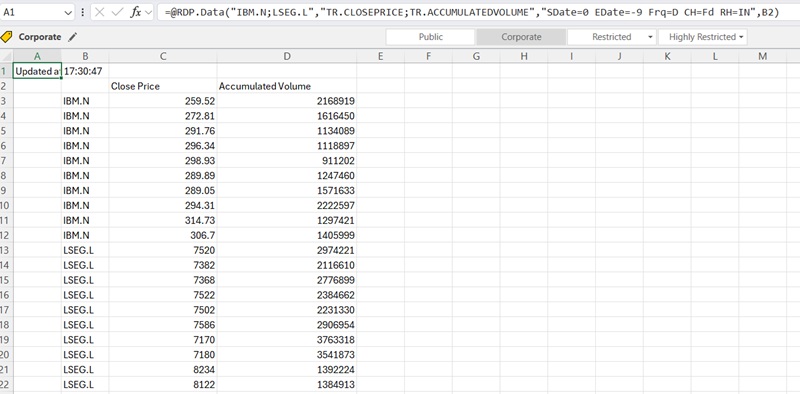
ld.get_data(
universe = ['IBM.N','LSEG.L'],
fields = ['TR.CLOSEPRICE','TR.ACCUMULATEDVOLUME'],
parameters = {'SDate':'0', 'EDate':'-9', 'Frq':'D'})
Output:
| Instrument | Close Price | Accumulated Volume | |
|---|---|---|---|
| 0 | IBM.N | 259.52 | 2168919 |
| 1 | IBM.N | 272.81 | 1616450 |
| 2 | IBM.N | 291.76 | 1134089 |
| 3 | IBM.N | 296.34 | 1118897 |
| ... | ... | ... | ... |
| 10 | LSEG.L | 7520.0 | 2974221 |
| 11 | LSEG.L | 7382.0 | 2116610 |
| 12 | LSEG.L | 7368.0 | 2776899 |
| 13 | LSEG.L | 7522.0 | 2384662 |
| 14 | LSEG.L | 7502.0 | 2231330 |
| ... | ... | ... | ... |
2. A companion date field in the RH parameter
| =@RDP.Data("IBM.N;LSEG.L","TR.CLOSEPRICE;TR.ACCUMULATEDVOLUME","SDate=1D EDate=-1AY Frq=AM CH=Fd RH=IN,Date",B2) |
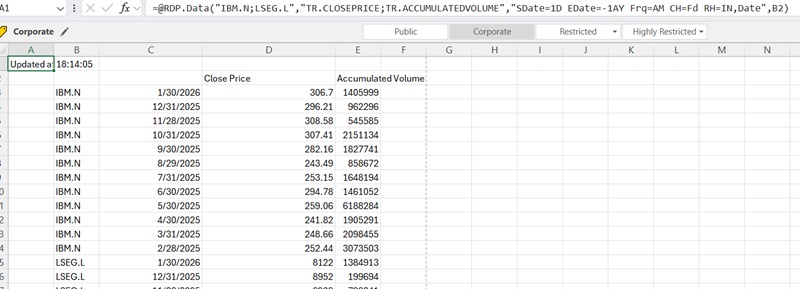
ld.get_data(
universe = ['IBM.N','LSEG.L'],
fields = ['TR.CLOSEPRICE.Date','TR.CLOSEPRICE','TR.ACCUMULATEDVOLUME'],
parameters = {'SDate':'1D', 'EDate':'-1AY', 'Frq':'AM'})
Output:
| Instrument | Date | Close Price | Accumulated Volume | |
|---|---|---|---|---|
| 0 | IBM.N | 2026-01-30 | 306.7 | 1405999 |
| 1 | IBM.N | 2025-12-31 | 296.21 | 962296 |
| 2 | IBM.N | 2025-11-28 | 308.58 | 545585 |
| 3 | IBM.N | 2025-10-31 | 307.41 | 2151134 |
| 4 | IBM.N | 2025-09-30 | 282.16 | 1827741 |
| ... | ... | ... | ... | ... |
| 12 | LSEG.L | 2026-01-30 | 8122.0 | 1384913 |
| 13 | LSEG.L | 2025-12-31 | 8952.0 | 199694 |
| 14 | LSEG.L | 2025-11-28 | 8908.0 | 798241 |
| ... | ... | ... | ... | ... |
3. Cell References
| =@RDP.Data(\$H\$1:\$H\$2,I1:I4,"SDate=#1 EDate=#2 CH=Fd RH=IN",B2, J1, $J2) |
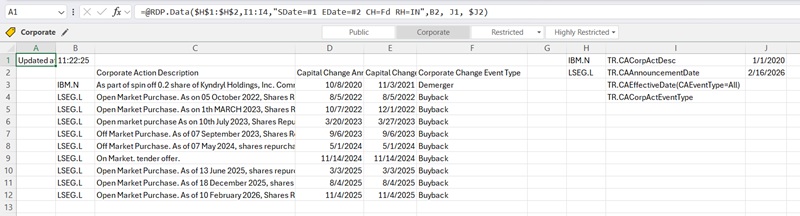
ld.get_data(
universe = ['IBM.N','LSEG.L'],
fields = ['TR.CACorpActDesc','TR.CAAnnouncementDate','TR.CAEffectiveDate(CAEventType=All)','TR.CACorpActEventType'],
parameters = {'SDate':'2020-01-01', 'EDate':'2026-02-16'})
Output:
| Instrument | Corporate Action Description | Capital Change Announcement Date | Capital Change Effective Date | Corporate Change Event Type | |
|---|---|---|---|---|---|
| 0 | IBM.N | As part of spin off 0.2 share of Kyndryl Holdi... | 2020-10-08 | 2021-11-03 | Demerger |
| 1 | LSEG.L | Open Market Purchase. As on 05 October 2022, S... | 2022-08-05 | 2022-08-05 | Buyback |
| 2 | LSEG.L | Open Market Purchase. As on 1th MARCH 2023, Sh... | 2022-10-07 | 2022-12-01 | Buyback |
| 3 | LSEG.L | Open market purchase As on 10th July 2023, Sha... | 2023-03-20 | 2023-03-27 | Buyback |
| 4 | LSEG.L | Off Market Purchase. As of 07 September 2023, ... | 2023-09-06 | 2023-09-06 | Buyback |
| 5 | LSEG.L | Off Market Purchase. As of 07 May 2024, shares... | 2024-05-01 | 2024-05-01 | Buyback |
| 6 | LSEG.L | On Market. tender offer. | 2024-11-14 | 2024-11-14 | Buyback |
| 7 | LSEG.L | Open Market Purchase. As of 13 June 2025, shar... | 2025-03-03 | 2025-03-03 | Buyback |
| 8 | LSEG.L | Open Market Purchase. As of 18 December 2025, ... | 2025-08-04 | 2025-08-04 | Buyback |
| 9 | LSEG.L | Open Market Purchase. As of 10 February 2026, ... | 2025-11-04 | 2025-11-04 | Buyback |
4. AVAIL function
| =@RDP.Data("IBM.N,LSEG.L","AVAIL(TR.TotCashFromInvestingActivitiesCFStmt(Period=LTM),TR.TotCashFromInvestingActivitiesCFStmt(Period=FY0))","CH=Fd RH=IN",B2) |

ld.get_data(
universe = ['IBM.N','LSEG.L'],
fields = ['AVAIL(TR.TotCashFromInvestingActivitiesCFStmt(Period=LTM),TR.TotCashFromInvestingActivitiesCFStmt(Period=FY0))'],
parameters = {})
Output:
| Instrument | AVAIL(TR.TOTCASHFROMINVESTINGACTIVITIESCFSTMT(PERIOD=LTM),TR.TOTCASHFROMINVESTINGACTIVITIESCFSTMT(PERIOD=FY0)) | |
|---|---|---|
| 0 | IBM.N | -10302000000 |
| 1 | LSEG.L | -1404000000 |
5. GRWAVG function
| =@RDP.Data("0#.FTSE","GRWAVG(TR.CompanyMarketCap,PERCENT_CHG(TR.F.TotRevenue(Period=FI0),TR.F.TotRevenue(Period=FI-4)),universe=""univ"")","Period=FI0 NULL=BLANK") |

ld.get_data(
universe = ["0#.FTSE"],
fields = ['GRWAVG(TR.CompanyMarketCap,PERCENT_CHG(TR.F.TotRevenue(Period=FI0),TR.F.TotRevenue(Period=FI-4)),universe="univ")'],
parameters = {'Period':'FI0'})
Output:
| Instrument | GRWAVG(TR.COMPANYMARKETCAP,PERCENT_CHG(TR.F.TOTREVENUE(PERIOD=FI0),TR.F.TOTREVENUE(PERIOD=FI-4)),UNIVERSE="UNIV") | |
|---|---|---|
| 0 | n/a | 11.894957 |
6. Screener
| =@RDP.Data("SCREEN(U(IN(Equity(active,public,primary))/*UNV:Public*/), IN(TR.HQCountryCode,""TH""), TR.CompanyMarketCap>=12326739695.24, CURN=USD)","TR.CommonName;TR.HeadquartersCountry;TR.CompanyMarketCap","curn=USD RH=In CH=Fd") |

ld.get_data(
universe = 'SCREEN(U(IN(Equity(active,public,primary))/*UNV:Public*/), IN(TR.HQCountryCode,"TH"), TR.CompanyMarketCap>=12326739695.24, CURN=USD)',
fields = ['TR.CommonName','TR.HeadquartersCountry','TR.CompanyMarketCap'],
parameters = {'curn':'USD'})
Output:
| Instrument | Company Common Name | Country of Headquarters | Company Market Cap | |
|---|---|---|---|---|
| 0 | CPALL.BK | CP All PCL | Thailand | 14289978727.034901 |
| 1 | SCB.BK | SCB X PCL | Thailand | 15334694035.077499 |
| 2 | AOT.BK | Airports of Thailand PCL | Thailand | 26531904069.767399 |
| ... | ... | ... | ... | ... |
| 10 | PTTEP.BK | PTT Exploration and Production PCL | Thailand | 17375097600.1292 |
| 11 | DELTA.BK | Delta Electronics Thailand PCL | Thailand | 87026624232.558105 |
Summary Cheat Sheet
The table below summarizes how to convert the values of the RDP.Data arguments into their equivalent Python parameters.
| RDP.Data Arguments | RDP.Data Values | Python Parameters (ld.data) |
|---|---|---|
| Instruments | "IBM.N,LSEG.L" | universe = ['IBM.N', 'LSEG.L'] |
| Instruments | "SCREEN(U(IN(Equity(active,public,primary))..., CURN=USD)" | universe = 'SCREEN(U(IN(Equity(active,public,primary))..., CURN=USD)' |
| Instruments (function) | "Peers(IBM.N)" | universe = 'Peers(IBM.N)' |
| Fields | "TR.CLOSEPRICE;TR.ACCUMULATEDVOLUME" | fields = ['TR.CLOSEPRICE', 'TR.ACCUMULATEDVOLUME'] |
| Fields (function) | "GRWAVG(...)" | fields = ['GRWAVG(...)'] |
| Parameters | "SDate=2020-01-01 EDate=2020-12-31 Frq=D" | parameters = {'SDate':'2020-01-01', 'EDate':'2020-12-31', 'Frq':'D'} |
| Parameters (A companion field) |
"RH=IN,date,calcdate" Or "CH=Fd,date,calcdate" |
fields = ['TR.<field_name>.date', 'TR.<field_name>.calcdate'] |
- Register or Log in to applaud this article
- Let the author know how much this article helped you
Get In Touch

Related APIs
Related Articles
-
Converting RDP.HistoricalPricing() Excel Function to ld.get_history() in Python
-
Workspace Excel-to-Notebook Conversion with GitHub Copilot
-
Essential Guide to the Data Libraries - Generations of Python library (EDAPI, RDP, RD, LD)
-
Upgrade from using Eikon Data API to the Data library
-
The Data Library for Python - Quick Reference Guide (Access layer)
-
LSEG's Refinitiv Data Library for Python and its Configuration Process
-
Find Your Right Companies with SCREENER
