

Wasin Waeosri
Developer Advocate
Overview
Update: February 2025.
Websocket API for Pricing Streaming and Real-Time Service aka Websocket API enables easy integration into a multitude of client technology environments such as scripting and web. This API runs directly on your Real-Time Distribution System (RTDS) and presents data in an open (JSON) readable format. The API supports all Real-Time data models and can be integrated into multiple client technology standards e.g. JavaScript, Python, R, .Net, etc.
The web browsers JavaScript runtime is a single-threaded environment by default. However, the HTML standard lets developers implement multi threads JavaScript application in web browser by introducing the Web Workers feature that lets web browsers run JavaScripts in a main thread and a background thread (workers thread).
This article shows how developers may use the JavaScrip Web Workers to implement the WebSocket API web application. It allows the Web Workers thread to handle the connection logic with the Real-Time Advanced Distribution server (ADS) while the main thread handles the UI interaction events and displaying data.
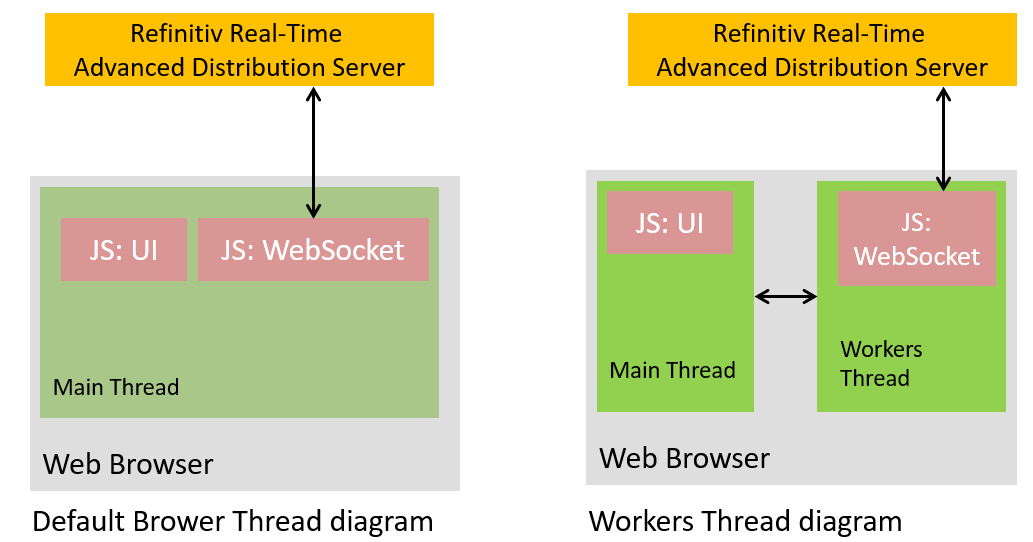
Figure-1: Web Workers and WebSocket connection diagram
WebSocket Overview
WebSocket specification defines an API that enables web pages to use the WebSockets protocol for two-way communication with a remote host. It introduces the WebSocket interface and defines a full-duplex communication channel that operates through a single socket over the Web. This specification also later applied to other client technology sides like Python, Ruby, Go, Java, etc.
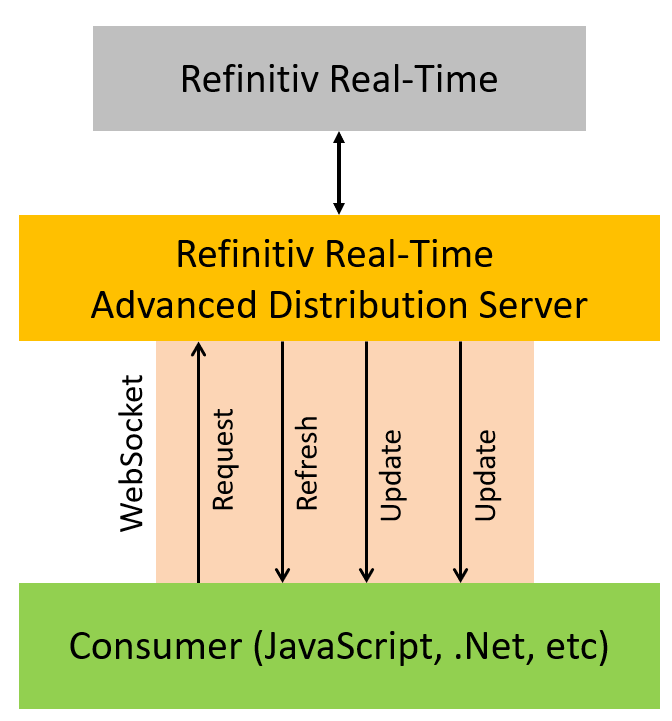
Figure-2: WebSocket connection diagram
Web Workers Overview
Web Workers allows for concurrent execution of the browser threads and one or more JavaScript threads running in the background. The main JavaScript application thread communicates with the Workers thread application via an event model and the postMessage() function. The postMessage() function can accept either a string or JSON object as its single argument.
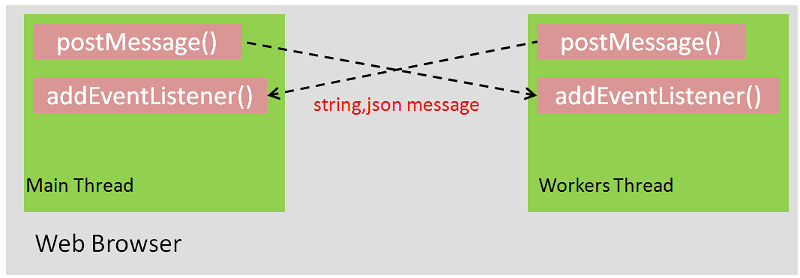
Figure-3: Web Workers communication diagram
Please see an example code below.
Main.js:
Worker.js:
There are two types of Web Workers, Dedicated Workers, and Shared Workers. This article covers only how to implement the WebSocket API with JavaScript web browser application with Dedicated Workers.
Supported Web Browsers
This example supports the following web browsers (based on the WebSocket and Web Workers browser supported)
- Chrome
- Firefox
- IE11
- Microsoft Edge (Chrome-based version)
Application files
The web application contains the following example files and folder:
- index.html: The application HTML page
- app/market_price_app.js: The application main file
- app/ws_workers.js: The application Web Workers file
- css/cover.css: The application CSS file
- libs/jquery-3.2.1.min.js: jQuery library file
- bootstrap/css, bootstarp/fonts and bootstrap/js folders: The folders for Bootstrap CSS and libraries files
- node_modules folder: Folder for Node.js and Express.js modules for webserver running
- server.js: A web server application file
- package.json: The Project npm dependencies file
Message Structure
The message between market_price_app.js and ws_worker.js care in JSON format. They use JSON property 'command' to tell what should they handle the incoming message.
The list of command values between market_price_app.js and ws_workers.js are following:
- 'connect': Inform ws_workers.js to establish a WebSocket connection with the RTDS
- 'login': Inform ws_workers.js to send the Login Request message to the RTDS
- 'requestitem': Inform ws_workers.js to send the Item Request message to the RTDS
- 'closeitem': Inform ws_workers.js to send the Item Close Request message to the RTDS
- 'pong': Inform ws_workers.js to send the Pong heartbeat message to the RTDS
- 'logout': Inform ws_workers.js to disconnect to the RTDS
- 'incomingMsg': Inform market_price_app.js to display incoming data in the web browser
Application Code Implementation Details
This article focus on the market_price_app.js and ws_workers.js files which demonstrate how to implement the WebSocket application with Web Workers.
Firstly, we create JavaScript market_price_app.js and ws_workers.js files in "app" folder.
- We define all required variables in the market_price_app.js and ws_workers.js files. All variables will be used for keeping the application WebSocket and Web Workers information.
3. Next, we create the addEventListener() functions callback in both files for receiving the messages from each other. The addEventListener() functions check the message's data and message's command properties to verify the operation.
4. Then we define all WebSocket required functions in ws_workers.js file.
5. Next, we implement a WebSocket connection logic. The market_price_app.js receives a user input for ADS Server IP Address and WebSocket port from the index.html web page, then market_price_app.js sends the WebSocket URL to ws_wokers.js file with the command 'connect' to establish a connection via postMessage() function. The ws_workers.js calls the WebSocket connect() function to establish a WebSocket connection.
6. Next, we implement the ws_workers.js's onOpen() function callback to handle a WebSocket connect event. When the application success connect to ADS this onOpen() function sends a message to notify market_price_app.js that the connection is established. The market_price_app.js will change the Web UI to inform users regarding this connection event.
7. When users click a connect button on index.html page, the market_price_app.js receives a user name for creating a login command. The market_price_app.js creates the JSON Login request message and sends it to ws_workers.js for sending this message to ADS.
8. Next, we implement the WebSocket onMessage() function in ws_workers.j file to receive an incoming message from the ADS WebSocket server and dispatch it to market_price_app.js file. The market_price_app.js sends it to the processData() function displaying that data in Web UI.
9. We implement the processData() function in market_price_app.js file to display incoming ADS JSON messages (Login, data, status, etc) in the web page. We start by enhance the processData() function to support the REFFRESH_RESP message for the OMM Login domain.
10. Now the application can establish a connection and log in with Real-Time Advanced Distribution Server. The next step is requesting Market Price data from the Real-Time Advanced Distribution Server. The market_price_app.js file receives user input item name in the RIC code format (and optionally, a service name) from the index.html page, then creates a JSON item request message and sends it to ADS WebSocket server via ws_workers.js file.
11. The ws_workers.js file receives incoming Market Price message via the WebSocket onMessage() function.The ws_workers.js file dispatches it to the market_price_app.js's processData() function, then we implement the processData() function to support incoming REFRESH_RESP and UPDATE_RESP messages for Market Price domain message.
12. The last step is handling the Ping and Pong messages. The Ping and Pong messages are the handshake message in JSON format ({ "Type": "Ping" } and { "Type": "Pong" } messages) between the ADS WebSocket server and client for monitoring connection health. The Real-Time Advanced Distribution Server periodically sends Ping messages to applications and applications must be prepared to send Pong messages as a response to any Ping message they receive.
Running the application
The application source code is available at GitHub. You can get it via the following git command
This example application requires the followinng libraries and runtime
- jQuery 3.2.1 JavaScript library (included with the project)
- Bootstrap 3.3.7 css library (included with the project)
- Node.js runtime
please check the README.md in the source code project for more detail.
How to run this example
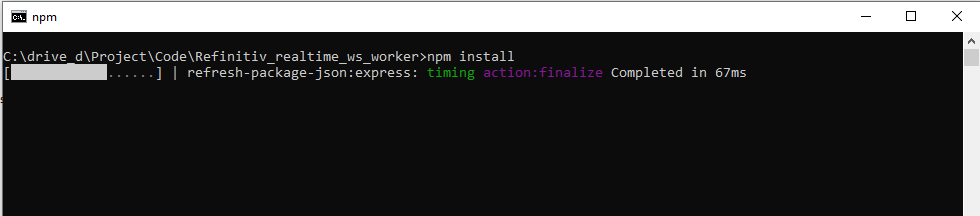
Firstly, get the project via the above git command, and then run npm install command in the command prompt to install all the dependencies required to run the sample in a subdirectory called node_modules/
If the machine is behind a proxy server, you need to configure Node.js uses proxy instead of a direct HTTP connection via the following command in command prompt
Run node server.js command in the command prompt to start the web server at HTTP port 8080
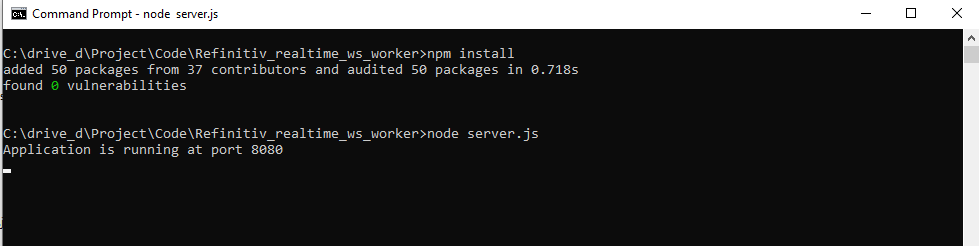
Open http://localhost:8080/index.html in the web browsers (IE11, Chrome/Microsoft Edge (Chrome-based version), and Firefox)
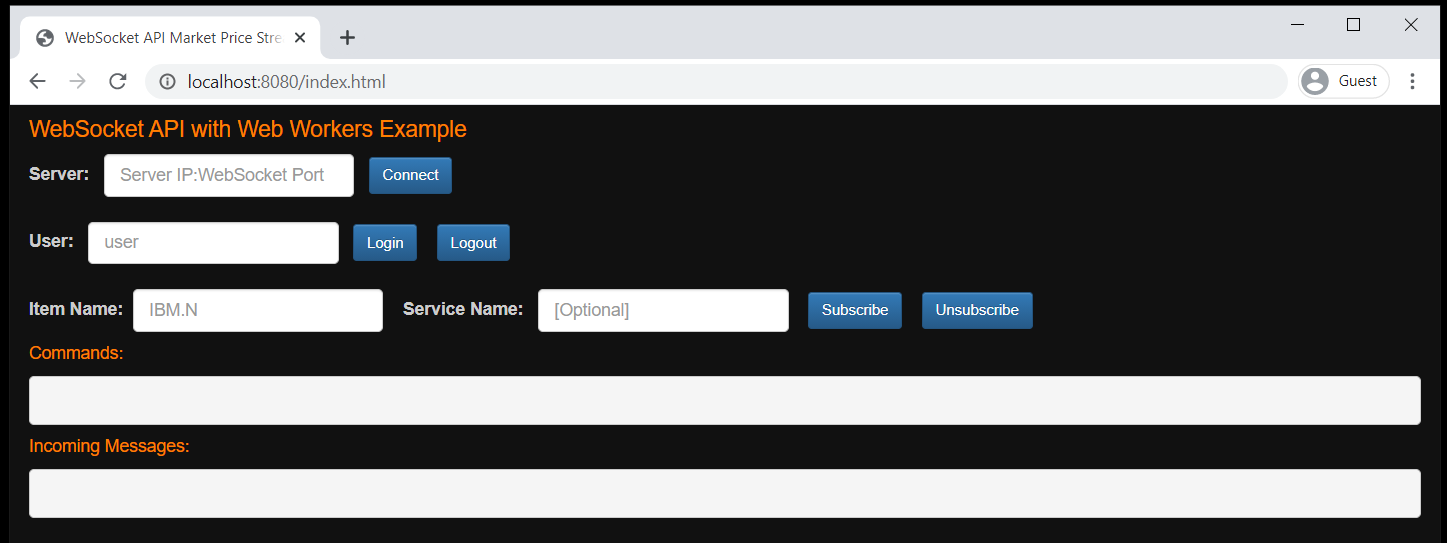
Figure-6: The application page that receives user input
Then, input the ADS Server WebSocket IP and port and click connect to establish a connection. Once connection success, the connect button label changes to "connected".
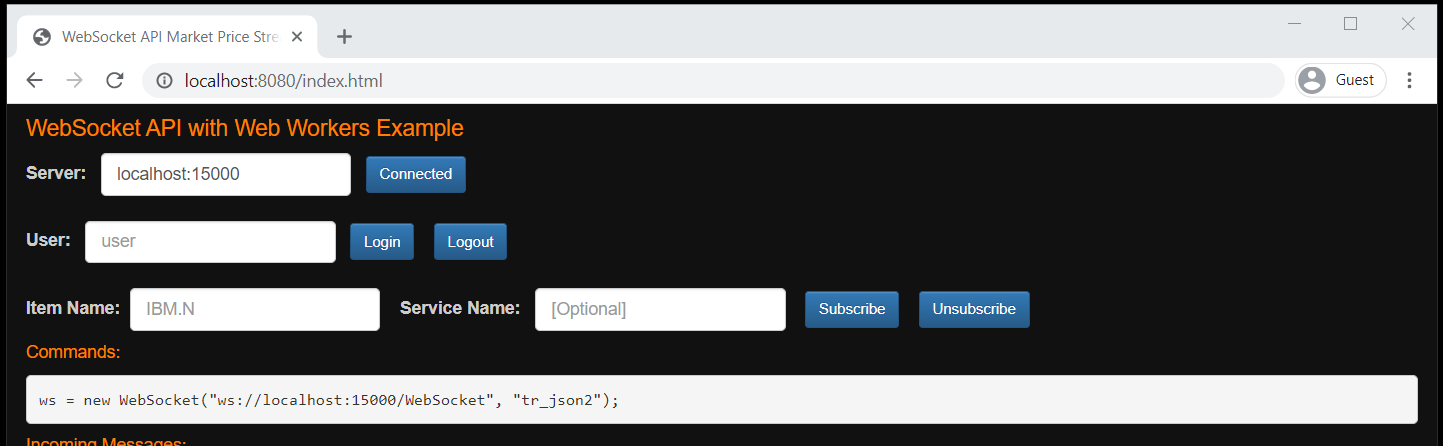
Figure-7: The WebSocket application has now established a connection with Real-Time Advanced Distribution Server
Then input the user name and click a Login button to send a Login request message to Real-Time Advanced Distribution Server.
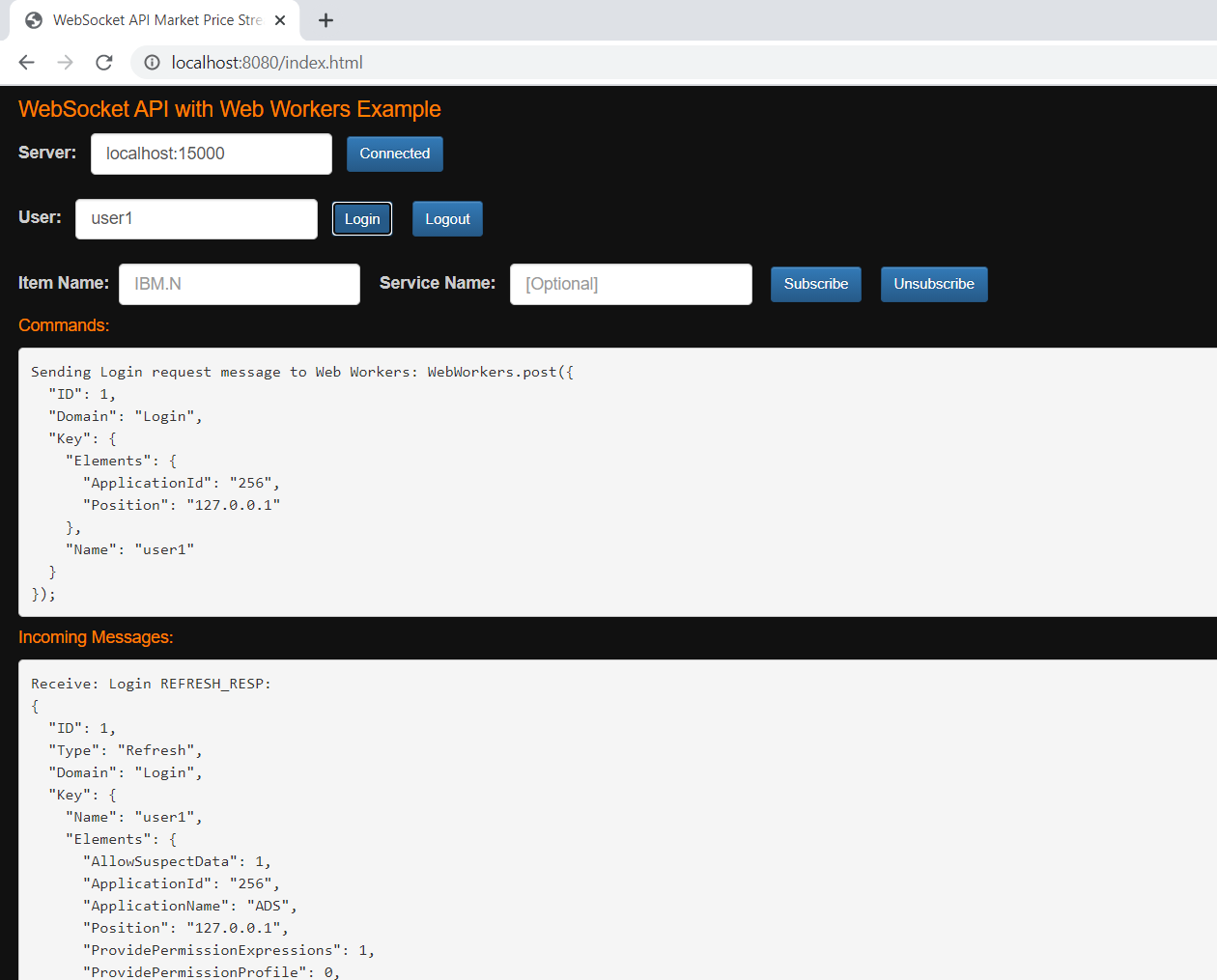
Figure-8: The application is now logged in with the Real-Time Advanced Distribution Server server
Then, input the item name in RIC code format (and optionally, service name), click subscribe. The page shows outgoing request messages and incoming Refresh, Update messages from Real-Time Advanced Distribution Server.
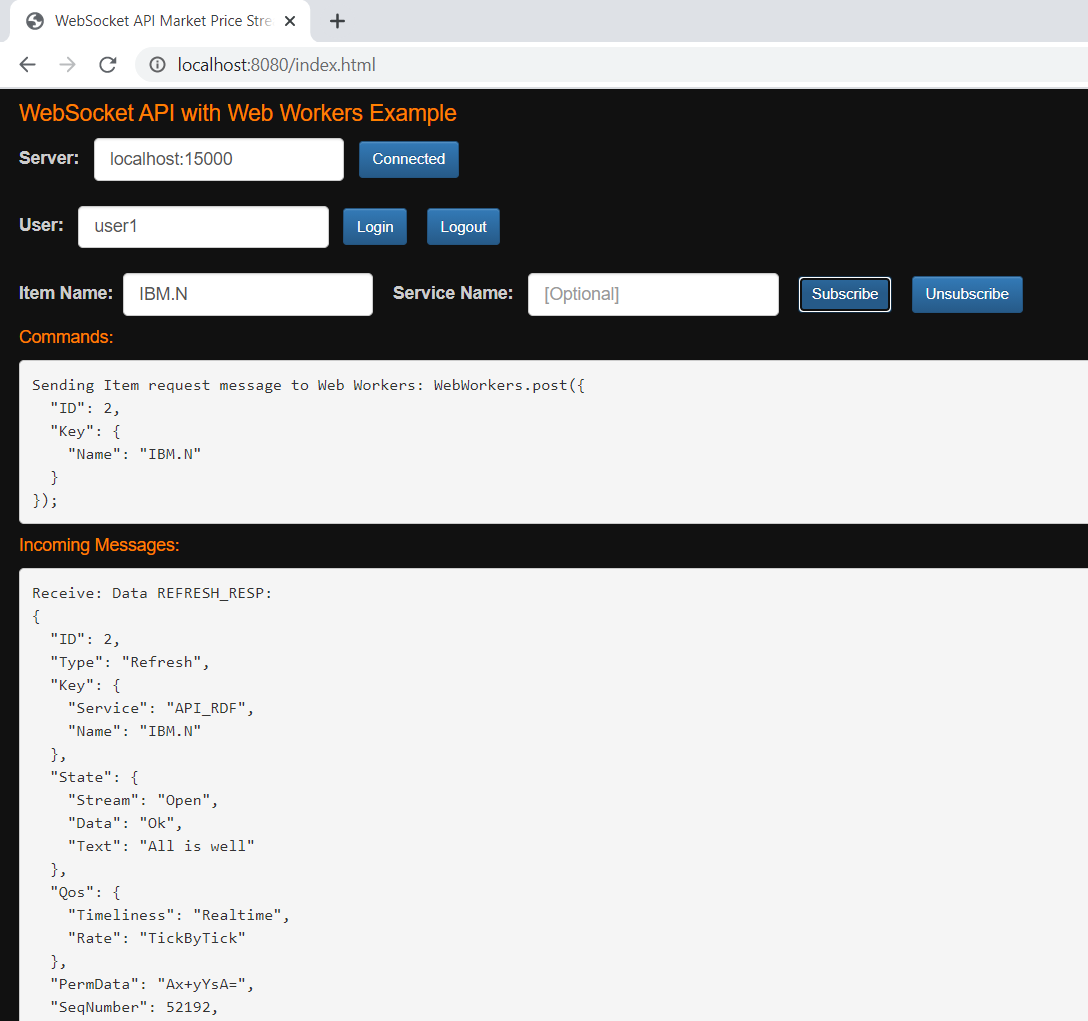
Figure-9: The application is now subscribing Market Price data with Real-Time Advanced Distribution Server.
Finally, the application is automatic sends a Pong message back to the Real-Time Advanced Distribution Server when it receives a Ping handshake message from Real-Time Advanced Distribution Server.
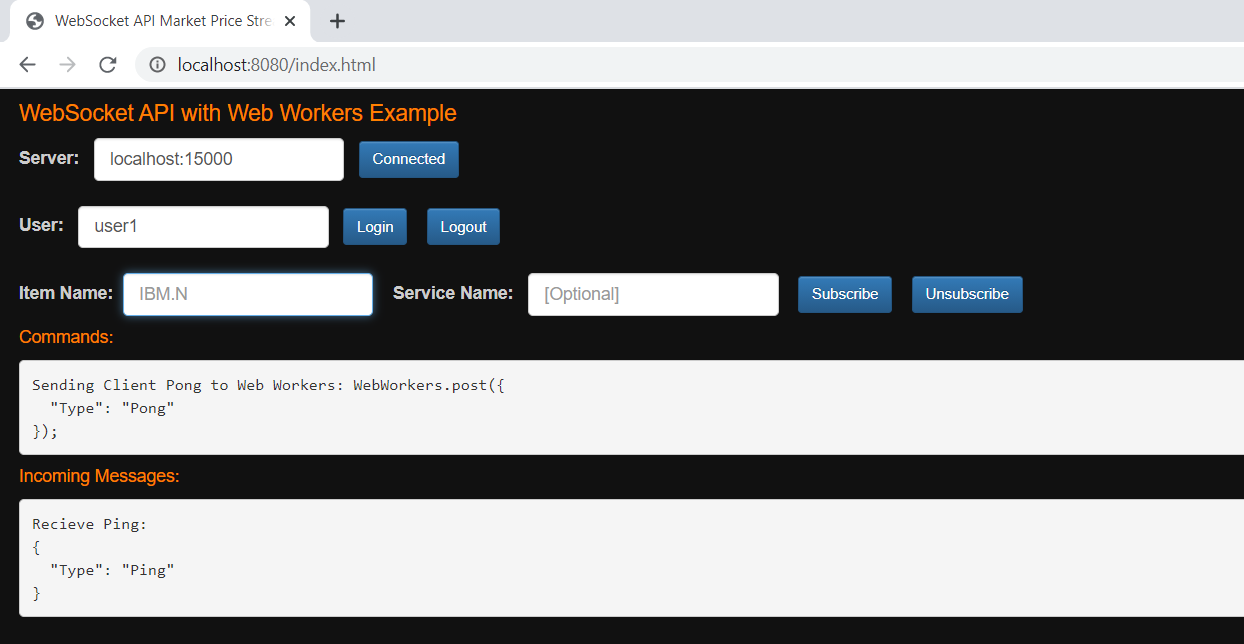
Figure-10: The application is now sending Ping-Pong message with Real-Time Advanced Distribution Server.
References
For further details, please check out the following resources:
- LSEG Real-Time products page on the LSEG Developer Community web site.
- WebSocket API page.
- Developer Webinar Recording: Introduction to Electron Websocket API
- Mozilla Developer Network: Web Workers API page.
- Google HTML5 Rocks: The Basics of Web Workers page
- Mozilla Developer Network: WebSocket API page
For any question related to this example or WebSocket API, please use the Developer Community Q&A Forum.
DOWNLOADS
Get In Touch

Relatead Articles

Related APIs
Source Code
Request Free Trial
Call your local sales team
Americas
All countries (toll free): +1 800 427 7570
Brazil: +55 11 47009629
Argentina: +54 11 53546700
Chile: +56 2 24838932
Mexico: +52 55 80005740
Colombia: +57 1 4419404
Europe, Middle East, Africa
Europe: +442045302020
Africa: +27 11 775 3188
Middle East & North Africa: 800035704182
Asia Pacific (Sub-Regional)
Australia & Pacific Islands: +612 8066 2494
China mainland: +86 10 6627 1095
Hong Kong & Macau: +852 3077 5499
India, Bangladesh, Nepal, Maldives & Sri Lanka:
+91 22 6180 7525
Indonesia: +622150960350
Japan: +813 6743 6515
Korea: +822 3478 4303
Malaysia & Brunei: +603 7 724 0502
New Zealand: +64 9913 6203
Philippines: 180 089 094 050 (Globe) or
180 014 410 639 (PLDT)
Singapore and all non-listed ASEAN Countries:
+65 6415 5484
Taiwan: +886 2 7734 4677
Thailand & Laos: +662 844 9576