
Divide and Conquer in Action
Downloading a Large Tick History File with Python

Introduction
There are many approaches and techniques that can be utilized to download files. The most obvious and simple approach is, to just request the file, to receive it fully, and to store it locally.
In this article, we are going to discuss an approach to downloading really large files from RDP CFS - Tick History service, that is robust, and minimizes the chances of a potential failure.
The two primary aspects that should enable us to get down our large file with a large decree of reliability and that we will next focus on are:
- Streaming the file via requests module, rather then downloading as a whole
- Partitioning a large requirement into smaller pieces, that can also serve as checkpoints, and only requesting one piece, at a time by using HTTP request header Range
Let us introduce the concepts that will be part of the discussion:
- Refinitiv Data Platform (RDP)
- Client File Store (CFS)
- Tick History (TH)
- Python Jupyter Notebook - a Python interface to run, document, share and learn Python code, that will be our vehicle
Authentication Requirement
RDP CFS Tick History service that is used to obtain Tick History files requires authentication with valid RDP credentials. In order to keep the focus of this discussion on downloading large tick history files, while still fullfilling the authentication requirements, and including the complete working example that is available for download on GitHub ( see References) authentication is implemented in a separate AuthTokenHandling notebook. We install module ipynb and reference the notebook from the same directory:
next we are ready to call the defined functions:
Authenticate- Call getToken
Request File Sets - Define a Helper Function
We are going to identify required FileSet and required FileID
So that next we can
Request FileSets Containing Large Tick History File -
The file we are going to use as example is FRA-2020-02-25-NORMALIZEDMP-Data-1-of-1
We request Tick History File Sets for a venue FRA and limit by dates 2020.02.25 to 2020.02.29, and the first FileSet should contain the file ID of the file that we require.

Select File Id
We are going to select the first File ID in the File Set, to use 2020.02.25 FRA normalized as an example of a large file. Another large file can be handled analogously- we just need it's File ID to proceed
Get TH File Details by File ID - Define a Helper Function
that we can next use to
Request File Details of a Large File
* We verify the size of the file to be retrieved
* Store its file name and file size
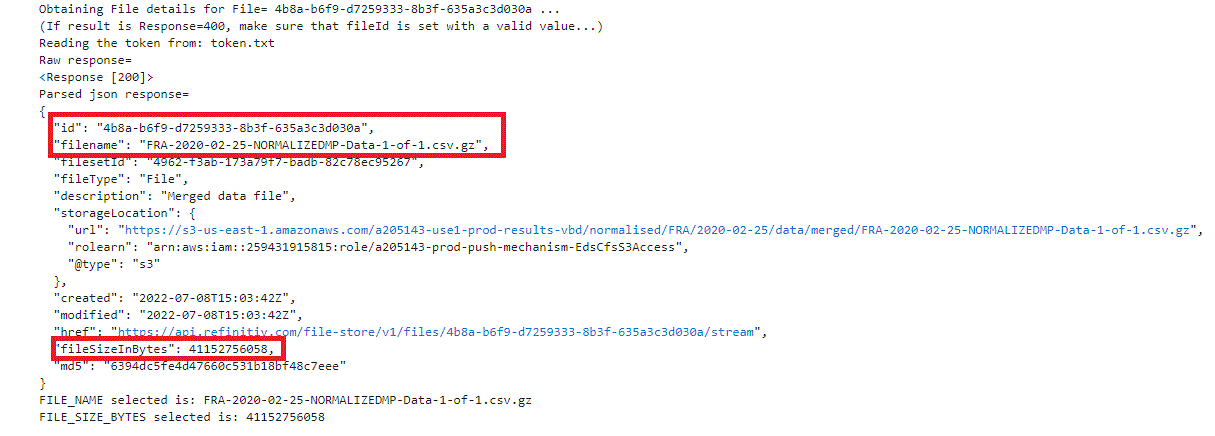
with what we have learned from the File details, we are ready to download as two step, without Redirect:
- Obtain the complete file location (URL)
- Stream and download file in chunks, continuously copying to disk just as it becomes ready
Get File Location (Step 1 of 2)

and
Download File From File Location in Chunks (Step 2 of 2)
The chunk size can be tuned for the specific environment and the required download size. chunkSize=3000000000 has worked well in my environment for the 38G file that was downloaded.

<<<>>>

Now our large file is ready to unzip and use as required.
To learn more, visit us on LSEG Developers Forums
References
- Quick Start | LSEG Developers -Refinitiv Data Platform APIs Quick Start Guide
- Documentation | LSEG Developers -CFS API User Guide
- LSEG Data Platform Questions - Forum | LSEG Developer Community -Developer Q&A Forums
- API Playground - API Playground
