

Wasin Waeosri
Developer Advocate
Introduction
Last Updated: May 2026
Machine Readable News (MRN) is an advanced service for automating the consumption and systematic analysis of news. It delivers deep historical news archives, ultra-low latency structured news, and news analytics directly to your applications. This enables algorithms to exploit the power of news to seize opportunities, capitalize on market inefficiencies, and manage event risk.
Developers can get the MRN real-time news data via LSEG Real-Time APIs like the Real-Time SDK (Java, C#, and C/C++ editions) and the WebSocket API.
Built on top of the WebSocket API, the Data Library for Python let wide range of developers can access to LSEG Real-Time content including the MRN data with the Python programming language.
This article shows how developers may use the Data Library for Python to subscribe Machine Readable News (MRN) from Real-Time Platform, then assemble and decode MRN textual news message to display news in a console (the logic can be applied to Jupyter Notebook too).
Note:
- The news message is in UTF-8 JSON string format. Some news messages that contain special Unicode character may not be able to show in Windows OS console (cmd, git bash, powershell, etc) due to the OS limitation. Those messages will be print as UnicodeEncodeError exception. Cannot decode Unicode character message in a console instead.
- This project demonstrates with the Data Library for Python edition. However, the MRN data parsing and assembling concept can be used with the Data Library for TypeScript edition too.
Introduction to the Data Library for Python
The Data Library for Python provides a set of ease-of-use interfaces offering coders uniform access to the breadth and depth of financial data and services available on the Workspace, RDP, and Real-Time Platforms. The API is designed to provide consistent access through multiple access channels and target both Professional Developers and Financial Coders. Developers can choose to access content from the desktop, through their deployed streaming services, or directly to the cloud. With the Data Library, the same Python code can be used to retrieve data regardless of which access point you choose to connect to the platform.
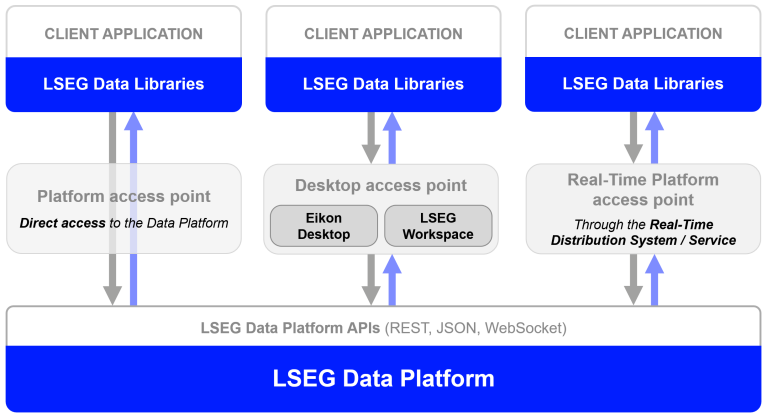
The Data Library are available in the following programming languages:
For more deep detail regarding the Data Library for Python, please refer to the following articles and tutorials:
This article is based on the Data Library for Python version 2.1.1 (As of July 2025).
Note For .NET Developers
If you are .NET developers, the Data Library for .NET provides a ready-to-use MachineReadableNews object for you. The MachineReadableNews object lets an application gets the MRN streaming news data without manual parsing/assembling code like the Python and TypeScript editions.
MRN on Data Library for .NET Example:
You can see more detail on the Data Library for .NET - 2.3.06-News-MRN example.
MRN Overview
MRN is published over Real-Time platform using an Open Message Model (OMM) envelope in News Text Analytics domain messages. The Real-time News content set is made available over MRN_STORY RIC. The content data is contained in a FRAGMENT field that has been compressed and potentially fragmented across multiple messages, to reduce bandwidth and message size.
A FRAGMENT field has a different data type based on a connection type:
The data goes through the following series of transformations:
- The core content data is a UTF-8 JSON string
- This JSON string is compressed using gzip
- The compressed JSON is split into several fragments (BUFFER or Base64 ASCII string) which each fit into a single update message
- The data fragments are added to an update message as the FRAGMENT field value in a FieldList envelope
Therefore, to parse the core content data, the application will need to reverse this process.
Data Model
Five fields, as well as the RIC itself, are necessary to determine whether the entire item has been received in its various fragments and how to concatenate the fragments to reconstruct the item:
- MRN_SRC: identifier of the scoring/processing system that published the FRAGMENT;
- GUID: globally unique identifier for the data item, all messages for this data item will have the same GUID value;
- FRAGMENT: compressed data item fragment;
- TOT_SIZE: total size in bytes of the fragmented data;
- FRAG_NUM: sequence number of fragments within a data item, which is set to 1 for the first fragment of each item published
and is incremented for each subsequent fragment for the same item. A single MRN data item publication is uniquely identified by the combination of RIC name, MRN_SRC, and GUID.
Fragmentation
For a given RIC/MRN_SRC/GUID combination, when a data item requires only a single message, then TOT_SIZE will equal the number of bytes length in the FRAGMENT and FRAG_NUM will be 1.
When multiple messages are required, then the data item can be deemed as fully received once the sum of the number of bytes length of each FRAGMENT equals TOT_SIZE. The consumer will also observe that all FRAG_NUM range from 1 to the number of the fragment, with no intermediate integers skipped. In other words, a data item transmitted over three messages will contain FRAG_NUM values of 1, 2, and 3.
The WebSocket application also needs to convert the FRAGMENT field data from Base64 string to bytes data before further process this field. Python application can use the base64 module to decode Base64 string to bytes data.
Compression
The FRAGMENT field is compressed with gzip compression, thus requiring the consumer to decompress to reveal the JSON plain-text data in that FID.
When an MRN data item is sent in multiple messages, all the messages must be received and their FRAGMENTs concatenated before being decompressed. In other words, the FRAGMENTs should not be decompressed independently of each other.
The decompressed output is encoded in UTF-8 and formatted as JSON. Python application can uses zlib module to decompress JSON string.
How to process MRN data
Once the application has established a connection and requested MRN RIC data from Real-Time platform, an application can process incoming MRN data message with the following flow:
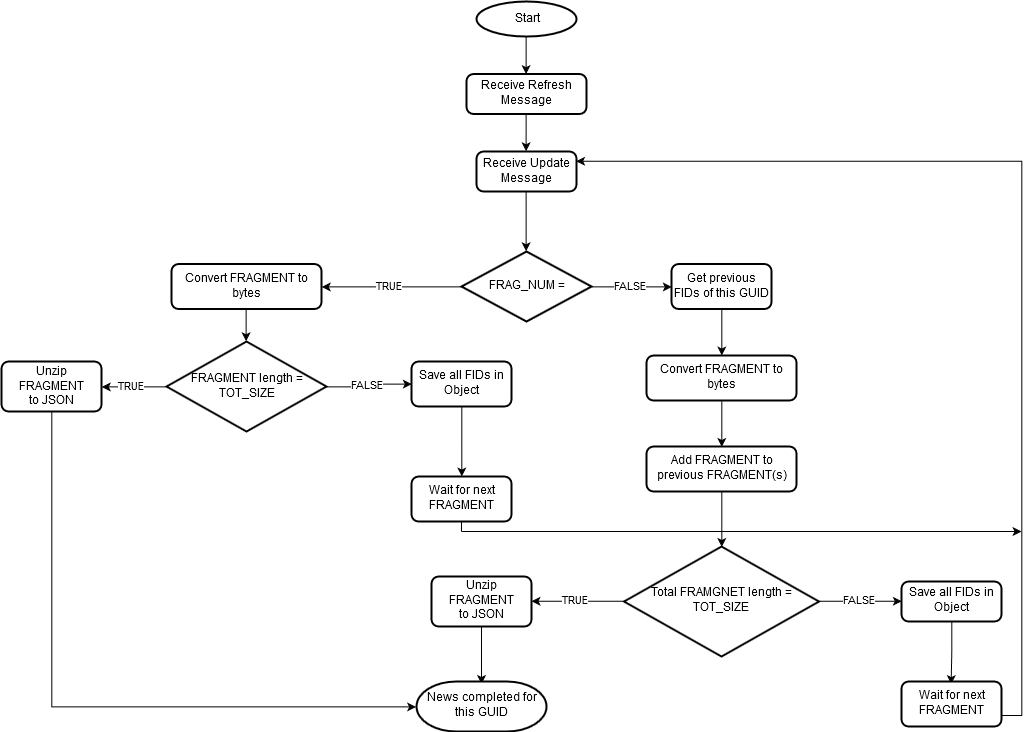
Please see more detail in the Code Walkthrough section below.
Prerequisite
Let’s start with the prerequisite. The following accounts and software are required to consume MRN data via a Data Library for Python:
- Access to LSEG Real-Time Platform with MRN data service
- Python
- Internet connection.
Please contact your LSEG's representative to help you to access LSEG Real-Time Platform and MRN data.
Code Walkthrough
Importing Libraries
The first step is to import required libraries in our application. To consume Real-Time MRN data, an application needs to use the Omm Stream object of the Delivery Layer of the Data Library. You can find more detail about the Delivery Layer on the Data Library Reference Guide page.
The other libraries are the json, base64, zlib, and binascii libraries to handle MRN fragmentation assemble.
Opening a session
The next step is call the Data Library open_session() function to start a session with the Real-Time or Delivery Platform. You should have input your credential or RTDS connection information on a lseg-data.config.json configuration file in the same location as Python application file.
Alternatively, you can use a session feature to set your credential to the library and opens a session as follows:
Delivery Platform
Deploy RTDS
Preparing the OMM Stream
An application can subscribe to MRN data with the NewsTextAnalytics domain and the following MRN-specific RIC name:
- MRN_STORY: Real-time News
- MRN_TRNA: News Analytics: Company and C&E assets
- MRN_TRNA_DOC: News Analytics: Macroeconomic News & events
- MRN_TRSI: News Sentiment Indices
I am demonstrating with the MRN_STORY RIC Code and connect to the platform with the OMM Stream object.
Handle Real-Time Streaming Events
The next step is defining our real-time streaming events callbacks. The Refresh,Status, and Error Messages will be handled by the display_event method.
Handle Update Messages
The Update response messages contain news information and fragment(s) data. Firstly, the application gets FRAGMENT, FRAG_NUM, GUID, and MRN_SRC fields values from the Update message. We use Python's base64 module to decode a FRAGMENT field value from ASCII string to bytes data.
Process the first fragment/single fragment news
Next, we check if a FRAG_NUM = 1 which means it is the first fragment of this news message. The application then checks if a FRAGMENT bytes length = TOT_SIZE field.
- If equal, this is a piece of single fragment news and this news message is completed
- If not, this is the first fragment of multi-fragments news. We store this Update message's all fields data to the _news_envelopes list object and waiting for the next fragment(s).
Process multi-fragments news
When the application receives Update message with FRAG_NUM > 1, it means this message is multi-fragments news. We get the previous fragment(s) data from _news_envelopes list object via a GUID. Please note that Update messages with FRAG_NUM > 1 will contain fewer fields as the metadata has been included in the first Update message (FRAG_NUM=1) for that news message.
The application also needs to check the validity of the received fragment by checking the MRN_SRC and FRAG_NUM field order with previous fragments. If the received fragment is valid, the application assembles a received FRAGMENT bytes data with previous fragments and compares a total fragments byte length value with TOT_SIZE value.
- If equal, it means this multi-fragments news message is completed
- If not, we update current news Update message fields to the _news_envelopes list object and waiting for more fragment(s).
Handle a completed news FRAGMENT message
To unzip the content and get JSON string news message, we use Python's zlib module to unzip the gzip bytes data, then we parse it to JSON message.
The last step is to set this process_mrn_update method to the OMM Stream Update event callback.
Now our application is ready to consume the MRN news data.
Open Stream
To start a subscription process and get data, an application must call the open() function of the OMM Stream as follows:
Refresh Message
The MRN Refresh response message does not contain any news or fragment information. It contains the relevant feed-related or other static Fields. An application just prints out each incoming field data in a console for informational purposes.
MRN Data Update Messages
The real-time news data are available via the Update messages.
Close Stream
To close the stream (unsubscribe MRN data) and close the session, an application must call the following statements.
That covers how to consume MRN data with the Data Library Delivery Layer.
Next Step and Conclusion
Before I finish, you may noticed that I have reused the MRN processing code and logic from the Introduction to Machine Readable News with WebSocket API and Migrating the WebSocket Machine Readable News Application to Version 2 Authentication articles. The reasons are as follows:
- The MRN data processing logic is always the same with whatever libraries or SDKs (except minor differences from a connection type and each programming language style).
- Both Data Library for Python and the Real-Time WebSocket API use the WebSocket connection to consume MRN data
Even you does not use Python, you can apply the logic to your application code to consume and decode the Machine Readable News from the Real-Time Platform.
References
For further details, please check out the following resources:
- LSEG Data Library for Python page on the on the LSEG Developer Community website.
- Introduction to Machine Readable News with WebSocket API.
- WebSocket API Machine Readable News Example with Python on GitHub.
- Machine Readable News (MRN) & N2_UBMS Comparison and Migration Guide.
- MRN WebSocket JavaScript example on GitHub.
- MRN WebSocket C# NewsViewer example on GitHub.
- Developer Article: Introduction to Machine Readable News with WebSocket API.
For any questions related to this example or the LSEG Data Library, please use the Developer Community Q&A Forum.
Get In Touch

Source Code
Related APIs
Related Articles
-
Machine Readable News (MRN) & N2_UBMS Comparison and Migration Guide
-
Introduction to Machine Readable News with WebSocket API
-
Essential Guide to the Data Libraries - Generations of Python library (EDAPI, RDP, RD, LD)
-
The Data Library for Python - Quick Reference Guide (Access layer)
-
LSEG's Refinitiv Data Library for Python and its Configuration Process

Request Free Trial
Call your local sales team
Americas
All countries (toll free): +1 800 427 7570
Brazil: +55 11 47009629
Argentina: +54 11 53546700
Chile: +56 2 24838932
Mexico: +52 55 80005740
Colombia: +57 1 4419404
Europe, Middle East, Africa
Europe: +442045302020
Africa: +27 11 775 3188
Middle East & North Africa: 800035704182
Asia Pacific (Sub-Regional)
Australia & Pacific Islands: +612 8066 2494
China mainland: +86 10 6627 1095
Hong Kong & Macau: +852 3077 5499
India, Bangladesh, Nepal, Maldives & Sri Lanka:
+91 22 6180 7525
Indonesia: +622150960350
Japan: +813 6743 6515
Korea: +822 3478 4303
Malaysia & Brunei: +603 7 724 0502
New Zealand: +64 9913 6203
Philippines: 180 089 094 050 (Globe) or
180 014 410 639 (PLDT)
Singapore and all non-listed ASEAN Countries:
+65 6415 5484
Taiwan: +886 2 7734 4677
Thailand & Laos: +662 844 9576