
Forward Looking Index Ratio Analysis
-
 Susan CluzelSenior Specialist, GBC and Investment Banking
-
Caroline AndradeSenior Specialist, GBC and Investment Banking
-
Marian KellySenior Specialist, GBC and Investment Banking
-
 Nick ZinconeLead Developer Advocate
Investment bankers, strategists, and analysts frequently need to pull historical forward valuation ratios for indices, including Enterprise Value (EV) multiples that don't exist in our IBES aggregate data sets. Using Jupyter and Python, the following article outlines an algorithm to overcome the limitations of accessing LSEG content through legacy Excel COM APIs to create aggregates based on underlying constituents, thus addressing key performance, methodology, and the use of historical constituents challenges.
The algorithm focuses on creating aggregates for a specified index based on underlying constituents' data over a selected time frame, and all company-level data for CY1, CY2, and CY3 periods are calendarized to a December year-end prior to aggregation. The challenges when pulling "rolling" calendar periods using the capabilities within Excel is greatly simplified using the power of Python and our desktop APIs.
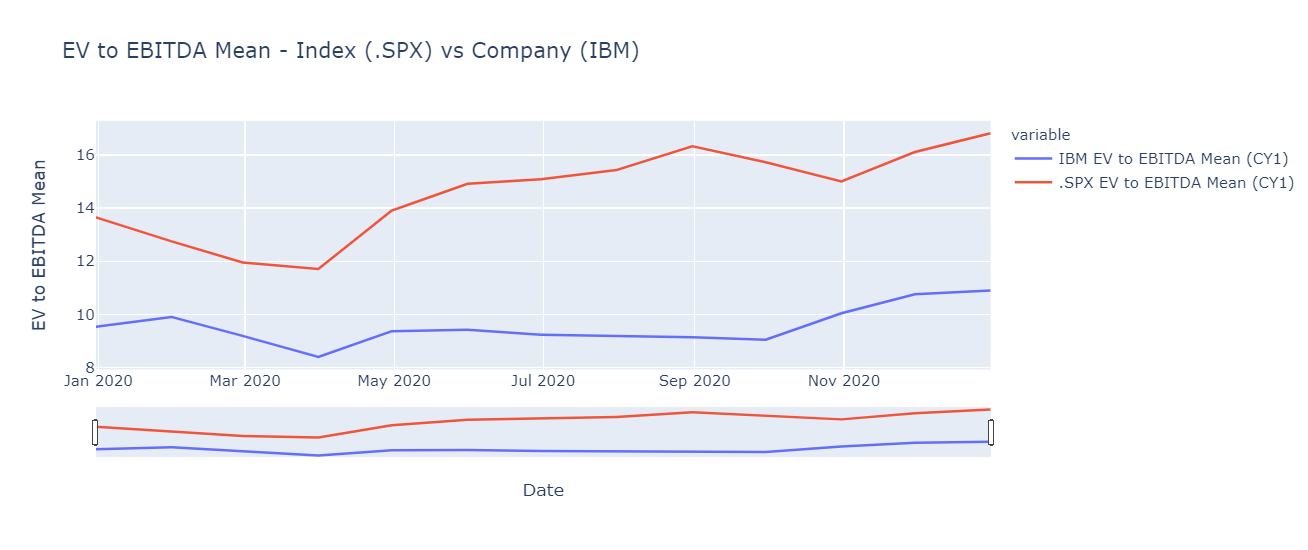
As a comparison metric, the code segments also provide the ability to pull historical time series estimates valuation multiples for a specified company and chart the comparison against the calculated index benchmark.
***Note: for indices, a direct license with the index provider may be required to pull constituents' data.
Getting Started
To get started, we will need to import the LSEG Data Library for Python responsible for pulling measures driving the analysis for our ratios. In addition, we'll include a convenient UI to enable the user to choose input parameters driving results. As part of our analysis, we'll need to manipulate the data and graph a comparison chart to observe the performance measures over time.
The following example notebook demonstrates data access within the LSEG Workspace desktop application. The notebook can be loaded in either Workspace's fully hosted Python environment *CodeBook* or within your own Jupyter environment.
Process Workflow
The following workflow outlines concrete steps involved in generating our data analysis. The steps have been intentionally broken out into well-defined segments for the purposes of reusability as well as a basis for understanding the processing details.
Index Calculations
The Index calculations phase involves the capture and calculation of index ratios used as the basis for our benchmark comparison. The following steps are outlined:
Capture input parameters
A UI is presented to allow the capture of the details related to our index including the estimates financial period.
Retrieve, prepare and chart the data
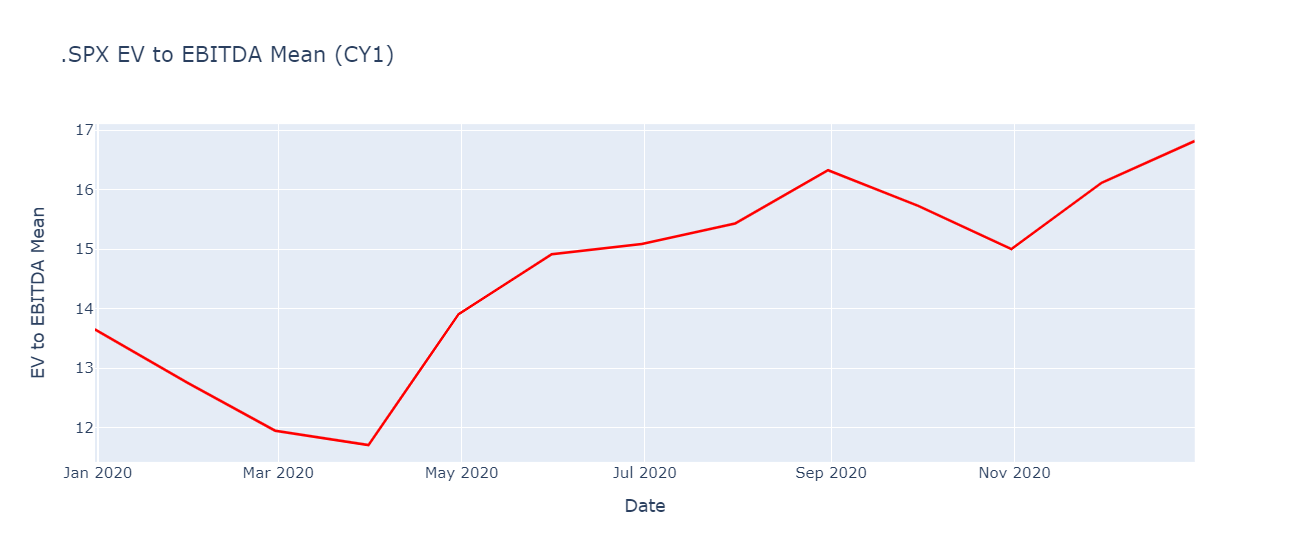
Based on the input details, derive the data points from LSEG using the data APIs available. The extraction and calculation of data points involve a number of steps, including the capture of index constituents over time. A chart is presented providing a visual of the index over the specified time.
Company Calculations
With our Index analysis prepared, we can use this as our benchmark to compare against any chosen company. The Company calculations phase involves the capture and preparations of the select multiple for our company. The following steps are outlined:
Capture input parameters
A UI is presented to allow the capture of the details related to our company including the estimates financial period.
Retrieve, prepare and chart the data
Calculate the EV multiple creating a time-series representation based on the date range specified for our benchmark.
Analysis
Finally, combine and chart the data sets captured to analyze how our chosen company is performing against our benchmark.
1 - Index Calculations:
- Calculate the selected multiple for historical constituents for the specified index as of each historical date
- Remove constituent duplicates in the case of multiple share classes for one company included within an index
- Remove rows if either EV or estimate is NA to ensure a consistent universe in numerator and denominator
- Exclude companies with negative estimates values
- Divide the resulting sum of estimates into a sum of EVs for weighted values
EV multiple is calculated one date at a time and added to a collection to create the resulting time series for further analysis, such as charting and export. Calculations for EV multiples one date at a time are necessary for both of the following reasons:
- Index constituents change over time
- Calendar year financial periods need to "roll". i.e. CY1, CY2, and CY3 need to be relative to the calculation date.
Index UI widgets
Capture the index parameters used to build our analysis:

Retrieve and prepare the Index data
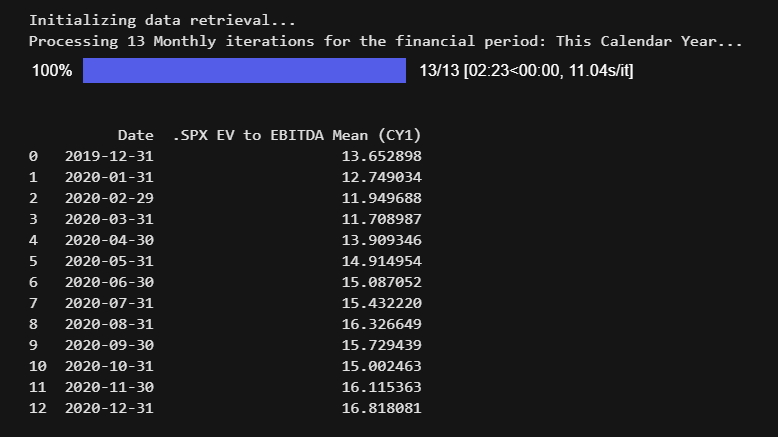
Prepare and chart the index data
2 - Company Calculations:
EV multiple is pulled one date at a time to create the resulting time series for analysis. Calculations for EV multiples one date at a time are necessary in case the user chooses a calendar year financial period for the estimates data to compare companies with different fiscal year ends. Fiscal year financial periods are also input options.
Company UI widgets
Capture the company parameters used to build our analysis:

Retrieve and prepare the Company data
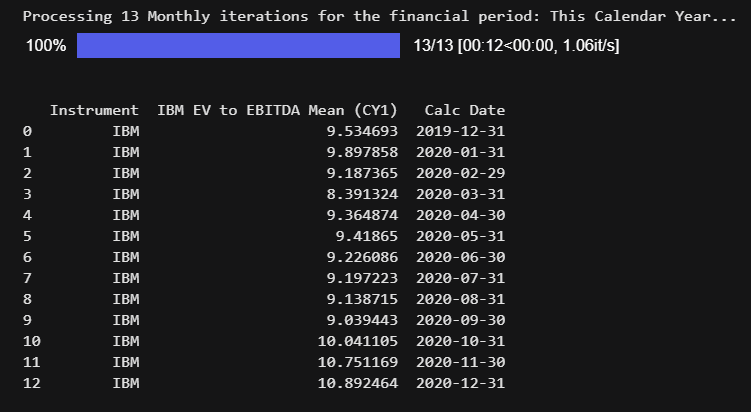
Prepare and chart the company data
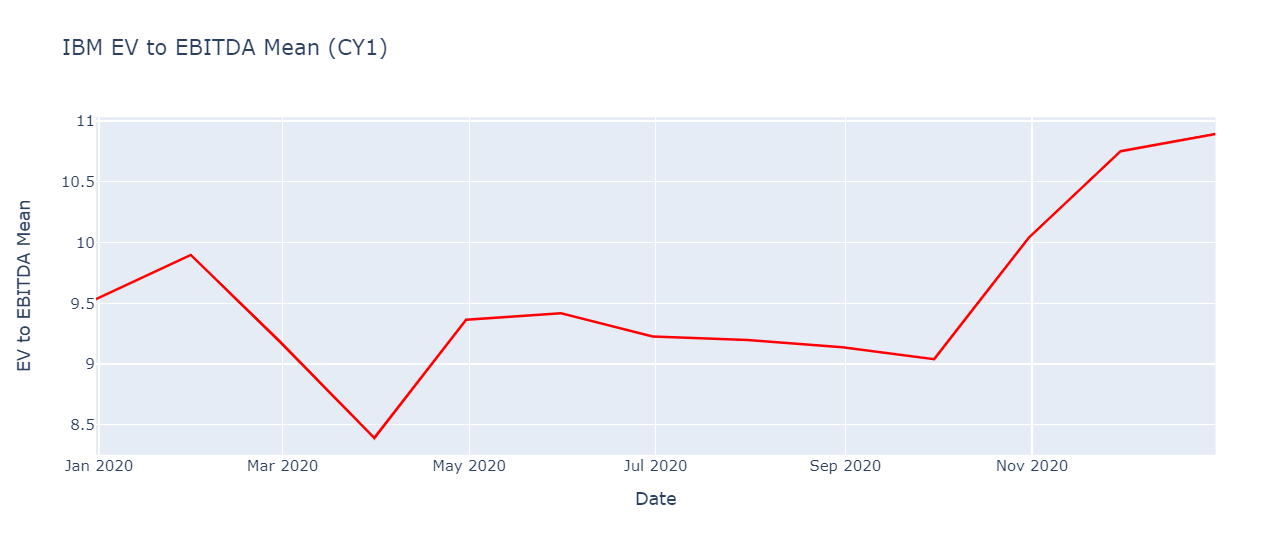
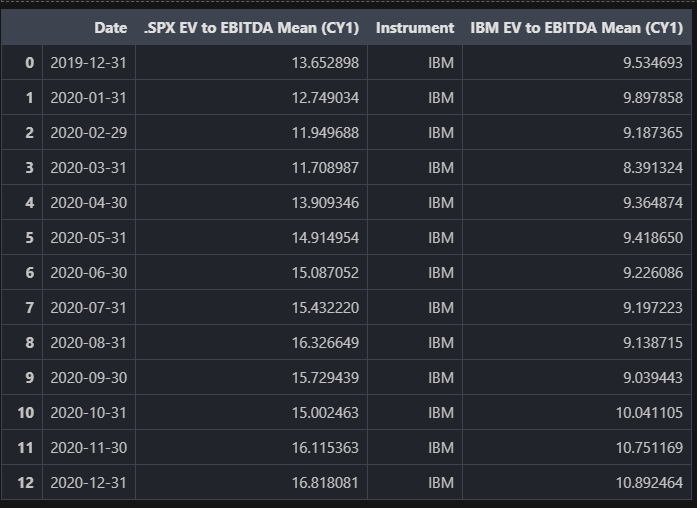
Chart index and company data
Additional Analysis
Once our data has been prepared, further analysis can be integrated with your own business workflows to be used in comps and valuation models. Whether ingesting the computed data frames within existing Python modules and importing the data set as import files, many options are available. For example, the following code segment exports our data set within Excel:
Conclusion
In this article, we have used the power of python along with the extensive data from LSEG to create valuation ratios for indices that can be used to make comparisons across markets, sectors, and time and as a benchmark to value companies.
We have used a bottom-up approach to calculate an index aggregate based on underlying constituents' data. Important concepts demonstrated are that of a chain RIC to pull index constituents as of a given point in time and a method of calculating a time series with a rolling calendar year financial period.
And finally, using Jupyter and Python, we have been able to overcome the limitations of accessing LSEG content through legacy Excel COM APIs.
