
Author

Introduction
Many financial analysts rely on the =RDP.HistoricalPricing() Excel function in LSEG Workspace to retrieve time-series pricing data such as intraday, interday, and event-based market information. However, as workflows evolve toward automation and reproducibility, developers often need to migrate these Excel-based formulas into Python.
This article explains how to convert the Excel function into the equivalent ld.get_history() method in the LSEG Data Library for Python.
Understanding the Excel Function
The RDP.HistoricalPricing API retrieves time series data for an instrument. This data is sourced from historical datasets that provide prices at regular intervals—such as daily, weekly, monthly, and yearly—as well as at irregular intervals, including Time and Sales (TAS), Trade and Quote (TAQ), and tick‑by‑tick data.
Note: The =RDP.HistoricalPricing Data function is equivalent to the =@RHistory function used in the Eikon product so they can be used interchangeably.
The syntax generally looks like:
The arguments of RDP.HistoricalPricing are:
Argument |
Description |
Instruments |
Mandatory. Specifies the instruments that you want to retrieve. You identify them by entering the instrument code. The instrument code is not case-sensitive, if the case is consistent. |
Fields |
Specifies the data you want to retrieve for the selected instruments. |
Request |
Mandatory. Defines your data retrieval parameters. The INTERVAL request parameter is mandatory. |
Refresh |
Defines when and how often the data is updated. |
Display |
Defines the layout of the results. |
Destination Cell |
Defines the position of the top-left corner of the table of data returned. If you do not specify a destination cell then the destination cell is the same as the function cell. |
The following parameters are used in the Request argument and correspond to the ld.get_history method.
Parameter |
Description |
ADJUSTED |
Specifies if the time series retrieved is adjusted for corporate actions. |
END |
Defines the date and time at which time series data retrieval ends. |
INTERVAL |
Defines the interval between each data point retrieved. The list of available values is instrument and field-specific. It can have these values. |
NBROWS |
Defines the number of rows LSEG Workspace - Microsoft Office returns. |
START |
Defines the date and time at which time series data retrieval starts. |
TRADETIME |
Allows you to filter out trades that take place outside trading hours. |
For Example:
Use the list of instruments and fields in the Instruments and Fields arguments to retrieve 50 rows of daily open, high, low, and close prices for LSEG.L and IBM.N.
User Excel cell references in the Instruments and Fields arguments and in the NBROWS and INTERVAL request parameter to retrieve historical data.
Use the Instruments and Fields arguments to retrieve daily open, high, low, and close prices for LSEG.L and IBM.N between 01-Jan-2026 and 05-Jun-2026.
Use the Instruments and Fields arguments to retrieve 5‑minute interval open, high, low, and close prices for LSEG.L between 01‑Jun‑2026T00:00 and 01‑Jun‑2026T23:59.
Use the RDP.Search function to generate a list of RICs, then pass this list to the Instruments argument to retrieve daily historical BID values.
The Python Equivalent: ld.get_history()
In Python, the =@RDP.HistoricalPricing Excel function corresponds to the get_history() function in the LSEG Data Library for Python. The library can connect to an active LSEG Workspace Desktop session to retrieve historical data from the same endpoint used by the =@RDP.Historical Excel function.
The ld.get_history() method can be used to retrieve historical data for fundamental, reference, and real-time fields. However, this article focuses specifically on using ld.get_history() to obtain historical data for real-time fields, which is similar to the functionality of the =@RDP.HistoricalPricing Excel function.
It accepts the following parameters:
Parameters |
Types |
Descriptions |
universe |
str or list |
Instruments to request (RICs) |
fields |
str or list (Optional) |
Fields to request (Real-Time fields) |
interval |
str (Optional) |
Date interval. Supported intervals are: · tick |
start |
str or date or datetime or timedelta (Optional) |
The start date and timestamp of the requested history. (The time is in UTC) |
end |
str or date or datetime or timedelta (Optional) |
The end date and timestamp of the requested history. (The time is in UTC) |
adjustments |
str or list (Optional) |
Tells the system whether to apply or not apply CORAX (Corporate Actions) events or exchange/manual corrections or price and volume adjustment according to trade/quote qualifier summarization actions to historical time series data. Possible values are: · exchangeCorrection |
count |
int (Optional) |
The maximum number of data points returned. Values range: 1 - 10000. |
For example:
Retrieve 10 days of historical daily Open, High, Low, and Close (OHLC) data for IBM.N and LSEG.L.
Retrieve historical daily Open, High, Low, and Close (OHLC) data for IBM.N and LSEG.L between 1 May 2026 and 31 May 2026.
Retrieve 1‑minute OHLC data for GOOG.O for May 1, 2026, from 13:00 to 13:30 UTC.
Mapping Excel Formula Components to Python Parameters
The mapping process is simple and consists of three steps.
1. Mapping Instruments
The first argument (Instruments) of the =@RDP.HistoricalPricing Excel function specifies the instruments. Its value may be one of the following:
· A string containing a list of instruments separated by semicolons
· A range of Excel cells that contains a list of instruments
· Another Workspace Excel function that returns a list of instruments, such as RDP.Search
The Instruments argument maps to the first parameter (universe) in the ld.get_history method. The universe parameter accepts either a single Python string or a list of strings. If only one RIC is provided, it can be passed as a string. If multiple RICs are required, they must be provided as a list of strings, with each RIC specified as an individual list element.
A list of Python strings is simply a Python list ([]) in which each element is a string enclosed in quotes, for example:
However, if the first argument (Instruments) of the =@RDP.HistoricalPricing function is an Excel cell range or another Workspace function, you must extract the list of instruments from those cells or from the function’s returned value, and then assign that data to the universe parameter as either a string for a RIC or a list of Python strings.
Sample Mappings
RDP.HistoricalPricing: The first argument (Instruments) |
ld.get_history: The first parameter (universe) |
=@RDP.HistoricalPricing("IBM.N;LSEG.L", ...) |
ld.get_history(universe = ["IBM.N","LSEG.L"], …) |
=@RDP.HistoricalPricing(\$A\$1:\$A\$2, ...) |
ld.get_history(universe = ["IBM.N","LSEG.L"], …) |
2. Mapping Fields
The second argument (Fields) of the =@RDP.HistoricalPricing Excel function specifies the fields. Its value may be one of the following:
· A string containing a list of fields separated by semicolons
· A range of Excel cells that contains a list of fields
This Fields argument maps to the second parameter, fields, in the ld.get_history method. The fields parameter accepts either a Python string or a list. If only one field is provided, it can be passed as a string. If multiple fields are required, they must be provided as a list of strings, with each field specified as an individual list element.
A list of Python strings is simply a Python list ([]) in which each element is a string enclosed in quotes, for example:
However, if the second argument (Fields) of the =@RDP.HistoricalPricing function is an Excel cell range, you must extract the list of fields from those cells, and then assign that data to the fields parameter as either a string for a field or a list of Python strings.
The =@RDP.HistoricalPricing function maps fields into several categories based on asset type, such as COMMON, TRDPRC_1, BID, ASK, and VWAP.
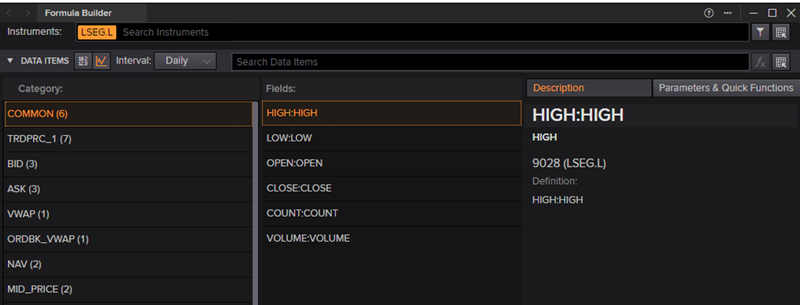
Field names can be mapped directly to the fields parameter in the ld.get_history method, except for those in the COMMON category.
The fields in the COMMON category—such as OPEN, HIGH, LOW, CLOSE, COUNT, and VOLUME—are normalized field names designed to abstract away asset-specific differences. These fields are dynamically mapped to the appropriate underlying field set based on the asset type.
For example, for the equity LSEG.L, the COMMON fields map to the corresponding fields in the TRDPRC_1 category, whereas for the currency pair JPY=, they map to fields in the BID category. This approach allows users to work with a consistent set of field names across different asset classes, while the system resolves them to the correct underlying fields.
However, the ld.get_history method does not support COMMON fields directly. Instead, users must specify the equivalent fields from the appropriate asset-specific category.
Sample Mappings
RDP.HistoriaclePricing: The second argument (Fields) |
ld.get_history: The second parameter (fields) |
Retrieve common historical fields for LSEG.L
|
The common historical fields of LSEG.L are mapped to the fields in the TRDPRC_1 category. ld.get_history( |
Retrieve common historical fields for JPY= =@RDP.HistoricalPricing( "JPY=", "HIGH;LOW;OPEN;CLOSE;COUNT", ...) |
The common historical fields of JPY= are mapped to the fields in the BID category. ld.get_history( |
=@RDP.HistoricalPricing("LSEG.L", "VWAP", …) |
ld.get_history(
|
=@RDP.HistoricalPricing("JPY=","MID_PRICE", …) |
ld.get_history( universe = ['JPY='], fields = ['MID_PRICE'], …) |
3. Mapping Parameters
The third argument (Request) of the =@RDP.HistoricalPricing Excel function specifies the request parameters. Each item contains a parameter name and its corresponding value, separated by a colon (:), and multiple parameters are separated by spaces.
The values in the Request argument maps to the following parameters of the ld.get_history method.
Request Argument |
ld.get_history Parameter |
START |
Start |
END |
End |
INTERVAL |
Interval |
NBROWS |
Count |
ADJUSTED |
adjustments |
Interval Mappings
INTERVAL Request Arguments |
ld.get_history Interval Parameters |
TICK |
tick |
TAS |
tas |
TAQ |
taq |
PT1M |
minute, 1min |
PT5M |
5min |
PT10M |
10min |
PT30M |
30min |
PT60M |
60min |
PT1H |
hourly, 1h |
P1D |
daily, 1d, 1D, |
P7D |
7d, 7D |
P1W |
weekly, 1W |
P1M |
monthly, 1M |
P3M |
quarterly, 3M |
P6M |
6M |
P1Y |
yearly, 12M, 1Y |
Sample Mappings
RDP.HistoricalPricing: The Request argument |
ld.get_history Parameters |
Retrieve weekly historical data between 01-Jan-2026 and 16-Jun-2026 =@RDP.HistoricalPricing("<Instruments>","<Fields>","START:01-Jan-2026 END:16-Jun-2026 INTERVAL:P1W SOURCE:RFV",…) |
ld.get_history( universe = …, fields = …, interval = 'weekly', start = '2026-01-01', end = '2026-06-16') |
Retrieve yearly unadjusted data between 01-Jan-2000 and 16-Jun-2026 =@RDP.HistoricalPricing("<Instruments>","<Fields>","START:01-Jan-2000 END:16-Jun-2026 INTERVAL:P1Y ADJUSTED:NO SOURCE:RFV ",…) |
ld.get_history( universe = …, fields = …, interval = 'yearly', adjustments = 'unadjusted', start = '2000-01-01', end = '2026-06-16') |
Retrieve 1 minute interval for 50 datapoints =@RDP.HistoricalPricing("<Instruments>","<Fields>","INTERVAL:PT1M SOURCE:RFV NBROWS:50",…) |
ld.get_history( universe = …, fields = […, interval = '1min', count = 50) |
Note: COMMON field mappings are asset-dependent and may vary by instrument type. Users should verify mappings for their specific asset class before converting formulas to Python.
Conversion Examples
The following are some Workspace Excel formulas and their equivalent Python code.
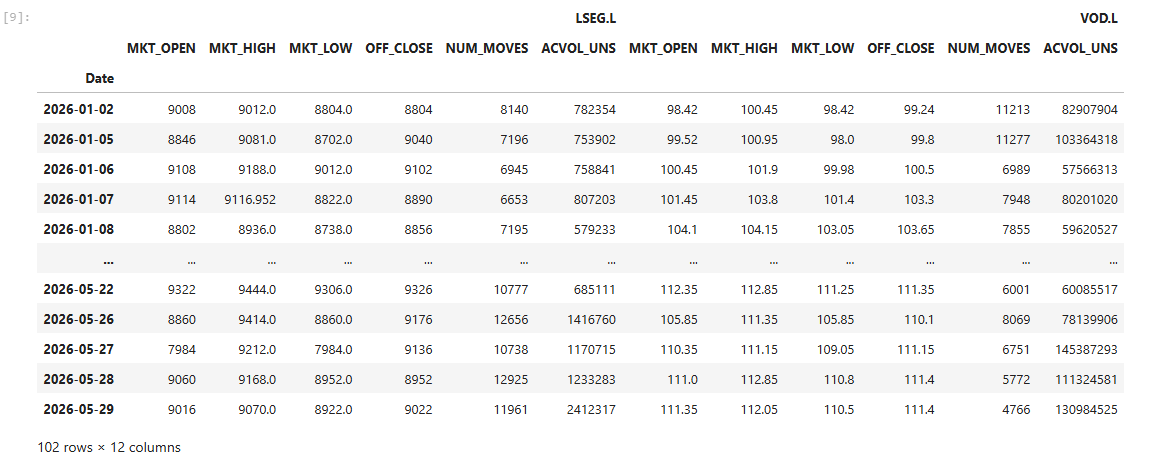
1. Retrieve daily historical data of common fields for LSEG.L and VOD.L between 01 Jan 2026 and 31 May 2026.
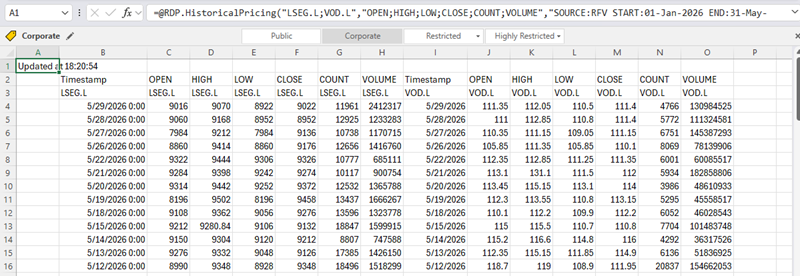
Output:
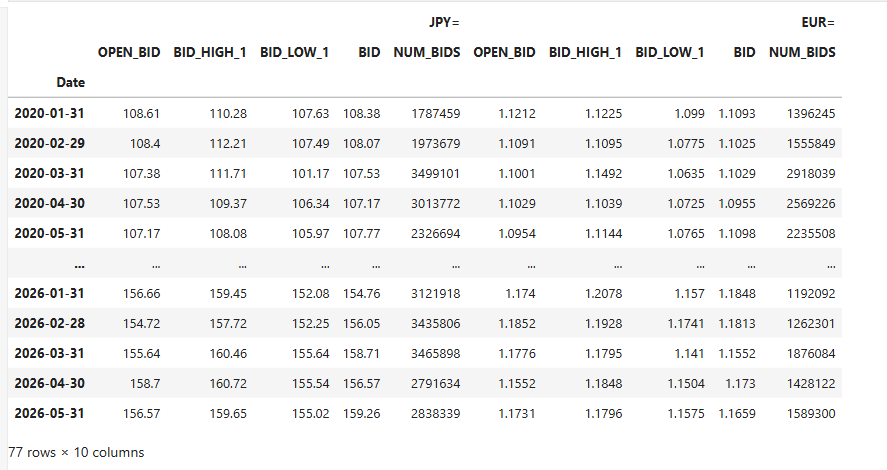
2. Retrieve monthly historical data of common fields for JPY= and EUR= between 01 Jan 2020 and 31 May 2026.
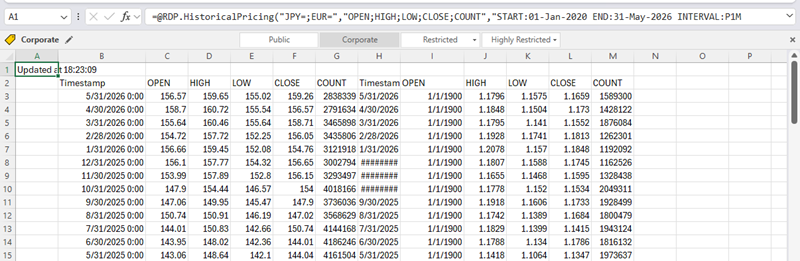
Output:
3. Retrieve weekly historical data of VWAP fields for LSEG.L and VOD.L between 01 Jan 2026 and 31 May 2026.
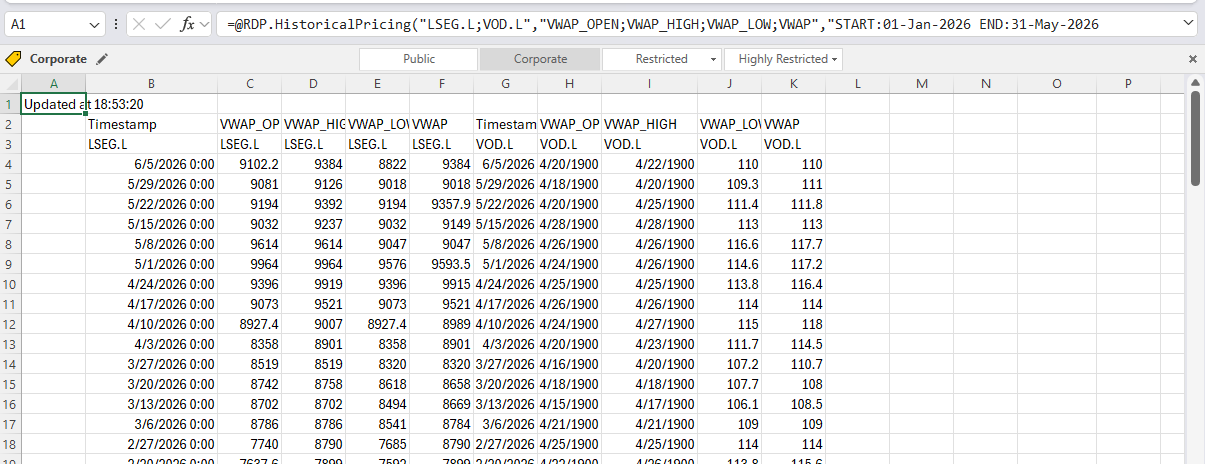
Output:
4. Retrieve 1 minute summary historical data for LSEG.L between 03 Jun 2026 09:00:00 (UTC) and 03 Jun 2026 09:59:00 (UTC).
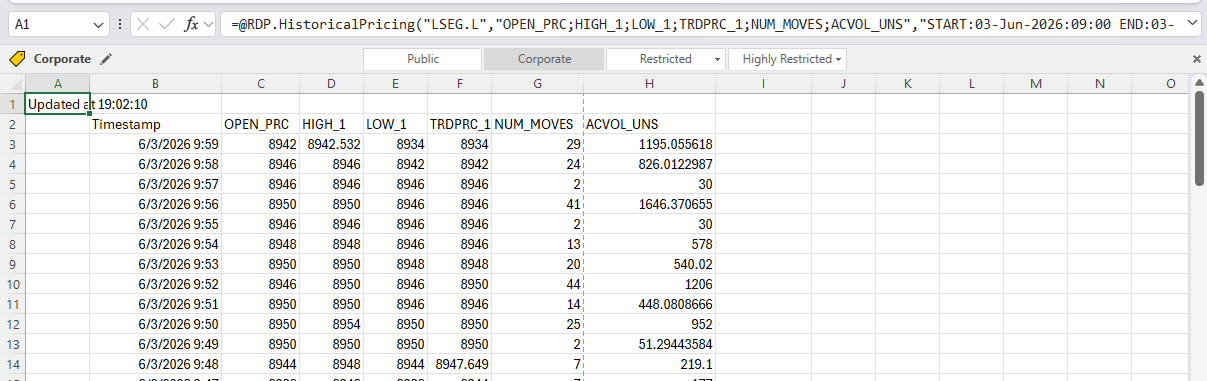
Output
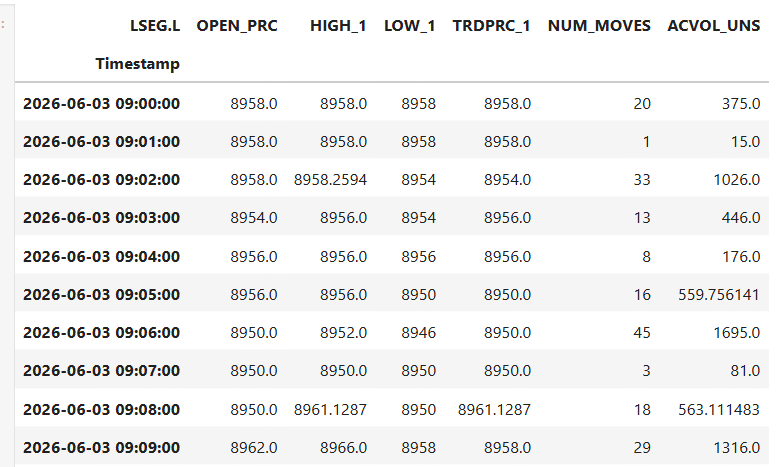
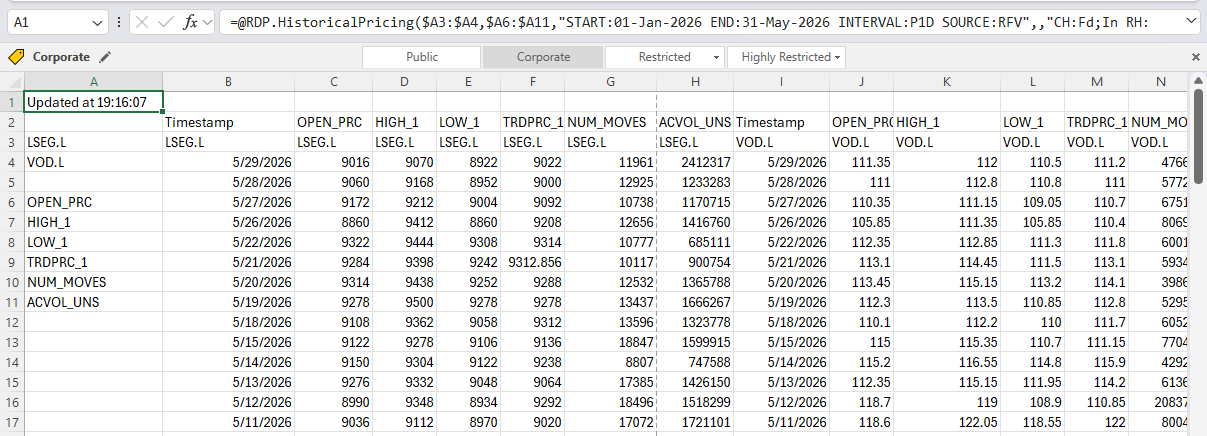
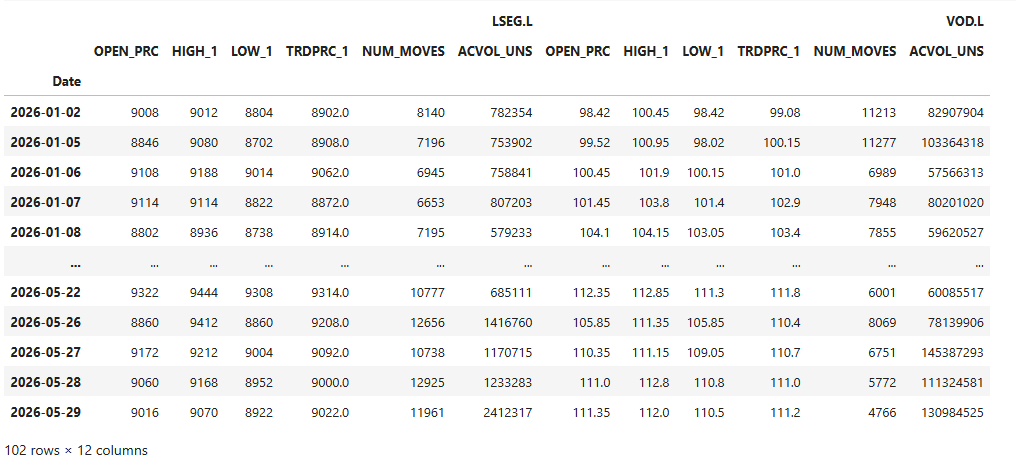
5. Retrieve daily historical data of the TRDPRC_1 category for LSEG.L and VOD.L between 01 Jan 2026 and 31 May 2026 by using cell references
Output
Quick Mapping Summary Table
Converting an =@RDP.HistoricalPricing() formula to ld.get_history() is typically a straightforward mapping exercise. The table below summarizes the most commonly used Excel arguments and request parameters and their corresponding Python equivalents, providing a quick reference for migration projects.
Excel |
Python |
Instruments |
universe |
Fields |
fields |
INTERVAL |
interval |
START |
start |
END |
end |
NBROWS |
count |
ADJUSTED:NO |
adjustments="unadjusted" |
Conclusion
Migrating from the Excel-based =@RDP.HistoricalPricing() function to the ld.get_history() method in Python unlocks greater flexibility, automation, and scalability for financial data workflows. By systematically mapping Instruments to universe, Fields to fields, and Request parameters to their Python equivalents, users can accurately reproduce Excel outputs while benefiting from the power of programmatic data processing.
Although some nuances, such as handling COMMON fields or converting interval formats require careful attention, the overall translation process is straightforward and consistent. With these principles, developers can confidently transition from spreadsheet-driven analysis to robust Python pipelines, enabling improved reproducibility, integration with broader data systems, and more advanced analytics capabilities.
- Register or Log in to applaud this article
- Let the author know how much this article helped you
Get In Touch

Related Articles
-
How to Convert the =@RDP.Data Excel Function into Python Using the LSEG Data Library for Python
-
Workspace Excel-to-Notebook Conversion with GitHub Copilot
-
Essential Guide to the Data Libraries - Generations of Python library (EDAPI, RDP, RD, LD)
-
Upgrade from using Eikon Data API to the Data library
-
The Data Library for Python - Quick Reference Guide (Access layer)
-
LSEG's Refinitiv Data Library for Python and its Configuration Process
-
Find Your Right Companies with SCREENER
