
Overview
Update: September 2021
Refinitiv Data Platform (RDP) gives you seamless and holistic access to all of the Refinitiv content (whether real-time or non-real-time, analytics or alternative datasets), commingled with your content, enriching, integrating, and distributing the data through a single interface, delivered wherever you need it.
As part of the Refinitiv Data Platform, Refinitiv Real-Time - Optimized (formerly known as ERT in Cloud) gives you access to best-in-class Real-Time market data delivered in the cloud. Refinitiv Real-Time - Optimized is a new delivery mechanism for RDP, using the AWS (Amazon Web Services) cloud. Once a connection to RDP is established using Refinitiv Real-Time - Optimized, data can be retrieved using Websocket API for Pricing Streaming and Real-Time Services aka WebSocket API.
This article is the second part of how to implement the Refinitiv Real-Time - Optimized Node.js application with TypeScript language articles. The first article shows how to authenticate and get VIPs information via RDP REST APIs. This second part article focuses on how to implement a Node.js TypeScript application to connect and consume streaming Market Price data from Refinitiv Real-Time - Optimized via the WebSocket connection. The application source codes are implemented in TypeScript language and will be compiled to a readable JavaScript file and run in a console with Node.js runtime environment.
*Note: The application functionalities are based on Refinitiv Real-Time - Optimized Service discovery Python example.. Access to the Refinitiv RDP and Refinitiv Real-Time - Optimized are required.
 TypeScript Overview
TypeScript is an open-source programming language developed and maintained by Microsoft. The language lead architect is Anders Hejlsberg, lead architect of C# and creator of Delphi and Turbo Pascal. TypeScript is a typed superset of JavaScript that compiles to readable, standards-based JavaScript. The syntax is designed for application-scale JavaScript by adding optional types, classes, modules, ECMAScript 2015 features, and future proposals to JavaScript. TypeScript supports tools for large-scale JavaScript applications for any browser, for any host, on any OS. TypeScript is a first-class programming language in Microsoft Visual Studio and Angular web application platform. It also supported by various application frameworks like React, NodeJS and Express framework, ASP.Net Core, Vue.js, and more.
RDP and Refinitiv Real-Time - Optimized Application Implementation Process
The application requires the following steps to authentication and consume data from RDP and Refinitiv Real-Time - Optimized
- Send a HTTP POST request message with username (Machine ID) and password information to RDP Authentication service to obtain access token, refresh token, expiration time and scope information
- Send a HTTP GET request message with access token to RDP Realtime Service Discovery service to get lists of Refinitiv Real-Time - Optimized WebSocket streaming server endpoints, ports and location information (VIPs)
- Connect to Refinitiv Real-Time - Optimized WebSocket endpoint from step (2)
- Once a WebSocket connection is established, sends a JSON Login request message with access token Refinitiv Real-Time - Optimized WebSocket server
- Once the Login request message is accepted by Refinitiv Real-Time - Optimized WebSocket server, the application can send item subscription request messages to Refinitiv Real-Time - Optimized endpoint.
- Handle asynchronous responses and status changes when they occur, including “pings” and connection failures.
- Re-issue RDP Authentication service before token expiration to keep the session opens.
- Once the application receives a new access token, application must re-send a new JSON Login request message with a new access token and refresh attribute value false in the JSON message to Refinitiv Real-Time - Optimized WebSocket server
- All current item streams will be remain opened
Refinitiv Real-Time - Optimized WebSocket Application Code Walkthrough
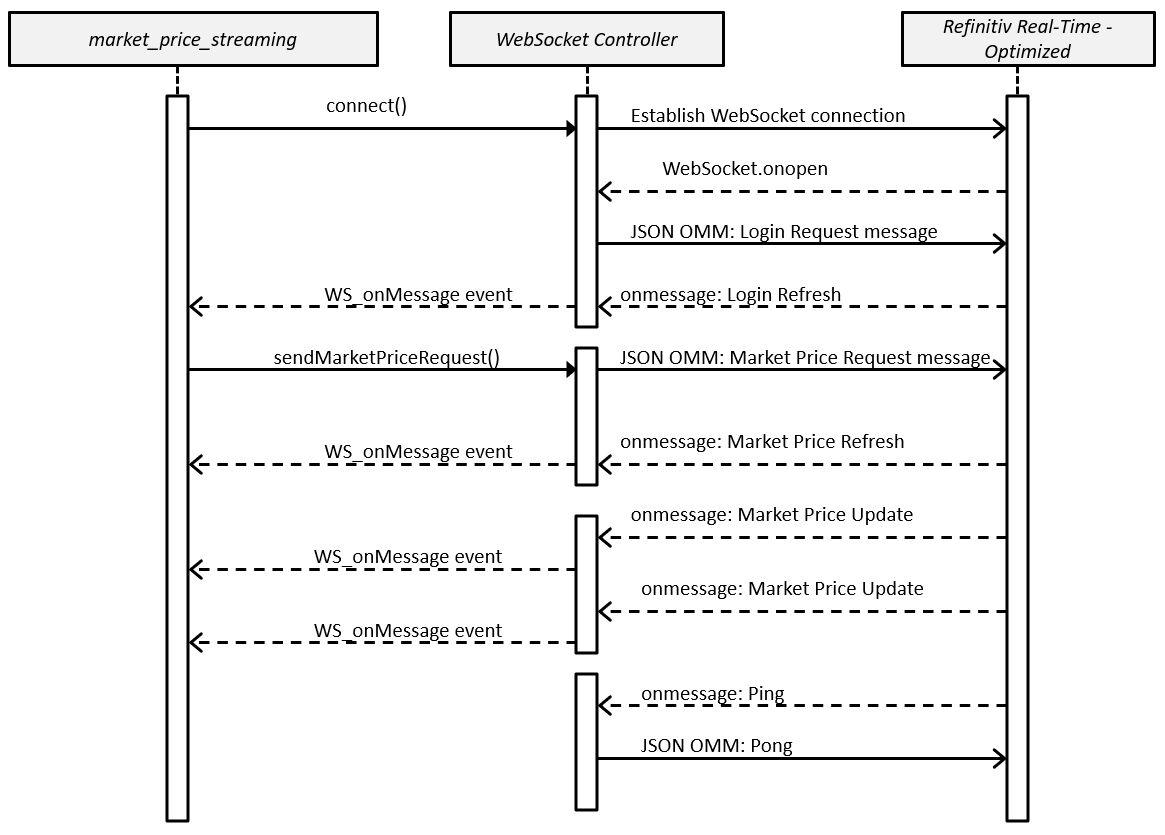
The main application is market_price_streaming.ts application file. All WebSocket communication logic are implemented in websocket_controller.ts WSConnectionController class file. The applications use Node.js EventEmitter class to asynchronous communicate between each other. The main application registers for specific WSConnectionController's events to receive JSON OMM messages with Refinitiv Real-Time - Optimized service.
The websocket_controller.ts WSConnectionController class uses Node.js ws module to make a WebSocket connection with Refinitiv Real-Time - Optimized.
All WebSocket JSON messages structure are defined in json_msg_interface.ts interface file.
json_msg_interface.ts Code Walkthrough: Define JSON messages interface
Firstly, we define interfaces for all JSON OMM messages in the json_msg_interface.ts file. The TypeScript's interfaces feature helps developers type-checking their variables and data in the implementation time to avoid data type error in a final JavaScript application. We use export keyword to let these interfaces can be used by other modules.
The interfaces include the Login request, Item request and Pong messages.
websocket_controller.ts Code Walkthrough: Initiate the class and connect to Refinitiv Real-Time Optimized
Firstly, we import all required interfaces and Node.js modules in the websocket_controller.ts file.
Next, we create a WSConnectionController class in the websocket_controller.ts file. This class handles all WebSocket operations between the main application class (market_price_streaming.ts file) and Refinitiv Real-Time Optimized server. We use export keyword to let this class can be used by other modules/classes. We create an emitter variable as an EventEmitter object for communicating with the main class.
Next, we implement a connect() function to establish a WebSocket connection with Refinitiv Real-Time Optimized endpoint with ws module.
websocket_controller.ts Code Walkthrough: Login process
Once the class success establish a connection with Refinitiv Real-Time Optimized server, the onOpen() callback function will be trigger. We implement the _send_login_request() function to send the OMM Login request message to Refinitiv Real-Time Optimized in JSON format. For Refinitiv Real-Time Optimized connection, the following attributes and values are required in a JSON messages.
- Key.NameType: AuthnToken
- Key.Elements.AuthenticationToken: RDP Access Token
- Key.Elements.ApplicationId: The ID of the application to which the connection is made.
- Key.Elements.Position: The IP address position of the application logging in.
The WSConnectionController class receives these RDP authentication information from the main application's auth_obj object as a connect() function parameter.
websocket_controller.ts Code Walkthrough: Handling Login Refresh response message
All WebSocket messages (Refresh, Update, Status, etc) from the Refinitiv Real-Time Optimized server will be available via WebSocket.onMessage() callback function. We implement this onMessage() callback function to parse incoming messages into JSON format, then process each message via an internal processMessage() function.
The processMessage() function checks if incoming message type is not a Ping message, it uses EventEmitter to send that message to "WS_onMessage" event listener in the main application (market_price_streaming.ts file). In this phase, it will send a Login Refresh message to the main application.
We will handle the Ping message later.
We will describe how market_price_streamingts handles the Login Response message in later section.
websocket_controller.ts Code Walkthrough: Market Price item request
Once the application receives a Login Refresh message from Refinitiv Real-Time Optimized, the application is ready for subscribing data from Refinitiv Real-Time Optimized.
We implement a sendMarketPriceRequest() function in WSConnectionController class to operate the Market Price item request from the main application. This function creates a JSON OMM item request message as an item_request_msg object and sends it to Refinitiv Real-Time Optimized via WebSocket.send() function.
This item_request_msg object will be compiled to a standard Item Request JSON message in a compiled JavaScript market_price_streaming.js file.
websocket_controller.ts Code Walkthrough: Handle incoming data, status and Handshake messages
All messages (Refresh, Update, Status, etc) from the Refinitiv Real-Time Optimized WebSocket server will be available via WebSocket.onMessage() callback function. This controller class just parses those messages into JSON format and sends them to a main application via "WS_onMessage" event listener to process further business logic.
The Ping and Pong messages are the handshake message ({ "Type": "Ping" } and { "Type": "Pong" }) between the Refinitiv Real-Time Optimized server and client for monitoring a connection health. Refinitiv Real-Time Optimized periodically sends Ping message to applications and applications must be prepared to send Pong messages as a response to any Ping message they receive.
This controller class receives the Ping message via WebSocket.onMessage() callback function. We modify this function to handle a handshake process for the applcaition by detecting an incoming Ping message, then sends the Pong message back to Refinitiv Real-Time Optimized server.
market_price_streaming.ts application: Initialize WebSocket connection
Let get back to a main application implementation (market_price_streaming.ts file). The main application utlizes RESTConnectionController and WSConnectionController classes to communication to RDP REST and Refinitiv Real-Time Optimized services. This main application receives all messages (except a handshake message) from Refinitiv Real-Time Optimized, then process a business logic on those messages.
Firstly we import all require mododules and classes including WSConnectionController class at a begining of the class. The application creates two WSConnectionController objects for a hot-standby feature.
Next, we decare all WebSocket and Refinitiv Real-Time Optimized relate variables such as an item name, Refinitiv Real-Time Optimized hosts list, WebSocket ports list, etc.
Next, we parse user's input command line arguments with NPM optimist module. The application lets user specific an interested item name in a RIC (Reuters instrument code) format via a --ricparameter. The application also support a hot-standby feature via a --hotstandby parameter.
Then we initialize the WSConnectionController object with the Emitter object and a session name. If user choose a hot-standby mode, it will connect to two Refinitiv Real-Time Optimized WebSocket servers in the same time, so we create two WSConnectionController objects with different session name ("session1" and "session2").
We create the hostList and portList array variables in the "REST_getServiceDiscoverySuccess" event callback which we get Refinitiv Real-Time Optimized VIPs endpoints information (location, port, endpoint, etc) from RDP Streaming Service Discovery. Please note that a hot-standby application requires endpoints from different location (availability zone in AWS term). The application then selects the WebSocket hostList and Port from the VIPs nodes that contain only one location (node['location'].length === 1).
Then We create a WebSocket endpoint URL in a wss://${hostList[index]}:${portList[index]}/WebSocket string format for the hostList and portList arrays. We pass this variable to the WSConnectionController.connect() function to initialize a WebSocket connection.
market_price_streaming.ts application: Handle Login Refresh Response message
The WSConnectionController class just receives incoming data from Refinitiv Real-Time Optimized and sends it to the main application as it is via the "WS_onMessage" event callback function. The main application is responsible for managing a business logic on each incomimg message.
When the application receives a Login Refresh response message (a JSON message with "Type":"Refresh and "Domain":"Login" properties), it means the application is ready for subscribing data from Refinitiv Real-Time Optimized server. The application calls a WSConnectionController.sendMarketPriceRequest() function to send the Market Price request message to Refinitiv Real-Time Optimized server.
If the application receives a Status Response message (a JSON message with "Type":"Status property), it prints that message to a console.
market_price_streaming.ts application: Handle Market Price Response messages
All Market Price response messages (Refresh, Update and Status) will be available via the the "WS_onMessage" event callback function. The application just prints incoming messages as it is in a console.
Please note that the "Domain" attribute for the Market Price domain data is absent in all JSON messages between client and server.
Application Setup
The project source code is available at GitHub page. You can get it via the following git command
This example requires the following dependencies softwares and runtime
- Node.js runtime - version 11.4.0 or higher.
- npm package manager (included in Node.js)
- TypeScript compiler (will be installed via npm install command)
- Webpack JavaScript module bundler (will be installed via npm install command)
please check the README.md in the source code project for more detail.
The RDP/Refinitiv Real-Time - Optimized credentials (a username must be a Machine ID) are required to run this example. Please contact your Refinitiv's representative to help you to access RDP/Refinitiv Real-Time - Optimized account and services. You will receive your Machine ID as a user name and a link to activate your machine account and set your password via the Welcome Email that you receive when you subscribe to Refinitiv Real-Time - Optimized.
How to run this example
1. Unzip or download the example project folder into a directory of your choice
2. Run $> npm install command in the command prompt to install all the dependencies required to run the sample in a subdirectory called node_modules/.
3. If the machine is behind a proxy server, you need to configure Node.js uses proxy instead of a direct HTTP connection via the following command in a command prompt:
4. Run $> npx webpack command in the command prompt to build and compile all TypeScript files in src folder into JavaScript file in ./dist/ folder.
5. In a command prompt, go to ./dist/ folder and run market_price_streaming.js Node.js application with the following command.
6. Upon execution, you will be presented with authentication and Refinitiv Real-Time Optimized Service discovery processes via RDP Gateway REST API.
7. Then the application initials WebSocket connection between the application and Refinitiv Real-Time Optimized, then sends a Login Request message to Refinitiv Real-Time Optimized to start OMM conversation.
8. Onces Refinitiv Real-Time Optimized server accept a Login request, the application subcribes data and display all incoming messages in a console.
References
For further details, please check out the following resources:
- Refinitiv Data Platform API page
- Refinitiv Real-Time & Distribution Family page on the Refinitiv Developer Community web site.
- WebSocket API page.
- Refinitiv WebSocket API: Quick Start - Connecting to Refinitiv Real-Time - Optimized.
- Developer Webinar Recording: Introduction to Websocket API.
- Refinitiv Data Model Discovery page: Explore Refinitiv Real-Time data models, content definitions and data update behaviors.
- TypeScript programming language: Documentation.
- Node.js Documentation.
- Mozilla Developer Network: WebSocket API page.
- Developer Article: How to implement WebSocket API JavaScript application with TypeScript.
For any question related to this article or RDP/Refinitiv Real-Time - Optimized API, please use the Developer Community Q&A Forum.

