

In the previous article (Building Power Query (M) to Retrieve Historical Pricing from LSEG Data Platform), Power Query loads an encoded BASE64 LSEG Data Platform credentials from a local file and then send the credentials to the authentication service on LSEG Data Platform to retrieve an access token. This method does not offer meaningful protection for sensitive data. Its use may be acceptable in development, testing, local deployment scenarios, educational demonstrations, or internal prototypes where convenience outweighs security concerns and the likelihood of credential exposure is low. For production systems, other credential storage solutions should be used instead.
This article demonstrates how to centralize authentication for LSEG Data Platform APIs by using Azure Functions and Azure Cache for Redis. The solution improves security by removing credentials from Power BI reports and improves performance through token caching and controlled token refresh operations.
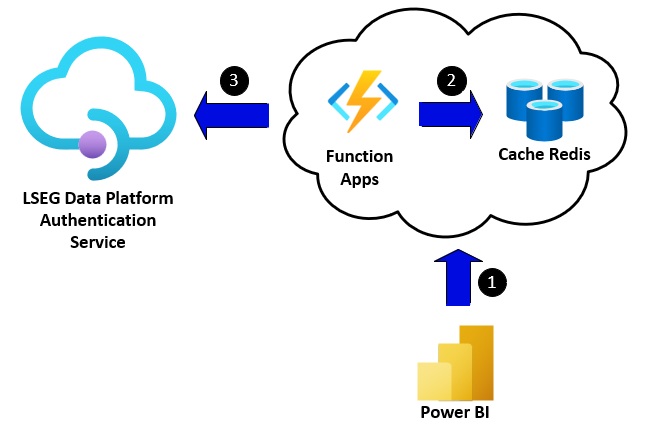
Architecture Overview
The following section provides a brief overview of how this solution works.
- Power BI calls an Azure Function to obtain an access token. The Azure Function authenticates users using basic authentication with a username and password. Upon successful authentication, the Azure Function returns an access token to Power BI.
- After validating the user credentials, the Azure Function retrieves an access token from Redis. If the token is still valid and has not expired, it is returned to Power BI. Otherwise, the Azure Function connects to the LSEG Data Platform Authentication Service to refresh or obtain a new access token, which is then returned to Power BI.
- When a token refresh or renewal is required, the Azure Function calls the LSEG Data Platform Authentication Service to obtain a new access token. The new token is then stored in Redis and returned to Power BI for subsequent requests.
This approach improves security and performance by ensuring that no client secrets are stored in Power BI. Credentials are managed centrally, making administration and rotation easier while reducing the risk of exposure. By caching authentication tokens in Azure Redis, the solution minimizes repeated authentication requests to the LSEG Data Platform, reducing authentication traffic and improving efficiency. As a result, Power BI refresh operations can complete faster and more reliably.
Note: The Basic Authentication credentials used to access the Azure Function are independent of the LSEG Data Platform credentials used to obtain OAuth2 access tokens.
Sample Azure Function Application
This section outlines the design and implementation of the Azure Function developed using C# and Visual Studio 2022, as well as the steps required to run and test it locally. The code is available on GitHub.
Prerequisites
Required Software
- .NET 8 SDK
- Visual Studio 2022
- Azure Functions Core Tools
- Redis Server (Local or cloud instance)
Required Accounts
- LSEG Data Platform API Account with username, password, and client ID
- Azure Subscription (for deployment)
- Redis Instance (Azure Cache for Redis or local Redis server)
Required .NET Libraries
- StackExchange.Redis (3.0.17)
High-Level Architecture
The following diagram illustrates the high-level architecture of the sample Azure Function.
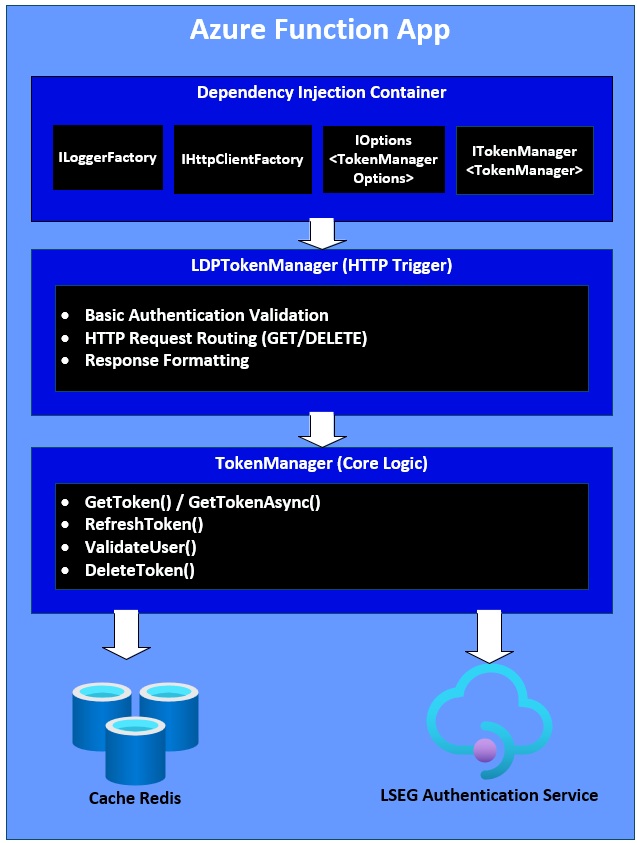
The following sections explain the core components and features of the sample Azure Function. You can skip to the Test and Run section if you would like to start building and running the sample Azure Function.
Redis Server
This project utilizes Redis as a high-performance, in-memory caching layer to store OAuth2 access tokens obtained from the LSEG API, dramatically improving response times and reducing unnecessary API calls. The TokenManager class establishes a connection to Redis using the StackExchange.Redis library via ConnectionMultiplexer.Connect() with the connection string sourced from TokenManagerOptions.RedisConnectionString (configured in application settings or Azure Key Vault). Tokens are stored as JSON-serialized strings under a configurable Redis key (default: "lseg_token") using StringSetAsync and retrieved using StringGetAsync, with the system implementing application-managed expiration rather than Redis TTL to enable proactive token refresh within a configurable buffer window (default: 2 minutes before expiration).
For local development, the application connects to a local Redis instance (localhost:6379), while production deployments leverage Azure Cache for Redis with SSL/TLS encryption (your-cache.redis.cache.windows.net:6380,password=xxx,ssl=True) for enhanced security and reliability. The Redis implementation provides a 90%+ cache hit rate in typical production scenarios, reducing token retrieval latency from 300-500ms (LSEG API call) to just 1-3ms (cache read), while the singleton registration of TokenManager ensures a single, shared Redis connection across all requests, with proper disposal handling through IDisposable and IAsyncDisposable implementations that close connections gracefully using CloseAsync() before disposing.
Dependency Injection
This sample project leverages Dependency Injection (DI), a core .NET 8 design pattern, to achieve loose coupling and maintainable code. The DI container in Program.cs registers key services: ITokenManager as a singleton (sharing a single Redis connection), IHttpClientFactory (for HTTP connection pooling), ILogger<T> (for logging), and IOptions<TokenManagerOptions> (for configuration). Both TokenManager and LDPTokenManager use constructor injection to receive their dependencies, allowing the DI container to automatically resolve and inject services at runtime. This approach enables components to depend on abstractions (interfaces) rather than concrete implementations, making the code easily testable with mocks, maintainable through centralized lifecycle management, and extensible following SOLID principles—particularly the Dependency Inversion Principle where high-level modules depend on abstractions rather than low-level implementations.
Configurations
This sample project uses the Options Pattern to manage configuration through the TokenManagerOptions class, which is populated from environment-specific sources (Environment Variables, Azure App Settings, or local.settings.json for local development). The configuration includes nine key settings:
- Redis connection details (RedisConnectionString and RedisTokenKey)
- LSEG API credentials (LDPUsername, LDPPassword, LDPClientID)
- HTTP endpoint security (BasicAuthUsername, BasicAuthPassword)
- Operational parameters (LDPTokenURL defaulting to the LSEG OAuth2 endpoint, and ExpiryBufferMinutes set to 2 minutes for proactive token refresh)
Configuration values are bound in Program.cs using services.Configure<TokenManagerOptions>() with null-coalescing operators providing defaults, then validated at startup through TokenManagerOptions.Validate() using a fail-fast approach that throws exceptions for missing critical settings. This architecture supports secure credential management via Azure Key Vault references (e.g., @Microsoft.KeyVault(SecretUri=...)), in production, ensures type safety with compile-time checking, and maintains security by excluding sensitive files like local.settings.json from source control.
Basic Authentication
This project implements HTTP Basic Authentication to protect Azure Function endpoints from unauthorized access through a stateless authentication mechanism. The ValidateUser method in TokenManager compares incoming credentials against pre-configured BasicAuthUsername and BasicAuthPassword values loaded from TokenManagerOptions (sourced from application settings or Azure Key Vault). When an HTTP request arrives, the LDPTokenManager.CheckBasicAuth method extracts the Authorization header, validates the "Basic " scheme, decodes the Base64-encoded credentials (format: username:password), and delegates validation to TokenManager.ValidateUser().
Failed authentication returns HTTP 401 Unauthorized, while successful validation allows token operations (GET/DELETE). Basic Authentication serves as the first security layer for endpoint access control, separate from LSEG API credentials used for token acquisition, and must operate over HTTPS/TLS in production since Base64 encoding provides obfuscation but not encryption, with comprehensive structured logging tracking all authentication attempts for security monitoring.
Note: While Basic Authentication is used for simplicity in this sample application, production deployments should consider Azure AD authentication, managed identities, API Management, or OAuth-based authorization for stronger security controls.
GET and DELETE (/api/Token) Endpoints
The system exposes a single Azure Function endpoint named "Token" that handles both GET and DELETE HTTP methods through the LDPTokenManager class. All requests must pass Basic Authentication validation before processing.
GET Endpoint Behavior
The GET /api/Token endpoint retrieves a valid access token through the following flow:
(1) validates Basic Authentication,
(2) calls _tokenManager.GetToken() to retrieve or refresh the token,
(3) returns the token as JSON with HTTP 200 OK status.
The response includes three fields: access_token (the OAuth2 bearer token), refresh_token (for token renewal), and expires_at (UTC timestamp indicating expiration). If the token is cached in Redis and still valid, the response is nearly instantaneous (1-3ms). If the token is expiring soon or missing, the system automatically refreshes it or obtains a new one from the LSEG API, which takes 300-500ms. Error scenarios return appropriate HTTP status codes: 401 Unauthorized if Basic Auth fails or LSEG credentials are invalid, 500 Internal Server Error if Redis connection fails or unexpected errors occur.
DELETE Endpoint Behavior
The DELETE /api/Token endpoint invalidates the cached token, forcing a fresh token acquisition on the next GET request. The flow is:
(1) validates Basic Authentication,
(2) calls _tokenManager.DeleteToken() which removes the token from Redis,
(3) returns "Token deleted successfully." with HTTP 200 OK status.
This endpoint is useful for administrative operations like forcing token refresh after credential updates, clearing cache during troubleshooting, or invalidating compromised tokens. The deletion operation is thread-safe using semaphore locking to prevent race conditions. After deletion, the next GET request will call the LSEG API to obtain a fresh token rather than returning cached data.
Both endpoints include comprehensive error handling and logging: successful operations are logged at Information level, errors are logged with full exception details, and all responses include appropriate Content-Type headers (application/json for tokens, text/plain for messages). The function is designed to be stateless and can handle concurrent requests safely through the use of Redis as a shared cache and semaphore-based synchronization.
Token Refresh and Expiration
The TokenManager implements a proactive token refresh strategy with intelligent expiration management to ensure uninterrupted API access. When the LSEG API returns a token with an expires_in value (in seconds), the system converts this to an absolute UTC timestamp (ExpiresAt = DateTime.UtcNow.AddSeconds(expiresIn)) and stores it in Redis along with the access token and refresh token. The IsTokenExpiringSoon method checks whether the current UTC time plus a configurable buffer window (default: 2 minutes, set via ExpiryBufferMinutes) exceeds the token's expiration time, triggering a refresh before the token actually expires to prevent authentication failures during long-running operations. When GetTokenAsync detects an expiring or missing token, it follows a graceful degradation pattern: first attempting to refresh using the OAuth2 refresh token grant (which doesn't require the password and is faster), and if that fails or returns null, falling back to obtaining a completely new token via the password grant flow.
Thread Safety
The TokenManager implements thread-safe operations using a SemaphoreSlim instance (_lock = new(1, 1)) with a maximum count of one, acting as a mutual exclusion lock to prevent race conditions when multiple concurrent requests attempt to access or modify the cached token. The semaphore protects critical sections in the synchronous GetToken() and DeleteToken() methods by acquiring the lock with _lock.Wait() before executing operations and releasing it in a finally block with _lock.Release(), ensuring the lock is always released even if exceptions occur. This is particularly important because TokenManager is registered as a singleton in the dependency injection container (services.AddSingleton<ITokenManager, TokenManager>()), meaning a single instance is shared across all HTTP requests, making concurrent access a real concern in production scenarios. The semaphore prevents the "thundering herd" problem where multiple simultaneous requests detecting an expiring token would all attempt to refresh it—instead, only one thread executes the refresh while others wait and receive the updated token from Redis cache. While GetTokenAsync() itself doesn't use explicit locking (relying on Redis as a coordination point), the synchronous GetToken() wrapper ensures thread safety by serializing async operations through the semaphore, with the trade-off being that concurrent requests are processed sequentially rather than potentially duplicating token refresh operations, maintaining data consistency at the cost of slightly increased latency during token refresh windows.
Test and Run
The complete sample project is available on GitHub. Clone or download the repository, then open and build the project in Visual Studio 2022. To test and run the Azure Function locally, follow the instructions below.
1. Run Redis Server
A Redis server can be provisioned locally by running the official Redis container image in Docker or Podman.
The following command starts a Redis container named local-redis in detached mode using the official Redis image. It maps port 6379 in the container to port 6379 on the host machine, allowing local applications to connect to the Redis server.
The connection string for this local Redis server is “<IP Address>:6379”.
Note: The local Redis configuration is intended for development and testing only. Production environments should use Azure Cache for Redis with TLS encryption and network access restrictions.
2. Configure the application
Set the following configurations in the local.settings.json file.
Configuration |
Description |
RedisConnectionString |
Redis connection string |
LDPUsername |
LSEG Data Platform username |
LDPPassword |
LSEG Data Platform password |
LDPClientID |
Application key |
BasicAuthUsername |
Username used by the client to authenticate with the Azure Function |
BasicAuthPassword |
Password used by the client to authenticate with the Azure Function |
The content of the local.settings.json file is:
3. Build and run the application
Build and run the application in Visual Studio 2022.
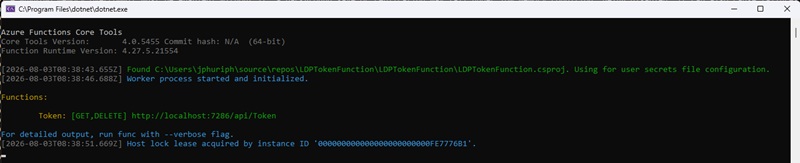
The function endpoint is available at http://<localhost>:7286/api/Token and supports both HTTP GET and DELETE requests.
4. Test the function with Postman or curl
Postman
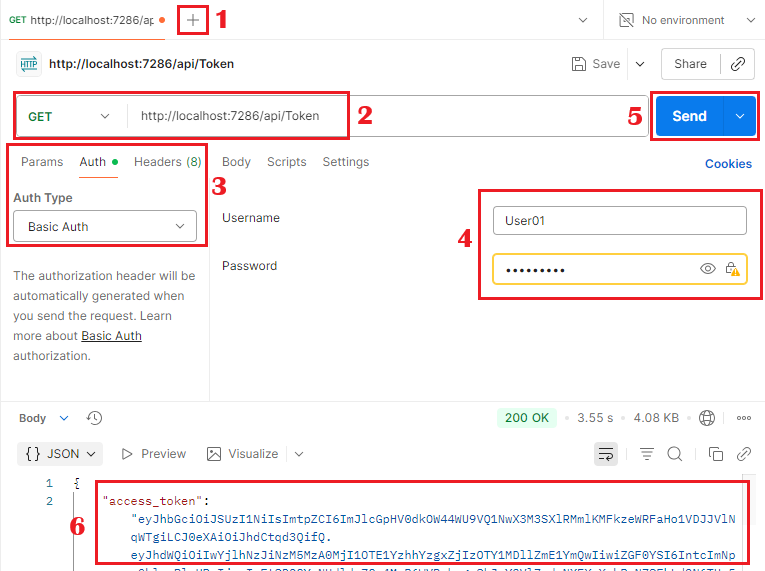
- Create a new request
- Set the HTTP method to GET or DELETE and URL to http://<localhost>:7286/api/Token
- In the Authorization tab, set the “Auth Type” to “Basic Auth”
- Set the Username and Password to the same values as the BasicAuthUsername and BasicAuthPassword accordingly
- Click the Send button to send a request message
- The response contains a token
Curl
The following curl command can be used to retrieve an access token.
The command uses the -u option to specify Basic Authentication credentials and sends an HTTP GET request to the http:// localhost:7286/api/Token endpoint.

Power BI
This section demonstrates how to modify the Power BI example presented in the Building Power Query (M) to Retrieve Historical Pricing from LSEG Data Platform article so that it retrieves access tokens from the Azure Function instead of reading Data Platform credentials from a local file. The example is available on GitHub.
1. Modify the GetAccessToken function to retrieve an access token from the Azure Function.
2. Modify the GetHistoricalPrices to call the modified GetAccessToken function to get a token.
3. Delete the file (SecretCredentials.txt) that contains the base64 data platform credentials
4. Set basic authentication credentials for the Azure Function endpoint
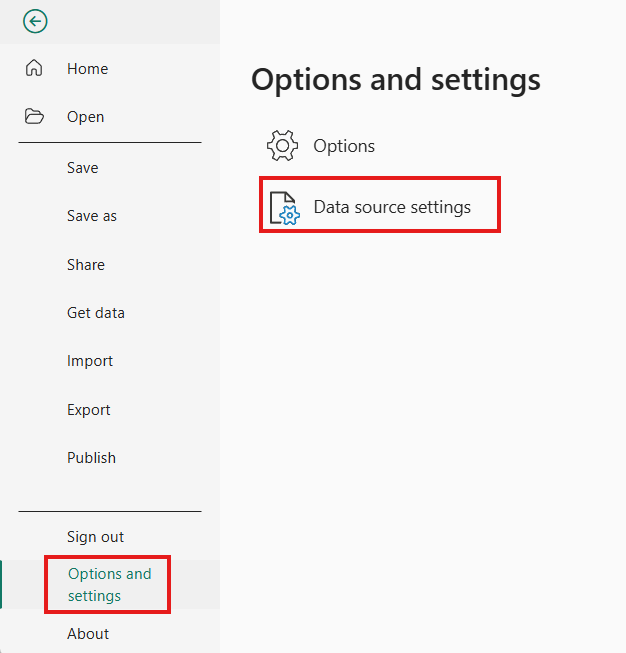
- From the menu, select File -> Options and setting -> Data source setting
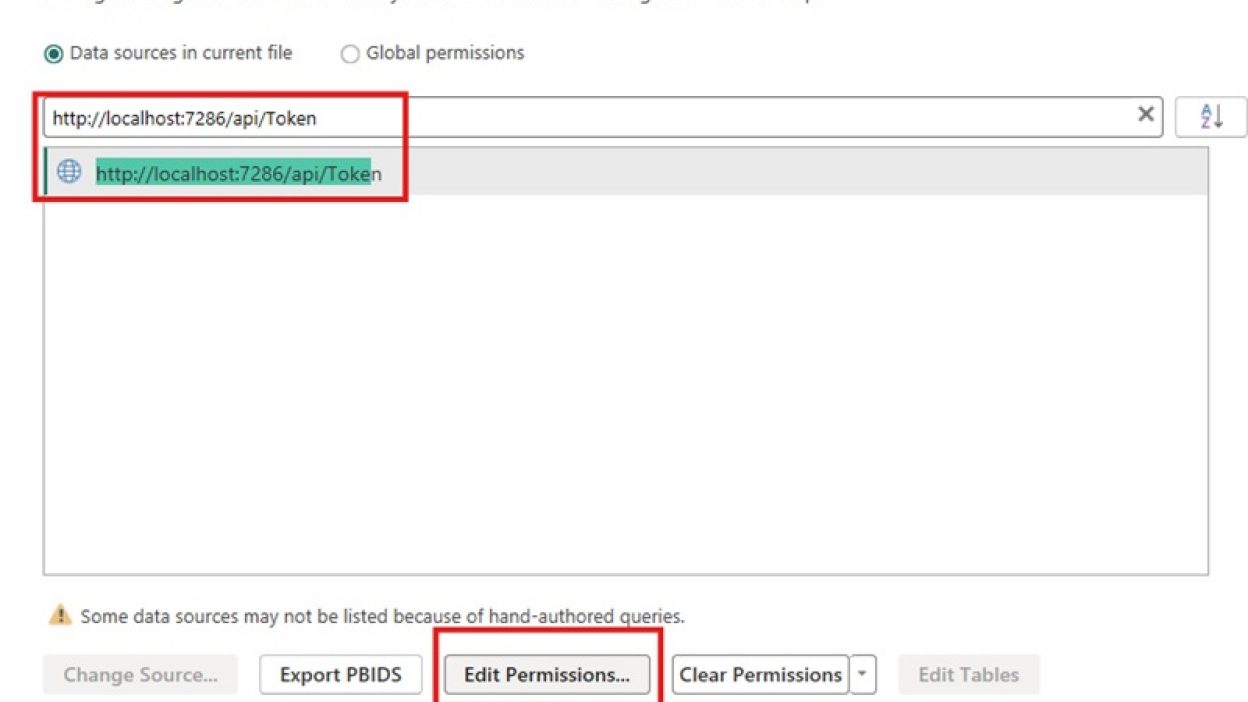
- Enter the Azure Function endpoint and click on the Edit Permissions… button
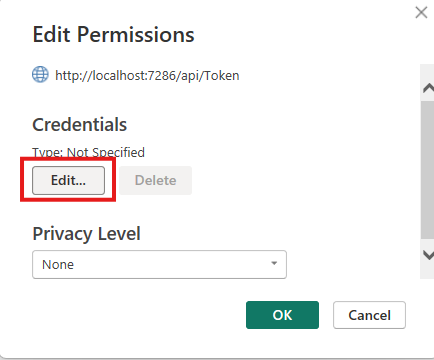
- In the Edit Permissions dialog box, click on the Edit… button
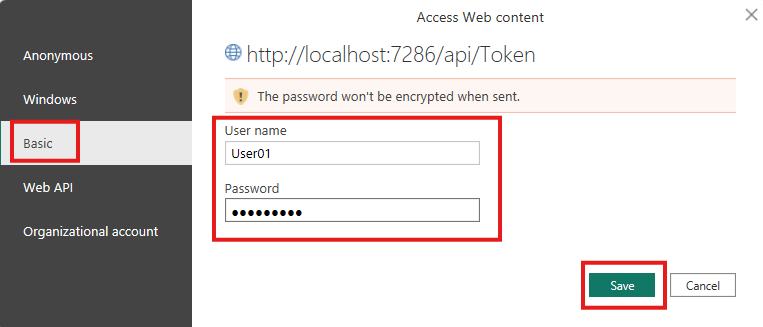
- In the Access Web content dialog box, select Basic, enter basic credentials (User name, and Password), and then click on the Save button.
- Close other dialog boxes and save the file.
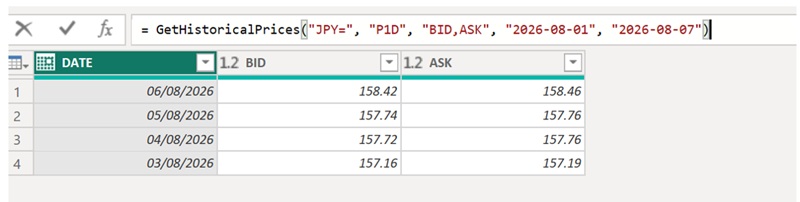
5. Run the modified GetHistoricalPrices function to retrieve historical data.
Summary
This article demonstrated how to centralize LSEG Data Platform authentication using Azure Functions and Azure Cache for Redis. By removing credentials from Power BI, caching OAuth tokens centrally, and implementing proactive token refresh, the solution improves security, simplifies credential management, and reduces authentication traffic. The architecture provides a scalable foundation for production deployments that require secure and efficient access to LSEG APIs from Power BI and other client applications.
Key points:
- Power BI requests tokens from an Azure Function, which authenticates users via Basic Authentication.
- The Azure Function caches LSEG OAuth tokens in Redis, allowing most requests to be served from cache rather than repeatedly calling the LSEG authentication service.
- When a cached token is expired or nearing expiration, the function automatically refreshes or obtains a new token from the LSEG Data Platform and stores it back in Redis.
- The solution improves security by centralizing credential management and removing LSEG credentials from Power BI files, while also improving performance and reliability through token caching.
- The sample implementation is built with.NET 8 Azure Functions, uses dependency injection, configuration through the Options Pattern, Basic Authentication, Redis-based token storage, proactive token refresh, and thread-safe token management.
- The guide includes instructions for configuring Redis, running the Azure Function locally, testing with Postman or curl, and updating Power Query code so Power BI retrieves tokens from the Azure Function instead of a local credentials file.
References
- London Stock Exchange Group (LSEG), LSEG Data Platform APIs Documentation. [Online]. Available: https://developers.lseg.com/en/api-catalog/refinitiv-data-platform/refinitiv-data-platform-apis. Accessed: Aug. 2026.
- Microsoft, Azure Functions Documentation. [Online]. Available: https://learn.microsoft.com/azure/azure-functions/. Accessed: Aug. 2026.
- Microsoft, Azure Cache for Redis Documentation. [Online]. Available: https://learn.microsoft.com/azure/azure-cache-for-redis/. Accessed: Aug. 2026.
- Stack Exchange, StackExchange.Redis Documentation. [Online]. Available: https://stackexchange.github.io/StackExchange.Redis/. Accessed: Aug. 2026.
- Microsoft, Dependency Injection in .NET. [Online]. Available: https://learn.microsoft.com/dotnet/core/extensions/dependency-injection/. Accessed: Aug. 2026.
- Microsoft, Options Pattern in .NET. [Online]. Available: https://learn.microsoft.com/dotnet/core/extensions/options/. Accessed: Aug. 2026.
- Microsoft, Azure Key Vault Documentation. [Online]. Available: https://learn.microsoft.com/azure/key-vault/. Accessed: Aug. 2026.
- Microsoft, Power BI Authentication and Data Source Credentials Documentation. [Online]. Available: https://learn.microsoft.com/power-bi/. Accessed: Aug. 2026.
- Docker Inc., Redis Official Docker Image. [Online]. Available: https://hub.docker.com/_/redis. Accessed: Aug. 2026.
- London Stock Exchange Group (LSEG), Building Power Query (M) to Retrieve Historical Pricing from LSEG Data Platform, internal technical article, referenced as the predecessor document to this guide.
Get In Touch

Source Code
Related APIs
Related Articles
-
Building Power Query (M) to Retrieve Historical Pricing from LSEG Data Platform
-
Using Power BI to visualize the data from LSEG Data Library for Python with Conda environment
-
How to integrate DSS/LSEG Tick History data into Power BI Desktop
-
Getting started using Azure Serverless Function with the Data Platform REST API
-
Getting Started with Refinitiv Data Platform
Request Free Trial
Call your local sales team
Americas
All countries (toll free): +1 800 427 7570
Brazil: +55 11 47009629
Argentina: +54 11 53546700
Chile: +56 2 24838932
Mexico: +52 55 80005740
Colombia: +57 1 4419404
Europe, Middle East, Africa
Europe: +442045302020
Africa: +27 11 775 3188
Middle East & North Africa: 800035704182
Asia Pacific (Sub-Regional)
Australia & Pacific Islands: +612 8066 2494
China mainland: +86 10 6627 1095
Hong Kong & Macau: +852 3077 5499
India, Bangladesh, Nepal, Maldives & Sri Lanka:
+91 22 6180 7525
Indonesia: +622150960350
Japan: +813 6743 6515
Korea: +822 3478 4303
Malaysia & Brunei: +603 7 724 0502
New Zealand: +64 9913 6203
Philippines: 180 089 094 050 (Globe) or
180 014 410 639 (PLDT)
Singapore and all non-listed ASEAN Countries:
+65 6415 5484
Taiwan: +886 2 7734 4677
Thailand & Laos: +662 844 9576