
Moragodkrit Chumsri
Developer Advocate
Last Updated: May 2025
Introduction
Data Platform provides simple web-based API access to a broad range of content. News service is one of the popular services provided on the platform. One of the important News sources on Data Platfrom is Reuters News. Reuters has 2600 journalists in nearly 200 locations delivering international and national news with speed and insight. It delivers more than 2.2 million News Stories per year in 16 languages, actively covering 41,000 companies. The Reuters news and third-party news is available via the News service on standard REST-based APIs.The service basically provides operations to query news content such as news headlines, stories, and get Top News, etc. It also provides another operation to retrieve related content and metadata. Data Platform users can explore the API Playground, which provides access to the News APIs via a Graphical User Interface(GUI).
In this article, we will talk about the Top News operation. The operation basically returns a hierarchy of top news packages in JSON format. The user can parse the JSON message to get a list of pages containing its name and top news id. The user can then use the top news id for each page to retrieve a list of top news headlines along with story id and image id associated with the headline. A developer can use the data returns from this operation to build the Top News application like the Workspace app. The following screenshot is a sample Top News page from the Workspace.
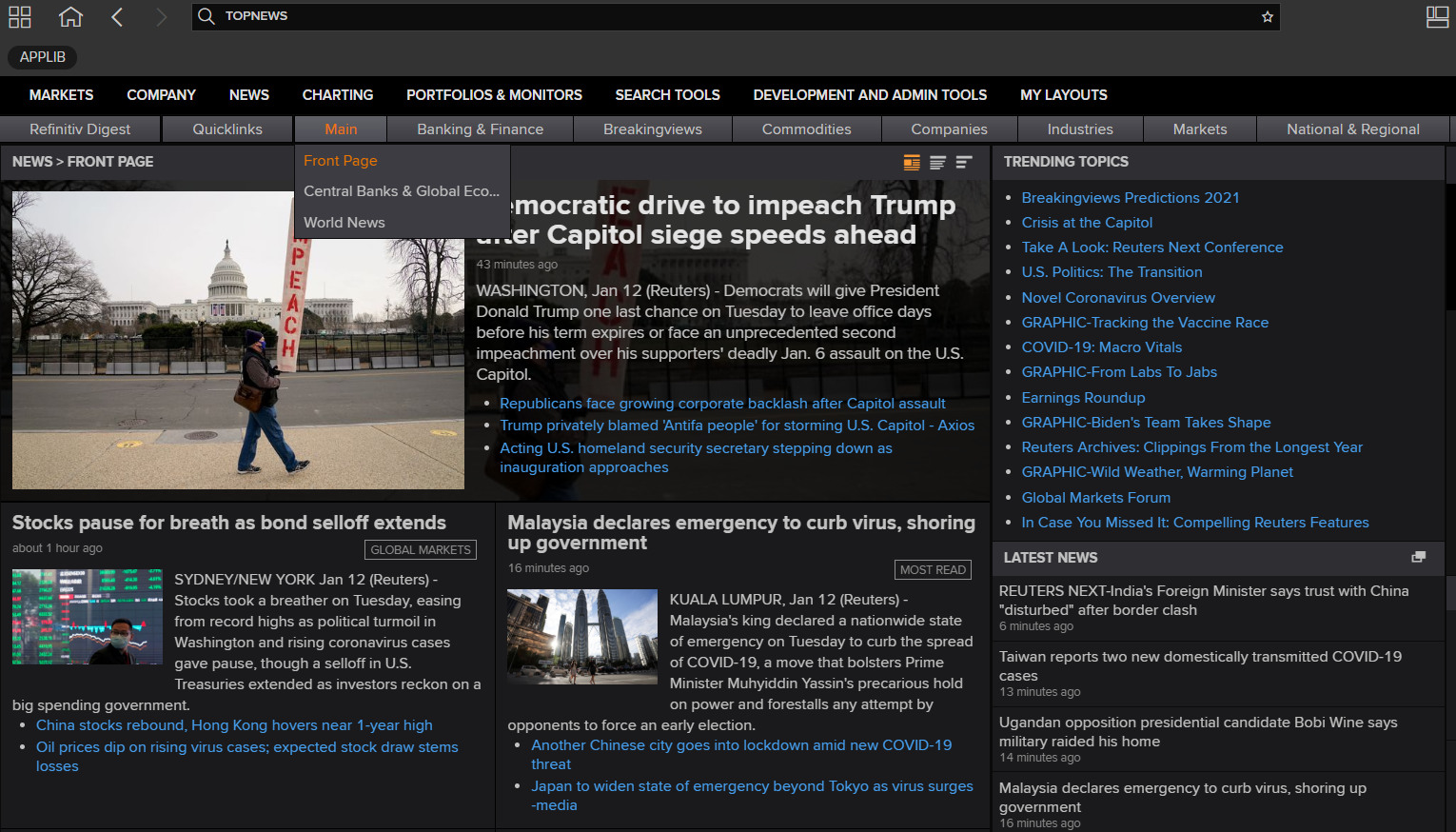
To demonstrate the REST API usages, we will utilize the LSEG Data Library for .NET to create a sample application. The application will call the Top News endpoint to retrieve a Top News packages' hierarchy along with the list of headlines provided under the specific Top News package. We will combine the other operations with the Top News operation to retrieve a story and images from the News services.
Prerequisite
Please read Getting Started with LSEG Data Library for .NET for the basic steps to set up the library and create a Session to login to the Data Platform server. We will not explain the basic usages in this article.
Installed .NET
Visual Studio or Visual Studio Code.
Valid Data Platform account with permission to retrieve data from the News service. You can find more details about credentials from the following Guide.
The following video provides introduction concepts of the Data Platform API and the Top News API with a short demo of the sample application we will create in this article. You can watch the video first and find more details in the article.
Top News interfaces and data structure
Referring to the APIDocs page, the News service has been provided under /data/news/{version} and the current version at the time we write this article is v1.
Below is the full base URI for the News APIs.
We will use the following interfaces to create the sample application and demonstrate the use case.
PATH |
Operation |
Description |
/top-news |
GET |
Retrieves the top news packages hierarchy. |
/top-news/{topNewsId} |
GET |
Retrieves the top news headlines package based on the topNewsId |
/stories/{storyId} |
GET |
Retrieves a Story content based on the storyId. |
/images/{imageid} |
GET |
Retrieves an image based on the imageid. |
No input is required for the operation. The response will be the hierarchy of top news packages in JSON format. The response message contains a hierarchy of top news package lowest level contains a package or page name and its topNewsId. You can pass the value of topNewsId to Headlines operation to get a list of relevant headlines.
Example of response:
The response data contains a list of headlines text with associated storyId, which you can pass to a story operation to retrieve a full news story. It also provides an id and the smallId under the image section. The application can pass to image operation to retrieve photos or thumbnail photos related to the headline.
Below is a sample response message :
The story can be retrieved in JSON or HTML format. To select the story format, 2 options are available:
• accept header:
o text/html
o application/json
• extension
o json
o html
The extension has a higher priority than the header. It means that if, for example, the accept header equals "text/html", but story ID is sent as sampleStory.json, the result will be in JSON format.
You can find additional details about the stories operation from News Service LSEG DataPlatform - User Guide. We also have an article that provides a sample mobile app to retrieve the news story using the stories operation.
Images operation
Basically, the stories that are part of a Top News or an Online Report package may have an image associated. It will be presented in the form of an identifier you can use in the /images/{id} endpoint. The full path for this operation is as follows:
You can retrieve an image either as a raw binary or as a JSON RSF document. When loading as a raw binary, you can also create a thumbnail for the image.
Basic usage
The only mandatory field is the image identifier. Depending on the source of the image, Online Report, or Top News package, the format will be slightly different.
The image id field will then be part of the URL path:
For instance, with image id: 58c94894-f0c9-49ca-80c9-69b9bd099f7f the resolved path is:
Supported output formats
You can switch between the raw image representation and a JSON RSF output using the accept header. There are two possible values:
• image/jpeg - the default, provides the raw image output
• application/json - provides the image in a JSON RSF format, which allows for additional metadata about the image to be retrieved
Thumbnail generation
When loading the image using the image/jpeg format, you can create a thumbnail on the fly using the height and width headers. If you specify only one of the two sizes, the services computed the other sizes to keep the image original ratio. When the two sizes are defined, and the ratio is changed, the image is stretched and cropped to fill the whole output.
Sample Usages to resized the Top News images
Basically, you can apply the concepts based on the above details to create your own Top News application. You can use any programming language or application which supports the REST API client library and the JSON parser to parse the content from the JSON response message. You can find additional details about the news service from the Top News section on the API Doc page.

Create Sample Top News Consumer app
We will create a simple .NET console application to demonstrate how to use LSEG Data Library for .NET to retrieve and parse the Top News content. There is no need to use the GUI and ASP.NET Web application framework in this project.
Once the session is open, we will use the TopNews and TopNewsHeadlines classes (provided under LSEG.Data.Content.News namespace) to retrieve the Top News content.
Request Top News packages
Currently, the LSEG Data Library for .NET provides an interface to retrieve Top News packages' hierarchy directly.
We will print the top-level Package Name and the number of underlying pages to verify the codes.
Below is the sample output. It will show the top-level Package name and number of sub-pages with its name and TopNewsId. We need to use the TopNewsId with the Headlines operation as described earlier.
Let me compare the following result with the content on the Top News app on Workspace.
It looks similar to the list when you click Banking & Finance menu on the application. Below is a sample screenshot from Refinitiv Workspace.

Retrieve Top News Headlines
We will use the TopNewsId from the previous step to retrieve the list of Top News Headlines for each page.
For example,
If we need the list of Top News Headlines for a Sport, we need to pass urn:newsml:reuters.com:20020927:SPDOC_66767272002 to TopNews headlines endpoint.
The following code can be used to retrieve Top News headlines. The method requires the TopNewsID.
Then, iterate and print all headlines on the console output.
Sample Output:
Compare the result with the screenshot from the Top News app again, you will see that the text property of the TopNewsData class is a text message in the yellow box from the screenshot, and the snippet property is a text message in the green box from the screenshot. You can find the structure of the raw JSON message from the section Top News operation.

Get Headlines images and Story content.
LSEG Data Library for .NET also provides the interfaces to retrieve relevant news images and stories. It requires the storyId to retrieve the news story and the top news image id to get a photo associated with the headline.
Get news stories using the LSEG Data Libaray for .NET interface
You can use the following snippet of codes to retrieve the news story. The class has IsSucess property you can use to verify if the operation is successful or a failure. If it's failed, a status returned from the server is shown on the console output.
Below is a sample output when passing storyId:[urn:newsml:reuters.com:20210118:nL4N2JQ1SR] to the snippet of codes.
When testing the same storyId with API Playground on the API Doc page, you will see the same content.

Get headline photos using the LSEG Data Libary for .NET interface
To retrieve the photo associated with the headline, you can use the following implementation. The application needs to pass the imageId to the Image interface, and the GetData method will return IImageResponse, which is an interface for ImageResponse. Like the Story operation, there will be a status return when the operation is a failure.
Basically, the raw data return from the function is a byte array to write the byte array to the jpeg file directly. I will add sample codes to write the Image data to jpg file format under the directory "c:\tmp\images".
Suppose we pass imageId:[2021-01-17T232321Z_544701600_RC2Z9L9AG8S2_RTRMADP_2_CHINA-ECONOMY-GDP__JPG] to the function we will get the following images under "c:\tmp\images".

This example provides an option for the console app to write the images that it can get from the server to a specific location. When you open the folder, you will see all photos with the same name as the image id under the folder "c:\tmp\images" such as the below sample screenshot.

The photo in the red box is an image for the following headline.
You can resize photos by setting the Rendition option to 'thumbnail' to create a thumbnail for your application or web page.
Demo Application
To test the sample application, you can download the sample app from Github.
Then you can open the project file TopNewsConsumer.csproj on Visual Studio 2022 or open the project folder on Visual Studio Code.
Before running the app, you have to set your Credentials in the following section of Program.cs.
You can also change the following parameters from false to true to let the application get the News Story and photo associated with the headlines. You can change images_save_path to a valid path on your pc, and the application must have permission to create files in the folder.
Then start the app using Debug=> Start Debugging or Start Without Debugging. Or you can run the app using the dotnet command under the same folder as the project file.
You will see the output like the following screen records.

Summary
This article describes how to use LSEG Data Library for .NET to retrieve the top news packages hierarchy and its child page. It also provides the sample codes to retrieve the associated stories and retrieve a photo associated with the news headline. The customer can utilize these functions to create an application likes the Top News application on LSEG Workspace. They can design the application to cache pages and its topnewsId and then provide a way for users to navigate each page's content based on the TopNews name and its Id.
Though we provide the sample in .NET, you can use another programming language that provides a REST client library with the endpoint we provided in this article. Your application requires an additional implementation to manage the access token. It is required when you send an HTTP request to get data from the endpoints. Data Platform will return data in JSON format then you use the JSON parser library to parse specific content from the data.
Get In Touch

Related Articles

SOURCE CODE
Related APIs
Request Free Trial
Call your local sales team
Americas
All countries (toll free): +1 800 427 7570
Brazil: +55 11 47009629
Argentina: +54 11 53546700
Chile: +56 2 24838932
Mexico: +52 55 80005740
Colombia: +57 1 4419404
Europe, Middle East, Africa
Europe: +442045302020
Africa: +27 11 775 3188
Middle East & North Africa: 800035704182
Asia Pacific (Sub-Regional)
Australia & Pacific Islands: +612 8066 2494
China mainland: +86 10 6627 1095
Hong Kong & Macau: +852 3077 5499
India, Bangladesh, Nepal, Maldives & Sri Lanka:
+91 22 6180 7525
Indonesia: +622150960350
Japan: +813 6743 6515
Korea: +822 3478 4303
Malaysia & Brunei: +603 7 724 0502
New Zealand: +64 9913 6203
Philippines: 180 089 094 050 (Globe) or
180 014 410 639 (PLDT)
Singapore and all non-listed ASEAN Countries:
+65 6415 5484
Taiwan: +886 2 7734 4677
Thailand & Laos: +662 844 9576