What are the COM APIs?
The COM APIs are older APIs that were initially delivered with 3000 Xtra Terminals and then Eikon. They provided access to a broad set of content and capabilities in Eikon.
The COM API covers a large range of functionalities, as shown in this article. Below we will show you how to migrate the following COM Component and API calls/functions:
- AdfinXRtLib (rtx.dll)
- AdxRtSourceList
- AdxRtList (including 'RtGet Real Time')
- AdxRtChain
- AdxRtHistory (both inter- and intra-day) - Only available in Excel
- Streaming News
- dex2.dll
- Rdata List
- DEX2 (including Symbology Conversion, Time Series, Fundamental and Reference data)
- RSearch.dll
- RSearch
- RHistoryAPI.dll
- RHistory
- RtContribute.dll
- RtContribute
----The APIs below do not currently have replacements in Workspace---------------
- Adxfo.dll
- AdfinX Analytics 2.0 Module
- Adxfoo.dll
- AdfinX Analytics 3.0 Module
Reasons you might need or want to migrate away from COM APIs:
Need to operate in 64-bit environment
The COM APIs were designed to be used on 32-bit environments. Many teams are still migrating to 64-bit environments where these will not work correctly and are not supported environments.
You want access to new datasets and improved capabilities offered on Refinitiv Data Platform
The COM APIs are feature-complete and no new development work is being done on them. This means that new datasets and capabilities will not be available to users of these APIs.
You want to upgrade from Eikon to Workspace
The COM APIs will not be available in Workspace - so to take advantage of the best desktop experience you would need to migrate to our more modern web-based APIs - which are much better and work with modern scripting environments such as Python - one of the most popular language ecosystems used in finance.
All the Python code below works in Codebook too! You can try it out as outlined in this Tutorial Video. We will use the Refinitiv Data Library (RD Library). To learn more about the Refinitiv Data Library for Python please join the Refinitiv Developer Community. By registering and logging into the Refinitiv Developer Community portal you will have free access to a number of learning materials like
and much more.
Prerequisits
COM Prerequisits
To use the COM API in the Microsoft Office suite, I would advise anyone to read through the COM APIs for Microsoft Office. A resume of the prerequisits in question can be found in the index of this article.
Python Prerequisits
If you are new to Python, don't hesitate to install it on your machine and try it out yourslef as outlined in this 3rd party tutorial. Elsehow, you can simply use Codebook as outlined in this Tutorial Video.
Python works with libraries that one can import to use functionalities that are not natively supported but the coding language. In the cell below, we import the Python library os, then we use it to point to the path where our Refinitiv Credentials are; we need this file in order to auithenticate ourselves to the Refinitiv data services and collect data. You can find out more on this here, and a copy of the Configuration file here.
<refinitiv.data.session.Definition object at 0x24c17bc8 {name='workspace'}>
AdfinX RealTime AdxRtSourceList
What does 'AdfinX RealTime AdxRtSourceList' do?
The functionality in Office was used to get the real-time field list for the selected Source Name, such as an instrument (e.g.: VOD.L) (using AdxRtSourceList Class of AdfinXRtLib, the AdfinX Real Time 6.0 Library, rtx.dll). It was best exemplified in the Tutorial 1 - Real-time Source List, Fields - AdxRtSourceList's Excel Workbook:
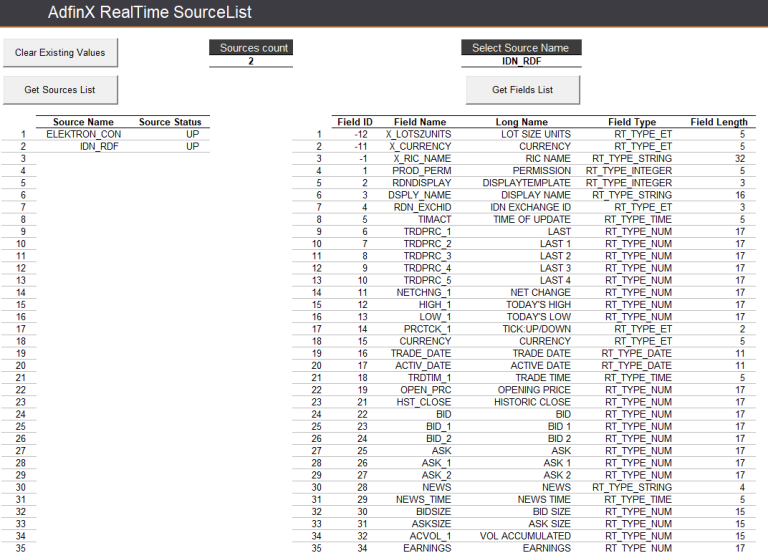
VBA
The VBA for AdxRtSourceList is very simple, and consists simply in creating an instance of an AdxRtSourceList object using the PLVbaApis function:
Set myAdxRtSrcLst = CreateAdxRtSourceList()
New Method
This is a functionality for which there is now an interface available called the Data Item Browswer (DIB) that you can find on workspace, and for which there is a video tutorial.
Real-Time Fields Available With The COM API
There is a limited number of fields available on the COM API in 'AdxRtSourceList', you can lookup fields available in the Quote app for any instrument in question:
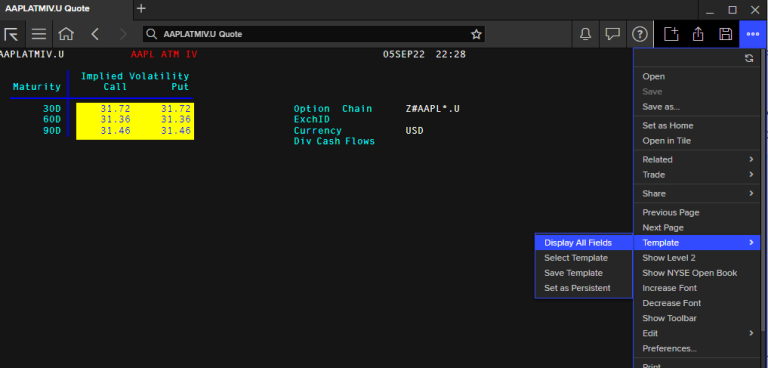
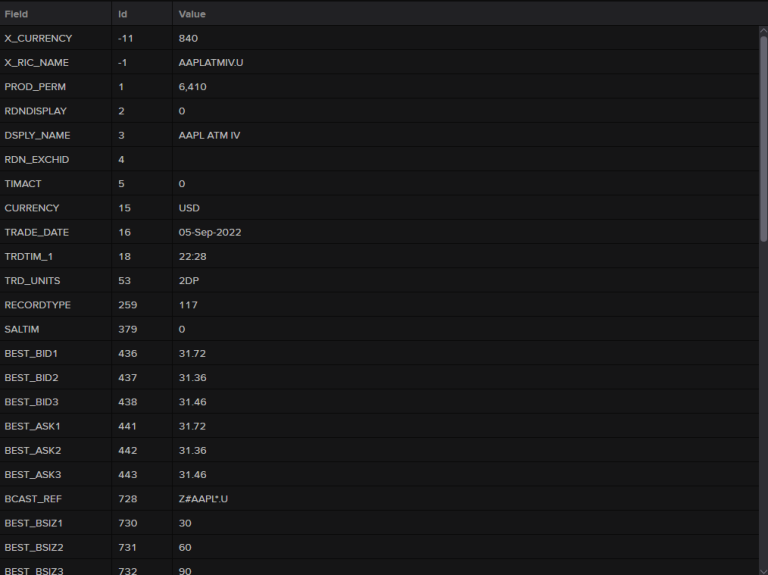
More are available on the DIB and via the code available below in the 'Real-Time Fields Available In Python' section.
Note that available fields for each instrument type difffers on the type.
Real-Time Fields Available In Python
You can get a collection of all the Real-Time fields available via:
['Instrument', 'PROD_PERM', 'RDNDISPLAY', 'DSPLY_NAME', 'TIMACT', 'NETCHNG_1', 'HIGH_1', 'LOW_1', 'CURRENCY', 'ACTIV_DATE', 'OPEN_PRC', 'HST_CLOSE', 'BID', 'BID_1', 'BID_2', 'ASK', 'ASK_1', 'ASK_2', 'ACVOL_1', 'TRD_UNITS', 'PCTCHNG', 'OPEN_BID', 'OPEN_ASK', 'CLOSE_BID', ..., 'MIDLO1_MS', 'BID_HR_MS']
Note that available fields for each instrument type difffers on the type, e.g.:
['Instrument', 'PROD_PERM', 'RDNDISPLAY', ... , 'CF_CURR', 'SPS_SP_RIC']
AdfinX RealTime AdxRtList
What does AdxRtList do?
Returns real-time data for multiple (or single) instrument and fields. Data is returned initially as ONIMAGE - which is a snapshot of data for the requested fields, followed by a series of ONUPDATE messages - which are received whenever a data item changes or gets updated. You can also request ONTIME returns which would give an ONIMAGE snapshot at periodic intervals (say every hour for example). All the following functions rely on AdxRtList API calls - RtGet(), RData() and TR() for real-time data. Typically we would need to write callback handlers to deal with the returns from the API.
RtGet Real-Time
When using the old COM API to get RtGet Real Time data, one may be greeted with an Excel sheet that looks like the below, as per Tutorial 2 - Real-time Data Retrieval - AdxRtList's Excel workbook:
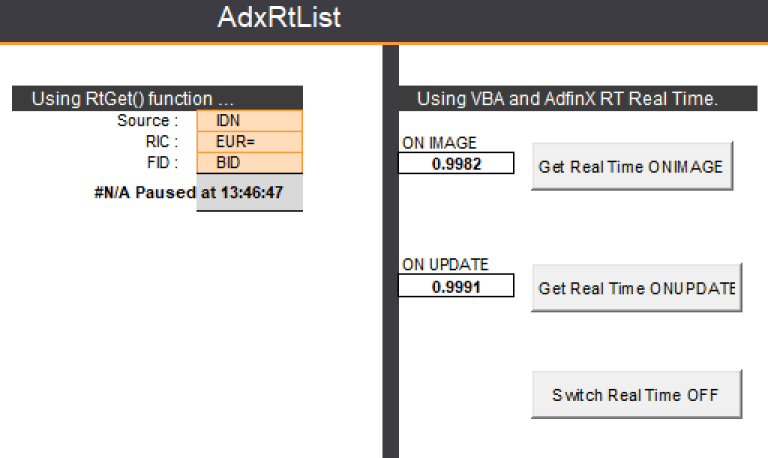
The functionalities shown here are easily recreated using the RD Library:
- Real Time FX rates snapshot - 'Real-Time ONIMAGE'
- 'Real Time Update', which updates real time, as soon as an update for the instrument and field is received
- A periodic ONTIME snapshot
Real-Time ONIMAGE
When collecting data ONIMAGE, we are collecting a current snapshot of the data we're after. This could not be simpler in RD in Python!
VBA
In VBA, you'd create an instance of an AdxRtList object using the PLVbaApis function CreateAdxRtList.
Then create your function cmdGetRealTimeONIMAGE_Click:
Then create your function cmdGetRealTimeONIMAGE_Click:
This would allow, in this example, for the 'Get Real Time ONIMAGE' buttons to work. For updates, the below could be used:
Python
In python, things could not be easier as most of the equivalent code about is abstracted to the library and you just use a one-line function! You can go ahead and try it all out in Codebook:
| Instrument | BID | ASK | |
|---|---|---|---|
| 0 | GBP= | 1.2283 | 1.2287 |
| 1 | EUR= | 1.0556 | 1.056 |
| 2 | JPY= | 136.73 | 136.76 |
You can easily assign this info to an object too.
| Instrument | Yield to Call Date | |
|---|---|---|
| 0 | GBP= | NaT |
| 1 | EUR= | NaT |
| 2 | JPY= | NaT |
In [8]:
realTimeImage = rd.get_data(
['GBP=', 'EUR=', 'JPY='],
['BID', 'ASK'])
realTimeImage
Out[8]:
| Instrument | BID | ASK | |
|---|---|---|---|
| 0 | GBP= | 1.2284 | 1.2285 |
| 1 | EUR= | 1.0557 | 1.0561 |
| 2 | JPY= | 136.73 | 136.76 |
Real-Time ONUPDATE
VBA

The 'Real Time ONUPDATE' buttons in the example pictured above was coded with VBA code for cmdGetRealTimeONUPDATE_Click:
Private Sub cmdGetRealTimeONUPDATE_Click()
Dim strRICs As Variant, varFIDs As Variant
ActiveCell.Select
Set myRtGet2 = CreateAdxRtList
With myRtGet2 .ErrorMode = DialogBox .Source = [Source].Value strRICs = [RIC].Value varFIDs = [FID].Value
.RegisterItems strRICs, varFIDs .StartUpdates RT_MODE_ONUPDATE End With ' For the With myRtGet2 End Sub
' Returns the data for updates - NOTE .StartUpdates RT_MODE_ONUPDATE. Private Sub myRtGet2_OnUpdate(ByVal a_itemName As String, ByVal a_userTag As Variant, ByVal a_itemStatus As AdfinXRtLib.RT_ItemStatus) Dim arrFields As Variant Dim lngRICFidVal As Long
If a_itemStatus = RT_ITEM_OK Then arrFields = myRtGet2.ListFields(a_itemName, RT_FRV_ALL, RT_FCV_VALUE)
' And a specific value for a specific instrument, specific field. 'If a_itemName = "EUR=" Then lngRICFidVal = myRtGet2.Value("EUR=", "BID"): [F12].Value = arrFields(0, 1) If a_itemName = [RIC].Value Then lngRICFidVal = myRtGet2.Value([RIC].Value, [FID].Value): [F12].Value = arrFields(0, 1) End If End Sub
Then, on VBA, you'd have to have a buttons to stop the stream with cmdSwitchRealTimeOFF_Click, which, in python, is stream.close():
Python
Some Python Library Imports to start with
In [9]:
import datetime # `datetime` allows us to manipulate time as we would data-points.
from IPython.display import display, clear_output # `IPython` here will allow us to plot grahs and the likes.
For us to start using pricing streams with events, we need to define a callback to receive data events:
In [10]:
def display_data(data, instrument, stream):
clear_output(wait=True)
current_time = datetime.datetime.now().time()
print(current_time, "- Data received for", instrument)
display(data)
Open the stream and register the callback
In [11]:
stream = rd.open_pricing_stream(
universe=['GBP=', 'EUR=', 'JPY='],
fields=['BID', 'ASK'],
on_data=display_data
)
11:41:51.778563 - Data received for JPY=
| BID | ASK | |
|---|---|---|
| JPY= | 136.72 | 136.75 |
Close the stream
In [12]:
stream.close()
Out[12]:
<OpenState.Closed: 'Closed'>
More related RD capabilities can be found here.
Real-Time ONTIME
With Real-Time ONTIME, you can get snapshot updates at a specific frequency:
We can use a Python loop with sleep to recreate that simply:
The cell below gets an update for instruments 'GBP=', 'EUR=' and 'JPY=' and fields 'BID' and 'ASK' every 5 seconds:
In [13]:
import time # the `time` library will allow us to make sure that this cell doesn't run in an infinite loop
now = time.perf_counter() # We create a time stamp for 'now'
while time.perf_counter() < now + 10: # This loop will only run for the 10 seconde following `now`.
time.sleep(1)
clear_output(wait=True)
df = stream.get_snapshot(
universe=['GBP=', 'EUR=', 'JPY='],
fields=['BID', 'ASK'])
display(df)
| Instrument | BID | ASK | |
|---|---|---|---|
| 0 | GBP= | 1.2282 | 1.2286 |
| 1 | EUR= | 1.0556 | 1.056 |
| 2 | JPY= | 136.72 | 136.75 |
Real Time ONTIME Note on chains used in ek.get_data:
It has to be pointed out that when getting this kind of data for each constituent of a chain (e.g.: 0#.FSTE for the FTSE Equity index, or the commodities chain 0#LCO: for ICE Brent Crude Oil Chain Future Contract) on the COM API in Excel:

you would not need the starting 0#, but this is needed for our Python API:
It will be included in RDL 1.0.0b27

In [14]:
import refinitiv.data.eikon as ek
## Outside CodeBook:
ek_key = open("eikon.txt", "r") # The key is placed in a text file so that it may be used in this code without showing it itself.
ek.set_app_key(str(ek_key.read())) # `'DEFAULT_CODE_BOOK_APP_KEY'` in CodeBook
ek_key.close() # It is best to close the files we opened in order to make sure that we don't stop any other services/programs from accessing them if they need to.
In [15]:
df, err = ek.get_data(
instruments=['0#LCO:'], # other e.g.: PSKc1 # in Office COM API, you do not need the 0#, but it is requiered on our Python API calls
fields=['CF_NAME', 'CF_TIME', 'HST_VOL'])
df
Out[15]:
| Instrument | CF_NAME | CF_TIME | HST_VOL | |
|---|---|---|---|---|
| 0 | LCOTOT | BRENT CRUDE VOLS | 10:41:08 | 740532 |
| 1 | LCOG3 | BRENT CRUDE FEB3 | 10:41:07 | 216497 |
| 2 | LCOH3 | BRENT CRUDE MAR3 | 10:41:04 | 157000 |
| 3 | LCOJ3 | BRENT CRUDE APR3 | 10:41:06 | 84627 |
| 4 | LCOK3 | BRENT CRUDE MAY3 | 10:40:43 | 53618 |
| ... | ... | ... | ... | ... |
| 82 | LCOX9 | BRENT CRUDE NOV9 | 23:00:00 | <NA> |
| 83 | LCOZ9 | BRENT CRUDE DEC9 | 23:00:00 | <NA> |
| 84 | LCOF0 | BRENT CRUDE JAN0 | 23:00:00 | <NA> |
| 85 | LCOG0 | BRENT CRUDE FEB0 | 23:00:00 | <NA> |
| 86 | LCOH0 | BRENT CRUDE MAR0 | 23:00:00 | <NA> |
87 rows × 4 columns
NEW FUNCTIONALITY: Record ticks
With the RD library we now have the ability to record a pricing stream. Here's how:
Create and open a Pricing stream
In [16]:
stream = rd.open_pricing_stream(
universe=['GBP=', 'EUR=', 'JPY='],
fields=['BID']
)
Start recording
In [17]:
stream.recorder.record(frequency='tick')
... Wait for a little while (5 seconds) ...
In [18]:
time.sleep(5)
Stop recording and display the recorded history
In [19]:
stream.recorder.stop()
tick_history = stream.recorder.get_history()
display(tick_history)
| EUR= | GBP= | JPY= | |
|---|---|---|---|
| BID | BID | BID | |
| Timestamp | |||
| 2022-12-12 11:42:10.757387 | <NA> | 1.2285 | <NA> |
| 2022-12-12 11:42:11.198940 | <NA> | 1.2285 | <NA> |
| 2022-12-12 11:42:11.244940 | 1.0558 | <NA> | 136.71 |
| 2022-12-12 11:42:11.852013 | <NA> | <NA> | 136.71 |
| 2022-12-12 11:42:11.876636 | <NA> | 1.2284 | <NA> |
| 2022-12-12 11:42:12.119414 | 1.0559 | <NA> | <NA> |
| 2022-12-12 11:42:12.141036 | <NA> | <NA> | 136.71 |
| 2022-12-12 11:42:12.161335 | <NA> | 1.2285 | <NA> |
| 2022-12-12 11:42:12.382668 | 1.0558 | <NA> | <NA> |
| 2022-12-12 11:42:12.383719 | <NA> | <NA> | 136.7 |
| 2022-12-12 11:42:12.427677 | <NA> | 1.2286 | <NA> |
| 2022-12-12 11:42:12.912487 | <NA> | <NA> | 136.71 |
| 2022-12-12 11:42:13.036311 | <NA> | 1.2287 | <NA> |
| 2022-12-12 11:42:13.199326 | <NA> | <NA> | 136.71 |
| 2022-12-12 11:42:13.335450 | <NA> | 1.2286 | <NA> |
| 2022-12-12 11:42:13.488798 | <NA> | <NA> | 136.7 |
| 2022-12-12 11:42:13.626007 | 1.0558 | <NA> | <NA> |
| 2022-12-12 11:42:13.791749 | <NA> | <NA> | 136.71 |
| 2022-12-12 11:42:14.063404 | <NA> | <NA> | 136.71 |
| 2022-12-12 11:42:14.203787 | 1.0559 | <NA> | <NA> |
| 2022-12-12 11:42:14.263789 | <NA> | 1.2287 | <NA> |
| 2022-12-12 11:42:14.357788 | <NA> | <NA> | 136.7 |
| 2022-12-12 11:42:14.493926 | <NA> | 1.2286 | <NA> |
| 2022-12-12 11:42:14.641583 | 1.0559 | <NA> | <NA> |
| 2022-12-12 11:42:14.648544 | <NA> | <NA> | 136.71 |
| 2022-12-12 11:42:14.813826 | <NA> | 1.2287 | <NA> |
| 2022-12-12 11:42:15.086284 | <NA> | <NA> | 136.71 |
| 2022-12-12 11:42:15.087285 | <NA> | 1.2289 | <NA> |
| 2022-12-12 11:42:15.218813 | 1.0559 | <NA> | <NA> |
| 2022-12-12 11:42:15.344042 | <NA> | <NA> | 136.7 |
| 2022-12-12 11:42:15.388166 | <NA> | 1.2287 | <NA> |
Resample the tick history to 5 seconds bars
In [20]:
tick_history.ohlc("5s")
Out[20]:
| EUR= | GBP= | JPY= | ||||||||||
|---|---|---|---|---|---|---|---|---|---|---|---|---|
| BID | BID | BID | ||||||||||
| open | high | low | close | open | high | low | close | open | high | low | close | |
| Timestamp | ||||||||||||
| 2022-12-12 11:42:10 | 1.0558 | 1.0559 | 1.0558 | 1.0559 | 1.2285 | 1.2287 | 1.2284 | 1.2287 | 136.71 | 136.71 | 136.7 | 136.71 |
| 2022-12-12 11:42:15 | 1.0559 | 1.0559 | 1.0559 | 1.0559 | 1.2287 | 1.2289 | 1.2287 | 1.2287 | 136.71 | 136.71 | 136.7 | 136.70 |
Close the stream
In [21]:
stream.close()
Out[21]:
<OpenState.Closed: 'Closed'>
As you can see, we get the data sought after. If you are after several fields for any one instrument (e.g.: an FX Pair), it couldn't be any simpler:
Rdata List Realtime
When using the old COM API to get Rdata List data, one may be greeted with an Excel sheet that looks like this:
VBA
In VBA, this was done with a function akin to .StartUpdates RT_MODE_ONUPDATE & myRTList = CreateAdxRtList(), e.g.:
With myRTList
.ErrorMode = EXCEPTION
' N.B.! Source name may need to be changed if not named as below!
.Source = "IDN" '_SELECTFEED"
' Register the items and fields
.RegisterItems ItemArray, FieldArray
' Set the user tag on each item. This helps indexing the results
' table for displaying the data in the callback
For m = LBound(ItemArray) To UBound(ItemArray)
.UserTag(ItemArray(m), "*") = m
For n = LBound(FieldArray) To UBound(FieldArray)
.UserTag(ItemArray(m), FieldArray(n)) = n
Next n
Next m
.Mode = "TIMEOUT:5"
' If timed basis desired, then FRQ setting and RT_MODE_ONTIME or RT_MODE_ONTIME_IF_UPDATED required,
' which will trigger the OnUpdate event, shown below.
'.Mode = "FRQ:2S"
' And, finally, request the data!
Select Case Range("dcUpdateType").Value
Case "RT_MODE_IMAGE"
.StartUpdates RT_MODE_IMAGE
Case "RT_MODE_ONUPDATE"
.StartUpdates RT_MODE_ONUPDATE
End Select
'.StartUpdates RT_MODE_ONUPDATE
'.StartUpdates RT_MODE_IMAGE
'Other modes shown below; different events will be fired.
'.StartUpdates RT_MODE_ONTIME, RT_MODE_ONTIME_IF_UPDATED, RT_MODE_ONTIME,
' RT_MODE_ONUPDATE, RT_MODE_IMAGE , RT_MODE_NOT_SET
End With
To stop this update, you would have to create some VBA code to (e.g.: Sub cmdStop_Click()), but that is simpler in Python with stream.close():
However - many developers also used the RData worksheet function object directly in VBA.
Python
Here we have a data-frame of instruments and fields updating live every x seconds, let's say (for the sake of the use-case example) every 3 seconds. This is simple to recreate in Python:
In [22]:
stream = rd.open_pricing_stream(
universe=['GBP=', 'EUR=', 'JPY=', '.DIB', '.FTSE', '.NDX', 'TRI.TO', 'EURGBP=R'],
fields=['CF_TIME', 'CF_LAST', 'BID', 'ASK', 'TRDTIM_1'])
In [23]:
stream.open()
[MixedStreams id=6 universe=['GBP=', 'EUR=', 'JPY=', '.DIB', '.FTSE', '.NDX', 'TRI.TO', 'EURGBP=R']] can’t open, state=StreamState.Opened
Out[23]:
<OpenState.Opened: 'Opened'>
In [24]:
now = time.perf_counter()
while time.perf_counter() < now + 30:
time.sleep(1)
clear_output(wait=True)
df = stream.get_snapshot(
universe = ['GBP=', 'EUR=', 'JPY=', '.DIB', '.FTSE', '.NDX', 'TRI.TO', 'EURGBP=R'],
fields = ['CF_TIME', 'CF_LAST', 'BID', 'ASK', 'TRDTIM_1'])
display(df)
| Instrument | CF_TIME | CF_LAST | BID | ASK | TRDTIM_1 | |
|---|---|---|---|---|---|---|
| 0 | GBP= | 10:41:54 | 1.2288 | 1.2288 | 1.2293 | <NA> |
| 1 | EUR= | 10:41:55 | 1.056 | 1.056 | 1.0564 | <NA> |
| 2 | JPY= | 10:41:55 | 136.7 | 136.7 | 136.71 | <NA> |
| 3 | .DIB | <NA> | <NA> | <NA> | <NA> | <NA> |
| 4 | .FTSE | 10:41:00 | 7468.59 | <NA> | <NA> | 10:41:00 |
| 5 | .NDX | <NA> | <NA> | <NA> | <NA> | <NA> |
| 6 | TRI.TO | 21:00:00 | 156.92 | 154.25 | 158.99 | <NA> |
| 7 | EURGBP=R | 10:41:55 | 0.859 | 0.859 | 0.8597 | <NA> |
Close the stream
In [25]:
stream.close()
Out[25]:
<OpenState.Closed: 'Closed'>
Create a Streaming Price and register event callbacks using RDP
You can build upon the example above, using the RDP Example notebook present in Codebook that demonstrates how to use a StreamingPrice with events to update a Pandas DataFrame with real-time streaming data. Using a StreamingPrices object that way allows your application to have at its own in memory representation (a Pandas DataFrame in this example) that is kept updated with the latest streaming values received from Eikon or Refinitiv Workspace. Here we're putting ourselves in the shoes of a Foreign eXchange (FX) trader looking at Emerging Market (EM) currency exchange rates; e.g: the Nigerian Nairas (NGN) and Indonesian Rupiah (IDR).
You can find the code for this on GitHub here.
RData Function
What does RData do?
RData is a flexible excel worksheet function allowing access to realtime and fundamental & reference data content. It can also be used programatcally in VBA and the results then dumped to an excel range for example.
VBA
For VBA related to Fundamental data, please see the 'DEX2 Fundamental and Reference' section below.
Python
We have separated getting current fundamental snapshots - using a rd.get_data function. For historical fundamental timeseries histories we have created a rd.content.fundamental_and_reference.Definition.
Such data can be found in Python with RD (and rd.get_data or rd.content.fundamental_and_reference.Definition) or EDAPI.
Snapshot requests
In [26]:
df1 = rd.get_data(
['BARC.L', 'TRI.N'], # PSKc1, '92857WAZ3=1M'
fields=[
'TR.IR.RatingSourceDescription', 'TR.IR.RatingSourceType', 'TR.IR.Rating',
'TR.TRBCEconomicSector', 'TR.TRBCEconSectorCode', 'TR.TRBCBusinessSector',
'TR.TRBCBusinessSectorCode', 'TR.TRBCIndustryGroup', 'TR.TRBCIndustryGroupCode',
'TR.TRBCIndustry', 'TR.TRBCIndustryCode', 'TR.IR.RatingSourceDescription.date'],
parameters={'SDate': 0, 'EDate': -3, 'FRQ': 'FY'}) # This will look for a data-point every Fianancial Year for the past 3 Financial Years
In [27]:
df1
Out[27]:
| Instrument | Rating Source Description | Rating Source Type | Issuer Rating | TRBC Economic Sector Name | TRBC Economic Sector Code | TRBC Business Sector Name | TRBC Business Sector Code | TRBC Industry Group Name | TRBC Industry Group Code | TRBC Industry Name | TRBC Industry Code | Date | |
|---|---|---|---|---|---|---|---|---|---|---|---|---|---|
| 0 | BARC.L | R&I Long-term Issuer Rating | RII | A | Financials | 55 | Banking & Investment Services | 5510 | Banking Services | 551010 | Banks | 55101010 | 2021-11-26 |
| 1 | BARC.L | R&I Long-term Issuer Rating | RII | A- | 2020-11-18 | ||||||||
| 2 | BARC.L | R&I Long-term Issuer Rating | RII | A- | 2019-11-27 | ||||||||
| 3 | BARC.L | NaT | |||||||||||
| 4 | TRI.N | Industrials | 52 | Industrial & Commercial Services | 5220 | Professional & Commercial Services | 522030 | Professional Information Services | 52203070 | NaT | |||
| 5 | TRI.N | Moody's Senior Unsecured | MSU | Baa2 | 2020-05-11 | ||||||||
| 6 | TRI.N | Egan-Jones Senior Unsecured | EJU | BBB- | 2019-12-02 | ||||||||
| 7 | TRI.N | NaT |
In [28]:
# The below in this cell is needed to forward fill our dataframe correctly:
df1.replace({'': np.nan}, inplace=True)
df1.where(pd.notnull(df1), np.nan, inplace=True)
for i in df1.groupby(by=["Instrument"]):
if i[0] == df1["Instrument"][0]: _df1 = i[1].ffill()
else: _df1 = _df1.append(i[1].ffill())
_df1
Out[28]:
| Instrument | Rating Source Description | Rating Source Type | Issuer Rating | TRBC Economic Sector Name | TRBC Economic Sector Code | TRBC Business Sector Name | TRBC Business Sector Code | TRBC Industry Group Name | TRBC Industry Group Code | TRBC Industry Name | TRBC Industry Code | Date | |
|---|---|---|---|---|---|---|---|---|---|---|---|---|---|
| 0 | BARC.L | R&I Long-term Issuer Rating | RII | A | Financials | 55 | Banking & Investment Services | 5510 | Banking Services | 551010 | Banks | 55101010 | 2021-11-26 |
| 1 | BARC.L | R&I Long-term Issuer Rating | RII | A- | Financials | 55 | Banking & Investment Services | 5510 | Banking Services | 551010 | Banks | 55101010 | 2020-11-18 |
| 2 | BARC.L | R&I Long-term Issuer Rating | RII | A- | Financials | 55 | Banking & Investment Services | 5510 | Banking Services | 551010 | Banks | 55101010 | 2019-11-27 |
| 3 | BARC.L | R&I Long-term Issuer Rating | RII | A- | Financials | 55 | Banking & Investment Services | 5510 | Banking Services | 551010 | Banks | 55101010 | 2019-11-27 |
| 4 | TRI.N | NaN | NaN | NaN | Industrials | 52 | Industrial & Commercial Services | 5220 | Professional & Commercial Services | 522030 | Professional Information Services | 52203070 | NaT |
| 5 | TRI.N | Moody's Senior Unsecured | MSU | Baa2 | Industrials | 52 | Industrial & Commercial Services | 5220 | Professional & Commercial Services | 522030 | Professional Information Services | 52203070 | 2020-05-11 |
| 6 | TRI.N | Egan-Jones Senior Unsecured | EJU | BBB- | Industrials | 52 | Industrial & Commercial Services | 5220 | Professional & Commercial Services | 522030 | Professional Information Services | 52203070 | 2019-12-02 |
| 7 | TRI.N | Egan-Jones Senior Unsecured | EJU | BBB- | Industrials | 52 | Industrial & Commercial Services | 5220 | Professional & Commercial Services | 522030 | Professional Information Services | 52203070 | 2019-12-02 |
In [29]:
rd.open_session("desktop.workspace")
Out[29]:
<refinitiv.data.session.Definition object at 0x257f7fe8 {name='workspace'}>
In [30]:
df2 = rd.get_history(
universe=['VOD.L'],
fields=['TR.IR.RatingSourceDescription', 'TR.IR.RatingSourceType',
'TR.IR.Rating','TR.TRBCEconomicSector','TR.TRBCIndustryGroupCode'],
interval="1Y",
start="2015-01-25",#T10-06",
end="2022-02-01")
df2
Out[30]:
| VOD.L | Rating Source Description | Rating Source Type | Issuer Rating | TRBC Economic Sector Name | TRBC Industry Group Code |
|---|---|---|---|---|---|
| Date | |||||
| 2021-07-29 | Fitch Commercial Paper | FCP | F2 | ||
| 2019-11-26 | Egan-Jones Senior Unsecured | EJU | BBB- | ||
| 2018-10-04 | Fitch Subordinated | FBD | BBB- | ||
| 2016-07-06 | Egan-Jones Senior Unsecured | EJU | BBB | ||
| 2015-12-17 | Egan-Jones Commercial Paper | EJC | A1 | ||
| 2015-12-17 | Egan-Jones Senior Unsecured | EJU | BBB+ |
Fundamental and Reference with EDAPI
You could do the same with the EDAPI, but as you can see, the dataframe returned is set to a format that may return many empty cells:
In [31]:
rd.open_session("desktop.workspace")
Out[31]:
<refinitiv.data.session.Definition object at 0x24f20460 {name='workspace'}>
In [32]:
df3, err = ek.get_data(
['92857WAZ3=', 'BARC.L', 'TRI.N'], # PSKc1
fields=[
'TR.IR.RatingSourceDescription', 'TR.IR.RatingSourceType', 'TR.GR.Rating',
'TR.TRBCEconomicSector', 'TR.TRBCEconSectorCode', 'TR.TRBCBusinessSector',
'TR.TRBCBusinessSectorCode', 'TR.TRBCIndustryGroup', 'TR.TRBCIndustryGroupCode',
'TR.TRBCIndustry', 'TR.TRBCIndustryCode'],
parameters={'SDate': 0, 'EDate': -3, 'FRQ': 'FY'}) # This will look for a data-point every Fianancial Year for the past 3 Financial Years
In [33]:
df3
Out[33]:
| Instrument | Rating Source Description | Rating Source Type | Rating | TRBC Economic Sector Name | TRBC Economic Sector Code | TRBC Business Sector Name | TRBC Business Sector Code | TRBC Industry Group Name | TRBC Industry Group Code | TRBC Industry Name | TRBC Industry Code | |
|---|---|---|---|---|---|---|---|---|---|---|---|---|
| 0 | 92857WAZ3= | Fitch Commercial Paper | FCP | Baa2 | Technology | 57 | Telecommunications Services | 5740 | Telecommunications Services | 574010 | Wireless Telecommunications Services | 57401020 |
| 1 | 92857WAZ3= | <NA> | <NA> | <NA> | <NA> | |||||||
| 2 | 92857WAZ3= | Egan-Jones Senior Unsecured | EJU | BBB | <NA> | <NA> | <NA> | <NA> | ||||
| 3 | 92857WAZ3= | <NA> | <NA> | <NA> | <NA> | |||||||
| 4 | BARC.L | R&I Long-term Issuer Rating | RII | <NA> | Financials | 55 | Banking & Investment Services | 5510 | Banking Services | 551010 | Banks | 55101010 |
| 5 | BARC.L | R&I Long-term Issuer Rating | RII | <NA> | <NA> | <NA> | <NA> | <NA> | ||||
| 6 | BARC.L | R&I Long-term Issuer Rating | RII | <NA> | <NA> | <NA> | <NA> | <NA> | ||||
| 7 | BARC.L | <NA> | <NA> | <NA> | <NA> | <NA> | ||||||
| 8 | TRI.N | <NA> | Industrials | 52 | Industrial & Commercial Services | 5220 | Professional & Commercial Services | 522030 | Professional Information Services | 52203070 | ||
| 9 | TRI.N | Moody's Senior Unsecured | MSU | <NA> | <NA> | <NA> | <NA> | <NA> | ||||
| 10 | TRI.N | Egan-Jones Senior Unsecured | EJU | <NA> | <NA> | <NA> | <NA> | <NA> | ||||
| 11 | TRI.N | <NA> | <NA> | <NA> | <NA> | <NA> |
In [34]:
# The below in this cell is needed to forward fill our dataframe correctly:
df3.replace({'': np.nan}, inplace=True)
df3.where(pd.notnull(df3), np.nan, inplace=True)
for i in df3.groupby(by=["Instrument"]):
if i[0] == df3["Instrument"][0]: _df3 = i[1].ffill()
else: _df3 = _df3.append(i[1].ffill())
_df3
Out[34]:
| Instrument | Rating Source Description | Rating Source Type | Rating | TRBC Economic Sector Name | TRBC Economic Sector Code | TRBC Business Sector Name | TRBC Business Sector Code | TRBC Industry Group Name | TRBC Industry Group Code | TRBC Industry Name | TRBC Industry Code | |
|---|---|---|---|---|---|---|---|---|---|---|---|---|
| 0 | 92857WAZ3= | Fitch Commercial Paper | FCP | Baa2 | Technology | 57 | Telecommunications Services | 5740 | Telecommunications Services | 574010 | Wireless Telecommunications Services | 57401020 |
| 1 | 92857WAZ3= | Fitch Commercial Paper | FCP | Baa2 | Technology | 57 | Telecommunications Services | 5740 | Telecommunications Services | 574010 | Wireless Telecommunications Services | 57401020 |
| 2 | 92857WAZ3= | Egan-Jones Senior Unsecured | EJU | BBB | Technology | 57 | Telecommunications Services | 5740 | Telecommunications Services | 574010 | Wireless Telecommunications Services | 57401020 |
| 3 | 92857WAZ3= | Egan-Jones Senior Unsecured | EJU | BBB | Technology | 57 | Telecommunications Services | 5740 | Telecommunications Services | 574010 | Wireless Telecommunications Services | 57401020 |
| 4 | BARC.L | R&I Long-term Issuer Rating | RII | NaN | Financials | 55 | Banking & Investment Services | 5510 | Banking Services | 551010 | Banks | 55101010 |
| 5 | BARC.L | R&I Long-term Issuer Rating | RII | NaN | Financials | 55 | Banking & Investment Services | 5510 | Banking Services | 551010 | Banks | 55101010 |
| 6 | BARC.L | R&I Long-term Issuer Rating | RII | NaN | Financials | 55 | Banking & Investment Services | 5510 | Banking Services | 551010 | Banks | 55101010 |
| 7 | BARC.L | R&I Long-term Issuer Rating | RII | NaN | Financials | 55 | Banking & Investment Services | 5510 | Banking Services | 551010 | Banks | 55101010 |
| 8 | TRI.N | NaN | NaN | NaN | Industrials | 52 | Industrial & Commercial Services | 5220 | Professional & Commercial Services | 522030 | Professional Information Services | 52203070 |
| 9 | TRI.N | Moody's Senior Unsecured | MSU | NaN | Industrials | 52 | Industrial & Commercial Services | 5220 | Professional & Commercial Services | 522030 | Professional Information Services | 52203070 |
| 10 | TRI.N | Egan-Jones Senior Unsecured | EJU | NaN | Industrials | 52 | Industrial & Commercial Services | 5220 | Professional & Commercial Services | 522030 | Professional Information Services | 52203070 |
| 11 | TRI.N | Egan-Jones Senior Unsecured | EJU | NaN | Industrials | 52 | Industrial & Commercial Services | 5220 | Professional & Commercial Services | 522030 | Professional Information Services | 52203070 |
AdfinX RealTime - AdxRtChain
What does AdxRtChain do?
As per Tutorial 3 - Real-time Chain Retrieval - AdxRtChain's Excel Workbook, Adfin X RealTime Chain (AdxRtChain) returns a list of the constituent instrument codes for any chain such as 0#.FTSE (the FTSE 100 instruments). Data is returned as OnUpdate event, the only other event is OnStatusChange:

VBA
In VBA, we went through with the creation of cmdGetChain_Click:
Private Sub cmdGetChain_Click()
ActiveCell.Select
If myAdxRtChain Is Nothing Then Set myAdxRtChain = CreateAdxRtChain()
With myAdxRtChain
.Source = "IDN"
.ItemName = Range("G6").Value
.RequestChain
End With
End Sub
then myAdxRtChain_OnUpdate:
Private Sub myAdxRtChain_OnUpdate(ByVal DataStatus As AdfinXRtLib.RT_DataStatus)
Dim i As Integer
If DataStatus = RT_DS_FULL Then
For i = 1 To UBound(myAdxRtChain.Data)
Range("G8").Offset(i - 1, 0).Value = myAdxRtChain.Data(i)
Next i
End If
End Sub
then we ought to make sure we can close the connection with cmdClearChain_Click, which is done simply in Python with rd.close_session().
We can replicate this easily in Python with the Pricing snapshots and Fundamental & Reference data function get_data():
Python
For Equity indecies, you can use the RD library with rd.get_data, and Comodity indecies with ek.get_data as oer the below
In [35]:
FTSEConstituentDf1 = rd.get_data(
universe=['0#.FTSE'], # in Office COM API, you do not need the 0#, but it is requiered on our Python API calls
fields=['TR.TURNOVER.timestamp', 'TR.TURNOVER', 'TR.EVToSales'])
FTSEConstituentDf1
Out[35]:
| Instrument | Timestamp | Turnover | Enterprise Value To Sales (Daily Time Series Ratio) | |
|---|---|---|---|---|
| 0 | STAN.L | 2022-12-09T00:00:00Z | 2610763971.903 | -1.010093 |
| 1 | CRDA.L | 2022-12-09T00:00:00Z | 1031453593.78014 | 4.722562 |
| 2 | ANTO.L | 2022-12-09T00:00:00Z | 1575808127.39776 | 3.256329 |
| 3 | BNZL.L | 2022-12-09T00:00:00Z | 1376404039.6706 | 1.085379 |
| 4 | SGE.L | 2022-12-09T00:00:00Z | 1160132804.08771 | 4.448122 |
| ... | ... | ... | ... | ... |
| 95 | EDV.L | 2022-12-09T00:00:00Z | 333236727.88 | 2.174804 |
| 96 | OCDO.L | 2022-12-09T00:00:00Z | 968226858.559294 | 2.682623 |
| 97 | LSEG.L | 2022-12-09T00:00:00Z | 5092135227.45618 | 6.632532 |
| 98 | TSCO.L | 2022-12-09T00:00:00Z | 5065019100.77058 | 0.434405 |
| 99 | LGEN.L | 2022-12-09T00:00:00Z | 1834310593.58838 | <NA> |
100 rows × 4 columns
In [36]:
LCOConstituentDf, err = ek.get_data(
['0#LCO:'], # PSKc1
fields=['CF_ASK', 'CF_BID','CF_LAST','SETTLE','OPINT_1'])
LCOConstituentDf
Out[36]:
| Instrument | CF_ASK | CF_BID | CF_LAST | SETTLE | OPINT_1 | |
|---|---|---|---|---|---|---|
| 0 | LCOTOT | <NA> | <NA> | <NA> | <NA> | 2182508 |
| 1 | LCOG3 | 75.65 | 75.63 | 75.63 | 76.1 | 321966 |
| 2 | LCOH3 | 76.05 | 76.04 | 76.04 | 76.6 | 301614 |
| 3 | LCOJ3 | 76.26 | 76.25 | 76.25 | 76.84 | 132896 |
| 4 | LCOK3 | 76.4 | 76.38 | 76.4 | 77.0 | 125296 |
| ... | ... | ... | ... | ... | ... | ... |
| 82 | LCOX9 | <NA> | <NA> | <NA> | <NA> | <NA> |
| 83 | LCOZ9 | <NA> | <NA> | <NA> | <NA> | <NA> |
| 84 | LCOF0 | <NA> | <NA> | <NA> | <NA> | <NA> |
| 85 | LCOG0 | <NA> | <NA> | <NA> | <NA> | <NA> |
| 86 | LCOH0 | <NA> | <NA> | <NA> | <NA> | <NA> |
87 rows × 6 columns
AdfinX RealTime - AdxRtHistory - Interday Time Series History
What does AdxRtHistory do?
Adfin RealTime History (AdxRtHistory) is used to retrieve time series (historic) data for an instrument or instruments except for intraday data. This was best exemplified in Tutorial 5 - Time Series History - AdxRtHistory's Excel Workbook:

VBA
In VBA, we used AdfinXRtLib:
' Note the use of CreateReutersObject - function in the PLVbaApis module.
If myAdxRtHist Is Nothing Then Set myAdxRtHist = CreateReutersObject("AdfinXRtLib.AdxRtHistory")
On Error GoTo errHndlr
With myAdxRtHist
.FlushData
.ErrorMode = EXCEPTION ' EXCEPTION, DialogBox, NO_EXCEPTION
.Source = "IDN"
.ItemName = [C7].Value
.Mode = [H8].Value
.RequestHistory ("DATE,CLOSE,VOLUME") 'NOTE USE OF OLD FIELD NAMES, NOT ("TRDPRC_1.TIMESTAMP,TRDPRC_1.CLOSE,TRDPRC_1.VOLUME")
'arrFlds = Array("DATE","CLOSE","VOLUME")
'.RequestHistory ()arrFlds
'.RequestHistory ("*") ' "*" requests all fields.
End With
before the Private Sub 'myAdxRtHist_OnUpdate(ByVal DataStatus As AdfinXRtLib.RT_DataStatus)'.
Things are simpler in Python:
Python
As aforementioned, AdxRtHistory is used to retrieve time series (historic) data for an instrument or instruments except for intraday data. This is exactly what the instruments get_history is for!
In [37]:
FTSEConstituents = list(FTSEConstituentDf1['Instrument'])
print(FTSEConstituents)
['STAN.L', 'CRDA.L', 'ANTO.L', 'BNZL.L', 'SGE.L', 'SVT.L', 'BLND.L', 'ICAG.L', 'REL.L', 'SMIN.L', 'HSV.L', 'AZN.L', 'HSBA.L', 'CTEC.L', 'WPP.L', 'FRES.L', 'AAF.L', 'SGRO.L', 'SJP.L', 'TW.L', 'AHT.L', 'HLMA.L', 'III.L', 'CNA.L', 'MNG.L', 'BKGH.L', 'SMDS.L', 'NG.L', 'RKT.L', 'SKG.L', 'MRON.L', 'CPG.L', 'AUTOA.L', 'HBR.L', 'AV.L', 'ENT.L', 'DGE.L', 'INF.L', 'UU.L', 'PSHP.L', 'HLN.L', 'WTB.L', 'PRU.L', 'IMB.L', 'EXPN.L', 'BRBY.L', 'RS1R.L', 'GSK.L', 'LAND.L', 'BP.L', 'JD.L', 'ABF.L', 'AAL.L', 'ADML.L', 'RTO.L', 'RMV.L', 'SBRY.L', 'PHNX.L', 'FLTRF.L', 'IHG.L', 'BT.L', 'MNDI.L', 'BATS.L', 'PSON.L', 'CRH.L', 'SPX.L', 'PSN.L', 'RIO.L', 'CCH.L', 'DPH.L', 'RR.L', 'SN.L', 'BMEB.L', 'SSE.L', 'SMT.L', 'FRAS.L', 'HRGV.L', 'KGF.L', 'LLOY.L', 'NWG.L', 'SDR.L', 'NXT.L', 'ITRK.L', 'BDEV.L', 'SHEL.L', 'GLEN.L', 'VOD.L', 'AVV.L', 'BARC.L', 'FCIT.L', 'UTG.L', 'ICP.L', 'BAES.L', 'DCC.L', 'ULVR.L', 'EDV.L', 'OCDO.L', 'LSEG.L', 'TSCO.L', 'LGEN.L']
In [38]:
FTSEConstituents[1:6]
Out[38]:
['CRDA.L', 'ANTO.L', 'BNZL.L', 'SGE.L', 'SVT.L']
In [39]:
TimeSeriesDf = rd.get_history(
universe=FTSEConstituents[1:6],
fields=['TR.RevenueMean', 'TR.PriceClose'], # 'TR' fields are usually historic ones.
interval="1D",
start="2022-01-25",
end="2022-02-01")
In [40]:
TimeSeriesDf
Out[40]:
| CRDA.L | ANTO.L | BNZL.L | SGE.L | SVT.L | ||||||
|---|---|---|---|---|---|---|---|---|---|---|
| Revenue - Mean | Price Close | Revenue - Mean | Price Close | Revenue - Mean | Price Close | Revenue - Mean | Price Close | Revenue - Mean | Price Close | |
| Date | ||||||||||
| 2022-02-01 | <NA> | 8008 | 7424067690 | 1361.5 | <NA> | 2775 | <NA> | 718.6 | <NA> | 2903 |
| 2022-01-31 | <NA> | 7972 | 7417848310 | 1332.5 | <NA> | 2767 | <NA> | 720.8 | <NA> | 2873 |
| 2022-01-28 | <NA> | 7774 | <NA> | 1337.5 | <NA> | 2786 | <NA> | 711.2 | <NA> | 2893 |
| 2022-01-27 | <NA> | <NA> | <NA> | <NA> | <NA> | <NA> | 1924686140 | <NA> | <NA> | <NA> |
| 2022-01-27 | 1836409180 | 7880 | <NA> | 1391.5 | <NA> | 2776 | 1924686140 | 701.0 | <NA> | 2914 |
| 2022-01-27 | 1836409180 | <NA> | <NA> | <NA> | <NA> | <NA> | <NA> | <NA> | <NA> | <NA> |
| 2022-01-27 | 1836409180 | <NA> | <NA> | <NA> | <NA> | <NA> | <NA> | <NA> | <NA> | <NA> |
| 2022-01-27 | 1836409180 | <NA> | <NA> | <NA> | <NA> | <NA> | <NA> | <NA> | <NA> | <NA> |
| 2022-01-27 | <NA> | <NA> | <NA> | <NA> | <NA> | <NA> | 1924686140 | <NA> | <NA> | <NA> |
| 2022-01-27 | <NA> | <NA> | <NA> | <NA> | <NA> | <NA> | 1924686140 | <NA> | <NA> | <NA> |
| 2022-01-26 | <NA> | <NA> | <NA> | <NA> | 10220804680 | <NA> | <NA> | <NA> | <NA> | <NA> |
| 2022-01-26 | <NA> | <NA> | <NA> | <NA> | 10220804680 | <NA> | <NA> | <NA> | <NA> | <NA> |
| 2022-01-26 | <NA> | <NA> | <NA> | <NA> | 10220804680 | <NA> | <NA> | <NA> | <NA> | <NA> |
| 2022-01-26 | <NA> | <NA> | <NA> | <NA> | 10220804680 | <NA> | <NA> | <NA> | <NA> | <NA> |
| 2022-01-26 | <NA> | 7830 | <NA> | 1411.5 | 10220804680 | 2754 | 1925405860 | 713.0 | <NA> | 2871 |
| 2022-01-25 | <NA> | 7666 | <NA> | 1379.0 | <NA> | 2721 | <NA> | 762.4 | <NA> | 2858 |
| 2022-01-24 | 1836164220 | <NA> | 7417035810 | <NA> | 10199194160 | <NA> | 1921980430 | <NA> | <NA> | <NA> |
| 2022-01-24 | <NA> | <NA> | 7417035810 | <NA> | <NA> | <NA> | <NA> | <NA> | <NA> | <NA> |
| 2022-01-24 | 1836164220 | <NA> | <NA> | <NA> | <NA> | <NA> | <NA> | <NA> | <NA> | <NA> |
| 2022-01-24 | <NA> | <NA> | 7417035810 | <NA> | <NA> | <NA> | <NA> | <NA> | <NA> | <NA> |
| 2022-01-24 | <NA> | <NA> | 7417035810 | <NA> | <NA> | <NA> | <NA> | <NA> | <NA> | <NA> |
| 2022-01-18 | <NA> | <NA> | <NA> | <NA> | <NA> | <NA> | <NA> | <NA> | 1945522400 | <NA> |
| 2022-01-18 | <NA> | <NA> | <NA> | <NA> | <NA> | <NA> | <NA> | <NA> | 1945522400 | <NA> |
| 2022-01-18 | <NA> | <NA> | <NA> | <NA> | <NA> | <NA> | <NA> | <NA> | 1945522400 | <NA> |
| 2022-01-18 | <NA> | <NA> | <NA> | <NA> | <NA> | <NA> | <NA> | <NA> | 1945522400 | <NA> |
| 2022-01-18 | <NA> | <NA> | <NA> | <NA> | <NA> | <NA> | <NA> | <NA> | 1945522400 | <NA> |
| 2022-01-18 | <NA> | <NA> | <NA> | <NA> | <NA> | <NA> | <NA> | <NA> | 1945522400 | <NA> |
AdxRtHistory - Intraday Time Series History
Which had few VBA lines needed:
Private Sub cmdGetInterday_Click()
ActiveCell.Select
MsgBox "AdxRtHistory cannot retrieve INTRA day data, use the RHistoryAPI instead"
End Sub
Python
Intraday data is just as easy to get:
In [41]:
# rd.open_session("platform.rdp")
In [42]:
IntradayTimeSeriesDf = rd.get_history(
universe=FTSEConstituents,
fields=['TRDPRC_1'],
interval="1min", # The consolidation interval. Supported intervals are: tick, tas, taq, minute, 1min, 5min, 10min, 30min, 60min, hourly, 1h, daily, 1d, 1D, 7D, 7d, weekly, 1W, monthly, 1M, quarterly, 3M, 6M, yearly, 1Y.
start="2022-06-01T13:00:00",
end="2022-06-01T16:00:00")
In [43]:
IntradayTimeSeriesDf
Out[43]:
| TRDPRC_1 | STAN.L | CRDA.L | ANTO.L | BNZL.L | SGE.L | SVT.L | BLND.L | ICAG.L | REL.L | SMIN.L | ... | UTG.L | ICP.L | BAES.L | DCC.L | ULVR.L | EDV.L | OCDO.L | LSEG.L | TSCO.L | LGEN.L |
|---|---|---|---|---|---|---|---|---|---|---|---|---|---|---|---|---|---|---|---|---|---|
| Timestamp | |||||||||||||||||||||
| 2022-06-01 13:00:00 | 636.8 | <NA> | <NA> | 2785.0 | 652.2 | 2855.0 | 526.506 | 129.2256 | <NA> | 1570.0 | ... | 1135.0 | 1540.0 | 777.16 | 5606.0 | 3759.7 | 1794.0 | <NA> | 7252.004 | 260.87 | 258.3 |
| 2022-06-01 13:01:00 | 636.8 | 6884.0 | <NA> | 2784.0 | <NA> | 2854.0 | 526.6 | 128.74 | 2242.0 | <NA> | ... | 1136.0 | <NA> | 777.5818 | 5608.0 | 3760.4058 | 1793.0 | 920.0 | 7253.7679 | 260.8942 | 258.4 |
| 2022-06-01 13:02:00 | 636.6 | 6882.0 | 1507.0 | <NA> | <NA> | <NA> | 526.4 | 128.64 | 2242.0 | 1570.78 | ... | <NA> | 1539.5 | 777.6 | <NA> | 3760.0 | 1793.0 | 920.2 | 7252.0 | 260.8139 | 258.4 |
| 2022-06-01 13:03:00 | <NA> | 6890.0 | <NA> | 2787.0 | 652.6 | 2854.0 | 526.8 | 128.68 | 2243.0 | 1570.5 | ... | <NA> | 1540.5 | 778.16 | 5610.0 | 3759.5 | 1794.0 | 922.6 | 7252.0 | 260.9699 | 258.4 |
| 2022-06-01 13:04:00 | 636.4 | 6892.0 | 1509.0 | 2785.0 | 653.0 | 2853.0 | <NA> | 128.74 | 2244.0 | 1572.0 | ... | 1134.0 | 1542.0 | 778.4 | 5614.0 | 3759.6 | 1795.0 | 923.6 | 7255.7678 | 261.0 | 258.4984 |
| ... | ... | ... | ... | ... | ... | ... | ... | ... | ... | ... | ... | ... | ... | ... | ... | ... | ... | ... | ... | ... | ... |
| 2022-06-01 15:38:00 | <NA> | <NA> | <NA> | <NA> | <NA> | <NA> | <NA> | <NA> | <NA> | <NA> | ... | <NA> | <NA> | <NA> | <NA> | <NA> | <NA> | <NA> | <NA> | <NA> | <NA> |
| 2022-06-01 15:39:00 | <NA> | <NA> | <NA> | <NA> | <NA> | <NA> | <NA> | <NA> | <NA> | <NA> | ... | <NA> | <NA> | 777.4748 | <NA> | <NA> | <NA> | <NA> | <NA> | <NA> | <NA> |
| 2022-06-01 15:40:00 | <NA> | <NA> | <NA> | <NA> | <NA> | <NA> | <NA> | <NA> | <NA> | <NA> | ... | <NA> | <NA> | <NA> | <NA> | <NA> | <NA> | <NA> | <NA> | <NA> | <NA> |
| 2022-06-01 15:43:00 | <NA> | <NA> | <NA> | <NA> | <NA> | <NA> | <NA> | <NA> | <NA> | <NA> | ... | <NA> | <NA> | <NA> | <NA> | <NA> | <NA> | <NA> | <NA> | <NA> | <NA> |
| 2022-06-01 15:58:00 | <NA> | <NA> | <NA> | <NA> | <NA> | <NA> | <NA> | <NA> | <NA> | <NA> | ... | <NA> | <NA> | <NA> | <NA> | <NA> | <NA> | <NA> | <NA> | <NA> | <NA> |
163 rows × 100 columns
RHistory
What does this do?
As per the EIKON FOR DEVELOPERS documentation that you may find here,
The RHistory API enables developers to access time series data in VBA inside Excel in the same way as the RHistory function. The RHistory function retrieves a list of time series data for one instrument or a list of instruments at regular intervals (for example, on a daily, weekly, monthly, and yearly basis) for a given time period or for a given number of records. It also provides time series data at non-regular intervals, for example, TAS (Time and Sales), TAQ (Trade and Quote), and TICK (tick by tick).
This COM API is best exemplified in Tutorial 9 - Time Series History - RHistoryAPI's Excxel Workbook in which you will find the following VBA:
VBA
In VBA, we declared myRHistoryQuery via Private WithEvents myRHistoryQuery As RHistoryAPI.RHistoryQuery before:
' Set the query parameters accordingly to your needs With myRHistoryQuery .InstrumentIdList = Range("G6").Value .FieldList = Range("G7").Value 'Or of the form "TRDPRC_1.TIMESTAMP;TRDPRC_1.VALUE;TRDPRC_1.VOLUME" '.FieldList = "TRDPRC_1.TIMESTAMP;TRDPRC_1.HIGH;TRDPRC_1.CLOSE;TRDPRC_1.LOW;TRDPRC_1.OPEN;TRDPRC_1.VOLUME;TRDPRC_1.COUNT" .RequestParams = Range("G8").Value .RefreshParams = Range("G9").Value .DisplayParams = Range("G10").Value .Subscribe End With
This allowed us to run sheets such as:

Python
For this, we can (yet again) use the get_history function:
In [41]:
IntradayTimeSeriesDf2 = rd.get_history(
universe=FTSEConstituents,
fields=['TRDPRC_1'],
interval="10min", # The consolidation interval. Supported intervals are: tick, tas, taq, minute, 1min, 5min, 10min, 30min, 60min, hourly, 1h, daily, 1d, 1D, 7D, 7d, weekly, 1W, monthly, 1M, quarterly, 3M, 6M, yearly, 1Y.
start="2022-06-01T13:00:00",
end="2022-06-01T16:00:00")
In [42]:
IntradayTimeSeriesDf2
Out[42]:
| TRDPRC_1 | STAN.L | CRDA.L | ANTO.L | BNZL.L | SGE.L | SVT.L | BLND.L | ICAG.L | REL.L | SMIN.L | ... | UTG.L | ICP.L | BAES.L | DCC.L | ULVR.L | EDV.L | OCDO.L | LSEG.L | TSCO.L | LGEN.L |
|---|---|---|---|---|---|---|---|---|---|---|---|---|---|---|---|---|---|---|---|---|---|
| Timestamp | |||||||||||||||||||||
| 2022-06-01 13:00:00 | 637.6 | 6918 | 1509.5 | 2789 | 653.2 | 2856.0 | 526.8 | 128.86 | 2250.0 | 1572.0 | ... | 1132 | 1545.0 | 779.153 | 5614 | 3762.0 | 1793 | 925.4 | 7262.0 | 260.64 | 258.4002 |
| 2022-06-01 13:10:00 | 636.6 | 6936 | 1511.5 | 2807 | 654.4 | 2852.0 | 526.4 | 129.16 | 2257.0 | 1573.0 | ... | 1129 | 1545.0 | 777.2 | 5620 | 3754.5 | 1796 | 930.2 | 7258.0 | 260.1 | 257.7 |
| 2022-06-01 13:20:00 | 636.0 | 6940 | 1511.5 | 2812 | 655.6 | 2855.65 | 526.0 | 129.02 | 2255.0 | 1574.0 | ... | 1136 | 1543.0 | 776.352 | 5616 | 3754.0 | 1798 | 935.0 | 7256.0 | 260.2 | 257.6 |
| 2022-06-01 13:30:00 | 635.2 | 6934 | 1513.0 | 2809 | 658.0 | 2854.0 | 524.6 | 128.54 | 2252.0 | 1574.5 | ... | 1132 | 1551.0 | 775.2 | 5610 | 3765.5 | 1807 | 938.2 | 7266.0 | 260.2 | 257.1 |
| 2022-06-01 13:40:00 | 635.7 | 6936 | 1516.0 | 2810 | 658.0 | 2852.0 | 524.4 | 128.26 | 2251.0 | 1575.0 | ... | 1131 | 1555.5 | 776.64 | 5608 | 3747.0 | 1799 | 937.6 | 7282.0 | 260.235 | 257.452 |
| 2022-06-01 13:50:00 | 635.4 | 6914 | 1511.5 | 2805 | 658.8 | 2852.0 | 524.2 | 128.36 | 2251.0 | 1573.0 | ... | 1130 | 1551.5 | 776.6 | 5612 | 3742.0 | 1795 | 932.2 | 7280.0 | 260.0 | 257.3 |
| 2022-06-01 14:00:00 | 634.4 | 6870 | 1509.5 | 2797 | 656.4 | 2852.0 | 524.6 | 128.08 | 2242.0 | 1566.8 | ... | 1132 | 1540.5 | 778.0 | 5608 | 3730.5 | 1797 | 923.2 | 7254.0 | 258.7 | 256.3 |
| 2022-06-01 14:10:00 | 634.2 | 6866 | 1505.5 | 2797 | 655.6 | 2845.0 | 523.0 | 127.5 | 2238.0 | 1565.0 | ... | 1131 | 1543.0 | 776.0 | 5612 | 3725.0 | 1804 | 918.8 | 7248.0 | 258.6 | 256.2 |
| 2022-06-01 14:20:00 | 633.0 | 6852 | 1502.0415 | 2793 | 655.8 | 2848.0 | 525.2 | 127.04 | 2236.328 | 1563.5 | ... | 1136 | 1544.0 | 777.4 | 5610 | 3714.3808 | 1807 | 924.8 | 7250.0 | 258.8112 | 256.1 |
| 2022-06-01 14:30:00 | 632.8 | 6832 | 1496.5 | 2793 | 654.6 | 2854.6495 | 524.6 | 127.12 | 2232.0 | 1562.0 | ... | 1131 | 1545.0 | 778.2 | 5608 | 3714.5 | 1807 | 917.8 | 7223.96 | 259.03 | 255.7 |
| 2022-06-01 14:40:00 | 632.8 | 6822 | 1494.5 | 2783 | 654.4 | 2846.0 | 524.6 | 127.5 | 2223.0 | 1559.0 | ... | 1131 | 1548.0 | 777.4 | 5608 | 3710.0 | 1808 | 915.0 | 7222.0 | 259.1 | 255.3 |
| 2022-06-01 14:50:00 | 633.4 | 6820 | 1501.5 | 2790 | 655.402 | 2849.0 | 524.2 | 127.52 | 2227.0 | 1562.0 | ... | 1127 | 1550.5 | 777.4 | 5614 | 3707.0 | 1810 | 918.0 | 7234.0 | 259.4279 | 256.3 |
| 2022-06-01 15:00:00 | 632.0 | 6814 | 1495.5 | 2787 | 655.4 | 2842.65 | 522.4 | 127.12 | 2218.0 | 1561.0 | ... | 1124 | 1543.5 | 776.0 | 5606 | 3704.0 | 1810 | 911.2 | 7198.0 | 259.2 | 256.0 |
| 2022-06-01 15:10:00 | 632.4 | 6796 | 1502.75 | 2786 | 653.6 | 2839.0 | 522.2 | 126.78 | 2210.0 | 1560.0 | ... | 1121 | 1549.5 | 777.0 | 5608 | 3702.5 | 1808 | 910.2 | 7180.0 | 259.3 | 256.12 |
| 2022-06-01 15:20:00 | 632.4 | 6782 | 1500.0 | 2793 | 652.4 | 2836.0 | 520.6 | 126.54 | 2206.0 | 1558.5 | ... | 1116 | 1543.5 | 777.6 | 5600 | 3695.5 | 1805 | 910.4 | 7138.0 | 259.0 | 254.6 |
| 2022-06-01 15:30:00 | 632.8 | 6758 | 1495.0 | 2811 | 653.6 | 2833.0 | 521.2 | 125.92 | 2207.0 | 1561.0 | ... | 1125 | 1540.5 | 777.4748 | 5604 | 3705.0 | 1804 | 908.6 | 7144.0 | 258.9 | 255.6 |
| 2022-06-01 15:40:00 | <NA> | <NA> | <NA> | <NA> | <NA> | <NA> | <NA> | <NA> | <NA> | <NA> | ... | <NA> | <NA> | <NA> | <NA> | <NA> | <NA> | <NA> | <NA> | <NA> | <NA> |
| 2022-06-01 15:50:00 | <NA> | <NA> | <NA> | <NA> | <NA> | <NA> | <NA> | <NA> | <NA> | <NA> | ... | <NA> | <NA> | <NA> | <NA> | <NA> | <NA> | <NA> | <NA> | <NA> | <NA> |
18 rows × 100 columns
PLSynchronization Manager
This synchronisation manager was an old method whereby the COM API managed connections to Refinitiv Datasets. It is no longer required in python.
DEX2
What does this do?
The DEX2 interface provided a broad range of content and functionality such Fundamental and Reference as well as timeseries histories of such fields. The DEX2 interface also provided interday timeseries histories for both realtime and non-realtime data. In addition you could use it for symbology conversion.
DEX2 ID to RIC (Symbology Conversion)
As shown in Tutorial 6 - Data Engine - Dex2's Excel Workbook, we can convert symbols using the COM API.
VBA
After setting MyDex2Mgr = CreateReutersObject("Dex2.Dex2Mgr"), for ISINs, we can then go ahead with
' Must call Initialise() at once
m_cookie = MyDex2Mgr.Initialize()
' We can then create an RData object
Set myRData1 = MyDex2Mgr.CreateRData(m_cookie)
With MyDex2Mgr .SetErrorHandling m_cookie, DE_EH_STRING ' Could also use DE_EH_ERRORCODES End With
' Set the properties & methods for the DEX2Lib.RData object With myRData1 .InstrumentIDList = Range("B7").Value ' Could use "TRI.N", "TRI.N; GOOG.O; MSFT.O" or array, e.g. arrInstrList. .FieldList = Range("D7").Value & "; " & Range("D8").Value '"RI.ID.RIC; RI.ID.ISIN" ' Could use "RI.ID.RIC", "RI.ID.RIC; RI.ID.WERT" or array, e.g. arrFldList. .DisplayParam = "Transpose:Y" 'N.B. Could use .SetParameter "TRI.N; MSFT.O","RF.G.COMPNAME; RF.G.NUMEMPLOY; RF.G.CNTEMAIL", "", "RH:In CH:Fd Transpose:Y" 'Hence .SetParameter [InstrumentIDList].Value, [FieldList].Value, [RequestParam].Value, [DisplayParam].Value
'Ignore cache; get data directly from the Snapshot Server '.Subscribe False 'Or use cache by default .Subscribe End With Exit Sub
For SEDOL, we can use:
' Must call Initialise() at once
m_cookie = MyDex2Mgr.Initialize()
' We can then create an RData object
Set myRData2 = MyDex2Mgr.CreateRData(m_cookie)
With MyDex2Mgr .SetErrorHandling m_cookie, DE_EH_STRING ' Could also use DE_EH_ERRORCODES End With
' Set the properties & methods for the DEX2Lib.RData object With myRData2 .InstrumentIDList = [B10].Value ' Could use "TRI.N", "TRI.N; GOOG.O; MSFT.O" or array, e.g. arrInstrList. .FieldList = Range("D10").Value & "; " & Range("D11").Value '"RI.ID.RIC; RI.ID.SEDOL" ' Could use "RI.ID.RIC", "RI.ID.RIC; RI.ID.WERT" or array, e.g. arrFldList. .DisplayParam = "Transpose:Y" 'N.B. Could use .SetParameter "TRI.N; MSFT.O","RF.G.COMPNAME; RF.G.NUMEMPLOY; RF.G.CNTEMAIL", "", "RH:In CH:Fd Transpose:Y" 'Hence .SetParameter [InstrumentIDList].Value, [FieldList].Value, [RequestParam].Value, [DisplayParam].Value
'Ignore cache; get data directly from the Snapshot Server '.Subscribe False 'Or use cache by default .Subscribe End With Exit Sub
Python
Symbology conversions in python are a lot more powerful than in Excel using the COM API. The extent of the use-cases for symbology conversions are best explained in our GitHub Repository, but for the sake of completeness, you can see an example use in the 2 cells directly below:
In [43]:
# # Get generic table of many symbols for 4 companies of choice:
response = rd.content.symbol_conversion.Definition(
symbols=["MSFT.O", "AAPL.O", "GOOG.O", "IBM.N"]).get_data()
response.data.df
Out[43]:
| DocumentTitle | RIC | IssueISIN | CUSIP | SEDOL | TickerSymbol | IssuerOAPermID | |
|---|---|---|---|---|---|---|---|
| MSFT.O | Microsoft Corp, Ordinary Share, NASDAQ Global ... | MSFT.O | US5949181045 | 594918104 | <NA> | MSFT | 4295907168 |
| AAPL.O | Apple Inc, Ordinary Share, NASDAQ Global Selec... | AAPL.O | US0378331005 | 037833100 | <NA> | AAPL | 4295905573 |
| GOOG.O | Alphabet Inc, Ordinary Share, Class C, NASDAQ ... | GOOG.O | US02079K1079 | 02079K107 | <NA> | GOOG | 5030853586 |
| IBM.N | International Business Machines Corp, Ordinary... | IBM.N | US4592001014 | 459200101 | 2005973 | IBM | 4295904307 |
In [44]:
# # Convert specific symbols:
response = rd.content.symbol_conversion.Definition(
symbols=["US5949181045", "US02079K1079"],
from_symbol_type=rd.content.symbol_conversion.SymbolTypes.ISIN, # Symbol types: RIC => RIC; ISIN => IssueISIN; CUSIP => CUSIP; SEDOL => SEDOL; TICKER_SYMBOL => TickerSymbol; OA_PERM_ID => IssuerOAPermID; LIPPER_ID => FundClassLipperID
to_symbol_types=[rd.content.symbol_conversion.SymbolTypes.RIC,
rd.content.symbol_conversion.SymbolTypes.OA_PERM_ID],
).get_data()
response.data.df
Out[44]:
| DocumentTitle | RIC | IssuerOAPermID | |
|---|---|---|---|
| US5949181045 | Microsoft Corp, Ordinary Share, NASDAQ Global ... | MSFT.O | 4295907168 |
| US02079K1079 | Alphabet Inc, Ordinary Share, Class C, NASDAQ ... | GOOG.O | 5030853586 |
DEX2 RData Equity Data
As best exemplified in Tutorial 6 - Data Engine - Dex2's Excel Workbook, the DEX2 RData Equity Data allows us to access historical Market Capital:

take this generic stuff down into appendix and make sure all components are referenced
VBA
DEX2 replicates RData() and TR() functions for real time data retrieval in Eikon for Excel / Eikon - Microsoft Office. The DEX2 methods differ slightly in the initialisation and use of the Dex2Mgr object depending upon whether RData() or the TR() function is being replicated. The examples below explain this. The TR() function can be used to retrieve data from ADC (the Analytics Data Cloud) and this is contained in Tutorial 11 - Dex2 TR function Analytics Data Cloud ADC data here.
NOTE - Eikon for Excel or Eikon - Microsoft Office should be logged in otherwise the sample VBA code will generate an error "ERROR #360c - AdxRtx : No connection to the platform".
Prerequisites
- Open a new single sheet Excel workbook. Save As with an appropriate name (e.g. DEX2.xls or DEX2.xlsm in Office 2007 or higher).
- Go to the VBE (Visual Basic Editor), ensure the Project Explorer is visible and select the project for the workbook above. \<ALT>\<F11> or Tools, Macro, Visual Basic Editor in Excel 2003 or Developer, Visual Basic in Excel 2007 and above, View, Project Explorer If the Developer header is not visible in Excel 2007 and above, go to the Excel Office Button, select Excel Options (lower right), Popular, and check the 'Show Developer tab in the Ribbon' box.
- In the VBE, click on File, Import File and import PLVbaApis.bas. The .bas location is C:\Program Files (x86)\Thomson Reuters\Eikon\Z\Bin (Z may be X or Y, depending on the last Eikon update). The .bas is loaded as a new VB project module, PLVbaApis.
- In the PLVbaAPis module, comment out the sections which aren't required. As this example is dealing with DEX2, part of the library DEX2Lib, the DEX2 section can remain uncommented.
In the VBE, go Tools, References and ensure that the DEX2 Library is checked. If it is not in the list the library is called DEX2.dll and its location for Eikon 4 is;
"C:\Program Files (x86)\Thomson Reuters\Eikon\Z\Bin" (Z may be X or Y, depending on the last Eikon update).
Note that for the latest versions of Eikon the default path is;
"C:\Program Files (x86)\Thomson Reuters\Eikon\Z\Bin\Apps\TR.OFFICE.CORE\0.0.0.0\Bin" (Z may be X or Y, depending on the last Eikon update).
DEX2
Create an instance of an DEX2Mgr object using the PLVbaApis function CreateDex2Mgr().
Set myDEX2Mgr = CreateDex2Mgr()
To replicate RData(), create the Dex2Mgr object (myDex2Mgr) and initialise it. Use the return value from the initialisation to create an instance of the Dex2Lib.RData Class (myDex2RData) using the CreateRData method.
Now go ahead with cmdMktCapHist_Click creation:
Private Sub cmdMktCapHist_Click() On Error GoTo errHandler
ActiveCell.Select
Range("F20:G100").ClearContents If MyDex2Mgr Is Nothing Then Set MyDex2Mgr = CreateReutersObject("Dex2.Dex2Mgr")
' Must call Initialise() at once m_cookie = MyDex2Mgr.Initialize() ' We can then create an RData object Set myRData2 = MyDex2Mgr.CreateRData(m_cookie)
With MyDex2Mgr .SetErrorHandling m_cookie, DE_EH_STRING ' Could also use DE_EH_ERROR_CODES End With
' Set the properties & methods for the DEX2Lib.RData object. With myRData2 .InstrumentIDList = [C15].Value .FieldList = [C16].Value '"RII.A.INDEX_MKT_CAP_RTRS" '"RII.A.INDEX_MKT_CAP_RTRS; RII.A.INDEX_MKT_CAP_USDRTRS" ' Could use single "RI.ID.RIC", multiple "RI.ID.RIC; RI.ID.WERT" or array, e.g. arrFldList. .RequestParam = [C17].Value .DisplayParam = "RH:D CH:Fd SORT:DESC" 'N.B. Could use .SetParameter "TRI.N; MSFT.O","RF.G.COMPNAME; RF.G.NUMEMPLOY; RF.G.CNTEMAIL", "", "RH:In CH:Fd Transpose:Y" 'Hence .SetParameter [InstrumentIDList].Value, [FieldList].Value, [RequestParam].Value, [DisplayParam].Value
'Ignore cache; get data directly from the Snapshot Server '.Subscribe False 'Or use cache by default .Subscribe End With Exit Sub
errHandler: MsgBox MyDex2Mgr.GetErrorString(Err.Number) End Sub
' OnUpdate event callback for myRData1 Private Sub myRData2_OnUpdate(ByVal DataStatus As Dex2Lib.DEX2_DataStatus, ByVal Error As Variant) Dim C As Integer, r As Integer Dim res2 As Variant
If Error <> 0 Then [F21].Value = Error: Exit Sub
res2 = myRData2.Data
If IsEmpty(res2) Then [F21].Value = "No data": Exit Sub
' r for the rows For r = LBound(res2, 1) To UBound(res2, 1) ' c for the columns For C = LBound(res2, 2) To UBound(res2, 2) [F21].Offset(r, C).Value = res2(r, C) Next C Next r End Sub
Python
Couldn't be easier in Python:
In [45]:
MarketCapDf = rd.get_history(
universe=['PEUP.PA'],
fields=['TR.MARKETCAPITALISATION'],
interval="1d", # The consolidation interval. Supported intervals are: tick, tas, taq, minute, 1min, 5min, 10min, 30min, 60min, hourly, 1h, daily, 1d, 1D, 7D, 7d, weekly, 1W, monthly, 1M, quarterly, 3M, 6M, yearly, 1Y.
start="2022-08-10",
end="2022-09-13")
MarketCapDf
Out[45]:
| PEUP.PA | Market Capitalisation |
|---|---|
| Date |
DEX2 Time Series
DEX2 returns reference and fundamental data for instruments. Data includes identifiers such as ISIN and Cusip codes for an instrument, market capitalisation history, business sector information, ratings information and time series data. This was best exemplified in Tutorial 6 - Data Engine - Dex2's Excel Workbook:

VBA
You'd have to Initialize Dex2 session under the sub cmdInitialize_Click():
' Initialize Dex2 session when the data request is first started. Private Sub cmdInitialize_Click() On Error GoTo ErrorHandle
ActiveCell.Select
' Clear the output of logger lbLog.Clear
ClearAllOutput
' Clear the Cookie and old query If Not MyDex2Cookie = 0 Then MyDex2Mgr.Finalize (MyDex2Cookie) MyDex2Cookie = 0 Set MyDex2Mgr = Nothing Set MyDex2RData = Nothing End If
' Instantiate the Dex2 manager Set MyDex2Mgr = CreateDex2Mgr() Set MyDex2MgrADC = MyDex2Mgr ' Instantiate the RSearch logger Set MyDex2Logger = New CLogger
' Initialize Dex2 session MyDex2Cookie = MyDex2MgrADC.Initialize(DE_MC_ADC_POWERLINK, MyDex2Logger)
' We can choose to display error code MyDex2Mgr.SetErrorHandling MyDex2Cookie, DE_EH_ERROR_CODES ' Or display error description ' MyDex2Mgr.SetErrorHandling MyDex2Cookie, DE_EH_STRING
' Create a Dex2 query using the session cookie Set MyDex2RData = MyDex2Mgr.CreateRData(MyDex2Cookie)
' Create a Dex2 query manager using the session cookie Set MyDex2RDataMgr = MyDex2Mgr.CreateRDataMgr(MyDex2Cookie)
Exit Sub
Python
In Python, things are a little simpler:
In [44]:
DEX2Df = rd.get_history(
universe=['.FCHI', 'BARC.L', 'TRI.N'],
fields=['TR.TotalReturn', 'TR.Close'],
interval="1D",
start="2021-10-01",
end="2021-10-11")
In [45]:
pd.set_option('display.max_columns', None) # This allows us to see all the columsn of the returned data-frame
In [46]:
DEX2Df
Out[46]:
| .FCHI | BARC.L | TRI.N | ||||
|---|---|---|---|---|---|---|
| Total Return | Price Close | Total Return | Price Close | Total Return | Price Close | |
| Date | ||||||
| 2021-10-11 | NaN | 6570.54 | 1.291248 | 197.68 | 0.412643 | 114.37 |
| 2021-10-08 | NaN | 6559.99 | 0.732941 | 195.16 | 0.228793 | 113.9 |
| 2021-10-07 | NaN | 6600.19 | 0.958833 | 193.74 | 1.673079 | 113.64 |
| 2021-10-06 | NaN | 6493.12 | -1.387461 | 191.9 | 1.213438 | 111.77 |
| 2021-10-05 | NaN | 6576.28 | 3.908586 | 194.6 | 0.923049 | 110.43 |
| 2021-10-04 | NaN | 6477.66 | -0.319353 | 187.28 | -0.67175 | 109.42 |
| 2021-10-01 | NaN | 6517.69 | -0.907173 | 187.88 | -0.289645 | 110.16 |
DEX2 RData Treasury Data
This functionality was best shown in Tutorial 6 - DEX2 Treasury where Treasury Ratings and their Source Descriptions were discoverable:

VBA
Private Sub cmdClearAll_Click()
ActiveCell.Select
Range("G10").Value = ""
Range("G21:J100").Value = ""
If Not myRData1 Is Nothing Then Set myRData1 = Nothing
If Not myRData2 Is Nothing Then Set myRData2 = Nothing
If Not MyDex2Mgr Is Nothing Then Set MyDex2Mgr = Nothing
End Sub
Private Sub cmdGetRating_Click() On Error GoTo errHandler
ActiveCell.Select
[G7].Value = "" ' Note the use of CreateReutersObject - function in the PLVbaApis module. If MyDex2Mgr Is Nothing Then Set MyDex2Mgr = CreateReutersObject("Dex2.Dex2Mgr")
' Must call Initialise() at once m_cookie = MyDex2Mgr.Initialize() ' We can then create an RData object Set myRData1 = MyDex2Mgr.CreateRData(m_cookie)
With MyDex2Mgr .SetErrorHandling m_cookie, DE_EH_STRING ' Could also use DE_EH_ERRORCODES End With
' Set the properties & methods for the DEX2Lib.RData object With myRData1 .InstrumentIdList = [C6].Value ' Could use "TRI.N", "TRI.N; GOOG.O; MSFT.O" or array, e.g. arrInstrList. .FieldList = [C7].Value '"EJV.GR.Rating" ' Could use "RI.ID.RIC", "RI.ID.RIC; RI.ID.WERT" or array, e.g. arrFldList. .RequestParam = [C8].Value '"RTSRC:S&P" 'N.B. Could use .SetParameter "TRI.N; MSFT.O","RF.G.COMPNAME; RF.G.NUMEMPLOY; RF.G.CNTEMAIL", "", "RH:In CH:Fd Transpose:Y" 'Hence .SetParameter [InstrumentIDList].Value, [FieldList].Value, [RequestParam].Value, [DisplayParam].Value
'Ignore cache; get data directly from the Snapshot Server '.Subscribe False 'Or use cache by default .Subscribe End With Exit Sub
errHandler: MsgBox MyDex2Mgr.GetErrorString(Err.Number) End Sub
' OnUpdate event callback for myRData1 Private Sub myRData1_OnUpdate(ByVal DataStatus As Dex2Lib.DEX2_DataStatus, ByVal Error As Variant) Dim res As Variant
'Debug.Print DataStatus
If Error <> 0 Then [G10].Value = Error: Exit Sub
' get the data retrieved from the database res = myRData1.Data
' Display the result. [G10].Value = res End Sub
Private Sub cmdGetHistoryOfRating_Click() On Error GoTo errHandler
ActiveCell.Select
Range("G21:J100").ClearContents If MyDex2Mgr Is Nothing Then Set MyDex2Mgr = CreateReutersObject("Dex2.Dex2Mgr")
' Must call Initialise() at once m_cookie = MyDex2Mgr.Initialize() ' We can then create an RData object Set myRData2 = MyDex2Mgr.CreateRData(m_cookie)
With MyDex2Mgr .SetErrorHandling m_cookie, DE_EH_STRING ' Could also use DE_EH_ERRORCODES End With
' Set the properties & methods for the DEX2Lib.RData object With myRData2 .InstrumentIdList = [C15].Value .FieldList = [C16].Value .RequestParam = [C17].Value .DisplayParam = [C18].Value
'N.B. Could use .SetParameter "TRI.N; MSFT.O","RF.G.COMPNAME; RF.G.NUMEMPLOY; RF.G.CNTEMAIL", "", "RH:In CH:Fd Transpose:Y" 'Hence .SetParameter [InstrumentIDList].Value, [FieldList].Value, [RequestParam].Value, [DisplayParam].Value
'Ignore cache; get data directly from the Snapshot Server '.Subscribe False 'Or use cache by default .Subscribe End With Exit Sub
errHandler: MsgBox MyDex2Mgr.GetErrorString(Err.Number) End Sub
Python
Things are much simpler in Python:
In [49]:
DEX2TrDf = rd.get_data(
['BARC.L', 'TRI.N', 'GB047986974='], # PSKc1, '92857WAZ3=1M'
fields=[
'TR.IR.RatingSourceDescription', 'TR.IR.RatingSourceType', 'TR.IR.Rating',
'TR.TRBCEconomicSector', 'TR.TRBCEconSectorCode', 'TR.TRBCBusinessSector',
'TR.TRBCBusinessSectorCode', 'TR.TRBCIndustryGroup', 'TR.TRBCIndustryGroupCode',
'TR.TRBCIndustry', 'TR.TRBCIndustryCode', 'TR.IR.RatingSourceDescription.date'],
parameters={'SDate': 0, 'EDate': -3, 'FRQ': 'FY'}) # This will look for a data-point every Fianancial Year for the past 3 Financial Years
In [50]:
# The below in this cell is needed to forward fill our dataframe correctly:
DEX2TrDf.replace({'': np.nan}, inplace=True)
DEX2TrDf.where(pd.notnull(DEX2TrDf), np.nan, inplace=True)
for i in DEX2TrDf.groupby(by=["Instrument"]):
if i[0] == DEX2TrDf["Instrument"][0]: _DEX2TrDf = i[1].ffill()
else: _DEX2TrDf = _DEX2TrDf.append(i[1].ffill())
_DEX2TrDf
Out[50]:
| Instrument | Rating Source Description | Rating Source Type | Issuer Rating | TRBC Economic Sector Name | TRBC Economic Sector Code | TRBC Business Sector Name | TRBC Business Sector Code | TRBC Industry Group Name | TRBC Industry Group Code | TRBC Industry Name | TRBC Industry Code | Date | |
|---|---|---|---|---|---|---|---|---|---|---|---|---|---|
| 0 | BARC.L | R&I Long-term Issuer Rating | RII | A | Financials | 55 | Banking & Investment Services | 5510 | Banking Services | 551010 | Banks | 55101010 | 2021-11-26 |
| 1 | BARC.L | R&I Long-term Issuer Rating | RII | A- | Financials | 55 | Banking & Investment Services | 5510 | Banking Services | 551010 | Banks | 55101010 | 2020-11-18 |
| 2 | BARC.L | R&I Long-term Issuer Rating | RII | A- | Financials | 55 | Banking & Investment Services | 5510 | Banking Services | 551010 | Banks | 55101010 | 2019-11-27 |
| 3 | BARC.L | R&I Long-term Issuer Rating | RII | A- | Financials | 55 | Banking & Investment Services | 5510 | Banking Services | 551010 | Banks | 55101010 | 2019-11-27 |
| 8 | GB047986974= | Fitch Commercial Paper | FCP | F2 | Technology | 57 | Telecommunications Services | 5740 | Telecommunications Services | 574010 | Wireless Telecommunications Services | 57401020 | 2021-07-29 |
| 9 | GB047986974= | Fitch Commercial Paper | FCP | F2 | Technology | 57 | Telecommunications Services | 5740 | Telecommunications Services | 574010 | Wireless Telecommunications Services | 57401020 | 2021-07-29 |
| 10 | GB047986974= | Egan-Jones Senior Unsecured | EJU | BBB- | Technology | 57 | Telecommunications Services | 5740 | Telecommunications Services | 574010 | Wireless Telecommunications Services | 57401020 | 2019-11-26 |
| 11 | GB047986974= | Egan-Jones Senior Unsecured | EJU | BBB- | Technology | 57 | Telecommunications Services | 5740 | Telecommunications Services | 574010 | Wireless Telecommunications Services | 57401020 | 2019-11-26 |
| 4 | TRI.N | NaN | NaN | NaN | Industrials | 52 | Industrial & Commercial Services | 5220 | Professional & Commercial Services | 522030 | Professional Information Services | 52203070 | NaT |
| 5 | TRI.N | Moody's Senior Unsecured | MSU | Baa2 | Industrials | 52 | Industrial & Commercial Services | 5220 | Professional & Commercial Services | 522030 | Professional Information Services | 52203070 | 2020-05-11 |
| 6 | TRI.N | Egan-Jones Senior Unsecured | EJU | BBB- | Industrials | 52 | Industrial & Commercial Services | 5220 | Professional & Commercial Services | 522030 | Professional Information Services | 52203070 | 2019-12-02 |
| 7 | TRI.N | Egan-Jones Senior Unsecured | EJU | BBB- | Industrials | 52 | Industrial & Commercial Services | 5220 | Professional & Commercial Services | 522030 | Professional Information Services | 52203070 | 2019-12-02 |
DEX2 Fundamental and Reference

Time Series data as the name suggests changes with time. Reference data, on the other hand, does not primarily change with time; when it does, it usually accounts for a structural change in the instrument at play (e.g.: a company changes from banking to tech operation industries or is acquired and changes name etc). Fundamental data is released temporally say quarterly or half-yearly or annually and is usually looked at across time eg Revenue or Sales. DEX2 provides access to all of our TR fields - which allow you to specify begin dates and end dates amongst other parameters. Access to these is unchanged in our new APIs - only its a lot simpler.
VBA
In VBA, after creating 'Private MyDex2Mgr As Dex2Lib.Dex2Mgr':
Private MyDex2Mgr As Dex2Lib.Dex2Mgr
Private MyDex2MgrADC As Dex2Lib.IDex2Mgr2
Private MyDex2Cookie As Long
' Private variable that holds the Dex2 RData, able to obtain TR fields.
Private WithEvents MyDex2RData As Dex2Lib.RData
to complete the Tutorial 6 example, one could go through the following to collect DEX2 Fundamental and Reference data:
' Now create the Dex2 and IDex2 objects. Set MyDex2Mgr = CreateDex2Mgr() Set MyDex2MgrADC = MyDex2Mgr ' Initialise using the DE_MC_ADC_POWERLINK enumeration MyDex2Cookie = MyDex2MgrADC.Initialize(DE_MC_ADC_POWERLINK) ' And create an RData object. Set MyDex2RData = MyDex2Mgr.CreateRData(MyDex2Cookie) With MyDex2RData .InstrumentIDList = Range("G6").Value ' Or for multiple isntruments "TRI.N;MSFT.O;GOOG.O" .FieldList = strInstrList ' Or single field "TR.CLOSE" .RequestParam = "" ' Or of the form "edate:-20d sdate:-9d" .DisplayParam = "CH:Fd" ' Or of the form "RH:In CH:Fd" '' OR can use .SetParameter '.SetParameter Range("G6").Value, strInstrList, "", "CH:Fd" ' Send the query without using cache .Subscribe False ' Or use cache by default - myDex2RData.Subscribe ' When the data is returned, the myDex2RData_OnUpdate event and Sub are 'fired'.
Python
Fundamental data was covered above under 'RData Fundamentals'; such data can be found in Python with RD (and rd.get_data, rd.get_history or rd.content.fundamental_and_reference.Definition) or EDAPI.
Fundamental and Reference Timeseries
VBA
DEX2 Fundamental and Reference Timeseries data could be fetched similarly to simple time series data:
Start with
' Private Variable that holds the instance of the Dex2 manager singleton
Private MyDex2Mgr As Dex2Lib.Dex2Mgr
Private MyDex2MgrADC As Dex2Lib.IDex2Mgr2
' Private variable that holds the cookie that identifies the Dex2 session Private MyDex2Cookie As Long ' Private variable that holds the Dex2 RData Private WithEvents MyDex2RData As Dex2Lib.RData ' Private variable that holds the Dex2 RDataMgr Private MyDex2RDataMgr As Dex2Lib.RDataMgr
' Private variable that holds the Dex2 logger Private MyDex2Logger As CLogger
Then initialise clicks:
' Instantiate the Dex2 manager Set MyDex2Mgr = CreateDex2Mgr() Set MyDex2MgrADC = MyDex2Mgr ' Instantiate the RSearch logger Set MyDex2Logger = New CLogger ' Initialize Dex2 session MyDex2Cookie = MyDex2MgrADC.Initialize(DE_MC_ADC_POWERLINK, MyDex2Logger) ' We can choose to display error code MyDex2Mgr.SetErrorHandling MyDex2Cookie, DE_EH_ERROR_CODES ' Or display error description ' MyDex2Mgr.SetErrorHandling MyDex2Cookie, DE_EH_STRING ' Create a Dex2 query using the session cookie Set MyDex2RData = MyDex2Mgr.CreateRData(MyDex2Cookie) ' Create a Dex2 query manager using the session cookie Set MyDex2RDataMgr = MyDex2Mgr.CreateRDataMgr(MyDex2Cookie)
Then, after some error & event handling:
' Set input values MyDex2RData.SetParameter _ Range("Dex2Item").Value, _ Range("Dex2Fields").Value, _ Range("Dex2RequestParameters").Value, _ Range("Dex2DisplayParameters").Value ' Or using the following individual properties ' MyDex2RData.InstrumentIDList = Range("Dex2Item").Value ' MyDex2RData.FieldList = Range("Dex2Fields").Value ' MyDex2RData.requestParam = Range("Dex2RequestParameters").Value ' MyDex2RData.displayParam = Range("Dex2DisplayParameters").Value
' Send the query without using cache MyDex2RData.Subscribe (False) ' Or use cache by default ' MyDex2RData.Subscribe
Before creating 'OnUpdate' code.
This is all quite heavy in VBA, while it could hardly be simpler in Python:
Python
This was covered above, in the section 'RData Fundamentals' using RD's rd.get_history function.
RSearch
RSearch is a COM API function for instrument level search - designed for building instrument lists conforming to various search criteria. See the example below:

RSearch is a powerful COM API function. It was best exemplified in Tutorial 7 - Instrument Search - RSearch's Excel Workbook.
VBA
Creating the sub cmdRSearch_Click:
' Instantiate the RSearch manager Set myRSrchMgr = CreateRSearchMgr() If Not myRSrchMgr Is Nothing Then ' Initialize RSearch session (we do not provide any logger here) ' NOTE - This will error if Eikon for Excel is not logged in. myRSrchCookie = myRSrchMgr.Initialize(RS_CT_EIKON) ' Create a RSearch query using the session cookie Set myRSrchQry = myRSrchMgr.CreateRSearchQuery(myRSrchCookie) If Not myRSrchMgr Is Nothing Then With myRSrchQry 'Initialize the RSearch query with the criteria to use for the search .AssetClass = [AssetClass].Value .SearchCriteria = [SearchCriteria].Value '"EPS:>5 RCSIssuerCountryLeaf:Canada" .SearchParameters = [SearchParameters].Value '"NBROWS:50 SORT:EPS:A" ' Send the query .Send End With End If End If
Then you can check the status of the query with 'myRSrchQry_OnUpdate'.
Python
RSearch is a powerful COM API function, and we're happy to announce that the Python equivalent - Search API - is even more powerful. For the full works on it, please do read Nick Zicone's article 'Building Search into your Application Workflow'.
The code below is a simple example of how one may use the Search API in Python. It requests M&A data using the filters specified above and orders the data by the announcement date in descending order. More on how you can use search, including guidance, examples, and tips to determine the possible approaches, from simple discovery through experimentation to more advanced techniques, are presented in this article.
In [51]:
from refinitiv.data.content import search
In [52]:
bondsSerarch = search.Definition(
view=search.Views.BOND_FUT_OPT_QUOTES, # for info on `SearchViews`, you can use `help(search.Views)`
# specify filtering properties
filter="IssueCouponRate ge 2",
# select only the required fields
select='CommonName, IssuerCommonName, IssueCouponRate, Currency, IssuerCountryName',
# then specify number of items to be 10000, which is the max; default value is 100
top=10000
).get_data().data.df
bondsSerarch.head()
Out[52]:
| CommonName | IssuerCommonName | IssueCouponRate | Currency | IssuerCountryName | |
|---|---|---|---|---|---|
| 0 | TTN 2.375 11/16/24 '24 | Titan Global Finance PLC | 2.375 | EUR | United Kingdom |
| 1 | ACB 2.500 02/05/23 | Alpha Bank SA | 2.5 | EUR | Greece |
| 2 | BNP 4.000 10/21/23 | Banca Nazionale del Lavoro SpA | 4.0 | EUR | Italy |
In [53]:
equitySerarch = search.Definition(
view=search.Views.EQUITY_QUOTES, # for info on `SearchViews`, you can use `help(search.Views)`
filter="MktCapCompanyUsd ge 1000000000000",
# select only the required fields
select='CommonName, PriceCloseUsd, MktCapCompanyUsd',
# then specify number of items to be 10000, which is the max; default value is 100
top=100
).get_data().data.df
equitySerarch.head()
Out[53]:
| CommonName | PriceCloseUsd | MktCapCompanyUsd | |
|---|---|---|---|
| 0 | APPLE ORD | 145.03 | 2307154353540 |
| 1 | MICROSOFT ORD | 220.1 | 1640729538994 |
| 2 | ALPHABET CL A ORD | 86.97 | 1126261309999 |
| 3 | SAUDI ARABIAN OIL ORD | 9.155023 | 2014105123087 |
| 4 | ALPHABET CL C ORD | 87.07 | 1126261309999 |
In [54]:
MnA = search.Definition(
view=search.Views.DEALS_MERGERS_AND_ACQUISITIONS, # for info on `SearchViews`, you can use `help(search.Views)`
# specify filtering properties
filter="((AcquirerCompanyName ne 'Creditors' and AcquirerCompanyName ne 'Shareholder') and (TargetCountry eq 'US' or TargetCountry eq 'UK')"
+ "and TransactionValueIncludingNetDebtOfTarget ge 100 and TargetPublicStatus eq 'Public')"
+ "and (TransactionStatus eq 'Completed' or TransactionStatus eq 'Pending' or TransactionStatus eq 'Withdrawn')"
+ "and (FormOfTransactionName xeq 'Merger' or FormOfTransactionName xeq 'Acquisition') and (TransactionAnnouncementDate le 2021-11-15 and TransactionAnnouncementDate ge 2020-09-15)",
# select only the required fields and order them based on announcement date
# then specify number of items to be 10000, which is the max; default value is 100
select='TransactionAnnouncementDate, TargetCompanyName, TargetRIC',
order_by='TransactionAnnouncementDate desc',
top=10000
).get_data()
MnA = MnA.data.df
#remove companies which doesn't have RIC
MnA = MnA.dropna(subset = ['TargetRIC']).reset_index(drop = True)
print(f'Number of M&A deals for the specified period is {len(MnA)}')
MnA.head()
Number of M&A deals for the specified period is 324
Out[54]:
| TransactionAnnouncementDate | TargetCompanyName | TargetRIC | |
|---|---|---|---|
| 0 | 2021-11-15 | CyrusOne Inc | [CONE.O^C22] |
| 1 | 2021-11-15 | CoreSite Realty Corp | [COR^L21] |
| 2 | 2021-11-15 | LAACO Ltd | [LAACZ.PK^L21] |
| 3 | 2021-11-15 | Casper Sleep Inc | [CSPR.K^A22] |
| 4 | 2021-11-08 | McAfee Corp | [MCFE.O^C22] |
A more complex method may be to create a function that incorporates that search function, outputing an excel file. This is a real-life use case replicating RSearch functionality's in looking for Government and Corporate Debt Instruments; the function is rather large, so we put it online for you to access.
News
Streaming News
The Office COM API allowed for streaming real time news. This was rather inconvenient because one would have to (i) record news flowing through on their own environment, (ii) be recording with an open streaming session when the news they're looking for is published, (iii) deal with the memory management involved with such streaming data. The Python code below recreated this, but takes a snapshot at the time the code is run:
(N.B: The Accessing News data with the RD or EDAPI Python libraries will only allow you access to news data up to three months ago. For news data predating that, look into this article.)
In [55]:
# Define functions ro be used later:
def display_data(data, instrument, stream):
clear_output(wait=True)
current_time = datetime.datetime.now().time()
print(current_time, "- Data received for", instrument)
display(data)
Change to NFCP_UBMS
In [56]:
# This will trigger the stream:
stream = rd.open_pricing_stream(
universe=['N2_UBMS'], # N2_NFCP, NFCP_UBMS
on_data=display_data)
You could recreate the streeming news too:
In [57]:
def display_news_headline(streaming_prices, instrument_name, fields):
clear_output(wait=True)
print(fields['HEADLINE1'])
In [58]:
stream = rd.content.pricing.Definition(universe=['NFCP_UBMS']).get_stream()
stream.on_update(display_news_headline)
Out[58]:
<refinitiv.data.content.pricing.Stream object at 0x28da9e68 {name='['NFCP_UBMS']'}>
In [59]:
stream.open()
Out[59]:
<OpenState.Opened: 'Opened'>
In [60]:
stream.close()
Out[60]:
<OpenState.Closed: 'Closed'>
NEW FUNCTIONALITY: Get News headlines
We added this functionality to find the headlines of news which was not a functionality in the old COM API:
In [61]:
newsResponse = rd.content.news.headlines.Definition(
query="LSEG",
date_from="20.03.2022",
date_to="25.03.2022",
count=3
).get_data() # Something simmilar can be made with EDAPI with, for e.g.`ek.get_news_headlines(query = 'AAPL.O', count=10)`.
newsResponse.data.df
Out[61]:
| versionCreated | text | storyId | sourceCode | |
|---|---|---|---|---|
| 2022-03-24 18:27:20.000 | 2022-03-24T18:27:20.000Z | BRIEF-London Stock Exchange Secondary ABO Book... | urn:newsml:reuters.com:20220324:nFWN2VR122:1 | NS:RTRS |
| 2022-03-24 18:09:06.000 | 2022-03-24T18:09:06.000Z | BRIEF-London Stock Exchange Secondary ABO Book... | urn:newsml:reuters.com:20220324:nFWN2VR17K:1 | NS:RTRS |
| 2022-03-24 17:56:19.357 | 2022-03-24T17:56:21.654Z | BLOCKTRADE: LONDON STOCK EXCHANGE SECONDARY A... | urn:newsml:reuters.com:20220324:nFWN2VR17K:2 | NS:RTRS |
Historical News
Thankfully, the ek library News API is much more powerful and simple to use. Again, most of it is better shown and explained on GitHub, but the below is a great starting point of how to collect News data (that is 15 months old or older):
In [62]:
story_id = newsResponse.data.df.iat[0,2]
story_id
Out[62]:
'urn:newsml:reuters.com:20220324:nFWN2VR122:1'
In [63]:
from IPython.display import HTML
story = ek.get_news_story(story_id)
HTML(story)
Out[63]:
March 24 (Reuters) - London Stock Exchange Secondary ABO Bookrunner:
BLOCKTRADE: LONDON STOCK EXCHANGE SECONDARY ABO TOTAL OFFERING SIZE: C. 5.8 MM SHARES / C. GBP 453 MM / C. USD 597 MM / C. 1.1% TSO - BOOKRUNNER
LONDON STOCK EXCHANGE GROUP SECONDARY ABO LAUNCH: SELLING SHAREHOLDERS INCLUDE BCP YORK AND CERTAIN OTHER CO-INVESTORS - BOOKRUNNER
Further company coverage: LSEG.L
(( Reuters.Briefs@thomsonreuters.com ;))
(c) Copyright Thomson Reuters 2022. Click For Restrictions - https://agency.reuters.com/en/copyright.html
In [64]:
rd.close_session()
Conclusion
In conclusion, we can see that the Office COM API had many great uses, but limitations too. This was without mentioning its reliability on DLLs that can be heavy to run on a personal machine. But the Refinitiv Python Libraries (RD, RDP and EDAPI) can not only replicate these COM functionalities but enhance them in many instances, the simplest example being the Historical News functionality shown above.
Several COM API functionalities relying on a technology called Adfin was not replicated in Python in this article, but we will investigate them in another article - so stay tuned!
Index
COM Prerequisits
Open a new single sheet Excel workbook.
Save As with an appropriate name (e.g. AdxRtSourceList.xls or AdxRtSourceList.xlsm in Office 2007 or higher).
Go to the VBE (Visual Basic Editor), ensure the Project Explorer is visible and select the project for the workbook.
\<ALT>\<F11> or Tools, Macro, Visual Basic Editor in Excel 2003 or Developer, Visual Basic in Excel 2007 and above, View, Project Explorer If the Developer header is not visible in Excel 2007 and above, go to the Excel Office Button, select Excel Options (lower right), Popular, and check the 'Show Developer tab in the Ribbon' box.
In the VBE, click on File, Import File and import PLVbaApis.bas.
The .bas location is C:\Program Files (x86)\Thomson Reuters\Eikon\Z\Bin (Z may be X or Y, depending on the last Eikon update). The .bas is loaded as a new VB project module, PLVbaApis.
In the PLVbaAPis module, comment out the sections which aren't required.
E.G.: when dealing with AdxRtSourceList, part of the real time library AdfinXRtLib, the AdfinX Real Time section can remain uncommented.
In the VBE, go Tools, References and ensure that AdfinX Real Time Library is checked.
If it is not in the list the library is called rtx.dll and its location for Eikon 4 is ">C:\Program Files (x86)\Thomson Reuters\Eikon\Z\Bin (Z may be X or Y, depending on the last Eikon update).
Refinitiv Data Library
The RD Python library works in layers:

The RD Python library is actually a wrapper that allows both (i) access to data in the Refinitiv Data Platform (RDP) and (ii) functions applied to that data (e.g.: rd.content.fundamental_and_reference). These functions are applied at different layers of the data as it is sent to you; these stages range from 'Session Layer' to 'Access Layer'.
Fundamental and Reference with rd.content.fundamental_and_reference.Definition
You could get Fundamental and Reference data, found in Office with the COM's RData Function, with with ek.get_data and rd.get_history, but you could also use the built in content.fundamental_and_reference.Definition function:
In [47]:
df4 = rd.content.fundamental_and_reference.Definition(
universe=['GB047986974=', 'BARC.L', 'TRI.N'],
fields=['TR.IR.RatingSourceDescription', 'TR.IR.RatingSourceType', 'TR.GR.Rating',
'TR.TRBCEconomicSector', 'TR.TRBCEconSectorCode', 'TR.TRBCBusinessSector',
'TR.TRBCBusinessSectorCode', 'TR.TRBCIndustryGroup', 'TR.TRBCIndustryGroupCode',
'TR.TRBCIndustry', 'TR.TRBCIndustryCode']
).get_data().data.df
df4
Out[47]:
| Instrument | Rating Source Description | Rating Source Type | Rating | TRBC Economic Sector Name | TRBC Economic Sector Code | TRBC Business Sector Name | TRBC Business Sector Code | TRBC Industry Group Name | TRBC Industry Group Code | TRBC Industry Name | TRBC Industry Code | |
|---|---|---|---|---|---|---|---|---|---|---|---|---|
| 0 | GB047986974= | Egan-Jones Commercial Paper | EJC | NR | Technology | 57 | Telecommunications Services | 5740 | Telecommunications Services | 574010 | Wireless Telecommunications Services | 57401020 |
| 1 | BARC.L | R&I Long-term Issuer Rating | RII | <NA> | Financials | 55 | Banking & Investment Services | 5510 | Banking Services | 551010 | Banks | 55101010 |
| 2 | TRI.N | Egan-Jones Commercial Paper | EJC | <NA> | Industrials | 52 | Industrial & Commercial Services | 5220 | Professional & Commercial Services | 522030 | Professional Information Services | 52203070 |
In [48]:
FTSEFunAndRef = rd.content.fundamental_and_reference.Definition(
["0#.FTSE"],
["TR.TURNOVER.date", "TR.TURNOVER", "TR.NetIncome.date", "TR.NetIncome",
"TR.F.ReturnAvgTotAssetsPctTTM(Period=FI0)", "TR.F.NetIncAfterTax(Period=FY0)"]
).get_data()
FTSEFunAndRef.data.df
Out[48]:
| Instrument | Date | Turnover | Date | Net Income Incl Extra Before Distributions | Return on Average Total Assets - %, TTM | Net Income after Tax | |
|---|---|---|---|---|---|---|---|
| 0 | STAN.L | 2022-12-09 | 2.610764e+09 | 2021-12-31 | 2315000000 | 0.303096 | 2.313000e+09 |
| 1 | CRDA.L | 2022-12-09 | 1.031454e+09 | 2021-12-31 | 320800000 | 19.521717 | 3.228000e+08 |
| 2 | ANTO.L | 2022-12-09 | 1.575808e+09 | 2021-12-31 | 1290200000 | 9.223862 | 2.175100e+09 |
| 3 | BNZL.L | 2022-12-09 | 1.376404e+09 | 2021-12-31 | 442800000 | 6.109895 | 4.428000e+08 |
| 4 | SGE.L | 2022-12-09 | 1.160133e+09 | 2022-09-30 | 260000000 | 7.197232 | 2.600000e+08 |
| ... | ... | ... | ... | ... | ... | ... | ... |
| 95 | EDV.L | 2022-12-09 | 3.332367e+08 | 2021-12-31 | 215500000 | 1.832027 | 2.795000e+08 |
| 96 | OCDO.L | 2022-12-09 | 9.682269e+08 | 2021-11-28 | -223200000 | -8.628652 | -1.857000e+08 |
| 97 | LSEG.L | 2022-12-09 | 5.092135e+09 | 2021-12-31 | 3129000000 | 0.129375 | 6.640000e+08 |
| 98 | TSCO.L | 2022-12-09 | 5.065019e+09 | 2022-02-26 | 1481000000 | 2.024578 | 1.508000e+09 |
| 99 | LGEN.L | 2022-12-09 | 1.834311e+09 | 2021-12-31 | 2050000000 | 0.39075 | 2.043000e+09 |
100 rows × 7 columns
Note how the fields that are inappropriate for the instrument asked (e.g.: TRBC Economic Sector Code for BARC.L) show up as <NA>, allowing you to mix and match fields and instruments even if they are not all complementary to each other, and collect all the information you are after, for all instruments you may me interested in, in one call.
In [ ]: