
Author

Jirapongse Phuriphanvichai
Developer Advocate
The EMA C++ Performance Tools provide a comprehensive framework for benchmarking real-time data systems by measuring throughput, latency, and system resource usage. These tools simulate realistic workloads and embed timestamps into messages to evaluate performance under different conditions. These are the same tools the product team uses to produce the Performance Report, with a summary provided in the Real-Time SDKs Performance Test Summary article.
This document describes how to use the following tools together:
- EMACppNIProvPerf (Non Interactive Provider)
- EMACppConsPerf (Consumer)
In this setup, the non-interactive provider publishes data into the LSEG Real-Time Distribution System (RTDS), and the consumer retrieves data through RTDS components.
Note: For the EMA C++ Interactive Provider and Consumer performance tools, please refer to this Benchmarking Throughput and Latency Using EMA C++ Interactive Provider and Consumer Performance Tools article.
EMA Performance Tools
The Real-time C/C++ SDK contains the following three EMA performance tools, EMACppIProvPerf, EMACppNIProvPerf, and EMACppConsPerf.
1. EMACppIProvPerf (Interactive Provider Performance Tool)
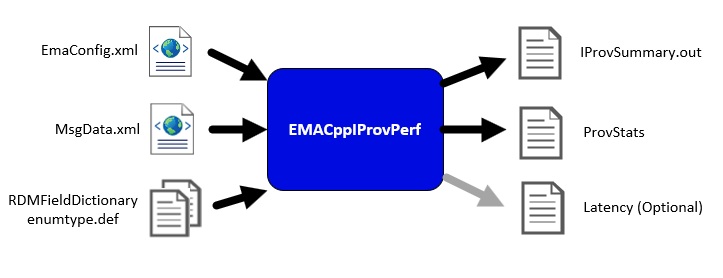
It is an interactive provider that accepts consumer connections—either directly or through the LSEG Real‑Time Distribution System—and supplies refresh, update, and optional generic messages. It simulates high‑volume publishing by generating data internally, handling login and directory requests, and sending configurable bursts of updates. The tool embeds timestamps in outgoing messages for latency measurement and supports multi‑threading to distribute consumer connections evenly across processing threads.
To run EmaCppIProvPerf, the user needs to provide the EMA configuration file (EmaConfig.xml), the message template file (MsgData.xml), and the data dictionary files (RDMFieldDictionary and enumtype.def). During execution, the tool produces a summary output (ProvSummary.out), a statistics file (ProvStats), and, if latency options are configured, an optional latency output file.
2. EMACppNIProvPerf (Non‑Interactive Provider Performance Tool)
It is a non‑interactive provider that publishes real‑time content directly into an LSEG Real‑Time Advanced Distribution Hub without requiring consumer requests. After logging in and publishing its service directory, it continually sends images and high‑rate updates for configured items, using timestamps to support latency measurement. The tool supports multi‑threaded publishing—where each thread opens its own ADH connection—and erecords statistics such as updates sent, CPU usage, and memory consumption to help assess system performance under sustained publishing loads.
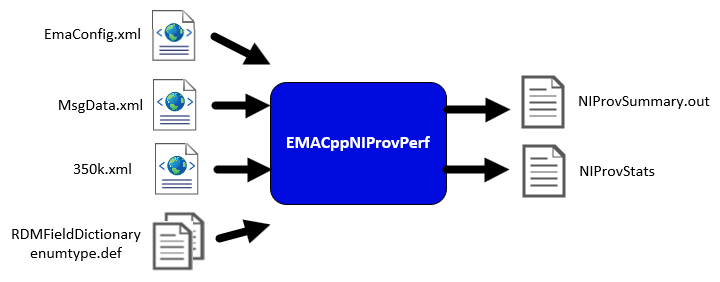
To run EmaCppNIProvPerf, the user needs to provide the EMA configuration file (EmaConfig.xml), the message template file (MsgData.xml), the item list file (350k.xml) and the data dictionary files (RDMFieldDictionary and enumtype.def). During execution, the tool produces a summary output (NIProvSummary.out), and a statistics file (NIProvStats). EMACppNIProvPerf does not generate a latency file.
3. EMACppConsPerf (Consumer Performance Tool)
It is a high‑performance Open Message Model (OMM) consumer that measures how efficiently a system can request, receive, and process real‑time market data. It issues large, configurable sets of item requests, processes refresh and update messages, and gathers detailed statistics such as update rates, image retrieval time, and latency. The tool embeds and detects timestamps to calculate both update and posting latency and supports multi‑threaded scaling, allowing multiple consumer connections for realistic workload simulation.
To run EmaCppConsPerf, the user needs to provide the EMA configuration file (EmaConfig.xml), the message template file (MsgData.xml) ), the item list file (350k.xml), and the data dictionary files (RDMFieldDictionary and enumtype.def). During execution, the tool produces a summary output (ConsSummary.out), a statistics file (ConsStats), and, if latency options are configured, an optional latency output file.
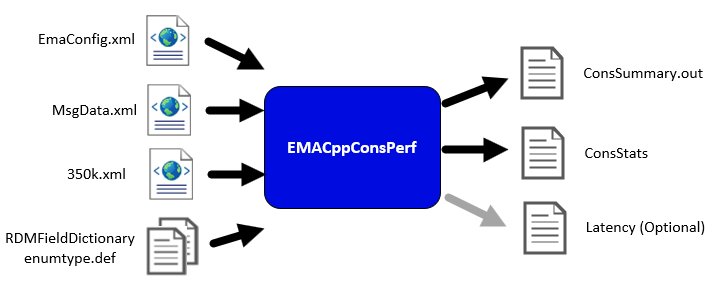
Note: The EMA configuration file (EmaConfig.xml), the message template file (MsgData.xml), the item list file (350k.xml), and the data dictionary files (RDMFieldDictionary and enumtype.def) are available in the Real-Time SDK C/C++ package.
This article will focus on the EMACppNIProvPerf and EMACppConsPerf tools.
Architecture Overview
Unlike the interactive provider model, the non interactive provider does not accept item requests. Instead, it continuously publishes data to the Advanced Distribution Hub (ADH), which distributes the data through RTDS.
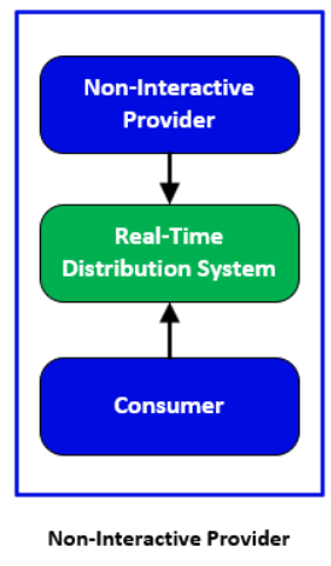
- NI Provider: Publishes data directly to ADH
- Real-Time Distribution System (RTDS): Acts as data cache and serves data to consumers
- Consumer: Requests and processes data
The non‑interactive provider publishes content without requiring consumer requests, making RTDS a mandatory component in this setup.
API Throughput
API throughput measures how many messages a system can process per second under load. It is typically evaluated using EMA performance tools, which simulate realistic traffic by sending update, and request messages at controlled rates governed by a configurable tick rate. The tools collect metrics such as message rates, image retrieval time, and per-thread processing statistics, storing results in summary and statistics files. Throughput depends on factors including CPU and thread configuration, buffering behavior, message packing, and network tuning (such as disabling Nagle’s algorithm). Tests may be conducted on a single machine to isolate API performance or across multiple machines to include network effects.
API Latency
API latency is the time a message takes to travel from sender to receiver. It is measured by embedding high-resolution timestamps in specific fields—TIM_TRK_1 when update messages are encoded by the non-interactive provider. Upon receipt, the application extracts the timestamp and compares it with the current time to calculate end-to-end latency. Messages are sent in bursts based on a configured tick rate, with one message per burst randomly selected for latency tracking to ensure representative sampling. Accurate one-way latency measurement requires both applications to run on the same host due to clock synchronization constraints.
Latency results typically include average, minimum, maximum, and standard deviation values, with optional logging of individual measurements for deeper analysis. Together, throughput and latency measurements provide a comprehensive view of system performance, enabling developers to identify bottlenecks and optimize real-time data delivery.
The followings are steps to run EMACppNIProvPerf and EMACppConsPerf tools.
Run EMACppNIProvPerf Tool
The Real-Time Distribution System (RTDS) environment must be properly configured to support non‑interactive providers and the services they publish. Follow the steps below to run the EMACppNIProvPerf tool and establish a connection to RTDS.
1. Copy EmaConfig.xml, MsgData.xml, 350k.xml, RDMFieldDictionary, and enumtype.def files from the RTSDK package into the current EMACppNIProvPerf tool directory.
2. Configure the EMA configurations. The EmaConfig.xml file contains the Perf_NIProvider_1 configuration for the non-interactive provider performance tool.
<NiProviderGroup>
<NiProviderList>
…
<NiProvider>
<Name value="Perf_NIProvider_1"/>
<Channel value="Perf_NIP_Channel_1"/>
<Directory value="Perf_Directory_1"/>
<Logger value="Logger_1"/>
<XmlTraceToStdout value="0"/>
<ItemCountHint value="100000"/>
<MaxDispatchCountApiThread value="500"/>
<MaxDispatchCountUserThread value="500"/>
</NiProvider>
…
</NiProviderList>
</NiProviderGroup>
…
<ChannelGroup>
<ChannelList>
…
<Channel>
<Name value="Perf_NIP_Channel_1"/>
<ChannelType value="ChannelType::RSSL_SOCKET"/>
<GuaranteedOutputBuffers value="100000"/>
<ConnectionPingTimeout value="30000"/>
<TcpNodelay value="0"/>
<Host value="<RTDS>"/>
<Port value="14003"/>
<InterfaceName value=""/>
<HighWaterMark value="6144"/>
<NumInputBuffers value="10000"/>
<SysRecvBufSize value="0"/>
<SysSendBufSize value="0"/>
</Channel>
</ChannelList>
</ChannelGroup>
…
<DirectoryGroup>
<DirectoryList>
<Directory>
<Name value="Perf_Directory_1"/>
<Service>
<Name value="NI_PUB"/>
<InfoFilter>
<ServiceId value="1"/>
<DictionariesProvided>
<DictionariesProvidedEntry value="Dictionary_3"/>
</DictionariesProvided>
<DictionariesUsed>
<DictionariesUsedEntry value="Dictionary_3"/>
</DictionariesUsed>
<Vendor value="LSEGDevTestLab"/>
<IsSource value="0"/>
…
</InfoFilter>
<StateFilter>
<ServiceState value="1"/>
<AcceptingRequests value="1"/>
</StateFilter>
</Service>
</Directory>
</DirectoryList>
</DirectoryGroup>
…
<DictionaryGroup>
<DictionaryList>
…
<Dictionary>
<Name value="Dictionary_3"/>
<DictionaryType value="DictionaryType::FileDictionary"/>
<RdmFieldDictionaryFileName value="./RDMFieldDictionary"/>
<EnumTypeDefFileName value="./enumtype.def"/>
<RdmFieldDictionaryItemName value="RWFFld"/>
<EnumTypeDefItemName value="RWFEnum"/>
</Dictionary>
</DictionaryList>
This non-interactive provider configuration uses the Perf_NIP_Channel_1 channel configuration to establish a connection to RTDS and uses the Perf_Directory_1 directory configurations that publish the NI_PUB service which in turn uses the Dictionary_3 configuration to load dictionaries from local files in the current directory.
Note: Change the value of the Host configuration in the Perf_NIP_Channel_1 channel to the hostname or IP address of RTDS and configure RTDS to support the NI_PUB service.
3. Run the EMACPPNIProvPerf by specifying the Perf_NIProvider_1 to the providerName parameter and the NI_PUB to the serviceName parameter.
-providerName Perf_NIProvider_1 -serviceName NI_PUB
The application will run using the Perf_NIProvider_1 non-provider’s configuration, with all other settings remaining at their defaults.
--- TEST INPUTS ---
Run Time (-runTime): 360
Provider Name (-providerName): Perf_NIProvider_1
useUserDispatch (-useUserDispatch): No
mainThread CpuId (-mainThread): -1
Thread List (-threads): -1
Api thread List (-apiThreads): -1
Worker thread List (-workerTheads): -1
Summary File (-summaryFile): NIProvSummary.out
Stats File (-statsFile): NIProvStats
Write Stats Interval (-writeStatsInterval): 5
Display Stats (-noDisplayStats): Yes
Item Count (-itemCount): 100000
Tick Rate (-tickRate): 1000
Update Rate (-updateRate): 100000
Latency Update Rate (-latencyUpdateRate): 10
Refresh Burst Size (-refreshBurstSize): 10
Item File (-itemFile): 350k.xml
Data File (-msgFile): MsgData.xml
Service Name (-serviceName): NI_PUB
Pre-Encoded Updates (-preEnc): No
Nanosecond Time (-nanoTime): No
Measure Encode (-measureEncode): No
Data loaded from XML. Market Price Memory: 11380 bytes, Market By Order Memory: 0 bytes
Loaded: 100000 items.
XmlItemParser Destroyed
NIProviderThread.MainThread. run. #1
The default settings can be changed via the corresponding application’s parameters. For more information regarding these parameters, please refer to the EMA C++ OPEN SOURCE PERFORMANCE TOOLS GUIDE in the Real-Time SDK C/C++ package.
With these parameters and configurations, the EMACppNIProvPerf tool will connect to RTDS and publish 100,000 items to the NI_PUB service at a rate of 100,000 updates per second, with the timestamps embedded in the TIM_TRK_1 (3902) field. The tool also generates a summary file (NIProvSummary.out) and a statistics file (NIProvstats.csv).
You can check from the RTDS monitor tool that the NI_PUB service is up with the 100,000 items in its cache.

Run EMACppConsPerf Tool
After the NI_PUB service in RTDS is up, you can configure and run the EMACppConsPerf to connect to RTDS and consume data from the NI_PUB service.
Follow these steps to run the EMACppConsPerf tool.
1. Copy EmaConfig.xml, MsgData.xml, 350k.xml, RDMFieldDictionary, and enumtype.def files from the RTSDK package into the current EMACppConsPerf tool directory.
2. Configure the EMA configurations. The EmaConfig.xml file contains the Perf_Consumer_2 configuration for the consumer performance tool.
<ConsumerGroup>
<ConsumerList>
…
<Consumer>
<Name value="Perf_Consumer_2"/>
<Channel value="Perf_Channel_1"/>
<Logger value="Logger_1"/>
<Dictionary value="Dictionary_2"/>
<MaxDispatchCountApiThread value="6500"/>
<MaxDispatchCountUserThread value="6500"/>
</Consumer>
…
</ConsumerList>
</ConsumerGroup>
…
<ChannelGroup>
<ChannelList>
…
<Channel>
<Name value="Perf_Channel_1"/>
<ChannelType value="ChannelType::RSSL_SOCKET"/>
<CompressionType value="CompressionType::None"/>
<GuaranteedOutputBuffers value="5000"/>
<NumInputBuffers value="2048"/>
<ConnectionPingTimeout value="30000"/>
<TcpNodelay value="1"/>
<Host value="<RTDS>"/>
<Port value="14002"/>
</Channel>
…
</ChannelList>
</ChannelGroup>
…
<DictionaryGroup>
<DictionaryList>
…
<Dictionary>
<Name value="Dictionary_2"/>
<DictionaryType value="DictionaryType::FileDictionary"/>
<RdmFieldDictionaryFileName value="./RDMFieldDictionary"/>
<EnumTypeDefFileName value="./enumtype.def"/>
</Dictionary>
…
</DictionaryList>
</DictionaryGroup>
This consumer configuration uses the Perf_Channel_1 channel, which connects to RTDS on TCP port 14002. It also uses Dictionary_2, which loads dictionary files from the current directory. If required, you can modify the Host setting in the Perf_Channel_1 channel to specify the IP address or hostname of the RTDS.
3. Run the EMACPPConsPerf by specifying the Perf_Consumer_2 to the consumerName parameter and the NI_PUB to the serviceName parameter
-consumerName Perf_Consumer_2 -serviceName NI_PUB
The application will run using the Perf_Consumer_2 consumer’s configuration, with all other settings remaining at their defaults.
--- TEST INPUTS ---
Steady State Time (-steadyStateTime): 300
Delay Steady State Time (-delaySteadyStateCalc): 0
Service (-serviceName): NI_PUB
useUserDispatch (-useUserDispatch): 0
mainThread (-mainThread): -1
Thread List (-threads): -1
ApiThread List (-apiThreads): -1
WorkerThread List (-workerTheads): -1
Username (-uname): (use system login name)
Item Count (-itemCount): 100000
Common Item Count (-commonItemCount): 0
Request Rate (-requestRate): 35000
Request Snapshots (-snapshot): No
Posting Rate (-postRate): 0
Latency Posting Rate (-postingLatencyRate): 0
Generic Msg Rate (-genericMsgRate): 0
Latency Generic Msg Rate (-genericMsgLatencyRate): 0
Item File (-itemFile): 350k.xml
Data File (-msgFile): MsgData.xml
Summary File (-summaryFile): ConsSummary.out
Stats File (-statsFile): ConsStats
Latency Log File (-latencyFile): (none)
Tick Rate (-tickRate): 1000
Security Protocol (-spTLSv1.2, -spTLSV1.3): NONE (default)
With these parameters and configurations, the application will connect to RTDS, subscribe to 100,000 items from the NI_PIB service, compute statistical data, and write the results to a statistics file (ConsStats.csv).
The default settings can be changed via the corresponding application’s parameters. For more information regarding these parameters, please refer to the EMA C++ OPEN SOURCE PERFORMANCE TOOLS GUIDE in the Real-Time SDK C/C++ package.
API Performance Benchmark
The performance results can be determined from the statistic files.
Throughput
The thoughput can be determined from the messages sent and received per interval (-writeStatsInterval).
For the EMACppNIProvPerf tool, the following fields can be used to determine the API throughput.
Field Name |
Description |
Requests received |
The number of item request messages received per interval |
Images sent |
The number of item refresh messages sent per interval |
Updates sent |
The number of item update messages sent per interval |
For the EMACppConsPerf tool, the following fields can be used to determine the API throughput.
Field Name |
Description |
Images |
The number of item refresh messages received per interval |
Update rate (msg/sec) |
The number of item update messages received per second |
Latency
Latency values are derived from the timestamps embedded in the retrieved messages.
The EMACppNIProvPerf tool only publishes item refresh and update messages to the Real-Time Distribution System and does not receive any messages from other components. Therefore, it does not generate latency statistics data.
For the EMACppConsPerf tool, the following fields can be used to determine the API latency.
Field Name |
Description |
Latency updates |
The number of update messages containing timestamps received per interval. |
Latency avg (usec) |
The average latency, in microseconds, calculated from update messages containing timestamps received during each interval. |
Latency std dev (usec) |
The standard deviation of latency, in microseconds, calculated from update messages containing timestamps received during each interval. |
Latency max (usec) |
The maximum latency, in microseconds, observed from update messages containing timestamps during each interval. |
Latency min (usec) |
The minimum latency, in microseconds, observed from update messages containing timestamps during each interval. |
Latency File
The latency file is an output file generated by the EMACppConsPerf tool that record individual latency measurements for messages processed during a performance test. It stores per-message latency values rather than aggregated statistics. It is primarily used for detailed analysis, troubleshooting, and visualization.
To create this latency file, the -latencyFile parameter must be specified with a latency file name.
Note: The EMACppNIProvPerf tool does not produce a latency file.
Sample Output
EMACppNIProvPerf Statistics File
UTC, Images sent, Updates sent, CPU usage (%), Memory (MB)
2026-05-29 08:04:19, 0, 0, 5.61, 770.61
2026-05-29 08:04:24, 92527, 0, 50.97, 792.46
2026-05-29 08:04:29, 7473, 211172, 55.07, 793.88
2026-05-29 08:04:34, 0, 309960, 70.59, 793.88
2026-05-29 08:04:39, 0, 226836, 76.79, 793.89
2026-05-29 08:04:44, 0, 232605, 72.39, 793.93
2026-05-29 08:04:49, 0, 238343, 72.49, 793.93
2026-05-29 08:04:54, 0, 178108, 60.84, 793.93
2026-05-29 08:04:59, 0, 325566, 63.72, 793.93
2026-05-29 08:05:04, 0, 408551, 75.50, 793.93
2026-05-29 08:05:09, 0, 242368, 75.29, 793.93
2026-05-29 08:05:14, 0, 269073, 55.19, 793.87
2026-05-29 08:05:19, 0, 389889, 66.69, 793.87
2026-05-29 08:05:24, 0, 182435, 63.74, 793.87
2026-05-29 08:05:29, 0, 33606, 46.28, 793.87
2026-05-29 08:05:34, 0, 30288, 50.78, 793.87
2026-05-29 08:05:39, 0, 224523, 57.04, 793.87
2026-05-29 08:05:44, 0, 355718, 53.30, 793.87
EMACppConsPerf Statistic File
UTC, Latency updates, Latency avg (usec), Latency std dev (usec), Latency max (usec), Latency min (usec), Images, Update rate (msg/sec), Posting Latency updates, Posting Latency avg (usec), Posting Latency std dev (usec), Posting Latency max (usec), Posting Latency min (usec), GenMsgs sent, GenMsgs received, GenMsg Latencies sent, GenMsg latencies received, GenMsg Latency avg (usec), GenMsg Latency std dev (usec), GenMsg Latency max (usec), GenMsg Latency min (usec), CPU usage (%), Memory (MB)
2026-05-29 08:04:38, 12, 1315.7, 514.9, 2090.0, 462.0, 100000, 19021, 0, 0.0, 0.0, 0.0, 0.0, 0, 0, 0, 0, 0.0, 0.0, 0.0, 0.0, 108.32, 462.99
2026-05-29 08:04:43, 25, 1137.8, 703.0, 3196.0, 404.0, 0, 51738, 0, 0.0, 0.0, 0.0, 0.0, 0, 0, 0, 0, 0.0, 0.0, 0.0, 0.0, 49.92, 463.07
2026-05-29 08:04:48, 22, 2436.0, 1981.0, 9495.0, 744.0, 0, 45655, 0, 0.0, 0.0, 0.0, 0.0, 0, 0, 0, 0, 0.0, 0.0, 0.0, 0.0, 69.11, 463.07
2026-05-29 08:04:53, 23, 1353.4, 650.7, 3387.0, 544.0, 0, 45057, 0, 0.0, 0.0, 0.0, 0.0, 0, 0, 0, 0, 0.0, 0.0, 0.0, 0.0, 48.75, 463.07
2026-05-29 08:04:58, 25, 823.2, 834.2, 3755.0, 431.0, 0, 51895, 0, 0.0, 0.0, 0.0, 0.0, 0, 0, 0, 0, 0.0, 0.0, 0.0, 0.0, 22.52, 463.07
2026-05-29 08:05:03, 37, 843.0, 529.4, 2755.0, 425.0, 0, 71121, 0, 0.0, 0.0, 0.0, 0.0, 0, 0, 0, 0, 0.0, 0.0, 0.0, 0.0, 42.76, 463.07
2026-05-29 08:05:08, 33, 847.3, 543.4, 2295.0, 447.0, 0, 62994, 0, 0.0, 0.0, 0.0, 0.0, 0, 0, 0, 0, 0.0, 0.0, 0.0, 0.0, 33.99, 463.07
2026-05-29 08:05:13, 22, 821.3, 667.1, 2868.0, 422.0, 0, 47581, 0, 0.0, 0.0, 0.0, 0.0, 0, 0, 0, 0, 0.0, 0.0, 0.0, 0.0, 25.35, 463.07
2026-05-29 08:05:18, 47, 768.2, 527.0, 2392.0, 410.0, 0, 88208, 0, 0.0, 0.0, 0.0, 0.0, 0, 0, 0, 0, 0.0, 0.0, 0.0, 0.0, 38.05, 463.07
2026-05-29 08:05:23, 19, 1082.4, 686.7, 2405.0, 457.0, 0, 41855, 0, 0.0, 0.0, 0.0, 0.0, 0, 0, 0, 0, 0.0, 0.0, 0.0, 0.0, 31.55, 463.07
2026-05-29 08:05:29, 2, 3980.0, 893.8, 4612.0, 3348.0, 0, 6773, 0, 0.0, 0.0, 0.0, 0.0, 0, 0, 0, 0, 0.0, 0.0, 0.0, 0.0, 10.87, 463.07
2026-05-29 08:05:34, 2, 2123.0, 1333.6, 3066.0, 1180.0, 0, 6116, 0, 0.0, 0.0, 0.0, 0.0, 0, 0, 0, 0, 0.0, 0.0, 0.0, 0.0, 12.67, 463.07
2026-05-29 08:05:39, 18, 800.2, 826.9, 3827.0, 377.0, 0, 29430, 0, 0.0, 0.0, 0.0, 0.0, 0, 0, 0, 0, 0.0, 0.0, 0.0, 0.0, 18.89, 463.07
2026-05-29 08:05:44, 41, 558.8, 152.4, 1032.0, 402.0, 0, 86671, 0, 0.0, 0.0, 0.0, 0.0, 0, 0, 0, 0, 0.0, 0.0, 0.0, 0.0, 34.03, 463.07
2026-05-29 08:05:49, 2, 2861.5, 951.1, 3534.0, 2189.0, 0, 5085, 0, 0.0, 0.0, 0.0, 0.0, 0, 0, 0, 0, 0.0, 0.0, 0.0, 0.0, 10.49, 463.07
2026-05-29 08:05:54, 31, 864.8, 503.3, 2588.0, 453.0, 0, 58058, 0, 0.0, 0.0, 0.0, 0.0, 0, 0, 0, 0, 0.0, 0.0, 0.0, 0.0, 28.15, 463.07
2026-05-29 08:05:59, 6, 1653.8, 1139.3, 3584.0, 543.0, 0, 12995, 0, 0.0, 0.0, 0.0, 0.0, 0, 0, 0, 0, 0.0, 0.0, 0.0, 0.0, 13.97, 463.07
2026-05-29 08:06:04, 5, 2386.4, 700.9, 3135.0, 1373.0, 0, 6695, 0, 0.0, 0.0, 0.0, 0.0, 0, 0, 0, 0, 0.0, 0.0, 0.0, 0.0, 13.66, 463.07
2026-05-29 08:06:09, 49, 559.3, 148.1, 963.0, 392.0, 0, 99965, 0, 0.0, 0.0, 0.0, 0.0, 0, 0, 0, 0, 0.0, 0.0, 0.0, 0.0, 37.75, 463.07
2026-05-29 08:06:14, 37, 878.3, 701.4, 3451.0, 377.0, 0, 71929, 0, 0.0, 0.0, 0.0, 0.0, 0, 0, 0, 0, 0.0, 0.0, 0.0, 0.0, 42.69, 463.07
2026-05-29 08:06:19, 1, 2743.0, 0.0, 2743.0, 2743.0, 0, 4437, 0, 0.0, 0.0, 0.0, 0.0, 0, 0, 0, 0, 0.0, 0.0, 0.0, 0.0, 9.57, 463.07
2026-05-29 08:06:24, 37, 725.7, 300.3, 1603.0, 411.0, 0, 73127, 0, 0.0, 0.0, 0.0, 0.0, 0, 0, 0, 0, 0.0, 0.0, 0.0, 0.0, 32.69, 463.07
EMACppConsPerf Latency File
Message type, Send time, Receive time, Latency (usec)
Upd, 164562493009, 164562494732, 1723
Upd, 164562501767, 164562503571, 1804
Upd, 164562623936, 164562624772, 836
Upd, 164564641501, 164564643012, 1511
Upd, 164564644130, 164564645430, 1300
Upd, 164564748069, 164564748795, 726
Upd, 164564749449, 164564750296, 847
Upd, 164564775060, 164564776179, 1119
Upd, 164565311564, 164565313383, 1819
Upd, 164565361909, 164565363460, 1551
Upd, 164565691771, 164565692233, 462
Upd, 164566026982, 164566029072, 2090
Upd, 164566481976, 164566484311, 2335
Upd, 164567054204, 164567055953, 1749
Upd, 164567084305, 164567085536, 1231
Upd, 164567152234, 164567153516, 1282
Upd, 164567587779, 164567588255, 476
Upd, 164567649063, 164567649551, 488
Upd, 164567953068, 164567956264, 3196
Upd, 164568053521, 164568054719, 1198
Upd, 164568173430, 164568174874, 1444
Upd, 164568464418, 164568465386, 968
Summary
The EMA C++ Performance Tools provide a comprehensive framework for benchmarking real-time data systems by measuring key metrics such as throughput, latency, and resource utilization. By simulating realistic workloads and embedding timestamps into messages, the tools enable accurate evaluation of system performance and help identify bottlenecks under various operating conditions.
This document focuses specifically on the EMACppNIProvPerf (Non-Interactive Provider) and EMACppConsPerf (Consumer) tools, which are commonly used together to measure end-to-end performance. These tools support configurable message rates, burst-based processing via tick rates, and multi-threaded scaling.
Through detailed outputs such as summary, statistics, and optional latency files, developers can analyze both aggregated metrics and individual message timings. This enables informed optimization of applications to achieve low latency, high throughput, and efficient resource usage in real-time data delivery systems.

Related Articles
-
Benchmarking Throughput and Latency Using EMA C++ Interactive Provider and Consumer Performance Tools
-
Real-Time SDKs Performance Test Summary
-
Choosing your Real-Time Streaming API
-
Introduction to Enterprise Message API
-
10 important things you need to know before you write a Refinitiv Real-Time application
-
Enterprise Message API (EMA) - Configuration Overview
Related APIs
Request Free Trial
Call your local sales team
Americas
All countries (toll free): +1 800 427 7570
Brazil: +55 11 47009629
Argentina: +54 11 53546700
Chile: +56 2 24838932
Mexico: +52 55 80005740
Colombia: +57 1 4419404
Europe, Middle East, Africa
Europe: +442045302020
Africa: +27 11 775 3188
Middle East & North Africa: 800035704182
Asia Pacific (Sub-Regional)
Australia & Pacific Islands: +612 8066 2494
China mainland: +86 10 6627 1095
Hong Kong & Macau: +852 3077 5499
India, Bangladesh, Nepal, Maldives & Sri Lanka:
+91 22 6180 7525
Indonesia: +622150960350
Japan: +813 6743 6515
Korea: +822 3478 4303
Malaysia & Brunei: +603 7 724 0502
New Zealand: +64 9913 6203
Philippines: 180 089 094 050 (Globe) or
180 014 410 639 (PLDT)
Singapore and all non-listed ASEAN Countries:
+65 6415 5484
Taiwan: +886 2 7734 4677
Thailand & Laos: +662 844 9576