
How to discover the health of Refinitiv Real-Time Infrastructure using the EMA Java API
Update: March 2021
This article describes how downstream applications discover the health of Refintiv Real-Time Infrastructure, through the consumption of SPS (Service Provider Status) messages provided by the Refinitiv Real-Time CHE (Collection Head End). It is intended for Java Developers using EMA to develop an application for monitoring the health of Refinitiv Real-Time Infrastructure. However, the general techniques outlined below could be applied to any of our real-time streaming APIs i.e. RFA C++/Java/.NET, ETA C++/Java, and EMA C++. The users should have a basic understanding of how to consume data using EMA Java which can be learned from EMA Consumer Tutorials.
Overview
Elektron Pulse is a real-time monitoring capability built into Refinitiv Real-Time products to provide full transparency into the health of Refinitiv infrastructure; helping customers to improve accuracy of data and manage business risk. It is an innovative approach into service management, with full end-to-end service monitoring and operational status for Refinitiv Real-Time to radically improve support levels and service manageability- fit for purpose in today’s high frequency, low latency trading environment.
Elektron Pulse provides real-time service information on infrastructural and distribution failures, the health is advertised through a feed, with the flexibility to be programmatically consumed into their monitoring system, or viewed on an interactive GUI provided by Refinitiv. Elektron Pulse displays Service Provider Status (SPS) messages provided on the Refinitiv Real-Time Network.
In Refinitiv Real-Time, the Collection Head End (CHE) is used to deliver market data from the venue. The CHE is composed of multiple sub-systems known as “line handler”. Each line handler is responsible for part of the venue data coverage. Each line handler advertises its data healthiness by publishing SPS message. In Elektron Pulse, the information of data healthiness is aggregated. A top-level SPS record acts as starting point for client to discover all CHE subProvider SPS. The high level overview is as follow:
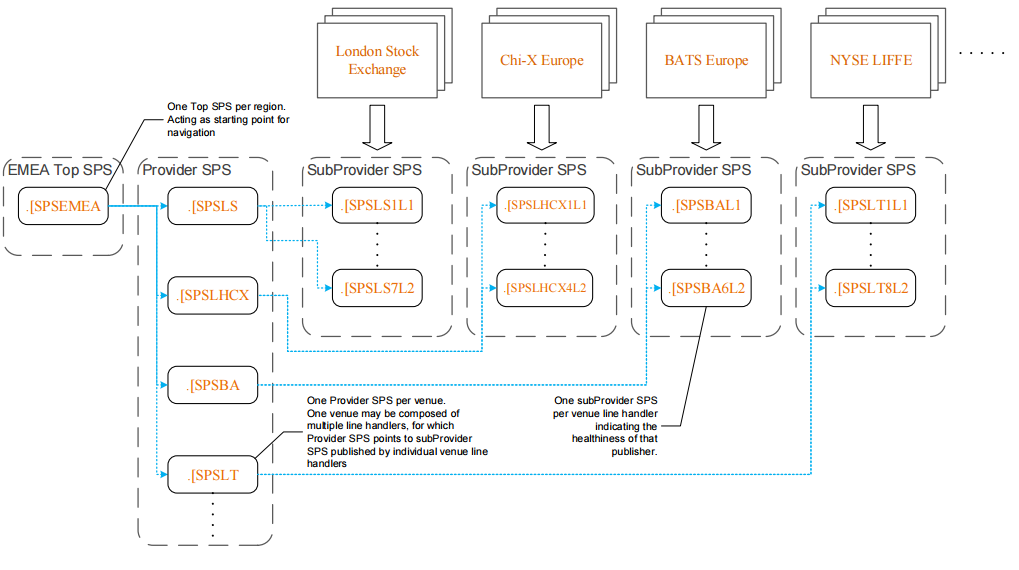
The top level SPS RIC points to provider SPS records, which shows individual venues within the same region. Each provider SPS record represents one venue.
- A line handler publishes venue data, and one venue may have multiple line handlers which contribute to the venue. A provider SPS RICs representing a venue, points to a subProvider SPS(s) which represents a CHE line handler.
- Subprovider SPS RIC shows the health of one CHE line handler of a venue. A line handler publishes the venues data, and one venue may be contributed to by multiple line handlers.
- By aggregating the subProvider SPS information, we can get the health of a venue
Solution
The application can consume Refinitiv Real-Time Infrastructure Health Status by the steps below:
- Subscribe to snapshot of a top-level SPS RIC and get the list of Provider SPS in a refresh message.
- Subscribe to snapshot of a Provider SPS and get the list of SubProvider SPS in a refresh message.
- Make a streaming Subscribtion of a SubProvider SPS and get it's health status in real time.
Data content from subscribing top-level SPS and Provider SPS are linkage of records which the application does not need to monitor in real-time, because they do not change. Therefore, the application should subscribe to them as snapshot requests; only refresh message is returned with no update message.
An EMA Java application to consume Refinitiv Real-Time Infrastructure Health Status is designed as per the figure below:
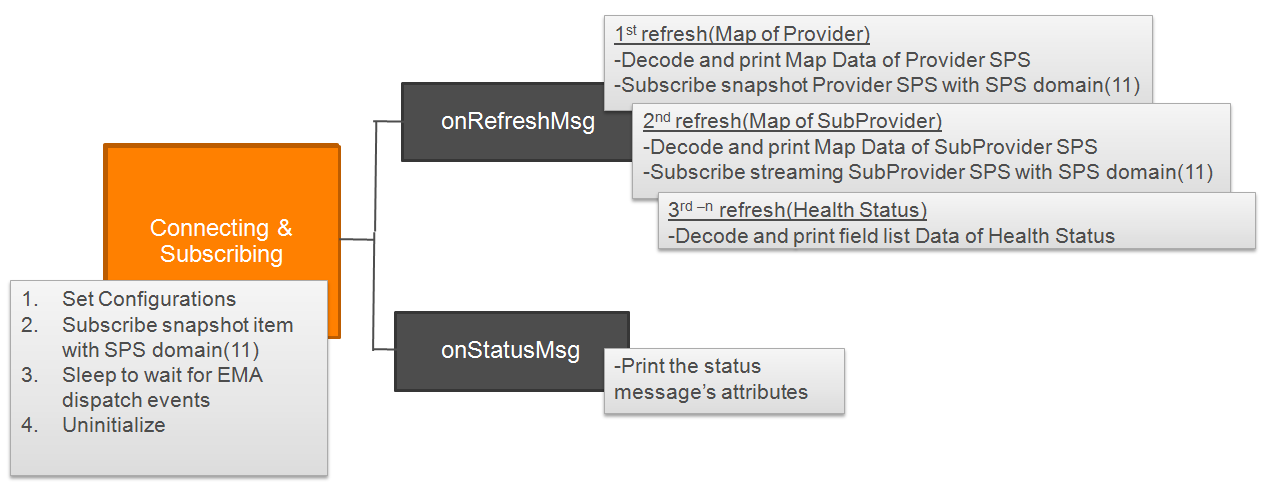
We will implement the application based on example210__MarketByOrder__Streaming. The example application includes source code to decode Map and field list data that we need in the application. The application will subscribe to a top-level SPS RIC, then show the Provider SPS list and wait for a Provider SPS which the user inputs. Next, subscribe to the input Provider SPS and show the SubProvider SPS list. Wait for a SubProvider SPS which the user inputs. Finally, subscribe to the input SubProvider SPS to get its health in real-time.
Solution Code
The EMA Java package can be downloaded at Refinitiv Real-time SDK- Java Downloads. The source code of ex210_MBO_Streaming is in \Ema\Src\examples\java\com\refinitiv\ema\examples\training\consumer\series200\ex210_MBO_Streaming. We will modify the file named Consumer.java. The steps to implement the above behaviour are the following:
1. Declare the following variables used in processing SPS data in AppClient class:
- Vector SPSList - keep the list of Provider SPS/SubProvider SPS
- int level - keep the current level that the application is processing so the application can act accordingly. For example: if level=1 or level=2, print the list of Provider SPS/SubProvider SPS and wait for a Provider SPS/SubProvider SPS RIC that the user inputs.
- boolean snapshot – a flag to request snapshot(true) or streaming(false).
- String spsRIC – holds the Provider SPS/SubProvider SPS RIC that the user inputs
- BufferedReader br – read an input Provider SPS/SubProvider SPS RIC
- OmmConsumer consumer – subscribe to a Provider SPS/SubProvider SPS RIC
2. Modify AppClient's Constructor to accept an OmmConsumer object and initialize the variables declared in the step 1. OmmConsumer provides the method for subscribing to Provider/SubProvider SPS.
3. Modify main(String[] args) to subscribe to a snapshot of a top level SPS domain(11) or EmaRdm.MMT_SERVICE_PROVIDER_STATUS
4. After subscribing to a top level SPS, the application receives a refresh message, of which the payload is a map container. Each map entry contains a Provider SPS info and the key is a Provider SPS RIC i.e. .[SPSCHE-EDX as shown below:
To get the list of Provider SPS RIC, we have to get the key from each map entry. Likewise, to get the list of SubProvider SPS RIC, we have to get the key in each map entry of a refresh message returned after subscribing to an input Provider SPS RIC e.g. .[SPSCHE-EDX as shown below:
The map entry above contains a SubProvider SPS info and the key is a SubProvider SPS RIC i.e. .[SPSEDXL1. Therefore, we have to add a method named getKeyString(..) in AppClient class. The method is used to get the key in each map entry of Provider SPS and SubProvider SPS as explained above. Then, we will be able to get the list of Provider SPS and SubProvider SPS RIC.
5. In the decode(..) method which decodes Map, call the method getKeyString(..) to get the keys from the map of a refresh message. Then, extract and add the keys which are the Provider/SubProvider SPS RICs/names to the SPS list.
6. Add a method named requestNextlevel() in AppClient class. The method is used to verify if it should print the list of Provider/SubProvider SPS and wait for the user input after it receives a refresh message or not, as detailed below:
- level 1 : print List of Provider SPS RICs and flag to subscribe an input RIC as a snapshot. Then, wait for a user input Provider SPS RIC and returns true to inform the application to subcribe the user input RIC.
- level 2 : print List of SubProvider SPS RICs and flag to subscribe to an input RIC streaming. Then, wait for a user input SubProvider SPS RIC and returns true to inform the application to subcribe to the user input RIC.
- level 3 or higher: returns false to inform the application not to subcribe to any RIC.
7. In onRefreshMsg(..) method, call the method requestNextlevel() after decoding a refresh message. The requestNextlevel() method prints the list of Provider/SubProvider SPS and wait for input. Finally, print the FieldList data which is the health status of the venue line handler(SubProvider SPS).
The application source code is available at Github. You can run the application using the following command line:
The example output when you run the application:
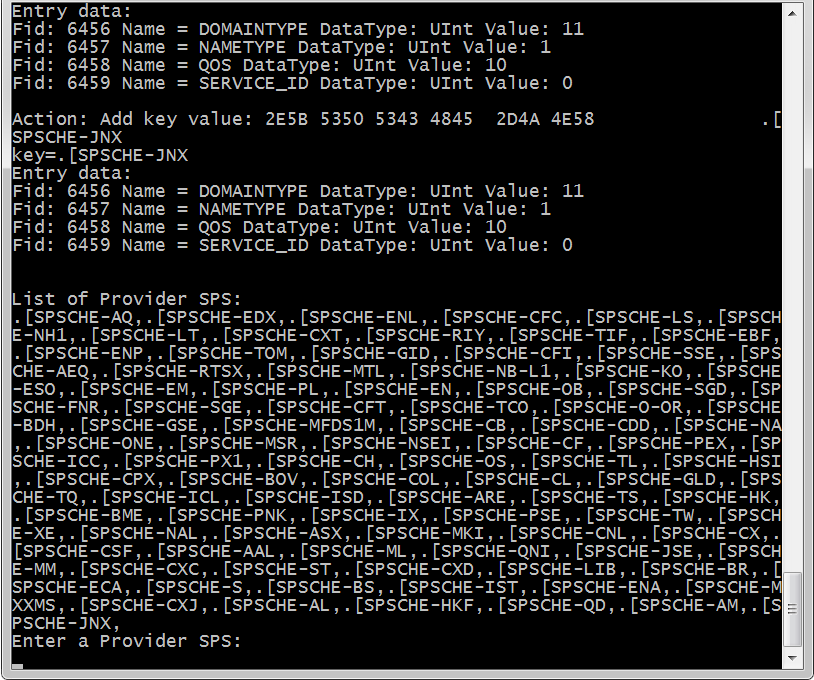
The application will show a refresh containing map of Provider SPS RICs in EMEA Top level SPS. Then, enter a Provider SPS RIC from the list e.g. .[SPSCHE-EDX
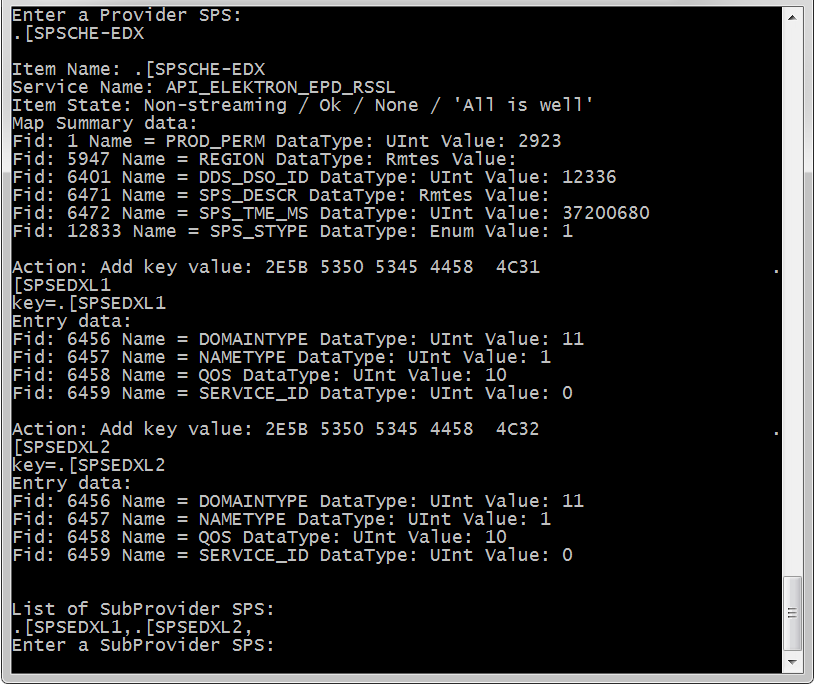
The application will show a list of SubProvider SPS RICs under .[SPSCHE-EDX. Next, enter a SubProvider SPS RIC from the list e.g. .[SPSEDXL1
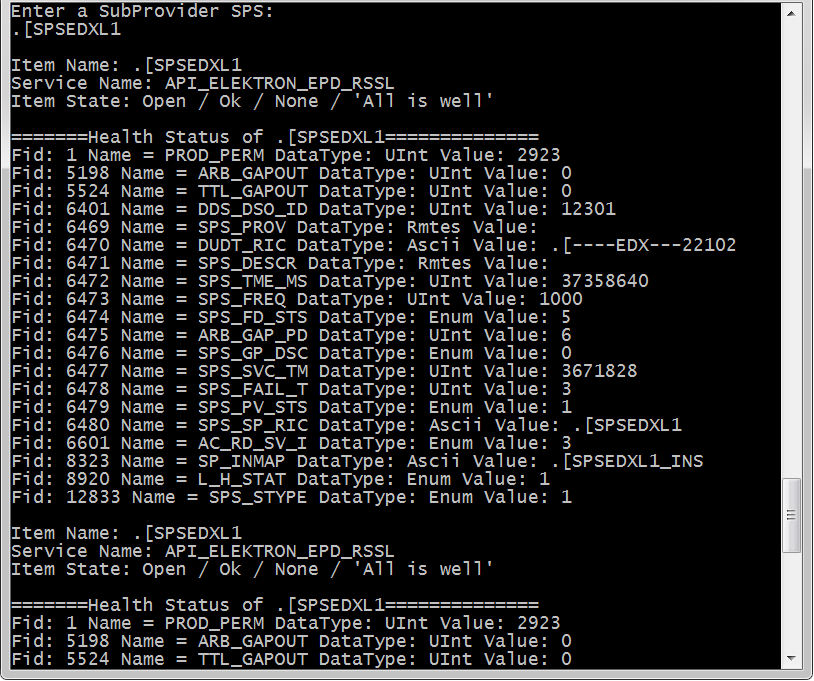
The application will show the health status of a SubProvider. In this example, SubProvider .[SPSEDXL1 has SPS_PV_STS field(field id 6479) is 1 means Line Handler/Provider is UP and SPS_FD_STS field(field id 6474) is 5 means the input feed connection status is UP. Please refer to the next section for further details.
The data content in a SubProvider
Unlike the Top and Provider level SPS items which carry linkage of records, the data content in SubProvider level SPS item returns FieldLists that reflect the health status of the venue line handlers. In Refinitiv Real-Time, data of a venue is published by one or multiple line handlers, and data in each line handler should be discrete. Below is the extract of FIDs in the subProvider level item which client should be aware of.
| CATEGORY | ACRONYM | FIELD ID | DATA TYPE | COMMENTS | ||
| Provider Information | SPS_DESCR | 6471 | RMTES_STRING | Description of the venue line handler | ||
| Timestamps | SPS_TME_MS | 6472 | UINT64 | GMT timestamp in milliseconds within a day, from the provider at the point of SPS transmission | ||
| SPS Connectivity Detection Criteria | SPS_FREQ | 6473 | UINT64 | Frequency of this SPS publication in milliseconds | ||
| SPS Fail Threshold | SPS_FAIL_T | 6478 | UINT64 | Used to inform SPS consumers how many consecutive missed heartbeats constitute a failure | ||
| Venue Information | L_H_STAT | 8920 | Enum | Indication of Market activity for a Line Handler, used for SPS | ||
| Value | Display | Meaning | ||||
| 0 | “ “ | Closed. No Market activity expected | ||||
| 1 | “OPEN” | Open. Market activity taking place, including pre/post market activity | ||||
| Line Handler Status | SPS_PV_STS | 6479 | Enum | Provider status. Enum values are – | ||
| Value | Display | Meaning | ||||
| 0 | “ ” | Undefined | ||||
| 1 | “UP” | Up | ||||
| 2 | “DOWN” | Down | ||||
| 3 | “UNAV” | Unavailable | ||||
| Input Feed Connectivity Status | SPS_FD_STS | 6474 | Enum | Represent input feed connection status – | ||
| 3 | “UNDF” | Undefined. The status is Down. | ||||
| 4 | “TCPO” | TCP Session unexpectedly offline. The status is Down. | ||||
| 5 | “UDPU” | All UDP Channel pairs up. The status is Up. | ||||
| 6 | “UDPN” | All UDP Channel up, some not redundant. The status is Up. | ||||
| 7 | “UDPS” | Some UDP Channel pairs down. The status is Down. | ||||
| 8 | “UDPD” | All UDP Channel pairs down. The status is Down. | ||||
| 9 | “UNMO” | Unmonitored. The status is Up. | ||||
| *All other ENUM values undefined and should be ignored by applications | ||||||
| Input Gap | ARB_GAP_PD | 6475 | UINT64 | Sampling period in seconds of the gap count (x) | ||
| Counters | ARB_GAPOUT | 5198 | UINT64 | Current number of outstanding arbitrator Gaps | ||
| TTL_GAPOUT | 5524 | UINT64 | Total Number of daily post arbitration sequence gaps, not individual messages. | |||
| Overall Pulse Status | VENUE_STAT | 6599 | Enum | Represent health group status of this publisher path. Enum values are – | ||
| Value | Display | Meaning | ||||
| 0 | “ ” | Undefined | ||||
| 1 | “HEALTH” | Confirmed Healthy | ||||
| 2 | “STALE” | Confirmed Stale | ||||
| 3 | “SUSPCT” | Suspected. Have problem but may not affect service, E.g. loss resiliency | ||||
| 1 – Service status is healthy | ||||||
| 2 – Service status is stale. | ||||||
| 3 – Service status is suspected. Non-Service Affecting | ||||||
Conclusion
If you are planning to develop an application to monitor/discover the health of Refinitiv Real-Time Infrastructure, you can use this article as a guide. EMA Java is one of the APIs(apart from ETA, RFA) which can be used to retrieve SPS messages. Implementing EMA Java to monitor the health of Refinitiv Real-Time is relatively quick and easy as shown in this article.
References
For further details, please check out the following resources:
- Elektron Pulse – Programmers Guide:
 pulseprogrammersguidev2.5.pdf
 - Refinitiv Real-time SDK - Java page.

