
DSS Extract Endpoint Obsolescence
Introduction
This article has two purposes. It aims to explain:
- Why extraction notes are useful, and why you should save and analyze them. This is relevant for anyone using DSS (DataScope Select) to retrieve data.
- The planned obsolescence of the DSS Extract endpoint. This change will impact existing and future developments that use the DSS REST API.
Table of contents
- Extract endpoint obsolescence
- Extraction notes details – why are they useful
- Extraction notes management
- How to modify your code
- Conclusions
Extract endpoint obsolescence
This is only relevant for On Demand extractions made without using the .Net SDK.
Current situation
The DSS REST API delivers 3 On Demand extraction endpoints:
- Extractions/Extract
- Extractions/ExtractWithNotes
- Extractions/ExtractRaw
Extract returns only the data, in JSON format.
ExtractWithNotes delivers the data in JSON format, as well as extraction notes.
ExtractRaw delivers data in compressed CSV format, as well as extraction notes, but uses a different workflow.
For a detailed comparison of these calls, refer to this section of the DSS REST Tutorials Introduction.
Reason for the change
The idea is to encourage a more effective use of the API, by systematically retrieving, storing and analyzing the extraction notes.
Time table and references
The Extract endpoint is already deprecated, and it is planned to disable it in the future. Although it was originally announced that the Extract endpoint would be disabled in release 12.3 (in January 2019), that will not be the case, but it will happen in the second half of 2019 (the exact date has yet to be announced). The Developer Community advisory and PCN (Product Change Notification) 10132 have been updated in consequence.
If you use the Extract endpoint, you should plan to replace it with ExtractWithNotes before mid 2019.
Extraction notes details – why are they useful
Extraction notes are extremely useful, for several reasons:
- They contain a lot of interesting information:
- Extraction details
- Instrument specifics
- Warning messages
- Error messages
- You must send them to the DSS support team when you ask for help on extraction issues encountered with particular requests.
There are actually 2 sets of extraction related notes:
- The extraction notes
- The RIC maintenance notes
They are bundled together in the result of an On Demand request. Scheduled extractions generate them in two separate files.
The extraction notes deliver details of the extraction and its timing, list inactive instruments, and highlight instrument expansion, applied embargoes, warnings, errors, data usage, etc.
The RIC maintenance notes deliver information on name changes and corporate actions.
It is strongly recommended to save all these notes, and to analyze them to detect name changes, warnings or potential issues that might otherwise go unnoticed.
Here is a notes sample (slightly reformatted to enhance lisibility) from an on demand intraday pricing request:
Let us now see in detail what type of information the notes can deliver, and why this is important.
General extraction information
Here is a snippet from extraction notes of an on demand End of Day pricing extraction request:
It contains the extraction start and end times, duration, IDs, etc. This can be useful if you want to do performance analysis or need to investigate suspected issues.
Actual extraction durations are often quite short; what usually takes a bit more time is the wait in queue (especially when the servers are under heavy load). Bear in mind that extraction times can be longer for Time Series requests, because Intraday requests will be treated with highest priority and End of Day requests are prioritized as well. Also take note that Intraday pricing requests could be subject to embargoes.
Intraday pricing snap time
When running an Intraday pricing request it can be useful to know the exact time when prices were snapped. Here is the relevant snippet from the extraction note:
Note that data was snapped a few seconds later than the extraction start time. This is normal; the delay varies depending on server load and the number of instruments.
Embargoes
An Intraday pricing extraction can be embargoed (in other words, delayed) if you do not have real-time permission for the selected data venues.
If no embargo applies, the notes will contain this:
If one or more embargoes apply, you will get details on each of them, one venue per line:
This particular example illustrates a 15 minute embargo applied for Xetra. It also tells us that a partial data delivery will be done immediately for data that is not embargoed (instruments for which we have real-time permissioning), whereas the Xetra data will be delivered 15 minutes later. Partial deliveries can be enabled or disabled using the GUI, in the user preferences. Embargoes and their handling are explained in detail in this section of the .Net SDK tutorial 4.
Thanks to this information you can find out why an intraday request was unexpectedly delayed, which could lead you to a better understanding of your real-time data requirements. This could lead you to a discussion with your account manager.
Invalid instruments
Invalid instruments are those that are unsupported, not found or inactive.
An inactive instrument had no activity in the request period, and thus does not deliver pricing data, whereas other data (like the currency or exchange code) could be returned.
Note: in the user preferences you can set if inactive and unsupported instruments should be allowed (or not) in your instrument lists. You can override this default value for individual extraction requests, using the identifier list validation options:
Here are a few examples of messages related to invalid instruments:
Please bear in mind that the extraction notes content differs depending on the type of requested data.
Data usage
You can check your total data usage in the DSS GUI usage dashboard.
For each individual request, a data usage summary is delivered in the extraction notes:
This gives you a more detailed view on how much each request impacts your data usage, and can serve to monitor data consumption, or investigate unexpected increases.
TRPS complex usage
Pricing for TRPS (Thomson Reuters Pricing Service) derivatives and structured notes is different from other instrument types, and requires additional permissions. Complex instruments are grouped in 3 tiers, their usage (or absence of) is also reported:
Instrument expansion
This is of importance if you use:
- Chain RICs: a chain is expanded, at extraction time, into its constituent RICs.
A request for one chain will therefore result in a request for several RICs (anything from a few to several hundred depending on the chain).
Example: the 0#.FTSE RIC (FTSE 100 international index) expands to 103 RICs.
- File codes: they also expand at extraction time, just like chains.
If you set file code expansion to include delisted RICs (the default value is set in the DSS GUI general preferences) they will expand even more. - Non-RIC instrument identifiers: CUSIPs, ISINs and SEDOLs are usually resolved to the primary RIC. But in some cases the mapping between these or other instrument codes and RICs is not 1:1.
Here is an extraction notes snippet mentioning instrument expansion, from an On Demand Intraday Pricing extraction request for ChainRIC 0#.FTSE:
There are a few rare cases where an instrument could expand to 0 instruments. This could happen with a sub-chain RIC for instance.
Instrument expansion consequences
Instrument expansion can potentially impact extraction limits, and your data usage.
If an instrument list used in an extraction request is very large and close to the extraction limit for that type of request, instrument expansion could result in exceeding the limit, in which case the instruments in excess would be ignored, and no data returned for them.
As instrument expansion dramatically increases the number of RICs in a request, your data usage also increases.
Suppressed items
Some data items might be suppressed for lack of permission, typically third party and premium data content fields. Here are 2 examples from the extraction notes:
Also, prices that are older than yesterday will be suppressed from extractions for current day prices.
Currency scaling
Several API calls allow you to set currency scaling, using the following condition in the extraction request:
This option allows you to extract certain prices in major currencies instead of minor currencies. It does not convert major currencies to minor currencies. For example, if an instrument is quoted in GBp, this option will convert the pricing to GBP. However, if the instrument is in GBP, no conversion will be performed.
Extraction notes will mention if no scaling was applied:
Here is what you can see when currency scaling was applied; this example is from an Intraday Pricing extraction request for ChainRIC 0#.FTSE:
You therefore know if any scaling was applied.
Warnings
These highlight various cases that are not considered as errors, but that you ought to know about, like: missing prices, delisted instruments, restricted content, value truncation (if you set the number of decimals to be smaller than delivered values), file code changes, etc.
Example from an Intraday pricing request for an instrument that is not traded:
Intraday pricing request for delisted instruments: the extraction notes contain warnings:
Time series request for an instrument where no historical data was found:
Thanks to this you understand why no pricing data is returned for specific instruments, whereas other data (like the currency or exchange code) is returned.
Errors
A bad request will generate an error immediately, the extraction request will not be processed and no extraction notes will be generated. But an error could also occur during the extraction process.
Here is an example where a request was made for a template that was not permissioned:
Maintenance notes
To receive them you must enable RIC Maintenance Reports in the DSS GUI user preferences:
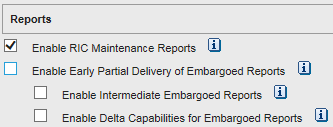
This second type of notes contains information on RIC maintenance changes that have occurred over the past ten days, including: Deletions, Renames, Currency Conversions, Delists, Relists, File Code Updates and Stock Split Adjustment Factors.
Instrument identifiers can change, for instance if a company changes its name, is bought or merges, or simply for normalization reasons. This is not a frequent occurrence. The probability of an instrument identifier change is obviously higher if the request is for many instruments.
Corporate actions like splits, dividends and others can have an impact on prices. Seeing split adjustment factors in the maintenance notes is a clear indication that something of interest happened, and is useful to understand sudden price changes.
RIC maintenance changes could require further actions in your company, like changes to your instrument lists, reference data or analytics.
For full information on individual corporate actions, you can make a Corporate Actions Extraction request, as explained in the DSS REST Tutorial 5.
Here are some sample maintenance notes lines, from an Intraday Pricing request for ChainRIC 0#.FTSE. The first line details the field names. Three data lines follow; they contain stock splits with their adjustment factors and individual dates:
If there are no maintenance notes, then only the field names will appear:
Notes reference documentation
For more information on extraction and maintenance notes, please refer to the following:
See also chapter 7 of the DSS GUI user guide.
Extraction notes management
As a minimum the notes should be requested, and saved to file for further reference.
Ideally you should also treat them automatically in your applications, to extract all the information that is of interest to you, detect issues and log or flag them for further treatment or human intervention.
As the extraction notes content differs depending on the API call, the best way to proceed is simply to parse the notes line by line to identify, log and treat all lines that contain key words like “inactive” , “invalid”, “permission”, “WARNING”, “ERROR”, etc.
Caveat: the list of key words above is just an example to get you started; you must define your own list based on your use cases and interests.
You must also manage the maintenance notes, if there are data lines after the one containing the field names.
How to modify your code
With the .Net SDK
The .Net SDK automatically requests the extraction notes.
For a scheduled request, the data, extraction notes and RIC maintenance notes are in three separate files. All you need to do is retrieve the appropriate files, as shown in the DSS .Net SDK Tutorial 4.
For an On Demand request, the extraction notes must be retrieved from the extraction result, as shown in this very simple extract from the DSS .Net SDK Tutorial 5 code:
In all cases, once you have the extraction notes you should save them to file, and analyze them. This is illustrated, with a very simple analysis, in the DSS .Net SDK Tutorial 6.
Without the .Net SDK
For a scheduled request, the data, extraction notes and RIC maintenance notes are in three separate files. All you need to do is retrieve the appropriate files, as shown in the DSS REST Tutorial 10, and then save them to file and analyze them.
For an On Demand request, you must select the appropriate endpoint to receive the extraction notes, before receiving and treating them.
Migrating from using the deprecated Extract endpoint to the ExtractWithNotes endpoint is fairly easy; here are the steps to follow:
- Change the endpoint to use ExtractWithNotes
- Change the data retrieval object name
- Handle the extraction notes
Change the endpoint to use ExtractWithNotes
Action point: wherever you are using it, replace this endpoint:
with this one:
Usage of this endpoint can be seen in the DSS REST Tutorial 2.
Change the data retrieval object name
The response differs slightly between the two endpoints. Here is a snippet of what the Extract endpoint delivers, for a small End of Day request:
Here is a snippet of what the ExtractWithNotes endpoint delivers, for the same request:
When migrating from Extract to ExtractWithNotes, the value object is replaced by 2 objects:
- Contents – Contains the same data in the same format as the value object
- Notes – Contains the extraction notes and the RIC maintenance report
Action point: modify your data handling code to retrieve data from the Contents object.
Handle the extraction notes
Action point: add some new code to save and analyze the contents of the Notes object.
This is out of scope for this article, but you can refer to some of our tutorials and sample code that illustrate a few parts of these tasks:
Java samples (available under the downloads tab, and described here):
- DSS2ImmediateScheduleTermsAndCondition – save and display notes
- DSS2OnDemandEndOfDay – display notes when retrieving data (most of the Java On Demand samples display the extraction notes in a similar way)
- DSS2OnDemandEndOfDayRaw – display notes when retrieving compressed data
Python sample (available under the downloads tab):
- Python Symbology Conversion – display notes when retrieving data
Conclusions
You should now have a better understanding of the content of extraction notes, and maybe also some ideas as to how you could leverage them to your advantage.
You are now also aware of the requirement to migrate any code using the Extract endpoint, and how to accomplish that task.
There is also a webinar on this topic, you can view it here.
