| Tutorial Source Code |
Examples referenced:
|
| Last Update | March 2022 |
| Compiler/Runtime | See Getting Started with TypeScript. |
| Pre-requisites | Enable the session environment as outlined within the Getting Started guide. |
Overview
Whether accessing from the desktop, directly to the cloud, or through your deployed managed streaming services, the Refinitiv Data Libraries provide ease-of-use interfaces to retrieve real-time streaming content from the platform. By utilizing the streaming interfaces, developers can easily define both basic and advanced properties to request, receive, and process market data in real-time.
The following tutorial will outline sample code that provides basic access to level 1 (MarketPrice) streaming content. The library defines an interface necessary to make WebSocket connections to Refinitiv Real-Time Distribution Systems, and, to Refinitiv Real-Time -- Optimized (cloud offering).
Executing the Application
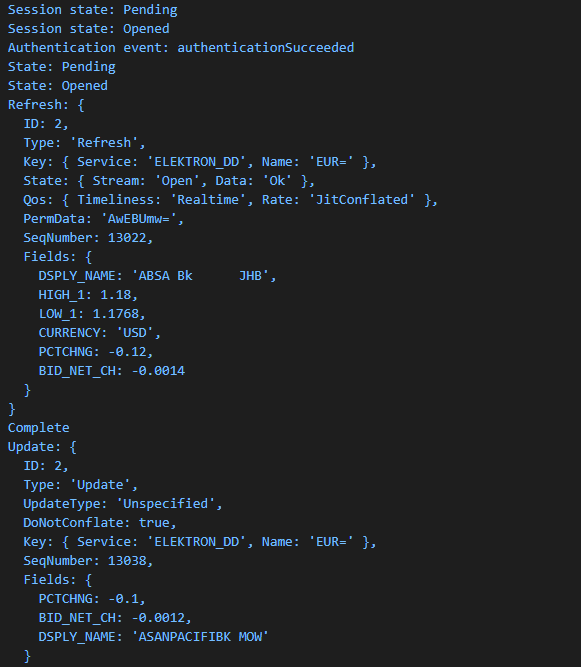
Running the example application will display the initial refresh image for the EUR= instrument. As market conditions change, you will see real-time events generated and displayed to the console.
Within the source code package, select the source code example within the Delivery section. To execute the example, refer to the pre-requisites section at the top of this tutorial.
The expected output should look similar to this:
How to request and retrieve streaming content
The first step required to access data from the platform is to establish a session. For convenience and simplicity, each example will utilize the following code segment to establish a session based on your package settings.
import { getSession } from '../../Common/session';
const session = getSession();
// open the session
await session.open();
The Session defines the interface for a specific channel which indicates how to access the platform. Each session defines unique properties that generally include user credentials and connection details. Once defined, a call to open() attempts to authenticate and manage any connection resources required.
Once a session has been established, you are free to access the available data services offered for the specified access channel. In this tutorial, we are interested in accessing streaming data services.
The following code segment outlines the basic syntax when defining s stream:
// define the data stream for the instrument
const stream = Delivery.OMMStream.Definition({
name: 'EUR=',
fields: ['DSPLY_NAME', 'BID_NET_CH', 'CURRENCY', 'PCTCHNG', 'HIGH_1', 'LOW_1'],
}).getStream(session);
// attach the event listener callbacks
stream.on(Delivery.OMMStream.Event.Refresh, (data: Delivery.OMMRefreshResponse) => console.log('Refresh:', data));
stream.on(Delivery.OMMStream.Event.Update, (data: Delivery.OMMUpdateResponse) => console.log('Update:', data));
// open the stream
await stream.open();
The OMMStream refers to the streaming services provided by the platform to retrieve OMM-based market streaming data. The interface provides a Definition that accepts multiple settings necessary to access financial market data. To open a stream and retrieve real-time updates, the interface defines a GetStream interface to provide the details related to capturing real-time events, such as market data updates. In this tutorial, we present the minimum properties to demonstrate streaming level 1 (MarketPrice) data to the application. The specified properties are:
Definition
The Definition accepts the item of interest, i.e. 'EUR='.
Stream
The Stream interface provides the following lambda expressions or callbacks. Each callback is provided 1 parameters, i.e.
- data - The corresponding message associated with the specific lambda expression
To capture real-time events, the following callbacks are provided:
- Open()
The call to Open() will send the request down to the streaming server to open the specified item. If we chose the open the item in streaming mode, the default, the item will remain open until closed.
- Close()
The call to Open() will send the request down to close the item if the item was opened in streaming mode. If the item was not opened in streaming mode, once the item returns the refresh (OnRefresh) image, the item will automatically close. Note: Because we are using the 'using' statement when defining the stream, the stream utilizes the C# Disposable interface and will automatically issue a Close() when it moves out of scope.
- Refresh
The callback/lambda expression used to capture the initial image containing all the specified fields for each item requested.
- Update
The callback/lambda expression used to capture real-time updates based on changes in the market. Only the requested fields/elements that have been affected by the change will be included within the update.Note: By default, update events will be sent to your stream. If there is only interest in receiving the initial image (snapshot), the behavior can be overridden using the Streaming() method call.
- Error
The callback/lambda expression used to capture any underlying error condition resulting from the
- Status
The callback/lambda expression used to capture status events related to the item name. For example, if an invalid item name is specified, this will generate a status event that will indicate a "record not found".
Status events can be reported throughout the life of the stream. Refer to Visual Studio Code IntelliSense for the entire list of methods and properties available.
While the Streaming interface does support additional properties, the syntax outlined above will cover the core features needed to request and process streaming content required by this tutorial. By default, the interface will choose to stream a level 1 MarketPrice message to include all fields defined for the specified name. These fields can be limited by providing a fields parameter with the list of fields an application is interested in.
Note: A request to open a stream is considered complete when the initial response (refresh or status) has returned for the specified item name.