| Tutorial Source Code |
Examples referenced:
|
| Last Update | March 2025 |
| Compiler/Runtime | See Getting Started with TypeScript. |
| Pre-requisites | Enable the session environment as outlined within the Getting Started guide. |
Overview
Whether accessing from the desktop, directly to the cloud, or through your deployed managed streaming services, the LSEG Data Libraries provide ease-of-use interfaces to retrieve content from both standard web-based APIs and real-time streaming services. Built on top of standard request/reply interfaces as well as HTML 5 WebSocket streaming protocols, the library includes a Pricing interface that allows developers to define instruments and properties to retrieve real-time, level 1 (MarketPrice) prices.
The following tutorial requests for a small watchlist of instruments, retrieving real-time prices available within the LDP's Pricing snapshot endpoint or within streaming services. In addition, the tutorial will include ways to access the data elements from the response.
Note: The intention of this tutorial is to demonstrate the ability to retrieve a snapshot of real-time prices. The Pricing interface supports 2 ways to retrieve real-time prices - through LDP's pricing snapshot interface or through LSEG streaming services. Depending on your permissions and what you entitled to access, this tutorial will demonstrate both ways to request real-time snapshots.
Executing the Application
In our examples, we're requesting to retrieve a snapshot of 3 instruments and demonstrate ways to extract the details from the response. A snapshot response contains the entire real-time image of the data based on the fields of interest. The tutorial demonstrates common ways to extract the data elements from the response.
Depending on what you are entitled to access, choose the appropriate example within the source code package. To execute either example, refer to the pre-requisites section at the top of this tutorial.
The expected output should look similar to this:
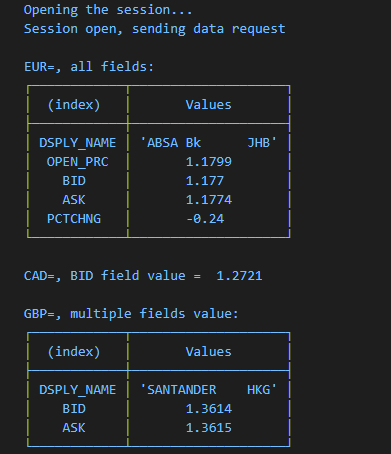
Requesting and extracting real-time prices from the streaming service
The following code segment requests for a small watchlist of items from the streaming service defined within the platform:
// specify a list of items and fields to retrieve a snapshot of prices
const pricingDefinition = Pricing.Definition({
universe: ['EUR=', 'CAD=', 'GBP='],
fields: ['DSPLY_NAME', 'BID', 'ASK', 'OPEN_PRC', 'PCTCHNG']
});
const stream = pricingDefinition.getStream(session);
// open the stream in snapshot mode
await stream.open({ withUpdates: false });
The above code segment was intentionally broken out into 3 distinct steps for the purpose of explanation, but also provides flexibility when using the interfaces. In general, the above code performs the following:
- Define a Pricing request
The Pricing interface provides the ability to specify a list of instruments to stream. In addition, includes a number of other options, including the ability to specify a list of fields. It's worth noting that if no fields are specified in the definition, all available fields will be returned. While not specifying the fields is a convenient way to look at all available fields, in practice, it's best to limit the fieldset based on requirements to optimize performance.
- Retrieve a stream interface
Using the pricing definition, retrieve a streaming interface providing the ability to request and manage real-time streaming data.
- Specify a snapshot
By default, the streaming interface will stream updates when changes occur in the market. In the above code segment, we are instructing the stream to turn off streaming so we only receive the refresh or initial image from the streaming services. Doing this effectively mirrors the actions of requesting a snapshot from the LDP snapshot pricing service.
- Open the stream
Using the stream interface, open the stream. Because we are not interested in streaming updates, the service will deliver the initial refresh for each item requested.
Once completed, we begin to extract and display details populated within the data.
// print all the fields of one item
console.table(stream.getFields('EUR='));
// print one field
console.log('\nCAD=, BID field value = ', stream.getFieldValue('CAD=', 'BID'));
// print multiple fields
console.table(stream.getFields('GBP=', ['DSPLY_NAME', 'BID', 'ASK']));
The Pricing interface defined within the LSEG Data Library includes other useful features, such as the ability to stream live quotes and trades within user-defined callbacks and to manage a real-time, in-memory, cache allowing users to dynamically Add and Remove instruments. Refer to the tutorial package for additional examples. In addition, we encourage the use of IntelliSense documentation within your Visual Studio editor to discover other useful capabilities.