| Tutorial Source Code |
Examples referenced:
|
| Last Update | December 2024 |
| .NET/C# Requirements | See Getting Started with .NET. |
| Pre-requisites | Enable the session environment as outlined within the Getting Started guide. To build and run the above example:
|
Overview
Whether accessing from the desktop, directly to the cloud, or through your deployed managed streaming services, the LSEG Data Libraries provide ease-of-use interfaces to retrieve content from both standard web-based APIs and real-time streaming services. Built on top of standard request/reply interfaces as well as HTML 5 WebSocket streaming protocols, the library includes a Pricing interface that allows developers to define instruments and properties to retrieve real-time, level 1 (MarketPrice) prices.
The following tutorial requests for a small watchlist of instruments, retrieving real-time prices available within the RDP's Pricing snapshot endpoint or within streaming services. In addition, the tutorial will include ways to access the data elements from the response.
Note: The intention of this tutorial is to demonstrate the ability to retrieve a snapshot of real-time prices. The Pricing interface supports 2 ways to retrieve real-time prices - through RDP's pricing snapshot interface or through LSEG's streaming services. Depending on your permissions and what you are entitled to access, this tutorial will demonstrate both ways to request real-time snapshots.
Executing the Application
In our examples, we're requesting to retrieve a snapshot of 3 instruments and demonstrate ways to extract the details from the response. A snapshot response contains the entire real-time image of the data based on the fields of interest. The tutorial demonstrates common ways to extract the data elements from the response.
Depending on what you are entitled to access, choose the appropriate example within the source code package. To execute either example, refer to the pre-requisites section at the top of this tutorial.
The expected output should look similar to this:
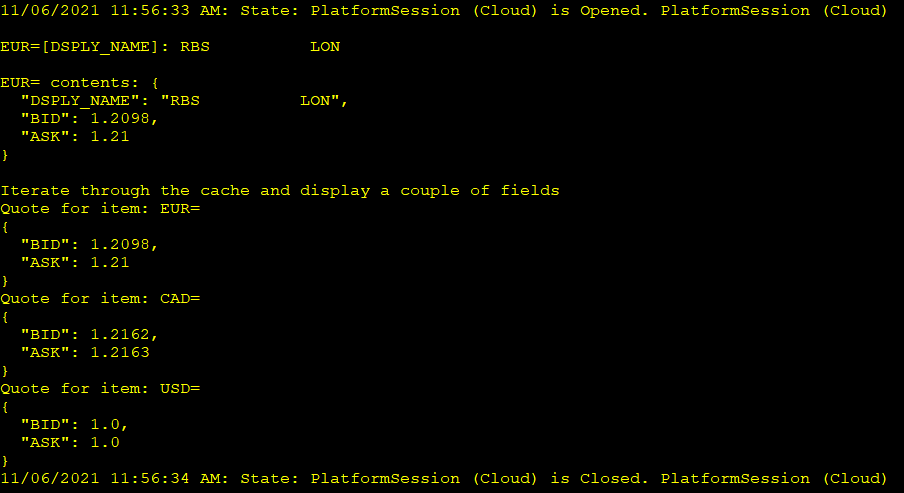
The output is a result of extracting a field element within a specific instrument, displaying the entire contents of an instrument, and walking through the entire response, display values for each.
Requesting and extracting real-time prices from the snapshot service
The following code segment requests for a small watchlist of items from the real-time snapshot service defined within the platform:
// Define the request details....
var definition = Pricing.Definition("EUR=", "CAD=", "GBP=").Fields("DSPLY_NAME", "BID", "ASK");
// Retrieve a real-time snapshot
var response = definition.GetData();
The above code segment was intentionally broken out into 2 distinct steps for the purpose of explanation, but also provides flexibility when using the interfaces. In general, the above code performs the following:
- Define a Pricing request
The Pricing interface provides the ability to specify a list of instruments to retrieve realtime pricing data. In addition, includes a number of other options such as the specification of an optional list of fields. It's worth noting that if no fields are specified in the definition, all available fields for each instrument will be returned. While not specifying the fields is a convenient way to look at all available fields, in practice, it's best to limit the field-set based on requirements to optimize performance.
- Request the data
Using the definition, request to retrieve a snapshot of data from the pricing service. The request will carry the attributes of the definition that are relevant to the service and respond with a complete collection of fields for each instrument specified.
All request-reply responses will carry standard response details such as the success of the response, HTTP status details, which include reasons why the request may fail, and a data section containing details specific to the service. For example, the following code segment determines if the request was successful, using a simple boolean property available within the response. Upon success, we begin to extract and display details populated within the data. Upon failure, the details of why the underlying HTTP request failed are displayed.
if (response.IsSuccess)
{
// Print 1 field
Console.WriteLine($"\nEUR=[DSPLY_NAME]: {response.Data.Prices["EUR="]["DSPLY_NAME"]}");
// Print the contents of one item
Console.WriteLine($"\nEUR= contents: {response.Data.Prices["EUR="].Fields()}");
// Iterate through the response and print out specific fields for each entry
Console.WriteLine("\nIterate through the cache and display a couple of fields");
foreach (var item in response.Data.Prices)
Console.WriteLine($"Quote for item: {item.Key}\n{item.Value.Fields("BID", "ASK")}");
}
else
Console.WriteLine($"Request failed: {response.HttpStatus}");
The details specific to the snapshot service are captured within a container defined within the data element. The container represents the entire collection of instruments and the corresponding values for each specified field. If there is a need to pull out a specific field for one of the instruments requested, you can easily do that by referencing the item using standard subscript operators. In addition, you should be able to pull out the entire data record for a specified instrument from the response. And finally, the ability to iterate through the details of the response and pull out individual elements.
Requesting and extracting real-time prices from the streaming service
The following code segment requests for a small watchlist of items from the streaming service defined within the platform:
// Define the request details....
var definition = Pricing.Definition("EUR=", "CAD=", "GBP=").Fields("DSPLY_NAME", "BID", "ASK");
// Retrieve a stream, specifying not to stream updates but only receive a snapshot
var stream = definition.GetStream().Streaming(false);
// Open the stream (requests for the snapshot)
stream.Open();
The above code segment was intentionally broken out into 3 distinct steps for the purpose of explanation, but also provides flexibility when using the interfaces. In general, the above code performs the following:
- Define a Pricing request
The Pricing interface provides the ability to specify a list of instruments to retrieve realtime pricing data. In addition, includes a number of other options such as the specification of an optional list of fields. It's worth noting that if no fields are specified in the definition, all available fields for each instrument will be returned. While not specifying the fields is a convenient way to look at all available fields, in practice, it's best to limit the field-set based on requirements to optimize performance.
- Retrieve a stream interface
Using the pricing definition, retrieve a streaming interface providing the ability to request and manage real-time streaming data.
- Specify a snapshot
By default, the streaming interface will stream updates when changes occur in the market. In the above code segment, we are instructing the stream to turn off streaming so we only receive the refresh or initial image from the streaming services. Doing this effectively mirrors the actions of requesting a snapshot from the RDP snapshot pricing service.
- Open the stream
Using the stream interface, open the stream. Because we are not interested in streaming updates, the service will deliver the initial refresh for each item requested.
Once completed, we begin to extract and display details populated within the data.
// Print 1 field
Console.WriteLine($"\nEUR=[DSPLY_NAME]: {stream["EUR="]["DSPLY_NAME"]}");
// Print the contents of one item
Console.WriteLine($"\nEUR= contents: {stream["EUR="].Fields()}");
// Iterate through the response and print out specific fields for each entry
Console.WriteLine("\nIterate through the cache and display a couple of fields");
foreach (var item in stream)
Console.WriteLine($"Quote for item: {item.Key}\n{item.Value.Fields("BID", "ASK")}");
The Pricing interface defined within the LSEG Data Library for .NET includes other useful features, such as the ability to stream live quotes and trades within user-defined callbacks and to manage a real-time, in-memory, cache allowing users to dynamically Add and Remove instruments. Refer to the tutorial package for additional examples. In addition, we encourage the use of IntelliSense documentation within your Visual Studio editor to discover other useful capabilities.