Data Management Approaches
Inserting Data in Bulk
Once you have configured Salesforce to talk to World-Check One you may want to screen your existing data. There are different approaches to take depending on the volume of records and frequency of screening.
- Data Jobs with Supporting Flows supports customers with only a few thousand records
- Apex Scheduled Jobs supports customers with many thousands of records
- Skeleton Cases supports existing World-Check One desktop customers who wish to import exisiting case data into Salesforce to manage going forwards.
Safely Archiving and Deleting Data
It is possible to delete data from Salesforce and for the corresponding Screening Case record to be automatically deleted from Salesforce and from World-Check One.
Automatic Deletion.
If the source Account, Contact or Lead records is deleted then the corresponding linked Screening Case(s) will be automatically deleted both from within Salesforce and World-Check One.
Manual Archive > Deletion
A user can manually Archive and then Delete the Screening Case from within the UI using the buttons "Archive" and "Delete". Note: only archived screening cases can be deleted via the user interface.
Bulk Archive.
To do this via data job or to automate using Flows the value for the field Archival Status (tr_WC1_Archival_Status_c ) should be changed to "ARCHIVED" all uppercase. It is possible to change Archival Status for multiple records at once with a limit of 1000 records per data job.
Bulk Delete.
It is also possible to delete multiple screening cases at once using tools such as DataLoader. If you wish the record to be deleted from within World-Check One over the interface then a limit of 1000 records per data job exists. If you wish to delete large volumes of records from World-Check One then it will be more efficient for the World-Check Administrator to login to World-Check One and archive/delete using bulk tools directly within World-Check One, as this will circumvent the API limits and large volumes can be processed in a single data job.
Managing Production and Sandbox environments
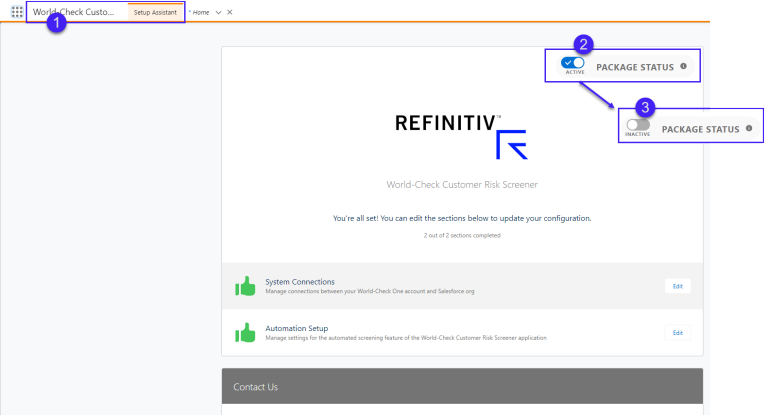
Due to the risk of corrupting your World-Check One production data, once you go live we recommend deactivating the package in your sandboxes. To do this in versions 6.0 and above:
- navigate to the app "World-Check Customer Risk Screener Setup"
- change the package status toggle from ACTIVE to INACTIVE
- a pop up appears "Are you sure you want to Deactivate the package" click Continue
- the package is now inactive
This means that you can leave any automations active in sandbox however Salesforce will not communicate with World-Check One while the package status is Inactive. This is an important step to consider as part of your full copy sandbox org refresh strategy, without this you risk corrupting your production data in World-Check One.
For customers on earlier versions we recommend deactivating your Flows/Process Builders in sandbox.